
Kisnt KN34GT
Uporabniški priročnik za brezžično mehansko številsko tipkovnico Kisnt KN34GT
Model: KN34GT | Brand: Kisnt
1. Uvod
The Kisnt KN34GT is a 34-key wireless mechanical number pad designed to enhance your productivity and workflow. Featuring a 2.4GHz wireless connection, hot-swappable switches, and durable PBT keycaps, this numeric keypad offers a comfortable and efficient typing experience for various computing environments, including laptops, Mac, and PC desktops.
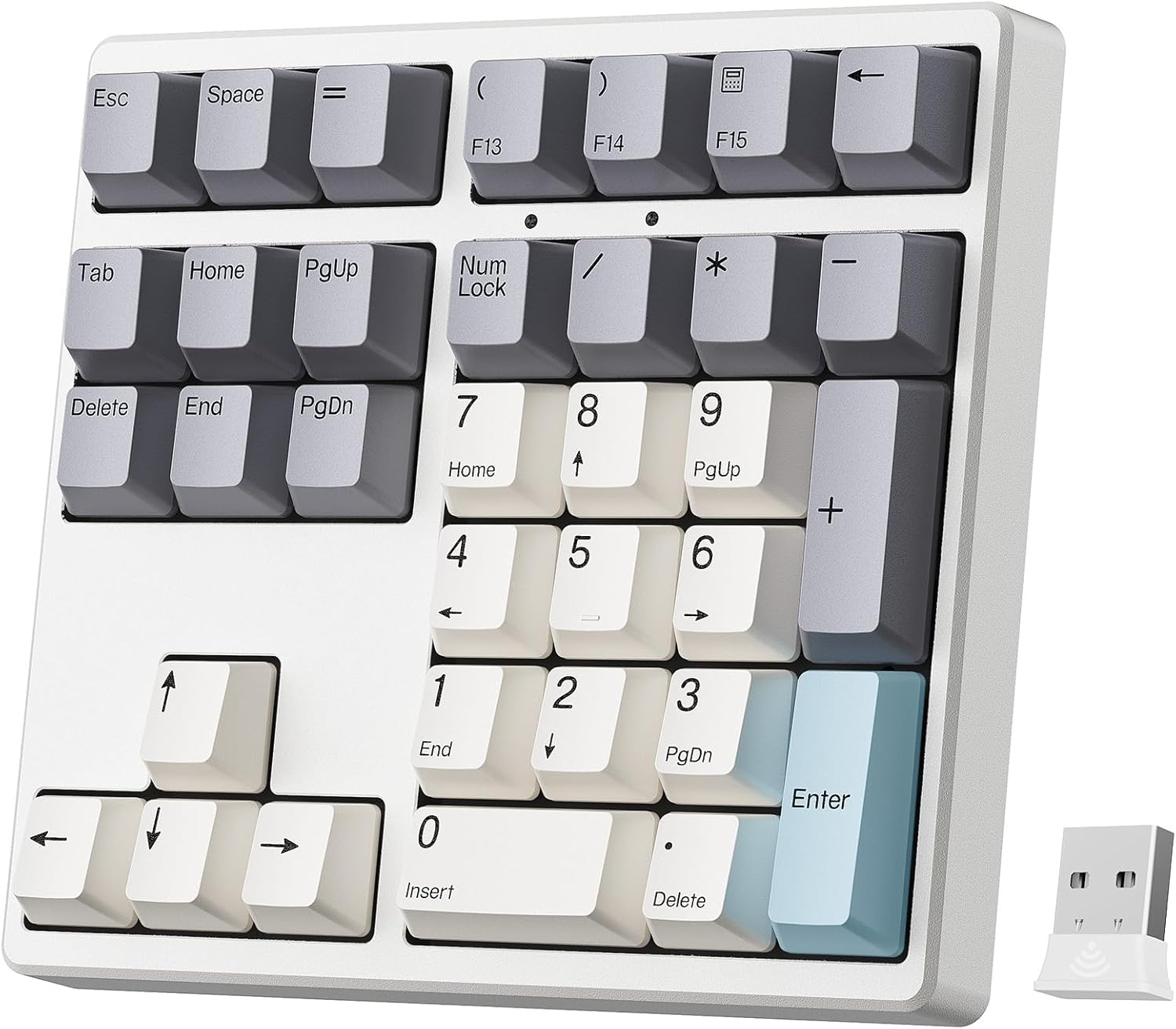
Image: The Kisnt KN34GT Wireless Mechanical Number Pad, showcasing its 34-key layout and compact design.
2. Kaj je v škatli
Prosimo, preverite vsebino paketa in se prepričajte, da so prisotni vsi elementi:
- 1 x 34 Keys Mechanical Number Pad
- 1 x 2.4G brezžični sprejemnik
- 1 x polnilni kabel USB-C v USB-A
- 1 x uporabniški priročnik
3. Navodila za namestitev
Follow these steps to set up your Kisnt KN34GT number pad for the first time:
- Charge the Number Pad: Before initial use, ensure the number pad is fully charged. Connect the included USB-C to USB-A charging cable to the Type-C charging interface on the number pad and a USB-A port on your computer or a wall adapter. The charging indicator will show the charging status.
- Insert the 2.4G Wireless Receiver: Locate the 2.4G wireless receiver. Plug the USB receiver into an available USB-A port on your PC or laptop. The number pad will automatically attempt to connect.
- Power On the Number Pad: Locate the power switch on the bottom of the number pad. Slide the switch to the 'ON' position. If the indicator does not flash, please charge the keypad first.
- Select Operating System: On the bottom of the number pad, there is an operating system switch. Push this switch to the corresponding position for your system (Windows or Mac) to ensure proper key functionality.

Image: The Kisnt KN34GT number pad connected wirelessly to a laptop via its 2.4G USB receiver.

Image: The bottom of the number pad showing the switch to toggle between Windows and Mac operating systems.

Image: A visual guide illustrating the three main setup steps: plugging in the USB receiver, turning on the power, and selecting the operating system.
4. Navodila za uporabo
4.1. Ključne funkcije
The KN34GT features a comprehensive 34-key layout, including standard number keys, function keys (F13-F15), and navigation keys (Home, PgUp, PgDn, End, Delete, Tab, Esc, Space, Backspace, Enter, Arrow Keys). This extended layout provides full functionality for various numerical and data entry tasks.

Slika: Bližnji posnetek view of the Kisnt KN34GT, highlighting its 34-key extended layout.

Image: A diagram illustrating the powerful functional keys on the numpad, including Esc, Equals, Backspace, Four Arrow Keys, Calculator, Tab, and Delete.
4.2 Stikala z možnostjo vroče menjave
The KN34GT features a hot-swappable PCB, allowing you to easily change mechanical switches without soldering. It supports most 3-pin and 5-pin MX style mechanical switches. This feature enables customization of your typing experience.
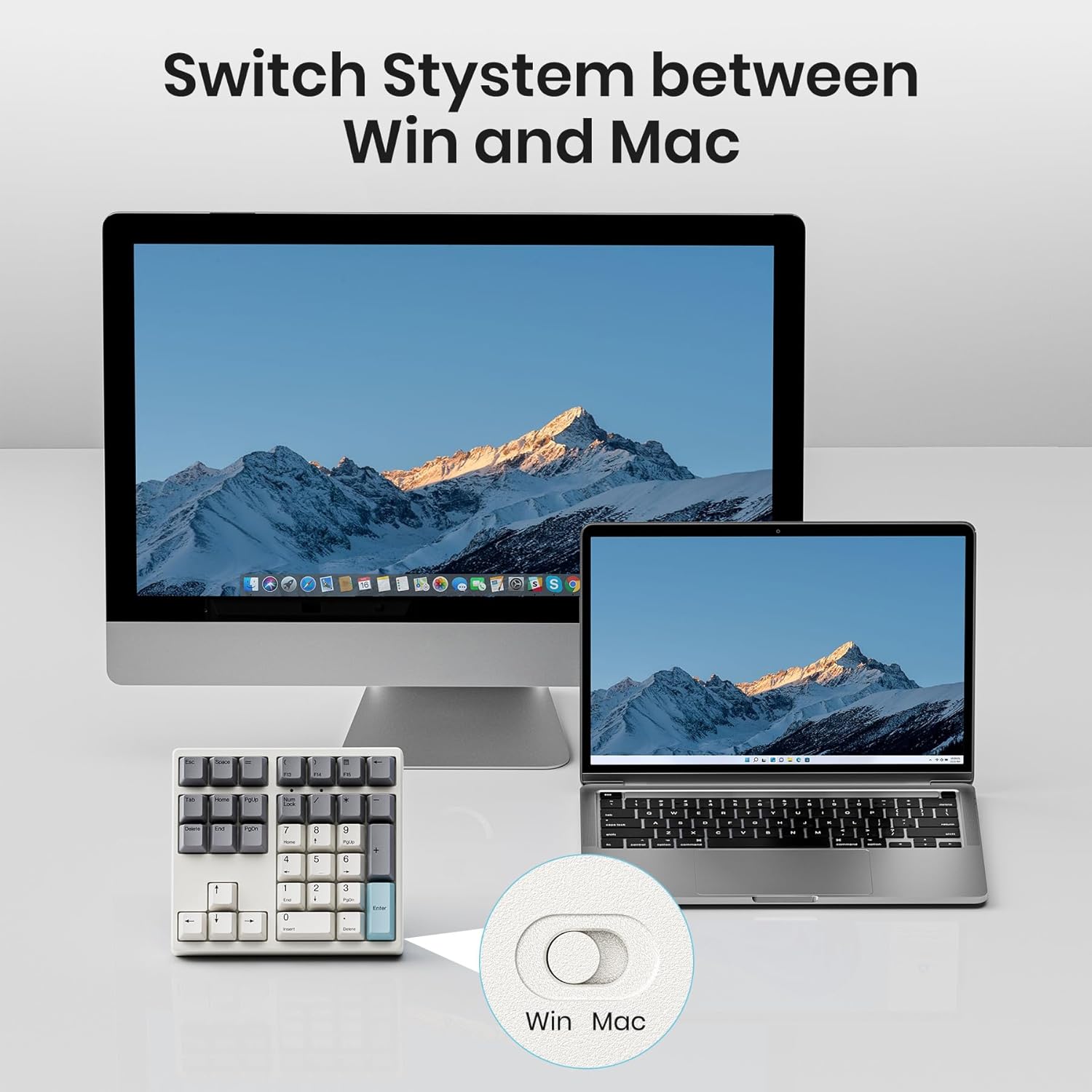
Image: A tool is used to remove a hot-swappable switch from the number pad, demonstrating the ease of switch replacement.

Image: A close-up of Gateron red linear switches, highlighting their smooth and quiet operation.
4.3. PBT Dye-Sub Keycaps
The number pad comes with high-quality PBT Dye-Sublimation keycaps. PBT keycaps are known for their durability, resistance to shine, and long-lasting legends, providing a premium feel and aesthetic.

Image: Various PBT Dye-Sub keycaps from the numpad, showcasing their texture and legends.
4.4. Multi-layer Silencing Structure
The KN34GT incorporates a multi-layered cushion design, including a Poron bottom layer, sandwich foam, and IXPE switch pad. This structure is engineered to make every keystroke consistent and produce a more pleasant, quieter sound.

Image: An exploded diagram illustrating the multi-layer noise reduction structure of the numpad, including PBT keycaps, upper cover, mechanical switch, locating plate, sandwiched Poron foam, IXPE switch cushion, PCB, switch sockets, bottom silicone, lithium battery, and bottom case.
5. Vzdrževanje in nega
5.1. Polnjenje akumulatorja
The number pad is equipped with a built-in 500mAh rechargeable lithium battery. When the battery is low, the charging indicator will signal. Recharge the device using the provided Type-C to Type-A cable. A full charge ensures long-time use without backlight.

Image: The number pad with icons indicating fast charging, durability, long-lasting use, auto sleep, and Type-C charging.
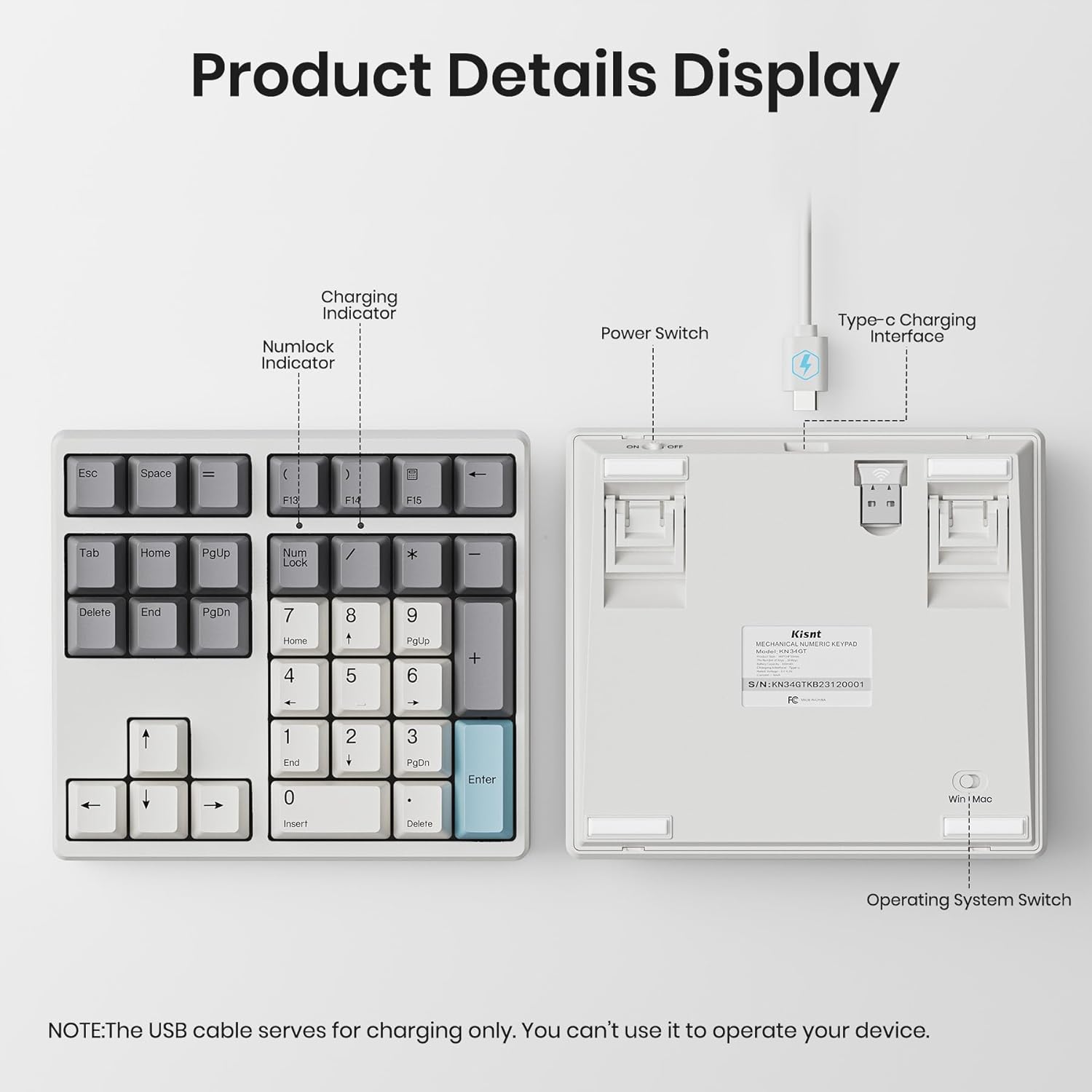
Slika: Zgoraj in spodaj views of the number pad, highlighting the charging indicator, Numlock indicator, power switch, Type-C charging interface, and operating system switch. Note: The USB cable is for charging only and cannot be used for operation.
5.2. Čiščenje
To clean the number pad, gently wipe the surface with a soft, dry cloth. For deeper cleaning, you may carefully remove the keycaps (if necessary) and use compressed air to clear debris from between the switches. Avoid using harsh chemicals or abrasive materials.
6. Odpravljanje težav
If you encounter issues with your Kisnt KN34GT number pad, please refer to the following common solutions:
- Brez povezave/zamik:
- Ensure the 2.4G wireless receiver is securely plugged into a USB port.
- Verify the number pad is powered on.
- Check the battery level and charge the device if necessary.
- Move the number pad closer to the receiver to reduce interference.
- Napačen izhod tipke:
- Confirm the operating system switch on the bottom of the number pad is set to the correct position (Windows or Mac).
- If a specific key is not working, ensure the switch underneath it is properly seated or try hot-swapping it with another switch to test.
- Težave s polnjenjem:
- Ensure the charging cable is fully inserted into both the number pad and the power source.
- Poskusite z drugim USB-vhodom ali polnilnim adapterjem.
If the problem persists, please contact Kisnt customer support for further assistance.
7. Specifikacije
| Številka modela | KN34GT |
| Tehnologija povezljivosti | 2.4GHz Wireless |
| Število ključev | 34 |
| Material ključavnice | PBT Dye-Sublimation |
| Tip stikala | Hot-Swappable Mechanical (Gateron Red pre-installed) |
| Kapaciteta baterije | 500mAh Lithium Polymer (Rechargeable) |
| Dimenzije izdelka | 5.86 x 5.27 x 1.54 palcev (14.88 x 13.39 x 3.91 cm) |
| Teža predmeta | 1.08 funtov (0.49 kg) |
| Združljive naprave | Prenosnik, Mac, računalnik |
| barva | Retro bež |
| Material | Plastika |
8. Garancija in podpora
8.1. Poprodajne storitve
Kisnt provides a 2-letna poprodajna storitev for quality issues. If you experience any quality-related problems within this period, a replacement will be provided.
8.2. Kontaktni podatki
For any inquiries, technical support, or warranty claims, please contact Kisnt customer service:
- E-pošta: kisnt_vip@163.com
- Uradno Webspletno mesto: http://www.kisnt.cn/

Image: Service support details, including email and official website for customer assistance.
Ask a question about this manual
Ask about setup, troubleshooting, compatibility, parts, safety, or missing instructions. Manuals+ will review the question and use this page’s manual context to help answer it.