
1. Uvod
Thank you for choosing the ieGeek 5MP Outdoor Wi-Fi Security Camera. This manual provides essential information for the proper installation, operation, and maintenance of your camera. Please read these instructions carefully before use and retain them for future reference. This camera is designed to provide reliable outdoor surveillance with advanced features for enhanced security.
2. Izdelek je končanview
The ieGeek 5MP Outdoor Wi-Fi Security Camera offers high-definition monitoring with flexible connectivity and smart detection capabilities.
Ključne značilnosti:
- Ločljivost 5MP HD: Provides clear and vivid images and videos with 2880x1600 resolution and 4x digital zoom.
- Dual-Band Wi-Fi (2.4/5 GHz): Supports both 2.4 GHz and 5 GHz Wi-Fi for stable and faster network connection.
- 360° PTZ Monitoring: Pan (355° horizontal) and Tilt (120° vertical) functionality allows for comprehensive area coverage.
- Barvni nočni vid: Three night vision modes (color, infrared, smart) with a range of up to 15 meters (50 feet).
- PIR Humanoid Detection: Advanced human detection reduces false alarms caused by non-human movements.
- Zvočni in svetlobni alarm: Deters intruders with customizable sound and light alerts.
- Neprekinjeno snemanje 24/7: Supports continuous recording and event-based recording.
- Lokalno in oblačno shranjevanje: Compatible with Micro SD cards (up to 128GB, not included) and cloud storage options.
- Deljenje z več uporabniki: Share camera access with family members via the dedicated app.
- Odpornost na vremenske vplive IP65: Zasnovan za zunanjo uporabo, odporen na prah in vodo.
Komponente kamere:
The camera unit typically includes the main camera body, dual Wi-Fi antennas, a power input port, and a Micro SD card slot.
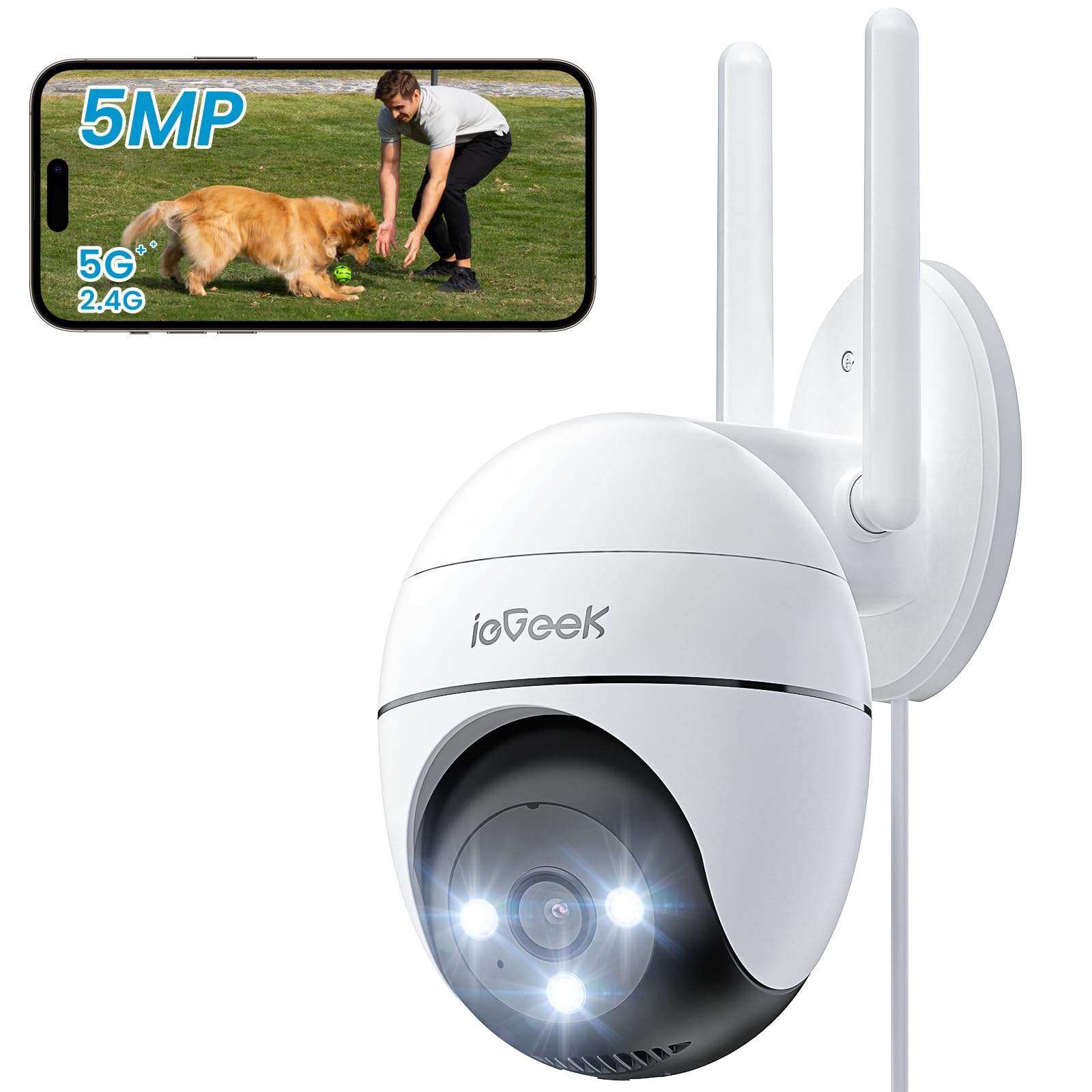
Figure 2.1: ieGeek 5MP Outdoor Wi-Fi Security Camera (Model ZS-GQ4)

Slika 2.2: Konecview of ieGeek 5MP Camera Features including PTZ, 24/7 recording, 2-way audio, humanoid tracking, Alexa compatibility, local and cloud storage, multi-user sharing, customizable alert areas, AI detection, and acoustic/light alarms.

Figure 2.3: The camera features a 5dBi antenna for improved Wi-Fi signal strength and stability.
3. Navodila za nastavitev
3.1 Vsebina paketa
- ieGeek 5MP Outdoor Wi-Fi Security Camera
- Napajalni adapter
- Montažni vijaki in sidra
- Uporabniški priročnik
3.2 Prenos aplikacije in registracija računa
- Prenesite ieGeek kamera or CloudEdge app from your smartphone's app store (iOS/Android).
- Register for an account using your email address and create a secure password.
3.3 Priključitev kamere
- Power on the camera by connecting it to a power outlet using the provided adapter.
- Open the ieGeek Cam/CloudEdge app and tap the "+" icon to add a new device.
- Follow the on-screen instructions to connect the camera to your 2.4 GHz or 5 GHz Wi-Fi network. Ensure your phone is connected to the same Wi-Fi network during setup.
- Ko se prikaže poziv, s kamero skenirajte kodo QR, prikazano na telefonu.
- Ko je povezava vzpostavljena, lahko kamero poimenujete in začnete v živo viewing.

Figure 3.1: Connecting the power adapter to the camera.
3.4 Fizična namestitev
- Izberite primerno zunanjo lokacijo z jasnim view in močan Wi-Fi signal.
- Use the provided mounting template to mark drill holes.
- Drill holes, insert anchors, and secure the camera base with screws.
- Po potrebi prilagodite kot kamere.

Figure 3.2: Ensure optimal Wi-Fi signal strength at the chosen installation location for stable performance.
4. Navodila za uporabo
4.1 V živo View in upravljanje PTZ
- Open the ieGeek Cam/CloudEdge app and select your camera to view krma v živo.
- Use the on-screen joystick or swipe gestures to control the camera's pan (horizontal 355°) and tilt (vertical 120°) movements.

Figure 4.1: Control the camera's 355° horizontal and 120° vertical rotation directly from your smartphone app.
4.2 Načini nočnega vida
Kamera ponuja tri načine nočnega vida:
- Barvni nočni vid: Utilizes built-in spotlights to provide full-color images in low-light conditions.
- Infrardeči nočni vid: Uporablja infrardeče LED diode za črno-bele slike v popolni temi.
- Pametni nočni vid: Automatically switches between infrared and color night vision upon detection of motion.
4.3 Zaznavanje gibanja in alarmi
- PIR Humanoid Detection: Configure sensitivity levels in the app to minimize false alarms.
- Prilagodljiva območja zaznavanja: Set specific areas for motion detection to focus on critical zones.
- Zvočni in svetlobni alarm: When motion is detected, the camera can activate a siren and/or spotlights to deter intruders. You can choose between silent, spotlight only, siren only, or both siren and spotlight modes.

Figure 4.2: Select from silent, spotlight only, siren only, or both siren and spotlight alarm modes to suit your security needs.

Figure 4.3: The camera's humanoid motion tracking follows detected human figures, reducing false alarms from other movements.

Figure 4.4: AI smart monitoring can differentiate between various detection types such as people, animals, packages, and vehicles (some features may require a subscription).
4.4 Snemanje in shranjevanje
- Nenehno snemanje: The camera supports 24/7 continuous recording to a Micro SD card (not included).
- Snemanje dogodka: Snema videoposnetke, ko zazna gibanje.
- Micro SD kartica: Vstavite kartico Micro SD (do 128 GB) v predvideno režo za lokalno shranjevanje.
- Shramba v oblaku: Optional cloud storage plans are available through the app for secure off-site backup.

Figure 4.5: The camera supports 24/7 continuous recording, ensuring constant surveillance.
5. Vzdrževanje
5.1 Čiščenje fotoaparata
- Pred čiščenjem se prepričajte, da je fotoaparat izklopljen.
- Uporabite mehko, damp cloth to wipe the camera body.
- Za čiščenje leč uporabite posebno krpo za čiščenje leč, da preprečite praske. Ne uporabljajte agresivnih kemikalij ali abrazivnih čistil.
5.2 Okoljski vidiki
- The camera has an IP65 weather resistance rating, making it suitable for outdoor use in various weather conditions.
- Delovno temperaturno območje: od -20 °C do 50 °C (od -4 °F do 122 °F).

Figure 5.1: The camera is designed with IP65 weather resistance to withstand outdoor elements like rain.

Figure 5.2: The camera operates effectively within a wide temperature range of -20°C to 50°C.
6. Odpravljanje težav
If you encounter issues with your ieGeek camera, please refer to the following common troubleshooting steps:
6.1 Težave s povezavo
- Kamera brez povezave: Ensure the camera is powered on and within range of your Wi-Fi router. Check your Wi-Fi signal strength in the app. Try restarting the camera and your router.
- Failed to Connect to Wi-Fi: Verify your Wi-Fi password is correct. Ensure you are connecting to a 2.4 GHz or 5 GHz network as supported. If using a dual-band router, ensure the camera is connecting to the correct band.
6.2 Težave z zaznavanjem gibanja
- Too Many False Alarms: Adjust the PIR detection sensitivity in the app. Define specific detection zones to exclude areas with frequent irrelevant movements (e.g., trees swaying).
- Brez zaznavanja gibanja: Ensure motion detection is enabled in the app settings. Check the camera's field of view for obstructions. Increase detection sensitivity if necessary.
6.3 Težave s kakovostjo slike
- Zamegljena slika: Clean the camera lens carefully. Ensure there is no condensation on the lens.
- Slab nočni vid: Ensure the night vision mode is set correctly (color, infrared, or smart). Check for any obstructions blocking the infrared LEDs or spotlights.
6.4 Druga vprašanja
- SD kartica ne snema: Ensure the Micro SD card is inserted correctly and is not full. Format the SD card via the app if it's a new card or if issues persist.
- Aplikacija se ne odziva: Close and restart the app. Ensure your smartphone's operating system is up to date.
If these steps do not resolve your issue, please contact ieGeek customer support for further assistance.
7. Specifikacije
| Model | ZS-GQ4 |
| Resolucija | 5 MP (2880 x 1600) |
| Objektiv | 3.6 mm |
| Digitalni zoom | 4x |
| Razdalja nočnega vida | Do 15 metrov (50 čevljev) |
| Povezljivost Wi-Fi | 2.4 GHz / 5 GHz Dual-Band |
| Območje vrtenja/nagiba | Pan 355 °, nagib 120 ° |
| Možnosti shranjevanja | Kartica Micro SD (do 128 GB, ni priložena), shramba v oblaku |
| Odpornost na vremenske vplive | IP65 |
| Delovna temperatura | -20 °C do 50 °C (-4 °F do 122 °F) |
| Dimenzije | 17 x 9 x 10 cm |
| Nadzorna metoda | Mobile App (ieGeek Cam / CloudEdge) |
| Vrsta alarma | PIR Humanoid Motion Detection, Sound & Light Alarm |
8. Garancija in podpora
ieGeek is committed to providing high-quality products and excellent customer service.
8.1 Informacije o garanciji
- 2-letna garancija: Your ieGeek camera is covered by a 2-year warranty from the date of purchase, protecting against manufacturing defects.
- 30-dnevna garancija vračila denarja: If you are not satisfied with your purchase, you may return the product for a full refund within 30 days.

Figure 8.1: ieGeek offers a 2-year warranty and a 30-day money-back guarantee, along with lifetime support.
8.2 Podpora strankam
For any questions, technical assistance, or warranty claims, please contact ieGeek customer support. Refer to the contact information provided with your product packaging or visit the official ieGeek webstran za podrobnosti o podpori.
- Spletna podpora: Obisk www.iegeek.com/support (nprample link, please refer to actual webspletno mesto)
- Podpora po e-pošti: support@iegeek.com (nprample email, please refer to actual contact)
- Doživljenjska tehnična podpora: ieGeek provides lifetime technical support for its products.