Uvod
This manual provides comprehensive instructions for the Ducky One 2 Phantom Black TKL Double Shot PBT Mechanical Keyboard. It covers setup, operation, maintenance, and troubleshooting to ensure optimal performance and longevity of your device.
Konec izdelkaview
The Ducky One 2 Phantom Black TKL is a high-performance tenkeyless mechanical keyboard designed for both gaming and professional use. It features a durable construction with PBT double-shot keycaps and reliable Cherry MX switches.
Ključne značilnosti
- Simplistic design with a black case (top and bottom).
- Double Shot PBT keycaps with seamless legends for enhanced durability and feel.
- 3-level adjustable feet for ergonomic comfort.
- Detachable USB Type-C cable for easy connectivity and portability.
- Cherry MX switches, capable of lasting over 50 million operations.
- Variety of backlit modes with adjustable brightness and speed.
- Ducky Macro 2.0 for custom key programming.
- Dual Layout PCB.
- USB N-Key Rollover (Anti-ghosting) for precise input.
- DIP switches feature for advanced customization.
Slika izdelka
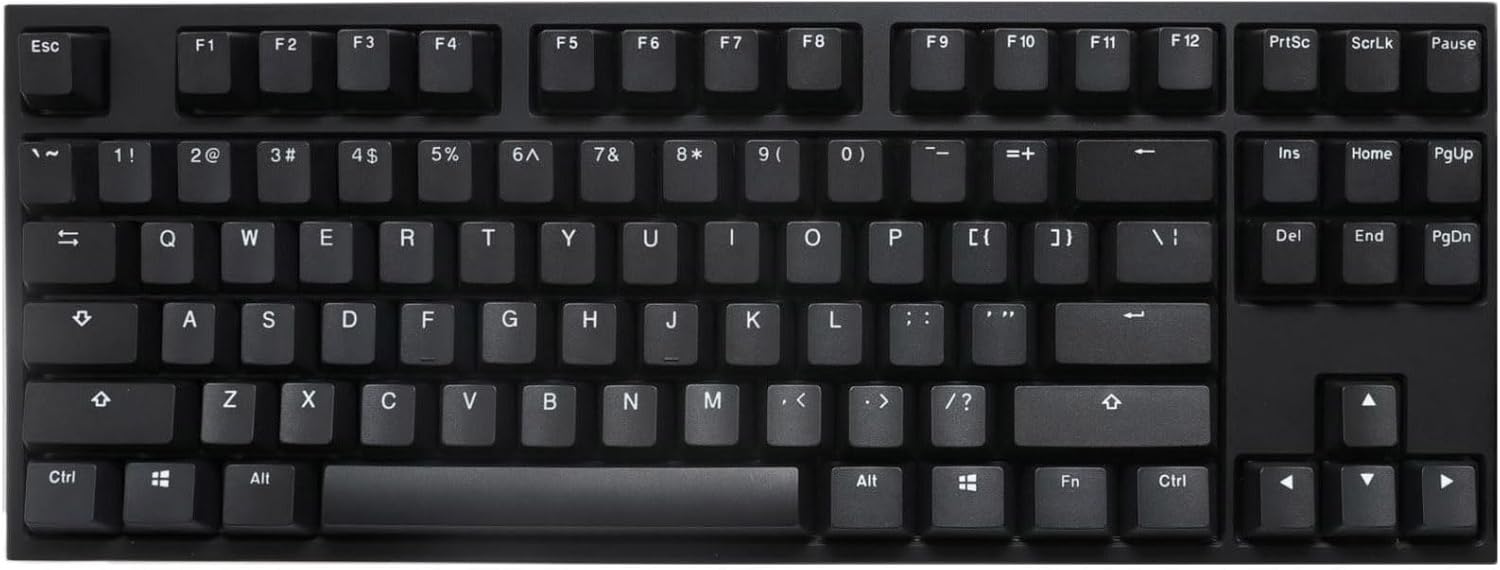
Režija view of the Ducky One 2 Phantom Black TKL Mechanical Keyboard, showcasing its compact tenkeyless layout and all-black PBT keycaps.
Video o izdelku
Ta videoposnetek nudi celovit pregledview of the Ducky One 2 keyboard, highlighting its design, key features, and functionality.
Nastavitev
Vsebina paketa
- Ducky One 2 Phantom Black TKL Mechanical Keyboard
- USB kabel
Priključitev tipkovnice
- Poiščite vrata USB Type-C na zadnji strani tipkovnice.
- Connect the smaller end of the provided USB cable to the keyboard's USB Type-C port.
- Povežite večji konec kabla USB z razpoložljivimi vrati USB na vašem računalniku.
- Vaš operacijski sistem bo tipkovnico samodejno prepoznal. Za osnovno delovanje običajno niso potrebni dodatni gonilniki.
Prilagajanje kota tipkovnice
The Ducky One 2 features 3-level adjustable feet on its underside. Gently flip out the desired set of feet to achieve your preferred typing angle.
Navodila za uporabo
Keycap Material and Durability
The keyboard is equipped with PBT Double-Shot Seamless Keycaps. PBT (Polybutylene Terephthalate) is a highly durable plastic that resists shine and wear over time, ensuring the legends remain clear and crisp. The double-shot molding process means the legends are physically molded into the keycap, not printed, preventing them from fading.
Stikala Cherry MX
Your Ducky One 2 keyboard uses genuine Cherry MX Blue mechanical switches. These switches are renowned for their tactile and clicky feedback, providing a satisfying typing experience. Cherry MX switches are designed for durability, capable of lasting over 50 million operations.
Načini osvetlitve ozadja
The Ducky One 2 Phantom Black TKL features various backlight modes. Users can adjust the brightness and speed of these modes directly from the keyboard. Refer to the specific key combinations in the included quick guide for detailed instructions on cycling through modes and adjusting settings.
Ducky Macro 2.0
Ducky Macro 2.0 allows users to program custom macros and reassign keys directly on the keyboard without software. This feature provides extensive customization options for gaming and productivity. Consult the full user manual for detailed macro programming instructions.
USB N-Key Rollover (Anti-ghosting)
The keyboard supports USB N-Key Rollover (NKRO), meaning every key press is registered independently, regardless of how many keys are pressed simultaneously. This prevents "ghosting" and ensures accurate input, especially crucial for fast-paced gaming.
DIP stikala
Located on the underside of the keyboard, DIP switches offer hardware-level configuration options, such as changing the function of certain keys or switching between different keyboard layouts. Refer to the full user manual for the specific functions of each DIP switch.
Vzdrževanje
Čiščenje tipkovnice
- Pred čiščenjem tipkovnico odklopite iz računalnika.
- Za odstranitev prahu in umazanije med tipkami uporabite pločevinko stisnjenega zraka.
- For stubborn dirt, gently wipe the keycaps and case with a slightly damp, krpo, ki ne pušča vlaken. Izogibajte se prekomerni vlagi.
- Do not use harsh chemicals or abrasive cleaners, as these can damage the keycaps or finish.
Odstranitev tipkovnice (neobvezno)
If you need to clean under the keycaps or replace them, use a keycap puller. Gently pull straight up on the keycap to remove it. When reattaching, align the keycap with the switch stem and press down firmly until it clicks into place.
Odpravljanje težav
Tipkovnica se ne odziva
- Prepričajte se, da je kabel USB varno priključen tako na tipkovnico kot na računalnik.
- Poskusite tipkovnico priključiti na drug USB vhod na računalniku.
- Preizkusite tipkovnico na drugem računalniku, da izključite težavo, specifično za računalnik.
- If possible, try a different USB-C cable.
Težave z osvetlitvijo ozadja
- Check the keyboard's manual for key combinations to adjust backlight brightness or cycle through modes.
- Ensure the backlight is not turned off or set to the lowest brightness setting.
Tipke se ne registrirajo ali tipkajo dvakrat
- Očistite pod prizadeto tipkovnico s stisnjenim zrakom.
- If the issue persists, it may indicate a switch malfunction. Contact Ducky support for assistance.
Specifikacije
| Funkcija | Podrobnost |
|---|---|
| Znamka | Ducky |
| Model | One 2 Phantom Black TKL |
| Opis tipkovnice | Mehanski |
| Tip stikala | Cherry MX Blue |
| Material ključavnice | Polibutilen tereftalat (PBT) |
| Število ključev | 87 |
| Tehnologija povezljivosti | USB-C |
| Združljive naprave | PC |
| Posebna funkcija | Space-saving tenkeyless design |
Garancija in podpora
Ducky products are designed for durability and performance. For warranty information and technical support, please refer to the official Ducky webali se obrnite na lokalnega prodajalca. Shranite dokazilo o nakupu za uveljavljanje garancije.
Za dodatno podporo in vire obiščite Ducky Store on Amazon.