
1. Uvod
The Sygonix SY-5044422 Digital Timer Switch is designed for easy programming and operation, helping to manage power consumption for various appliances. This device features 20 ON/OFF programs, 3 random settings, and a countdown function, with switching intervals as short as 1 minute. Programs can be set for specific days, combinations of days, or daily. Its IP44 splash-proof rating allows for outdoor use, and an integrated battery retains settings during power outages. The timer supports a maximum switching capacity of 1800 W and includes enhanced touch protection.
2. Varnostna navodila
- Pred uporabo natančno preberite vsa navodila.
- This device is rated IP44, making it splash-proof for outdoor use. However, do not immerse it in water or expose it to direct jets of water.
- Ensure the total load of connected appliances does not exceed 1800 W.
- Do not open the device housing. Repairs should only be performed by qualified personnel.
- Keep out of reach of children. The device features enhanced touch protection.
- Always unplug the timer from the power outlet before cleaning.
3. Vsebina paketa
- Sygonix SY-5044422 Digital Timer Switch
- Navodila za uporabo
- Informacije o garanciji
4. Izdelek je končanview
Familiarize yourself with the components and controls of your digital timer switch.
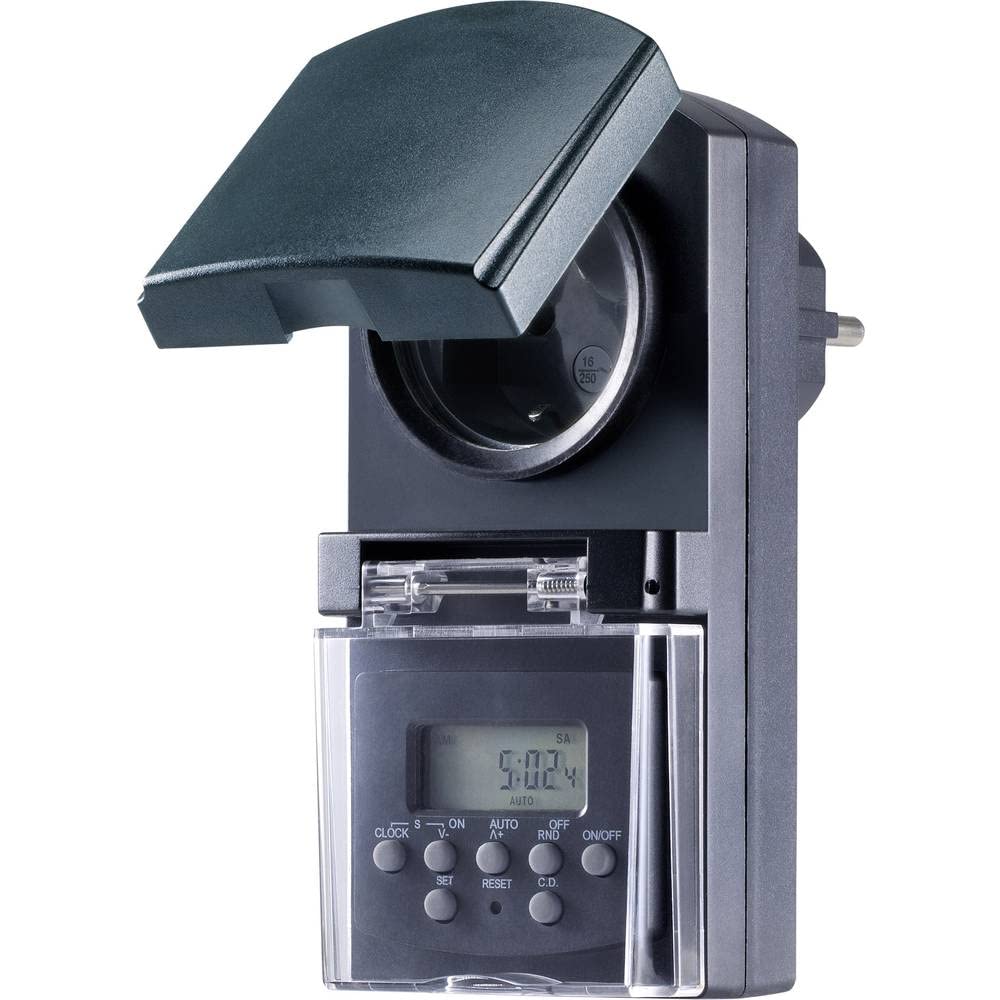
Slika 1: Spredaj view of the Sygonix SY-5044422 Digital Timer Switch. This image displays the LCD screen, which shows the current time and day, along with various control buttons including CLOCK, ON/OFF, SET, RESET, AUTO/A+, OFF/RND, and C.D. (Countdown).

Slika 2: Spredaj view of the timer with the protective cover opened, showing the integrated power socket. The display and control buttons are visible below the socket.
Gumbi za upravljanje:
- URA: Used to set the current time and day.
- VKLOP/IZKLOP: Manually switches the timer output ON or OFF.
- NASTAVITEV: Vstopi v način programiranja in potrdi nastavitve.
- PONASTAVITI: Clears all settings and resets the timer to factory defaults.
- AUTO/A+: Cycles through automatic mode, program settings, and adjusts values.
- OFF/RND: Activates or deactivates the Random function.
- C.D. (Countdown): Activates or deactivates the Countdown function.
5. Nastavitev
5.1 Začetno polnjenje
Before first use, plug the timer into a power outlet for approximately 30 minutes to charge the internal battery. This ensures the display is active and settings are retained during power outages or when unplugged.
5.2 Nastavitev trenutnega časa in dneva
- Pritisnite in držite URA gumb.
- Med držanjem URA, pritisnite AUTO/A+ repeatedly to set the current day (MO, TU, WE, TH, FR, SA, SU).
- Med držanjem URA, pritisnite NASTAVI večkrat za nastavitev trenutne ure.
- Med držanjem URA, pritisnite OFF/RND večkrat za nastavitev trenutne minute.
- Spustite URA , da shranite nastavitve.
5.3 Prehod na poletni čas
The timer supports a summer time function. To activate or deactivate:
- Pritisnite in držite URA gumb in VKLOP/IZKLOP button simultaneously for 3 seconds. The display will show "SUMMER" or "WINTER" to indicate the mode.
6. Navodila za uporabo
6.1 Programming ON/OFF Times (Weekly Program)
Časovnik omogoča do 20 programov VKLOP/IZKLOP. Vsak program je mogoče nastaviti za določene dni ali kombinacije dni.
- Pritisnite NASTAVI button once to enter program mode. The display will show "1 ON".
- Pritisnite AUTO/A+ to select the desired day(s) for the program (e.g., MO, TU, WE, TH, FR, SA, SU, MO-FR, SA-SU, MO-SA, etc.).
- Pritisnite NASTAVI za potrditev izbire dneva.
- Pritisnite AUTO/A+ za nastavitev želene ure vklopa.
- Pritisnite OFF/RND za nastavitev želene minute vklopa.
- Pritisnite NASTAVI again. The display will now show "1 OFF".
- Repeat steps 2-5 to set the OFF time for the same program.
- Nadaljujte s pritiskom NASTAVI to cycle through all 20 ON/OFF programs. To exit program mode at any time, press the URA gumb.
Opomba: After programming, ensure the timer is in AUTO mode for the programs to execute. Press VKLOP/IZKLOP repeatedly until "AUTO" is displayed.
6.2 Funkcija odštevanja
The countdown function allows you to switch the connected appliance ON or OFF after a set duration.
- Pritisnite CD button once. The display will show "CD ON" or "CD OFF".
- Pritisnite AUTO/A+ to set the desired countdown hour.
- Pritisnite OFF/RND to set the desired countdown minute.
- Pritisnite CD again to start the countdown. The display will show the remaining time.
- Za preklic odštevanja pritisnite CD še enkrat.
6.3 Random Function (Presence Simulation)
The random function simulates presence by randomly switching the connected appliance ON and OFF within a set time window, deterring potential intruders.
- Prepričajte se, da je časovnik vklopljen AUTO način.
- Pritisnite OFF/RND button. The display will show "RND" to indicate the random function is active.
- The timer will now randomly switch the output ON and OFF for short periods within the programmed ON/OFF times.
- To deactivate the random function, press OFF/RND again. "RND" will disappear from the display.
6.4 Ročno preglasitev VKLOP/IZKLOP
You can manually override the programmed settings at any time.
- Pritisnite VKLOP/IZKLOP button repeatedly to cycle through "ON", "OFF", and "AUTO" modes.
- "ON" means the output is continuously ON.
- "OFF" means the output is continuously OFF.
- "AUTO" means the timer will follow the programmed settings.
7. Vzdrževanje
- Pred čiščenjem vedno izključite časovnik iz električne vtičnice.
- Napravo obrišite z mehko, suho krpo. Ne uporabljajte abrazivnih čistil ali topil.
- Pazite, da v napravo ne pridejo tekočine.
8. Odpravljanje težav
| Težava | Možen vzrok | rešitev |
|---|---|---|
| Zaslon je prazen ali temen. | Notranja baterija je izpraznjena. | Plug the timer into a live power outlet for at least 30 minutes to charge the battery. |
| Programi se ne izvajajo. | Časovnik ni v samodejnem načinu. | Pritisnite VKLOP/IZKLOP button repeatedly until "AUTO" is displayed. |
| Incorrect time or day displayed. | Time/day was not set correctly or reset. | Refer to Section 5.2 "Setting Current Time and Day" to re-set. |
| Vse nastavitve so izgubljene po izpadu napajanjatage. | Internal battery not charged or faulty. | Ensure the timer is regularly plugged in to keep the internal battery charged. If the issue persists, contact support. |
9. Specifikacije
| Številka modela: | SY-5044422 |
| Max. Switching Capacity: | 1800 W |
| Zaščitni razred: | IP44 (odporno na škropljenje) |
| Vrsta zaslona: | Digitalno |
| Programi: | 20 VKLOP/IZKLOP programov |
| Minimum Switching Interval: | 1 minuta |
| Posebne lastnosti: | Countdown function, Random function (presence simulation), Summer time, Integrated battery for settings retention, Enhanced touch protection. |
| Dimenzije izdelka: | 14 x 10 x 6 cm |
| Proizvajalec: | Sygonix |
| Država izvora: | Kitajska |
10. Garancija in podpora
This product comes with a minimum 2-year warranty from the date of purchase. In case of any issues or defects, please contact your retailer or Sygonix customer support for assistance. Keep your proof of purchase for warranty claims.