
IPRO IPRO P1
Uporabniški priročnik za mobilni telefon IPRO P1 GSM 2G
Model: IPRO P1
Uvod
This manual provides comprehensive instructions for the IPRO P1 GSM 2G Mobile Phone. Designed for ease of use, particularly for seniors, this phone features large buttons, a clear display, and essential functions. Please read this manual carefully before using your device to ensure proper operation and maintenance.
Kaj je v škatli
Po razpakiranju preverite, ali so priloženi vsi naslednji elementi:
- 1 x mobilni telefon IPRO P1
- 1 x polnilnik z mikro USB-jem
- 1 x baterija
- 1 x uporabniški priročnik
Nastavitev
1. Vstavljanje SIM kartice in baterije
- Previdno odstranite zadnji pokrov telefona.
- Insert your 2G GSM SIM card(s) into the designated SIM card slot(s). This phone supports Dual SIM.
- Insert the battery into the battery compartment, ensuring the gold contacts align with the phone's terminals.
- Namestite zadnji pokrov, dokler se ne zaskoči.
2. Polnjenje baterije
Pred prvo uporabo popolnoma napolnite baterijo telefona.
- Priključite kabel polnilnika Micro-USB v polnilni priključek na telefonu.
- Polnilnik priključite v električno vtičnico.
- Indikator polnjenja na telefonu bo prikazoval stanje polnjenja. Ko je telefon popolnoma napolnjen, izključite polnilnik.

Slika 1: Spredaj in zadaj view mobilnega telefona IPRO P1, razstavaasing njegovo kompaktno zasnovo in teksturiran zadnji pokrov.
Navodila za uporabo
1. Vklop/izklop
- To power on: Press and hold the Power/End Call button (usually red) until the screen lights up.
- To power off: Press and hold the Power/End Call button until the power off options appear, then select "Power off".
2. Klicanje
- S tipkovnico vnesite telefonsko številko.
- Pritisnite gumb za klic (običajno zelen), da začnete klic.
- Če želite končati klic, pritisnite gumb za vklop/končanje klica.
3. Sending SMS Messages
- Navigate to the "Messages" menu from the main screen.
- Izberite »Napiši sporočilo« ali »Novo SMS«.
- Vnesite sporočilo s tipkovnico.
- Vnesite telefonsko številko prejemnika ali jo izberite iz stikov.
- Izberite »Pošlji«.
4. Using Key Features

Slika 2: The IPRO P1 phone with visual representations of its core functionalities, including communication, settings, multimedia, and utility features.
- FM radio: Plug in headphones (not included) to use as an antenna, then navigate to the FM Radio application.
- Kamera: Access the camera application from the menu to take photos. The phone has a basic camera.
- Bluetooth: Enable Bluetooth in the settings menu to connect to compatible devices like headsets.
- Svetilka: The phone features a powerful LED flashlight. It can usually be activated by a dedicated button or a long press of a specific key (refer to quick guide or on-screen prompts).
- Budilka: Set alarms through the "Clock" or "Alarm" application.
- Koledar in kalkulator: Basic utility applications are available in the menu.

Slika 3: The IPRO P1 phone demonstrating its powerful LED flashlight feature, illuminating a dark path.
Vzdrževanje
- Čiščenje: Za čiščenje površine telefona uporabljajte mehko, suho krpo. Izogibajte se tekočim čistilom ali abrazivnim materialom.
- Vzdrževanje baterije: Do not expose the battery to extreme temperatures. If the phone will not be used for an extended period, charge it periodically to maintain battery health.
- Shranjevanje: Telefon shranjujte na hladnem in suhem mestu, stran od neposredne sončne svetlobe in vlage.
- Izogibajte se kapljicam: While durable, avoid dropping the phone to prevent damage to internal components or the screen.
Odpravljanje težav
| Težava | Možen vzrok | rešitev |
|---|---|---|
| Telefon se ne vklopi | Battery is low or not inserted correctly. | Napolnite baterijo. Prepričajte se, da je baterija pravilno vstavljena. |
| Ne morem klicati ali sprejemati klicev | No SIM card, SIM card not active, or out of network coverage. | Ensure SIM card is inserted and active. Check network signal strength. Contact your service provider. |
| Slaba kakovost klica | Šibek omrežni signal ali motnje. | Move to an area with better signal. Avoid using near other electronic devices. |
| Baterija se hitro izprazni | Frequent use, background applications, or old battery. | Zmanjšajte svetlost zaslona. Zaprite neuporabljene aplikacije. Razmislite o zamenjavi baterije, če je stara. |
| Zaslon se ne odziva | Napaka v programski opremi. | Odstranite in ponovno vstavite baterijo, da ponovno zaženete telefon. |
Specifikacije
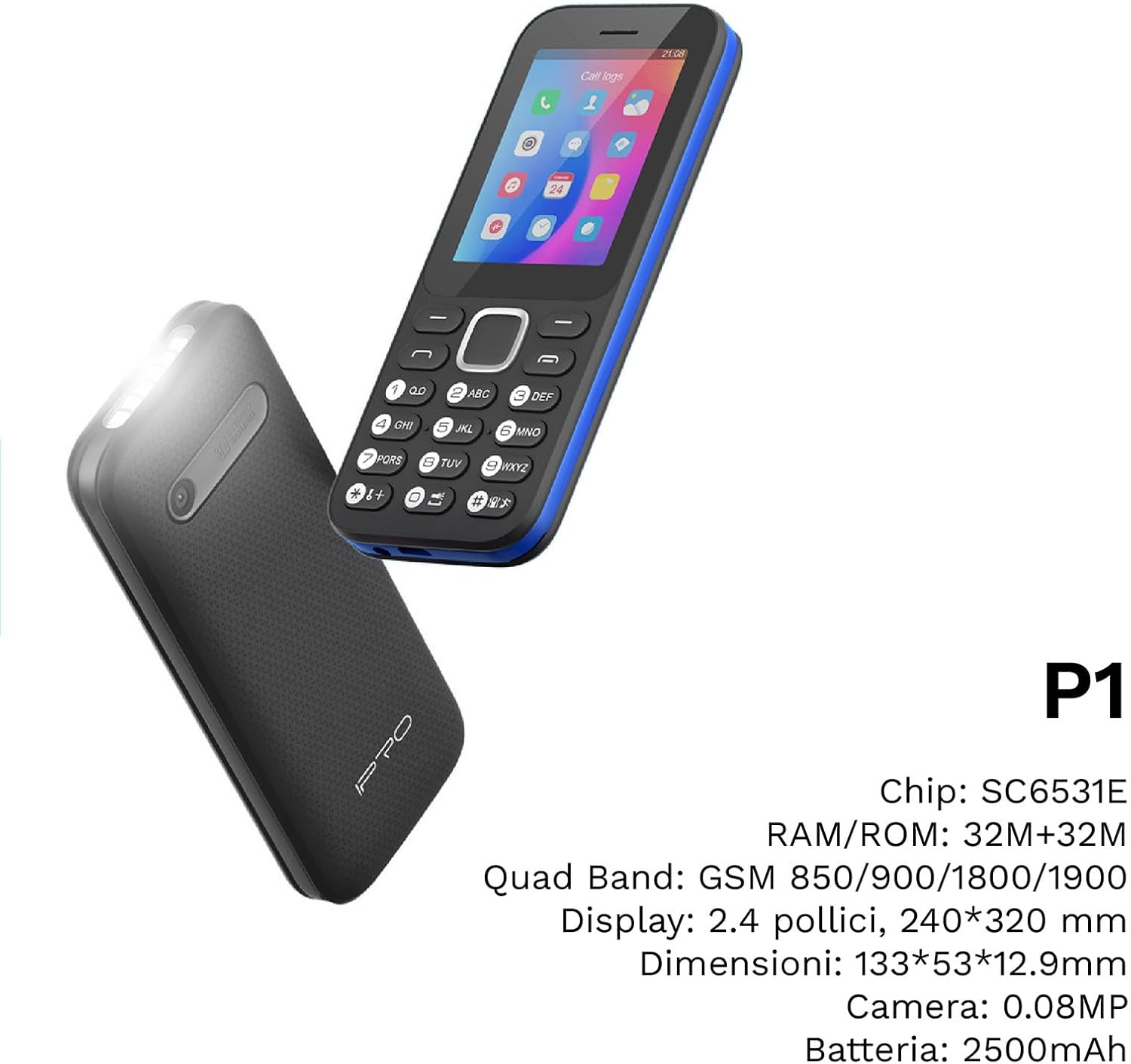
Slika 4: Kot view of the IPRO P1 phone, accompanied by a summary of its technical specifications.
- Omrežje: 2G GSM Quad Band (850/900/1800/1900 MHz)
- Čipset: SC6531E
- Zaslon: 2.4-palčni barvni zaslon (ločljivost 240 x 320)
- RAM: 4 MB
- ROM: 4 MB
- Razširljiv pomnilnik: Podpira do 16 GB (kartica MicroSD ni priložena)
- SIM: Podpora za dve kartici SIM
- Povezljivost: Bluetooth
- Lastnosti: Camera, FM Radio, MP3, MP4, Alarm Clock, Calendar, Calculator, Integrated Games, LED Flashlight
- Baterija: 2500 mAh litij-ionski
- Jeziki: Španščina, angleščina, francoščina, italijanščina, portugalščina
- barva: Črna
- Dimenzije izdelka: 133 x 53 x 12.9 mm
- Teža: Približno 200 gramov

Slika 5: A close-up of the IPRO P1's screen, illustrating its 2.4-inch display size for clear viewing.
Garancija in podpora
IPRO offers technical service and customer support for two years from the date of purchase. This warranty covers manufacturing defects but does not include artificial damage.
For support, please contact IPRO customer service through the details provided on the product packaging or the official IPRO website. When contacting support, please have your product model number (IPRO P1) and purchase details ready.

Slika 6: A visual representation of the IPRO P1 phone's target audience, showing various seniors comfortably interacting with mobile devices, highlighting its user-friendly design.

Slika 7: Display of the IPRO P1 phone in two color variants: classic black and a version with a distinctive blue trim.
Ask a question about this manual
Ask about setup, troubleshooting, compatibility, parts, safety, or missing instructions. Manuals+ will review the question and use this page’s manual context to help answer it.