
1. Uvod
This manual provides detailed instructions for the safe and efficient operation of your YITRANIC 2500W Pure Sine Wave Inverter. Please read this manual thoroughly before installation and use, and retain it for future reference.
The YITRANIC 2500W Pure Sine Wave Inverter converts 12V DC battery power to 110V AC household power, suitable for various applications including home backup, camping, and vehicle use. It features a pure sine wave output, ensuring compatibility with sensitive electronics, and includes both wireless and wired LCD remote control options.
2. Varnostne informacije
OPOZORILO: Failure to follow these safety instructions may result in electric shock, fire, serious injury, or death. Always exercise caution when working with electrical equipment.
- Ne odpirajte pretvornika casing. V notranjosti ni delov, ki bi jih lahko uporabnik servisiral.
- Poskrbite za ustrezno prezračevanje okoli pretvornika, da preprečite pregrevanje.
- Connect the inverter only to a 12V DC power source. Do not connect to 24V or higher DC systems.
- Always connect the inverter to the battery terminals with correct polarity (positive to positive, negative to negative). Reverse polarity connection will damage the inverter.
- Pretvornik hranite stran od vode, vlage in vnetljivih materialov.
- Do not overload the inverter. The continuous output power is 2500W, with a peak surge power of 5000W.
- Pred kakršnim koli vzdrževanjem ali čiščenjem odklopite pretvornik iz akumulatorja.
3. Vsebina paketa
Preverite, ali so v paketu prisotni vsi elementi:
- YITRANIC 2500W Pure Sine Wave Inverter Unit
- 2-in-1 Remote Controller (Wireless and Wired)
- DC Battery Cables (Red and Black)
- Backup Fuses
- USB Charging Cable (for remote controller)
- Uporabniški priročnik (ta dokument)

Figure 3.1: Inverter unit with DC cables, remote controller, wireless receiver, USB cable, and fuses.
4. Izdelek je končanview in funkcije
4.1 Komponente inverterja

Figure 4.1: Front panel with AC outlets, USB ports, Type-C port, and remote connection. Side panel with DC input terminals and cooling fans.
- AC vtičnice: Four standard US 110V AC outlets for connecting appliances.
- Vrata USB: Dual 5V/3A QC3.0 USB fast charging ports.
- Vrata tipa C: One PD30W Type-C port for compatible devices.
- Remote Control Interface: Port for wired remote connection and wireless receiver.
- Vhodni priključki za enosmerni tok: Red (+) and Black (-) terminals for 12V DC battery connection.
- Ventilatorji za hlajenje: Dual temperature-controlled fans activate automatically when the internal temperature exceeds 45°C.
- Stikalo za vklop/izklop: Main power switch on the inverter unit.
4.2 Daljinski upravljalnik
The inverter includes a versatile 2-in-1 remote controller, offering both wireless and wired operation for convenience.
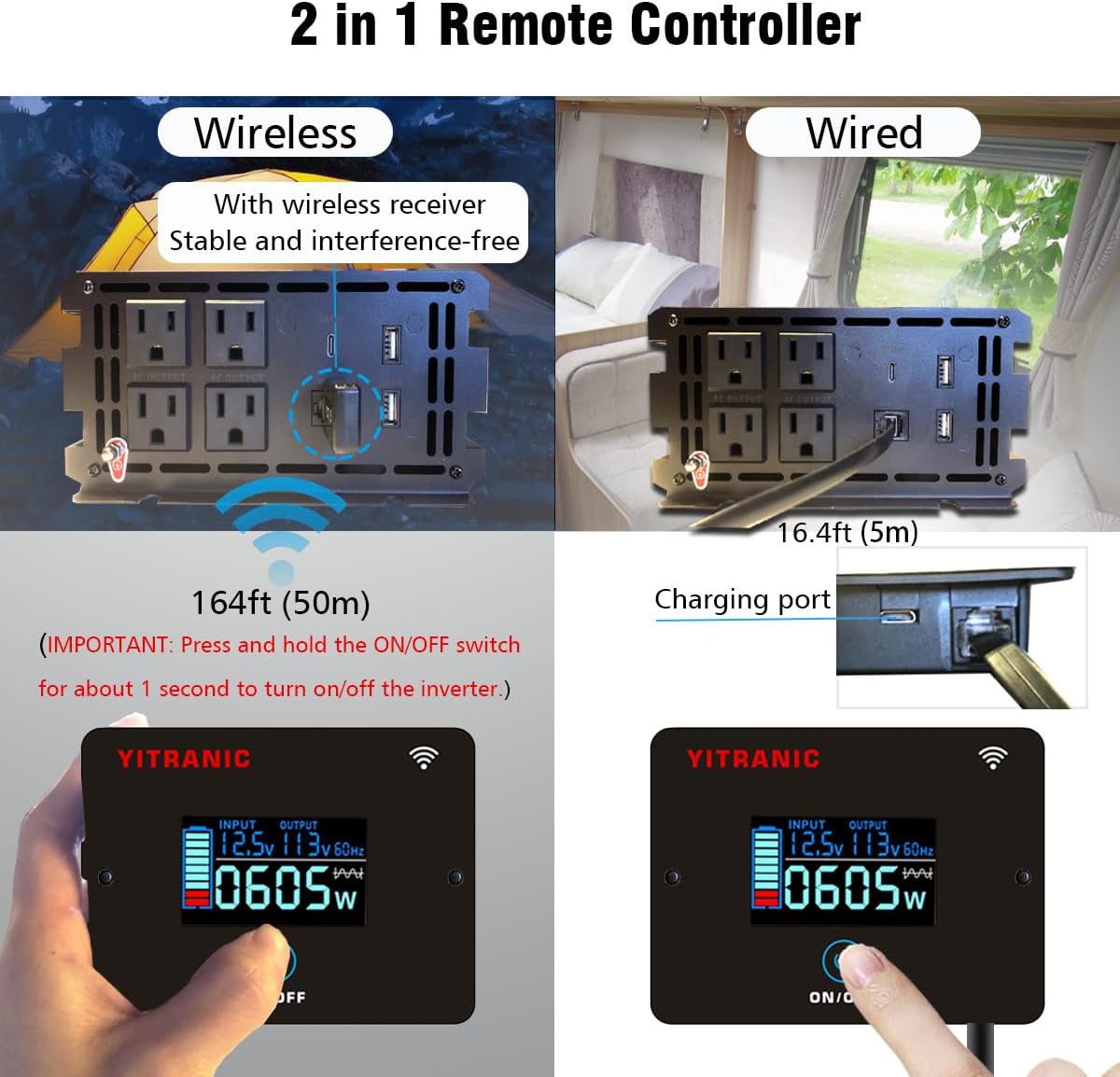
Figure 4.2: Remote controller showing wireless operation with receiver and wired connection via cable.
- Brezžično delovanje: Connect the wireless receiver to the inverter's remote port. The remote can operate up to 164 feet (50 meters) away.
- Žično delovanje: Connect the remote directly to the inverter's remote port using the provided 16.4ft (5m) cable.
- LCD zaslon: Prikaže vhodno voltage, izhodna voltage, frequency, and power consumption.
- Gumb za VKLOP/IZKLOP: Press and hold for approximately 1 second to turn the inverter on or off.
- Vrata za polnjenje: The remote controller has a built-in rechargeable Li-Ion battery, charged via a USB cable.
4.3 Izhod čistega sinusnega vala
This inverter produces a pure sine wave output, which is identical to the AC power supplied by utility grids. This ensures compatibility and safe operation for all types of electronic devices, including sensitive equipment like laptops, medical devices, and appliances with motors.

Figure 4.3: Pure Sine Wave compatibility with various appliances compared to modified sine wave.
4.4 Multiple Protection Features
The inverter is equipped with multiple safety features to protect both the device and connected equipment:

Figure 4.4: Visual representation of the inverter's built-in protection mechanisms.
- Zaščita pred preobremenitvijo: Shuts down if connected load exceeds rated power.
- Zaščita pred pregrevanjem: Vklopi hladilne ventilatorje in se izklopi, če je notranja temperatura previsoka.
- Undervoltage Zaščita: Shuts down if input DC voltage pade prenizko.
- Overvoltage Zaščita: Shuts down if input DC voltage presega varne meje.
- Zaščita pred povratno povezavo: Protects against incorrect battery polarity connection.
- Zaščita pred kratkim stikom: Ščiti pred kratkimi stiki na izhodu.
5. Nastavitev in namestitev
5.1 Izbira mesta namestitve
- Install the inverter in a dry, well-ventilated area, away from direct sunlight and heat sources.
- Ensure there is sufficient space around the inverter for proper airflow, especially around the cooling fans.
- Mount the inverter securely on a flat, stable surface.
5.2 Connecting to a 12V DC Battery
POMEMBNO: Before making any connections, ensure the inverter's main ON/OFF switch is in the OFF position.
- Identify the positive (+) and negative (-) terminals on your 12V DC battery.
- Povežite rdeča DC cable to the rdeča (+) terminal of the inverter.
- Povežite drugi konec rdeča DC cable to the pozitivno (+) terminal akumulatorja.
- Povežite črna DC cable to the črna (-) terminal of the inverter.
- Povežite drugi konec črna DC cable to the negativno (-) terminal akumulatorja.
- Prepričajte se, da so vse povezave tesne in varne, da preprečite ohlapne stike in iskrenje.

Figure 5.1: DC input terminals for battery connection.
5.3 Nastavitev daljinskega upravljalnika
Choose between wired or wireless operation for the remote controller:
- Žična povezava: Plug the remote cable into the "REMOTE" port on the inverter and the corresponding port on the remote controller.
- Brezžična povezava: Plug the wireless receiver into the "REMOTE" port on the inverter. The remote controller will automatically pair with the receiver. Ensure the remote controller's battery is charged using the provided USB cable.
6. Delovanje
6.1 Turning the Inverter On/Off
- After connecting the battery, press and hold the ON/OFF button on the inverter unit or the remote controller for approximately 1 second.
- The LCD display on the remote controller will illuminate, showing input voltage, izhodna voltage, and current power consumption.
- To turn off the inverter, press and hold the ON/OFF button again for approximately 1 second.
6.2 Priklop naprav z izmeničnim tokom
- Zagotovite skupno vattage of all connected AC appliances does not exceed the inverter's continuous output power of 2500W.
- Plug your AC appliances into the 110V AC outlets on the inverter's front panel.
- For appliances with high starting currents (e.g., motors, refrigerators), ensure their surge wattage is within the inverter's 5000W surge capacity.
6.3 Using USB and Type-C Ports
- Connect your USB-powered devices to the QC3.0 USB ports for fast charging.
- Connect compatible devices to the PD30W Type-C port for power delivery charging.
6.4 Razumevanje LCD-zaslona
The remote controller's LCD provides real-time operational status:

Figure 6.1: LCD display indicating input voltage, izhodna voltage, power, and potential error codes (OV, LV, OT, OL, SC).
- VHOD: Prikazuje trenutno glasnost vhodnega enosmernega tokatage iz baterije.
- IZHOD: Prikazuje glasnost izhodnega AC tokatage and frequency (e.g., 110V 60Hz).
- WATTAGE: Shows the real-time power consumption of connected devices in watts.
- Ikona baterije: Indicates the approximate charge level of the remote controller's internal battery.
- Kode napak: The display may show codes like OV (Overvoltage), LV (Low Voltage), OT (Over Temperature), OL (Overload), SC (Short Circuit) if a protection mechanism is triggered. Refer to the Troubleshooting section for details.
7. Vzdrževanje
- Čiščenje: Periodically clean the inverter's exterior with a dry, soft cloth. Ensure the cooling vents are free from dust and debris. Do not use liquid cleaners.
- Povezave: Regularly check battery cable connections for tightness and corrosion. Clean any corrosion with a wire brush and baking soda solution.
- Shranjevanje: Če boste pretvornik shranjevali dlje časa, ga odklopite iz akumulatorja in shranite na hladnem in suhem mestu.
- Zamenjava varovalke: The inverter contains internal fuses. If a fuse blows, it indicates a significant issue. Contact customer support for assistance; do not attempt to replace internal fuses yourself.
8. Odpravljanje težav
If the inverter is not functioning correctly, refer to the following table for common issues and solutions:
| Težava | Možen vzrok | rešitev |
|---|---|---|
| No power output, inverter OFF. | Ohlapne povezave akumulatorja, nizka napetost akumulatorjatage, inverter switch OFF. | Check and tighten battery cables. Charge battery. Press and hold ON/OFF switch for 1 second. |
| Inverter shuts down with "OL" (Overload) on LCD. | Connected load exceeds 2500W continuous or 5000W surge. | Zmanjšajte skupno vattage of connected appliances. Restart inverter. |
| Inverter shuts down with "LV" (Low Voltage) on LCD. | Baterija voltage je prenizek (pod 10.5 V). | Ponovno napolnite ali zamenjajte baterijo. |
| Inverter shuts down with "OV" (Overvoltage) on LCD. | Baterija voltage je previsok (nad 15.5V). | Disconnect from charging source. Check battery voltage. |
| Inverter shuts down with "OT" (Over Temperature) on LCD. | Pretvornik se pregreva zaradi slabega prezračevanja ali prekomerne obremenitve. | Ensure adequate ventilation. Reduce load. Allow inverter to cool down. |
| No power from USB/Type-C ports. | Inverter is OFF, or device is incompatible. | Turn on the inverter. Check device compatibility. |
If the problem persists after attempting these solutions, please contact YITRANIC customer support.
9. Specifikacije
| Funkcija | Specifikacija |
|---|---|
| Model | 2500W-12V |
| Neprekinjeno napajanje | 2500 W |
| Prenapetostna moč | 5000 W |
| DC vhod Voltage | 12 V |
| AC izhod Voltage | 110 V |
| AC izhodna frekvenca | 60Hz |
| Izhodna valovna oblika | Čisti sinusni val |
| USB izhod | Dual 5V/3A QC3.0 |
| Izhod tipa C | PD30W |
| Učinkovitost | ≥ 90 % |
| Dimenzije izdelka | 15.75 x 3.54 x 7.09 palcev (40 x 9 x 18 cm) |
| Teža predmeta | 10 funtov (4.5 kg) |
| Certifikati | FCC certificirano |
10. Garancija in podpora strankam
YITRANIC products are designed and manufactured to high-quality standards. For warranty information, technical support, or any questions regarding your inverter, please contact YITRANIC customer support through the retailer where the product was purchased or visit the official YITRANIC webmesto.
Please have your model number (2500W-12V) and purchase date available when contacting support.