
DonosHome DH300
DonosHome DH300 OBD2 Auto Diagnostic Scanner User Manual
Model: DH300
1. Uvod
The DonosHome DH300 is an innovative, multi-function OBD2 code reader designed to be one of the most accurate and economical vehicle diagnostic tools available. It helps users easily determine the cause of the Check Engine Light (MIL) and provides comprehensive information on vehicle health and performance. This manual provides detailed instructions for the proper use and maintenance of your DH300 scanner.

Figure 1.1: DonosHome DH300 OBD2 Scanner and its retail packaging, highlighting key features.
2. Varnostni ukrepi
Please read this user manual carefully and follow the warnings and precautions below before use, to avoid the possibility of personal injury or damage to the vehicle and/or the device:
- Do not smoke, light matches, or cause sparks near the vehicle during operation.
- Do not come into contact with hot engine parts to avoid severe burns, especially when the engine is running.
- Do not use this tool while driving.
- Always wear appropriate eye protection when working on vehicles.
- Ensure the vehicle is in a well-ventilated area when running the engine.
3. Vsebina paketa
Po odprtju paketa preverite, ali so vsi spodaj navedeni elementi priloženi in v dobrem stanju:
- 1 x DonosHome DH300 OBD2 Scanner
- 1 x Uporabniški priročnik (ta dokument)
- 1 x paketna škatla

Figure 3.1: The package includes the OBD2 scanner, user manual, and package box.
4. Značilnosti izdelka
The DonosHome DH300 OBD2 scanner is equipped with a variety of features designed for comprehensive vehicle diagnostics:
- Check Engine Light (MIL) Management: Easily determine the cause, turn off the light, clear codes, and reset monitors.
- Definicije diagnostičnih kod DTC: Displays Diagnostic Trouble Code definitions directly on the screen.
- Podatki zamrznjenega okvira: View a snapshot of vehicle conditions when a fault code was set.
- Stanje pripravljenosti I/M: Check monitor and I/M readiness status for emissions testing.
- Pending Codes: Identify codes that have not yet triggered the MIL.
- Real-time PCM Data Stream: Read live data from the Powertrain Control Module.
- O2 Sensor Test Data: Display real-time O2 sensor test results.
- Data Graphing: Visualize live data for easier analysis.
- Predvajanje podatkov: Read, store, and playback real-time sensor data, DTC data, and freeze frame data.
- Test Modules: Perform present test modules.
- Pridobivanje informacij o vozilu: Retrieve VIN (Vehicle Identification Number), CIN (Calibration Identification Number), and CVN (Calibration Verification Number).
- Podpora protokolu: Supports CAN (Controller Area Network) and all other current OBD2 protocols.
- Built-in DTC Library: Integrated OBD2 DTC lookup library for quick reference.
- Funkcija voltmetra: Test voltage in sistem polnjenja.
- Waveform Graphing: Starting waveform graph and real-time waveform graph.
- Večjezična podpora: 10 built-in languages (English, German, Spanish, French, Italian, Dutch, Finnish, Polish, Portuguese, Russian).
- Ergonomska oblika: Color screen, plug-and-play operation, powered directly by the vehicle.
- Indikatorji napak: Red, yellow, and green LED indicators for quick fault status.

Figure 4.1: Key diagnostic functions of the DonosHome DH300.

Figure 4.2: Innovative design with LED indicators and multilingual support.

Figure 4.3: Multilingual interface and broad vehicle compatibility.
5. Nastavitev in povezava
The DH300 scanner is designed for simple plug-and-play operation. Follow these steps to connect the device to your vehicle:
- Poiščite vrata OBD2: The OBD2 port is typically located under the dashboard on the driver's side, often near the steering column. Refer to your vehicle's owner's manual if you cannot find it.
- Connect the OBD2 Plug: Firmly insert the DH300's OBD2 connector into the vehicle's OBD2 port. The device will power on automatically.
- Zaženite motor: Turn the vehicle's ignition to the "ON" position or start the engine. The scanner will establish communication with the vehicle's ECU.
- Začnite diagnostiko: Once connected and powered, the scanner is ready for use.
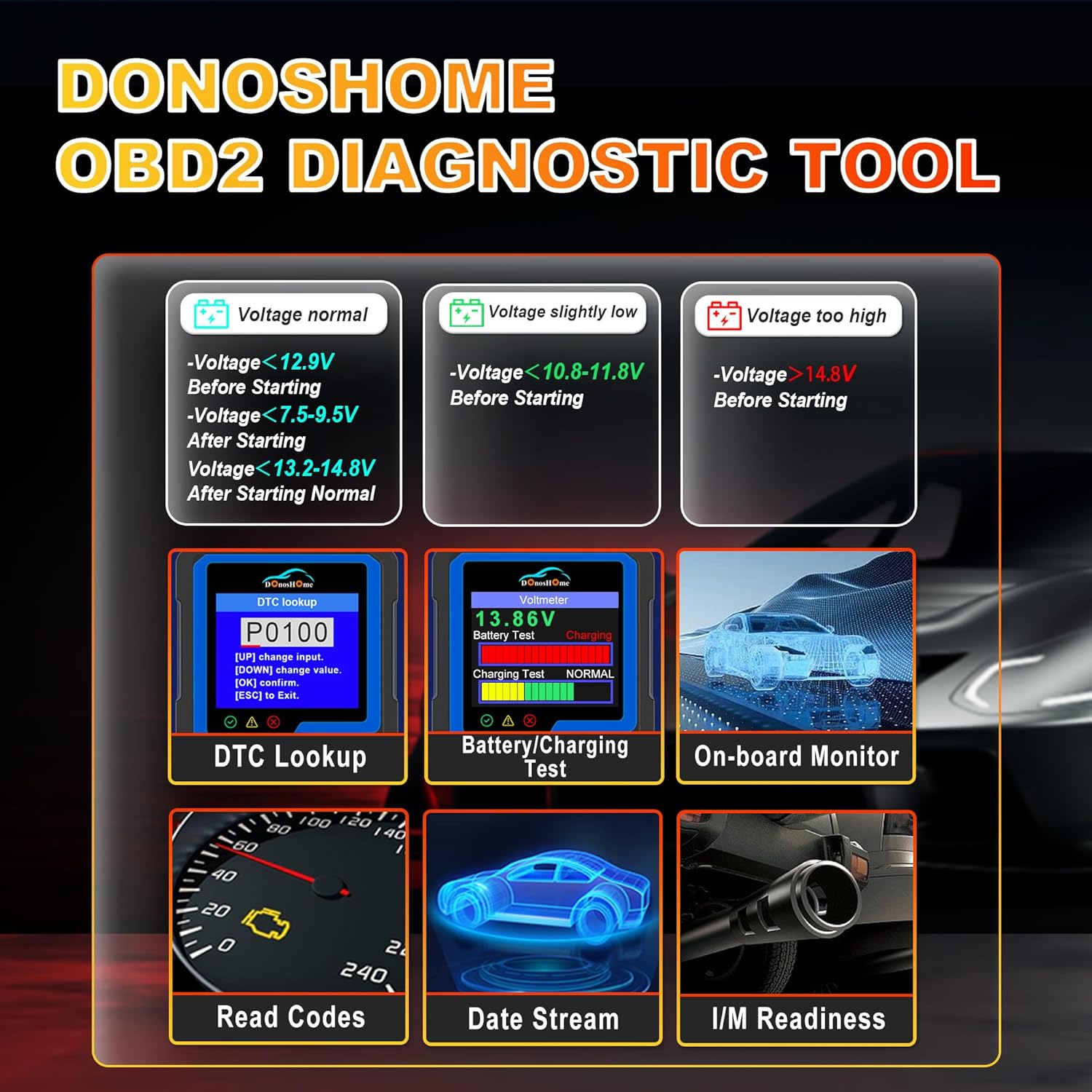
Figure 5.1: Simple plug-and-play connection process.
6. Navodila za uporabo
The DH300 features a user-friendly interface with a color screen and five buttons: Up, Down, OK, ESC, and I/M. Navigate through menus using the Up/Down buttons, confirm selections with OK, and go back with ESC. The I/M button provides quick access to readiness status.
6.1. Reading and Clearing Trouble Codes (DTCs)
To read and clear Diagnostic Trouble Codes:
- From the main menu, select "Diagnose" and press OK.
- Navigate to "Read Codes" and press OK. The scanner will display any stored, pending, or permanent codes.
- To clear codes, select "Erase Codes" from the diagnostic menu and press OK. Confirm the action when prompted. This will turn off the Check Engine Light.

Figure 6.1: DTC Lookup function and examples of error codes.
6.2. I/M Readiness Quick Start
The I/M Readiness function allows you to quickly check the status of emission-related monitors, which is crucial for smog tests.
- Pritisnite namensko SEM gumb na skenerju za hitro preverjanje.
- Alternatively, navigate to "I/M Readiness" from the main menu.
- The screen will display the status of various monitors (e.g., MIL, MIS, FUE, CCM, CAT, HCAT, O2S, EVAP, AIR, HRT, EGR) indicating whether they are "OK" (completed), "X" (not completed), or "N/A" (not applicable).

Figure 6.2: I/M Readiness Quick Start screen.
6.3. Voltmeter and Battery Test
The DH300 includes a voltmeter function to test your vehicle's battery and charging system.
- From the main menu, select "Voltmeter" and press OK.
- The screen will display the current battery voltage and charging status (e.g., Normal, Charging).
- Interpret the results based on the provided guidelines:
- voltage normal: >12.9V Before Starting, >13.2-14.8V After Starting.
- voltage slightly low: <12.9V Before Starting, <13.2V After Starting.
- voltage prenizko: <10.8-11.8V Before Starting.
- voltage previsok: >14.8V After Starting.

Figure 6.3: Voltmeter and Battery Test interface.
6.4. Tok podatkov v živo
View real-time sensor data from your vehicle's engine. This can help diagnose intermittent problems or verify repairs.
- From the main menu, select "Diagnose" and then "Live Data".
- The scanner will display various parameters such as engine RPM, vehicle speed, coolant temperature, O2 sensor readings, etc.
- Use the Up/Down buttons to scroll through the data. Some parameters can be graphed for better visualization.
6.5. Other Diagnostic Functions
The DH300 offers additional diagnostic capabilities:
- Test senzorja O2: Access results of the oxygen sensor monitor tests.
- Preizkus sistema EVAP: Začnite preizkus sistema za nadzor emisij izhlapevanja.
- Preizkus vgrajenega monitorja: View results of on-board diagnostic monitoring tests for specific components/systems.
- Retrieve VIN: Get vehicle information including VIN, CIN, and CVN.
- Review Zgodovina: Access previously stored diagnostic data.
7. Vzdrževanje
To ensure the longevity and optimal performance of your DonosHome DH300 scanner:
- Čiščenje: Za čiščenje zunanjosti skenerja uporabite mehko, suho krpo. Ne uporabljajte abrazivnih čistil ali topil.
- Shranjevanje: Napravo shranjujte v čistem in suhem okolju, stran od ekstremnih temperatur in neposredne sončne svetlobe.
- Skrb za kabel: Avoid bending or crimping the OBD2 cable excessively. Always grasp the connector, not the cable, when plugging or unplugging.
- Posodobitve programske opreme: Preverite pri proizvajalcu website periodically for any available software updates to ensure compatibility with newer vehicles and improved functionality.
8. Odpravljanje težav
If you encounter issues while using your DH300 scanner, refer to the following common problems and solutions:
| Težava | Možen vzrok | rešitev |
|---|---|---|
| Skener se ne vklopi. |
|
|
| Sporočilo »Napaka povezave« ali »Napaka v komunikaciji«. |
|
|
| Kod ni mogoče izbrisati. |
|
|
9. Specifikacije
| Atribut | Podrobnost |
|---|---|
| Znamka | DonosHome |
| Model | DH-300 |
| Teža predmeta | 191 g |
| Mere izdelka (D x Š x V) | 8 x 5 x 15 cm |
| Vir napajanja | Corded Electric (Vehicle OBD2 port) |
| Velikost zaslona | 3.2 palcev |
| Ločljivost zaslona | 320x240 |
| Podprti protokoli | CAN and all other current OBD2 protocols |
| Podprti jeziki | English, German, Spanish, French, Italian, Dutch, Finnish, Polish, Portuguese, Russian |
| Združljivost | American vehicles after 1996, European vehicles after 2003, Asian vehicles after 2008 |
10. Garancija in podpora
DonosHome provides excellent after-sales service, including a 2-letna garancija and professional technical support for the DH300 OBD2 Auto Diagnostic Scanner.
For technical assistance, warranty claims, or any other inquiries, please contact DonosHome customer service. Refer to the contact information provided with your purchase or on the official DonosHome webmesto.
Povezani dokumenti - DH300
 |
DonosHome AT500 OBDII Scanner User Manual Comprehensive user manual for the DonosHome AT500 OBDII Scanner, covering setup, operation, diagnostic functions like reading DTCs, I/M readiness, data stream, and system tests. Includes safety precautions, technical specifications, and warranty information. |
 |
DonosHome AT500 OBDII Scanner User Manual User manual for the DonosHome AT500 OBDII Scanner, detailing its features, operation, and troubleshooting for vehicle diagnostics. |
 |
Manual del Usuario del Escáner DonosHome AT500 OBDII Manual de usuario completo para el escáner DonosHome AT500 OBDII, que cubre la instalación, operación, diagnóstico de vehículos, pruebas del sistema, y más. Incluye guías detalladas sobre lectura y borrado de códigos DTC, monitores de emisiones, flujo de datos, información del vehículo, y pruebas de batería. |
 |
DonosHome BT60 Battery Analyzer User Manual - Features, Operation, and Testing Guide This user manual provides comprehensive instructions for operating the DonosHome BT60 Battery Analyzer. It covers setup, battery testing procedures for motorcycles, cars, and trucks, waveform analysis, charging system tests, and troubleshooting. Learn about technical specifications, warranty information, and safety precautions. |
 |
DonosHome BT60 Battery Analyzer User Manual Comprehensive user manual for the DonosHome BT60 Battery Analyzer, detailing its features, operation for various vehicle types (motorcycle, car, truck), testing procedures (battery, waveform, charging, cranking), technical specifications, updates, and warranty information. |
 |
DH300 Curve Digital Hub Hitri referenčni vodnik Quick reference guide for the Motorola Solutions DH300 Curve Digital Hub, covering installation, safety information, and LED indicator troubleshooting. |
Ask a question about this manual
Ask about setup, troubleshooting, compatibility, parts, safety, or missing instructions. Manuals+ will review the question and use this page’s manual context to help answer it.