
NOSILEC MU0062
Navodila za uporabo ultra tankega stenskega nosilca za TV s polnim gibanjem MOUNTUP
Comprehensive guide for the MOUNTUP MU0062 Ultra Slim Full Motion TV Wall Mount, designed for 26-60" LED OLED QLED TVs. This manual provides detailed instructions for installation, operation, and maintenance to ensure optimal performance and safety.
Uvod
The MOUNTUP MU0062 Ultra Slim Full Motion TV Wall Mount offers a sleek, space-saving solution for mounting your television. Its design allows the TV to sit only 1.3 inches from the wall when fully retracted, blending seamlessly into your living space. This mount is engineered for durability and flexibility, providing a wide range of motion for optimal viewing kotov.
- Ultra Slim & Discreet Design: Retracts to just 1.3 inches from the wall.
- Zmogljivost polnega gibanja: Features 10° tilt, 45° left/right swivel, and 3° leveling adjustment.
- Univerzalna združljivost: Supports most 26"-60" flat TVs up to 88lbs, with VESA patterns from 75x75mm to 400x400mm.
- Trden in varen: Constructed from heavy-duty alloy steel with a strong six-arm design for enhanced stability.
- Enostavna montaža: Includes an installation manual, bubble level, and necessary hardware for quick setup.

Image: The MOUNTUP MU0062 Ultra Slim Full Motion TV Wall Mount, showcasing njegovo robustno zasnovo in zgibne roke.
Nastavitev in namestitev
Before beginning installation, ensure you have all components and tools as listed in the included packing list. It is highly recommended to review the full installation manual for detailed steps and safety precautions. This mount is suitable for wood studs (12-16 inches spacing), concrete walls, and brick walls. Ni samo za suhomontažne plošče.
Združljivost tipov sten

Image: Diagram illustrating compatible wall types: wood stud (max 16" spacing), concrete wall (requires anchor), and brick wall (requires anchor). Drywall alone is not supported.
For concrete or brick wall installations, concrete anchors are required and can be requested from the manufacturer. Always use a stud finder to locate wood studs accurately.
Quick 3-Step Assembly Overview
- Pritrditev nosilcev za TV: Secure the mounting brackets to the back of your TV using the appropriate screws and spacers from the kit. Ensure the VESA pattern matches the mount's compatibility (75x75mm to 400x400mm).
- Stenska plošča za montažo: Position the wall plate on your chosen wall location, ensuring it is level. Mark and drill pilot holes into the wood stud(s) or concrete/brick, then secure the wall plate using the provided lag bolts.
- Hang and Secure TV: Carefully lift the TV and hook the attached brackets onto the wall plate. Secure the TV to the mount using the safety screws or locking mechanisms to prevent accidental dislodgement.

Image: Visual representation of the three main steps for installing the TV mount: attaching brackets to TV, mounting the wall plate, and hanging/securing the TV.
For a complete guide, please refer to the official Priročnik za namestitev (PDF).
Delovanje in prilagoditve
The MOUNTUP MU0062 mount provides full motion capabilities to optimize your viewing experience from various positions in the room.
Extension and Tilt
The mount allows your TV to extend up to 14 inches from the wall, providing flexibility for viewing. It also features a 10° downward tilting angle, which helps reduce glare and improve viewudobje.

Image: A TV mounted on the wall, extended forward and tilted downwards, demonstrating the mount's extension and tilt capabilities.
Nastavitev vrtenja
You can swivel your TV up to 45° to the left or right, depending on your TV size and wall proximity. This feature is ideal for viewing from different seating areas.

Image: A TV mounted on a wall, swiveled to the side, illustrating the mount's swivel range. The maximum swivel angle depends on the TV size.
Prilagoditev izravnave
After installation, the mount allows for a ±3° leveling adjustment to ensure your TV is perfectly horizontal.

Image: A diagram showing a TV mount with arrows indicating a ±3° leveling adjustment capability after installation.
Vzdrževanje
To ensure the longevity and safe operation of your MOUNTUP TV wall mount, follow these simple maintenance guidelines:
- Redni pregled: Periodically check all screws and connections to ensure they remain tight and secure. Over time, vibrations or frequent adjustments can loosen fasteners.
- Čiščenje: Obrišite nosilec z mehko, suho krpo, da odstranite prah. Za trdovratne madeže rahlo obrišiteamp cloth can be used, followed by drying. Avoid abrasive cleaners or solvents that could damage the finish.
- Mazanje: The articulating joints are designed for smooth movement. If you notice any stiffness or squeaking, a small amount of silicone-based lubricant can be applied to the moving parts.
- Upoštevanje omejitve teže: Never exceed the maximum weight capacity of 88lbs (40kg) for the mount. Overloading can lead to structural failure and damage to your TV or property.
Odpravljanje težav
If you encounter any issues with your MOUNTUP TV wall mount, consider the following common solutions:
- TV ni raven: Use the built-in leveling adjustment feature (±3°) to fine-tune the TV's horizontal position. Ensure the wall plate itself was installed level.
- Mount Feels Flimsy/Wobbly:
- Verify all wall plate lag bolts are securely fastened into solid wood studs or appropriate concrete/brick anchors.
- Ensure the TV brackets are properly seated and locked onto the wall plate.
- Confirm your TV's weight and size are within the mount's specified limits (up to 88lbs, 26"-60").
- Check that all articulating arm bolts are tightened.
- Difficulty Adjusting Movement (Tilt/Swivel/Extension):
- Check for any obstructions behind the TV or mount.
- Ensure no cables are snagged or preventing movement.
- Apply a small amount of silicone lubricant to the joints if they feel stiff.
- TV Not Sitting Flush to Wall (when retracted):
- Ensure all cables are neatly managed and not creating bulk behind the TV.
- Verify that the TV's VESA mounting holes are not recessed in a way that prevents full retraction without additional spacers (which should be used if needed).
If problems persist, please contact MOUNTUP customer support for assistance.
Specifikacije izdelka
| Funkcija | Podrobnost |
|---|---|
| Znamka | MONTAŽA |
| Številka modela | MU0062 |
| Združljive velikosti televizorjev | 26" - 60" |
| Zmogljivost teže | Do 88 lbs (40 kg) |
| Združljivost VESA | 75x75 mm do 400x400 mm |
| Distance from Wall (Retracted) | 1.3 palcev |
| Max Extension from Wall | 14 palcev |
| Kot nagiba | +5° / -10° |
| Zasučni kot | ±45° (Max, depends on TV size) |
| Prilagoditev izravnave | ±3° |
| Material | Heavy-duty Alloy Steel |
| barva | Črna |
| Teža predmeta | 11.38 funtov |
| Dimenzije izdelka | 17.1 x 16 x 1.3 palcev |
Združljivost vzorcev VESA
The VESA (Video Electronics Standards Association) pattern refers to the spacing of the four mounting holes on the back of your TV. This mount supports a wide range of VESA patterns, ensuring compatibility with many TV models.
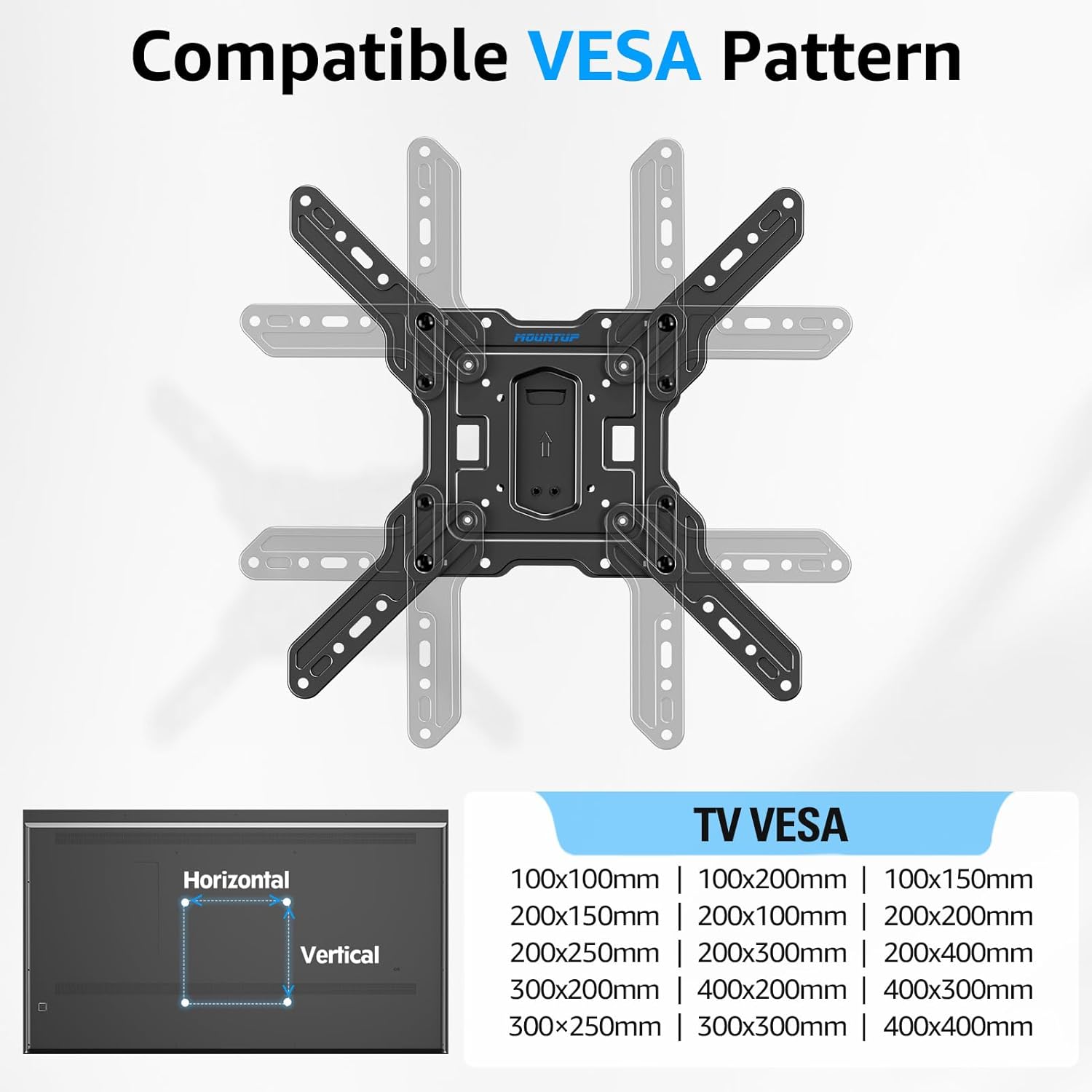
Image: A diagram showing various compatible VESA mounting patterns (e.g., 100x100mm, 200x200mm, 400x400mm) supported by the TV mount.
Informacije o garanciji
MOUNTUP products are designed for durability and reliability. For specific warranty terms and conditions applicable to your MU0062 Ultra Slim Full Motion TV Wall Mount, please refer to the warranty card included with your product or visit the official MOUNTUP website. Typically, manufacturer warranties cover defects in materials and workmanship under normal use.
Podpora uporabnikom
For further assistance, technical support, or inquiries regarding your MOUNTUP TV wall mount, please contact MOUNTUP customer service. You can find more information and contact details by visiting the official MOUNTUP store:
Ask a question about this manual
Ask about setup, troubleshooting, compatibility, parts, safety, or missing instructions. Manuals+ will review the question and use this page’s manual context to help answer it.