
1. Uvod
The tenlamp G1 Live Sound Card is an integrated audio mixer designed for live streaming, podcasting, recording, singing, and gaming. This equipment bundle includes the G1 audio console and two 3.5mm studio condenser microphones, providing a comprehensive solution for audio production. This manual provides detailed instructions for setting up, operating, maintaining, and troubleshooting your G1 system.
2. Vsebina paketa
Preden nadaljujete, preverite, ali so v paketu vsi elementi:
- tenlamp Zvočna konzola G1
- 2 x 3.5mm Studio Condenser Microphones
- Microphone Stands and Pop Filters
- Kabel USB-C na USB-A (za napajanje in prenos podatkov)
- 3.5mm TRRS Audio Cables (for mobile device connection)
- Uporabniški priročnik
3. Izdelek je končanview
The tenlamp G1 audio console features multiple inputs and outputs, along with various controls for audio mixing and effects. Familiarize yourself with the layout before setup.

Image: The tenlamp G1 Live Sound Card and two condenser microphones set up for a two-person podcast, demonstrating a typical usage scenario.
3.1 Kontrole sprednje plošče
- Mic VOL Fader: Adjusts the input volume of the connected microphones.
- Music VOL Fader: Adjusts the volume of the background music input.
- Monitor VOL Knob: Controls the volume of the monitoring headphones.
- Output VOL Knob: Nadzira glasnost glavnega izhoda.
- Reverb Effect Fader: Prilagodi intenzivnost učinka odmeva.
- Izenačevalnik visokih tonov/nizkih tonov: Adjusts high and low frequencies for microphone input.
- Voice-change Buttons: Activates various voice modulation effects.
- Sound Pad Buttons: Triggers pre-loaded sound effects.
- Noise Reduction Buttons: Activates different levels of intelligent noise reduction.
3.2 Priključki na zadnji plošči

Slika: Podrobna view of the tenlamp G1 audio console's rear panel, showing various input and output ports including USB-C, Output, Music, Monitor, Headset, and Mic inputs.
- Vrata USB-C: For power supply, data transfer to computer, and digital audio I/O. Note: Does not support USB mic connection via this port.
- Output Ports (TRRS): Connects to mobile devices for live streaming or recording.
- Glasbeni vnos: Connects external audio sources (e.g., phone, tablet) for background music.
- Izhod monitorja: Connects monitoring headphones.
- Headset Input: Connects a headset with integrated microphone.
- Mic Inputs (3.5mm): Connects the included 3.5mm condenser microphones.
4. Navodila za namestitev
Follow these steps to set up your tenlamp G1 Live Sound Card for optimal performance.
- Priključite mikrofone: Insert the 3.5mm plugs of the condenser microphones into the designated mikrofon input jacks on the rear panel of the G1 console. Secure microphones on their stands.
- Connect Monitoring Headphones: Priključite slušalke v Monitor izhodni priključek.
- Priključitev na napajanje/računalnik: Konec USB-C priloženega kabla priključite na USB-C port on the G1 console and the USB-A end to your computer's USB port or a power adapter. The device will power on.
- Connect to Mobile Device (Optional): If live streaming or recording on a mobile device, use the TRRS audio cables to connect the Izhod ports on the G1 to your mobile device's headphone jack.
- Connect Music Source (Optional): If using external background music, connect your music device to the Glasba vhodni priključek.
5. Navodila za uporabo
This section details how to use the various features of your tenlamp G1 Live Sound Card.
5.1 Osnovno miksanje zvoka
- Prilagodite glasnost mikrofona: Uporabite Mic VOL fader to control the loudness of your voice.
- Prilagodite glasnost glasbe: Uporabite Music VOL fader to balance the background music with your voice.
- Spremljajte svoj zvok: Prilagodite Monitor VOL knob to set a comfortable listening level in your headphones.
- Control Output Volume: The Output VOL knob controls the overall volume sent to your recording device or live stream.

Image: A close-up of the tenlamp G1 audio console, illustrating the various knobs and faders for fine-tuning audio parameters such as microphone volume, music volume, monitoring, output, reverb, treble/bass, and voice effects.
5.2 Zmanjšanje hrupa
The G1 features intelligent noise reduction to enhance audio clarity.
- Pritisnite namensko Zmanjšanje hrupa buttons (e.g., "Denoise1", "Denoise2", "Denoise3") to activate different levels of noise cancellation. Experiment to find the best setting for your environment.

Image: The tenlamp G1 audio console displaying its noise reduction capabilities, with three distinct levels labeled "Cheer Denoise1", "Kiss Denoise2", and "Guffaw Denoise3" for clear and clean audio recording.
5.3 Special Streaming Features
Enhance your live streams and recordings with these integrated functions:
- Dodge (Auto Ducking): When activated, this feature automatically lowers background music volume when you speak into the microphone, making your voice clearer.
- Odstrani vokale: This function attempts to remove the vocal track from accompaniment music, allowing you to sing over instrumental versions.
- Povratna zanka: Enables recording of internal PC audio along with your microphone input via the USB-C connection.

Image: The tenlamp G1 audio console showcasing convenient features for streaming, including "Dodge" for auto-ducking microphone input, "Remove Vocals" to eliminate vocals from accompaniment, and "Loopback" for recording PC internal audio via USB-C.
5.4 Creating Atmosphere
Utilize the built-in effects to customize your audio environment:
- Glasovni menjalniki: Select from 4 different voice modulation effects.
- Načini odmeva: Choose from 5 preset reverb modes to add depth to your vocals.
- Samodejna nastavitev: Apply 12-step auto-tune for pitch correction.
- Zvočne blazinice: Trigger various sound effects using the dedicated buttons.
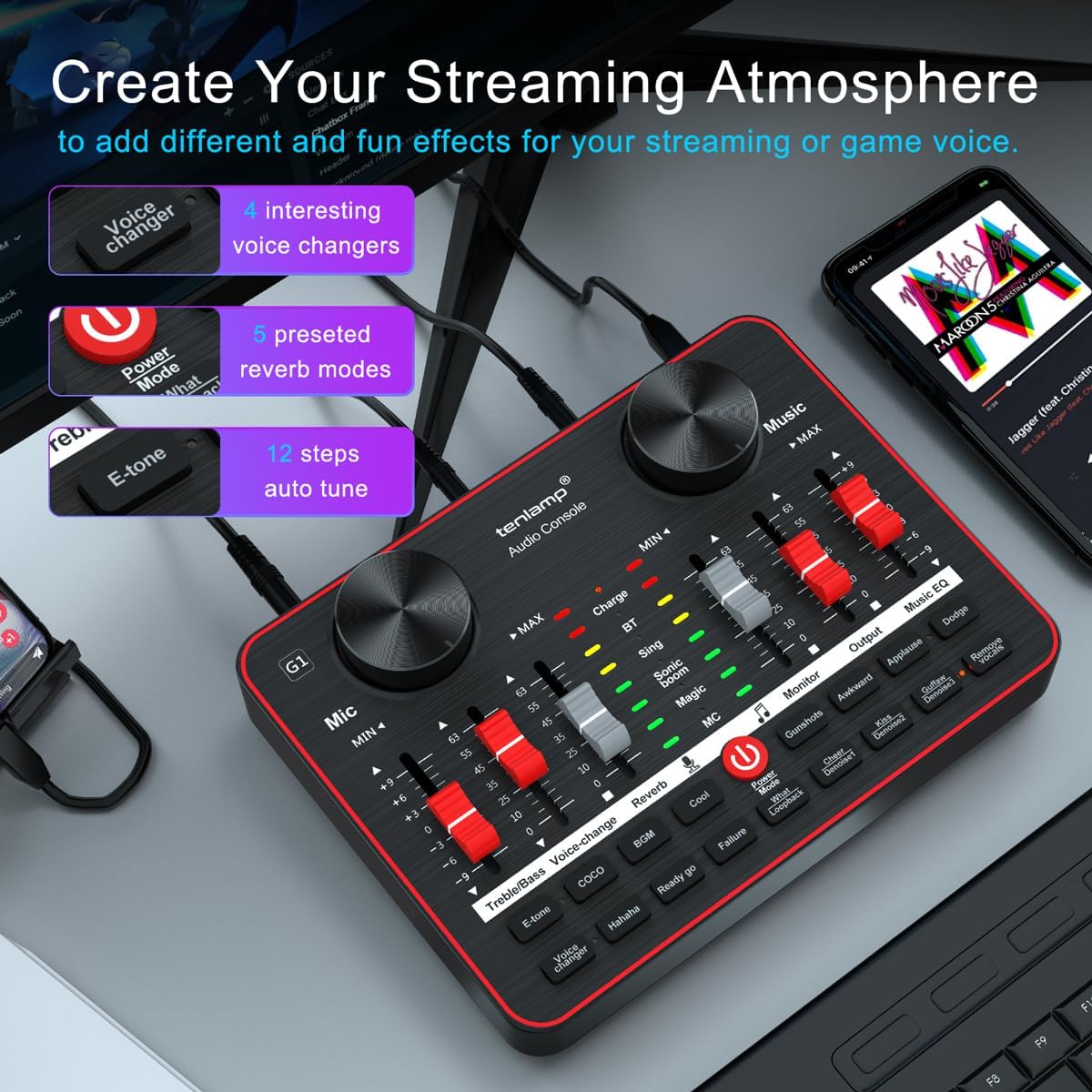
Image: The tenlamp G1 audio console highlighting features designed to create a streaming atmosphere, such as 4 interesting voice changers, 5 preset reverb modes, and 12 steps of auto-tune.
6. Vzdrževanje
Proper care ensures the longevity and performance of your tenlamp sistem G1.
- Čiščenje: Use a soft, dry cloth to wipe the surface of the audio console and microphones. Avoid liquid cleaners or abrasive materials.
- Shranjevanje: Napravo shranjujte na hladnem in suhem mestu, stran od neposredne sončne svetlobe in ekstremnih temperatur, ko je ne uporabljate.
- Upravljanje kablov: Izogibajte se pretiranemu upogibanju ali stiskanju kablov, da preprečite poškodbe.
- Vzdrževanje mikrofona: Keep microphones dry and free from dust. Use pop filters to protect against moisture and plosives.
7. Odpravljanje težav
Če naletite na težave, si oglejte naslednje pogoste težave in rešitve:
| Težava | Možen vzrok | rešitev |
|---|---|---|
| Ni zvoka | Incorrect cable connection, low volume settings, device not powered on. | Check all cable connections. Ensure G1 is powered. Adjust Mic VOL, Music VOL, Monitor VOL, and Output VOL faders/knobs. Verify computer/mobile device audio settings. |
| Mikrofon ne deluje | Microphone not properly connected, Mic VOL too low, faulty microphone. | Ensure microphone is securely plugged into the correct 3.5mm Mic input. Increase Mic VOL. Test with the second microphone to rule out a faulty unit. |
| Slaba kakovost zvoka/šum | High gain, environmental noise, incorrect noise reduction setting. | Lower Mic VOL if distortion occurs. Activate or adjust noise reduction levels. Ensure proper microphone placement (e.g., close to mouth, away from noise sources). |
| Računalnik ne prepozna naprave | USB cable issue, driver problem (rare for plug-and-play), computer settings. | Try a different USB port or cable. Restart your computer. Check your computer's sound settings to ensure the G1 is selected as the input/output device. |
8. Specifikacije
Key technical specifications for the tenlamp G1 Live Sound Card:
- Znamka: tenlamp
- Model: G1
- Število kanalov: 5
- Tehnologija povezljivosti: USB
- vir energije: Električni z žico (prek USB-ja)
- Vrsta izhodnega priključka: TRS
- Avdio vhod: USB, XLR (via 3.5mm adapter for condenser mics)
9. Garancija in podpora
For warranty information or technical support, please refer to the documentation included with your purchase or visit the official tenlamp website. You can also contact tenlamp customer service through their brand store on Amazon: