
FREDEES BL-84011
FREDEES Entryway Table Instruction Manual
Model: BL-84011
Uvod
Thank you for choosing the FREDEES Entryway Table. This manual provides essential information for the safe assembly, operation, and maintenance of your new console table. Please read these instructions thoroughly before use and retain them for future reference.
Pomembna varnostna navodila
- Vedno natančno upoštevajte navodila za montažo.
- Do not exceed the maximum weight recommendation of 22.68 kg (50 lbs) for the tabletop and shelves.
- Ensure all connections for the power outlets and USB ports are secure before use.
- Tekočine hranite stran od električnih vtičnic in USB-vtičnic, da preprečite električne nevarnosti.
- Place the table on a flat, stable surface. Use the adjustable footpads to ensure stability and prevent tilting.
- Do not allow children to climb on or play with the table.
- Unplug the power cord from the wall outlet when not in use or during cleaning.
Vsebina paketa
Pred začetkom montaže preverite, ali so prisotne vse komponente:
- Console Table *1
- Assembly Guide *1
- Installation Tool *1
- Hardware Package (screws, bolts, etc.)
Postavitev in montaža
Assembly of the FREDEES Entryway Table is designed to be straightforward. Please follow the included Assembly Guide for detailed, step-by-step instructions. Ensure you have adequate space and the necessary tools (provided) before starting.
- Razpakirajte komponente: Vse dele previdno vzemite iz embalaže in jih položite na čisto, mehko površino, da preprečite praske.
- Sestavite okvir: Attach the metal frame components according to the diagrams in the Assembly Guide. Ensure all screws are tightened securely.
- Namestite police: Secure the wooden shelves to the frame.
- Vstavite predale: Slide the rattan drawers into their designated slots.
- Priključite napajalno enoto: Secure the power outlet and USB port unit to the side of the table as indicated in the guide.
- Adjust Footpads: Once assembled, place the table in its desired location. Adjust the footpads at the bottom of the legs to ensure the table is level and stable on uneven floors.

This image illustrates the overall dimensions of the entryway table, including height, width, and depth, along with shelf spacing. It also highlights key features such as the metal frame construction, 50 lbs weight capacity, high-quality material, and integrated smart power sensor.

This image highlights four main features of the entryway table: the three rattan-front drawers for storage, the unique rattan design detail, the two open storage shelves, and the adjustable footpads designed to ensure stability on uneven floors.
Navodila za uporabo
1 Integrirana polnilna postaja
The entryway table features a built-in charging station for your convenience. It includes:
- 2 AC Power Outlets (120V/12A)
- 1 vrata USB (5 V/2 A)
- 1 priključek tipa C (5 V/2 A)
To use, simply plug the table's main power cord into a wall outlet. You can then connect your electronic devices directly to the available ports.

Ta slika ponuja podroben view of the integrated charging station located on the side of the entryway table. It shows the two AC power outlets, one USB port, and one Type-C port, demonstrating how devices can be connected for charging.
2. Three-Color Ambient LED Lighting
The table is equipped with LED lights offering three color options and adjustable brightness.
- Izbira barve: The lights can display Cold light, White light, or Warm light. Refer to the Assembly Guide for the specific control button location.
- Prilagoditev svetlosti: To adjust brightness (0-100%), press and hold the light control button. Release when the desired brightness is achieved.

This image showcases the entryway table's LED lighting system, illustrating the three available light colors: cold light, white light, and warm light. It also indicates the 0-100% brightness adjustment feature, controlled by a long-press function.
3. Smart Motion Sensing Design
The table features a human motion sensor that automatically activates the LED lights when movement is detected within its range (approximately 2-3 meters) and dims them when no presence is detected, conserving energy.
- Aktivacija: The lights will automatically brighten when a person approaches the table.
- Deaktivacija: The lights will dim or turn off after a period of inactivity.
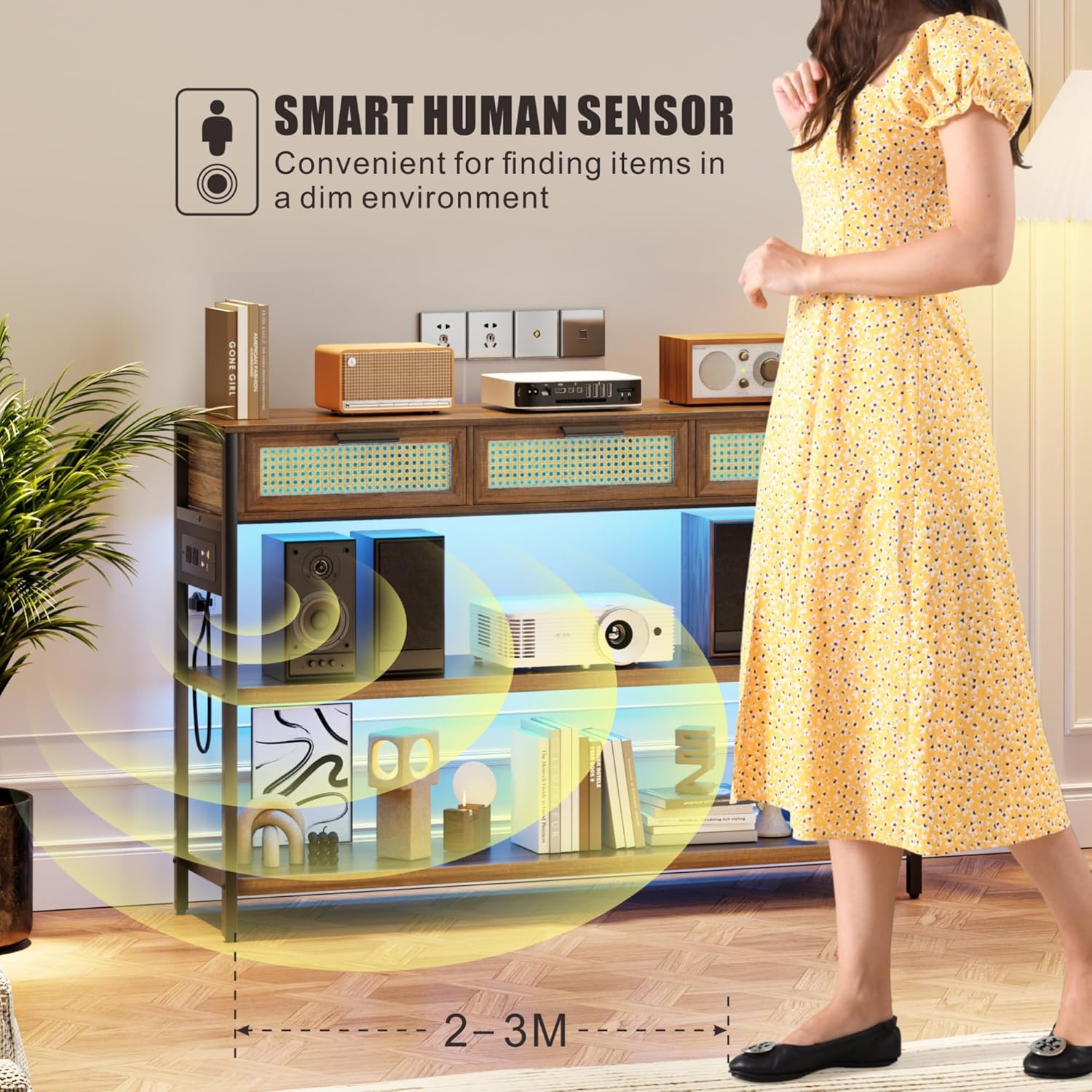
This image depicts a person approaching the entryway table, triggering the smart human sensor. The LED lights beneath the shelves illuminate, demonstrating the automatic lighting feature for convenience in dim environments.
Vzdrževanje
- Čiščenje: Lesene površine obrišite z mehko,amp cloth. Avoid harsh chemicals or abrasive cleaners that may damage the finish. For rattan drawers, use a soft brush or cloth to remove dust.
- Odstranjevanje prahu: Redno obrišite prah z vseh površin, da preprečite nabiranje umazanije.
- Razlitje: Clean spills immediately to prevent staining, especially on the wooden surfaces.
- Napajalna enota: Ensure the power unit and cables are free from dust and debris. Do not attempt to disassemble the power unit.
- Pregled: Občasno preverite vse vijake in povezave, da se prepričate, da so trdno priviti. Po potrebi jih ponovno privijte.
Odpravljanje težav
| Težava | Možen vzrok | rešitev |
|---|---|---|
| Luči se ne prižgejo | 1. Table not plugged in. 2. Power outlet not working. 3. Light control button not pressed. | 1. Ensure the table's power cord is securely plugged into a functional wall outlet. 2. Test the wall outlet with another device. 3. Press the light control button to activate. |
| Vrata za polnjenje ne delujejo | 1. Table not plugged in. 2. Device cable faulty. 3. Power unit connection loose. | 1. Verify the table is plugged into a live outlet. 2. Try a different charging cable or device. 3. Check the connection of the power unit to the table frame. |
| Senzor gibanja se ne odziva | 1. Obstruction blocking sensor. 2. Insufficient movement. 3. Okvara senzorja. | 1. Ensure the sensor area is clear of obstructions. 2. Ensure movement is within the sensor's range (2-3 meters). 3. Če težave ne odpravite, se obrnite na podporo strankam. |
| Miza je majava/nestabilna | 1. Neravna tla. 2. Loose assembly screws. 3. Footpads not adjusted. | 1. Move the table to a level surface. 2. Check and tighten all assembly screws. 3. Adjust the adjustable footpads at the bottom of the legs until stable. |
Specifikacije
| Funkcija | Podrobnost |
|---|---|
| Znamka | OSVOBOJA |
| Ime modela | BL-84011 |
| Dimenzije (DxŠxV) | 116 x 30 x 80 Centimeters (45.67"D x 11.81"W x 31.5"H) |
| Teža predmeta | 21 kg |
| Največja priporočena teža | 22.68 kg (50 lbs) |
| Material | Wood (MDF), Metal frame, Rattan drawers |
| barva | Rustikalno rjava |
| Število predalov | 3 |
| Polnilna postaja | 2 AC vtičnici (120 V/12 A), 1 USB vhod (5 V/2 A), 1 vhod tipa C (5 V/2 A) |
| Razsvetljava | 3 LED Light Colors (Warm/White/Blue), 0-100% Brightness Adjustable |
| Senzor | Smart Human Motion Sensor |
| Vključene komponente | Console Table, Assembly Guide, Installation Tool |
Garancija in podpora
For warranty information or technical support, please refer to the documentation provided with your purchase or contact FREDEES customer service directly. Keep your purchase receipt for warranty claims.
Ask a question about this manual
Ask about setup, troubleshooting, compatibility, parts, safety, or missing instructions. Manuals+ will review the question and use this page’s manual context to help answer it.