
NBD NBD-EU-S110-QT
NBD 4K 48MP Digital Vlogging Camera User Manual
Model: NBD-EU-S110-QT
1. Uvod
Hvala za nakupasing the NBD 4K 48MP Digital Vlogging Camera. This manual provides essential information for setting up, operating, and maintaining your camera. Please read it thoroughly before use to ensure optimal performance and longevity of your device.
2. Vsebina paketa
Preverite, ali so v vašem paketu priloženi vsi spodaj navedeni elementi:
- NBD 4K Camera x 1
- Mikrofon x 1
- Stativ x 1
- Wide-Angle Lens x 1
- Macro Lens x 1
- Komplet za čiščenje x 1
- Additional Light x 1
- 32GB SD Card x 1
- Čitalnik kartic x 1
- Baterija x 2
- Polnilnik x 1
- Torba za fotoaparat x 1
- Vrvica x 1
- Daljinski upravljalnik x 1
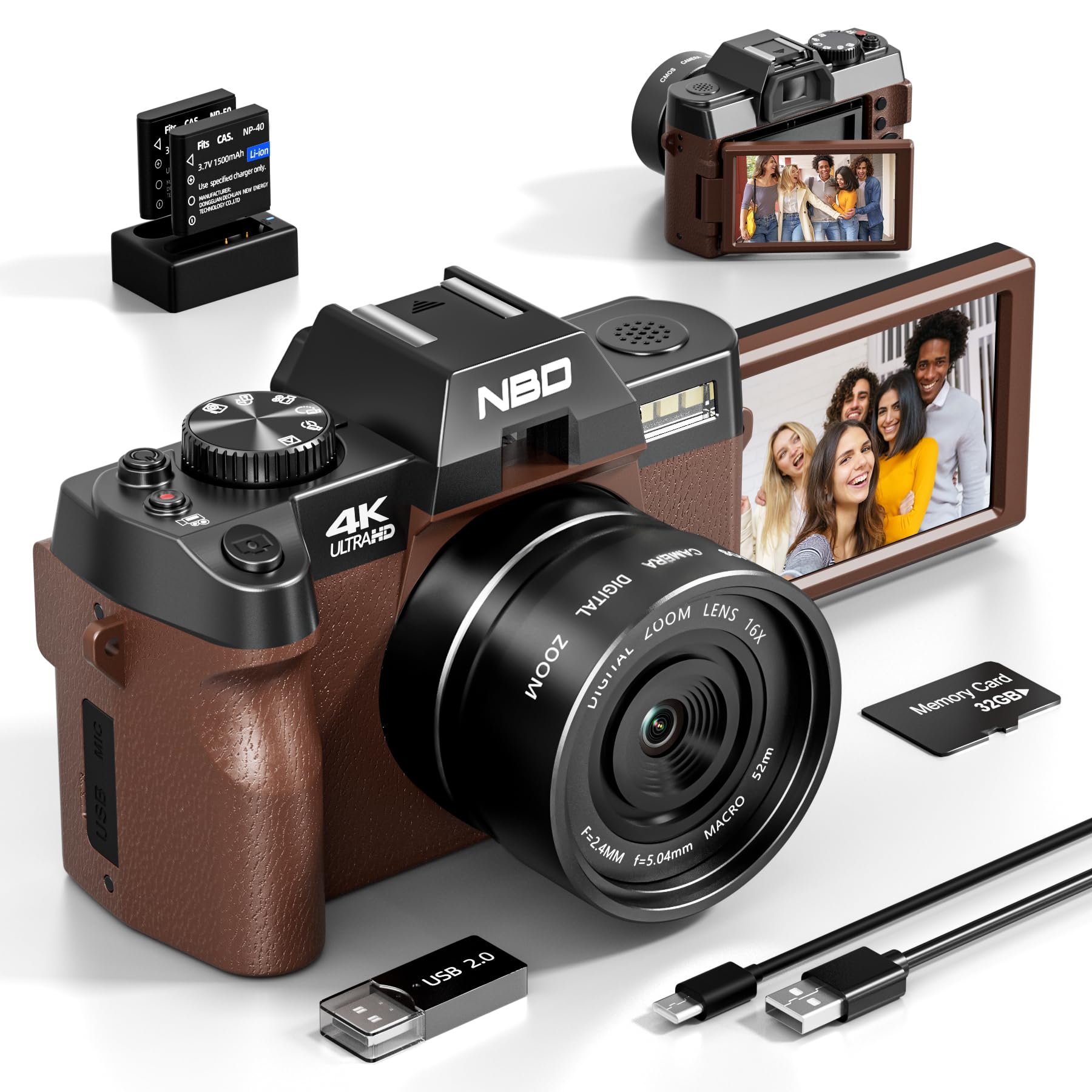
Image: NBD 4K Digital Camera with its complete set of accessories, including microphone, tripod, lenses, and other components.
3. Izdelek je končanview
3.1 Komponente kamere
Familiarize yourself with the main parts of your NBD camera.
- Objektiv: Glavna optična komponenta za zajemanje slik.
- LCD zaslon: 3-inch OLED display for viewnavigacija.
- Gumb za vklop: Vklopi/izklopi kamero.
- Sprožilec: Zajame fotografije ali začne/ustavi snemanje videoposnetkov.
- Nadzor povečave: Adjusts digital zoom (up to 16x).
- Gumb/izbirnik načina: Selects different shooting modes (photo, video, playback).
- Vhod za mikrofon: For external microphone connection.
- Vrata USB: Za prenos podatkov in polnjenje.
- Reža za kartico SD: Za vstavljanje pomnilniške kartice.
- Predal za baterije: Vsebuje polnilno baterijo.
4. Nastavitev
4.1 Polnjenje baterije
- Insert the provided battery into the charger.
- Polnilnik priključite na vir napajanja.
- The indicator light on the charger will show charging status. Charge fully before first use.
4.2 Vstavljanje SD-kartice
- Poiščite režo za kartico SD na fotoaparatu.
- Insert the 32GB SD card with the metal contacts facing the correct direction until it clicks into place.
- Za odstranitev kartico nežno potisnite navznoter, dokler ne izskoči.
4.3 Attaching Lenses and Accessories
- Širokokotni objektiv: Screw the wide-angle lens onto the front of the camera's main lens. This expands the field of view za 45 %.
- Makro objektiv: The macro lens is typically integrated with the wide-angle lens or can be used separately for close-up shots. Refer to the lens markings for separation if applicable.
- Mikrofon: Connect the external microphone to the camera's microphone input port.
- Stativ: Screw the camera onto the tripod mount for stable shooting.
5. Navodila za uporabo
5.1 Vklop/izklop
Pritisnite in držite gumb za vklop, da vklopite ali izklopite kamero.
5.2 Fotografiranje
- Vklopi kamero.
- Select Photo mode using the mode dial or button.
- Kadrirajte posnetek z uporabo LCD-zaslona.
- Press the Shutter button halfway to activate autofocus.
- Za zajem fotografije do konca pritisnite sprožilec.
5.3 Snemanje videoposnetkov
- Vklopi kamero.
- Izberite način videa.
- Press the Shutter button to start recording. A red indicator will usually appear on the screen.
- Ponovno pritisnite gumb Sprožilec, da ustavite snemanje.
5.4 Funkcija povečave
Use the zoom controls (usually a rocker switch) to digitally zoom in or out. The camera supports up to 16x digital zoom.
5.5 Autofocus and Night Vision
- Samodejno ostrenje: The camera features autofocus for sharper images. Half-press the shutter button to engage.
- Nočni vid: Activate night vision mode for improved performance in low-light conditions. Refer to the camera's menu for this setting.
5.6 Samosprožilec
The self-timer function allows for a delay before taking a photo. Access this setting through the camera's menu. Options include 2-second and 10-second delays.
5.7 Povezljivost Wi-Fi
The camera supports Wi-Fi connectivity for transferring photos and videos to compatible devices. Consult the camera's on-screen menu for Wi-Fi setup and connection instructions.
5.8 Using as a Webcam
Connect the camera to your computer via USB to use it as a webcam for vlogging, video calls, or live streaming. Select the webcam mode on the camera when prompted.
6. Vzdrževanje
- Čiščenje: Use the provided cleaning kit to gently clean the lens and screen. Avoid abrasive materials.
- Shranjevanje: Store the camera in its bag in a cool, dry place when not in use. Remove the battery if storing for extended periods.
- Vzdrževanje baterije: Do not expose batteries to extreme temperatures. Dispose of depleted batteries according to local regulations.
7. Odpravljanje težav
| Težava | Možen vzrok | rešitev |
|---|---|---|
| Kamera se ne vklopi. | Baterija je prazna ali nepravilno vstavljena. | Baterijo popolnoma napolnite. Prepričajte se, da je baterija pravilno vstavljena. |
| Fotografiranje/snemanje videoposnetkov ni mogoče. | SD kartica je polna, zaklenjena ali ni vstavljena. | Check SD card capacity. Unlock the SD card. Reinsert the SD card. |
| Slike so zamegljene. | Autofocus not engaged, lens dirty, or insufficient light. | Half-press shutter to focus. Clean the lens. Use additional light or night vision mode. |
| Težave z Wi-Fi povezavo. | Incorrect password or out of range. | Verify Wi-Fi password. Move closer to the Wi-Fi source. |
| Mikrofon ne snema zvoka. | Microphone not properly connected or settings incorrect. | Ensure microphone is securely plugged in. Check camera audio settings. |
| Kamera se zamrzne ali se ne odziva. | Začasna programska napaka. | Za ponastavitev fotoaparata odstranite in ponovno vstavite baterijo. |
8. Specifikacije
| Znamka: | NBD |
| Ime modela: | NBD-EU-S110-QT |
| Effective Photo Resolution: | 48 MP |
| Ločljivost zajema videa: | 4K |
| Digitalni zoom: | 16x |
| Velikost zaslona: | 3 palcev |
| Vrsta zaslona: | OLED |
| Image Sensor Technology: | CMOS |
| Max Aperture: | F/1.8 |
| Tehnologija povezljivosti: | Wi-Fi |
| Stabilizacija slike: | ja |
| Samodejno ostrenje: | ja |
| Nočni vid: | ja |
| Samosprožilec: | Yes (2s, 10s) |
| Vrsta baterije: | Litij-ionska |
| Included Memory Card Size: | 32GB (SD Card) |
9. Garancija in podpora
For warranty information and technical support, please refer to the documentation provided with your purchase or visit the official NBD webspletnega mesta. Shranite dokazilo o nakupu za uveljavljanje garancije.
Opomba: Ta priročnik je zgolj informativne narave. Specifikacije se lahko spremenijo brez predhodnega obvestila.
Ask a question about this manual
Ask about setup, troubleshooting, compatibility, parts, safety, or missing instructions. Manuals+ will review the question and use this page’s manual context to help answer it.