
1. Uvod
Hvala za nakupasing the JVC XS-N1123PB Party Bluetooth Speaker. This manual provides essential information for the safe and efficient operation of your speaker. Please read it thoroughly before use and retain it for future reference.
2. Varnostne informacije
- Zvočnika ne izpostavljajte ekstremnim temperaturam, neposredni sončni svetlobi ali visoki vlažnosti.
- Izogibajte se padcem ali izpostavljanju zvočnika močnim udarcem.
- Zvočnika ne razstavljajte ali poskušajte popraviti sami. Vsa servisna dela prepustite usposobljenemu osebju.
- Keep the speaker away from water and other liquids to prevent electric shock or damage.
- Uporabljajte samo navedeno polnilno glasnosttage (5 Volts) and compatible charger.
3. Vsebina paketa
Preverite, ali so v paketu prisotni vsi elementi:
- JVC XS-N1123PB Party Bluetooth Speaker
- USB polnilni kabel
- Uporabniški priročnik
4. Izdelek je končanview
4.1 Spredaj View

The front of the speaker features the main speaker grille with integrated RGB lighting, displaying various color patterns.
4.2 Stran View

Stran view shows the compact and portable design of the speaker, suitable for easy transport.
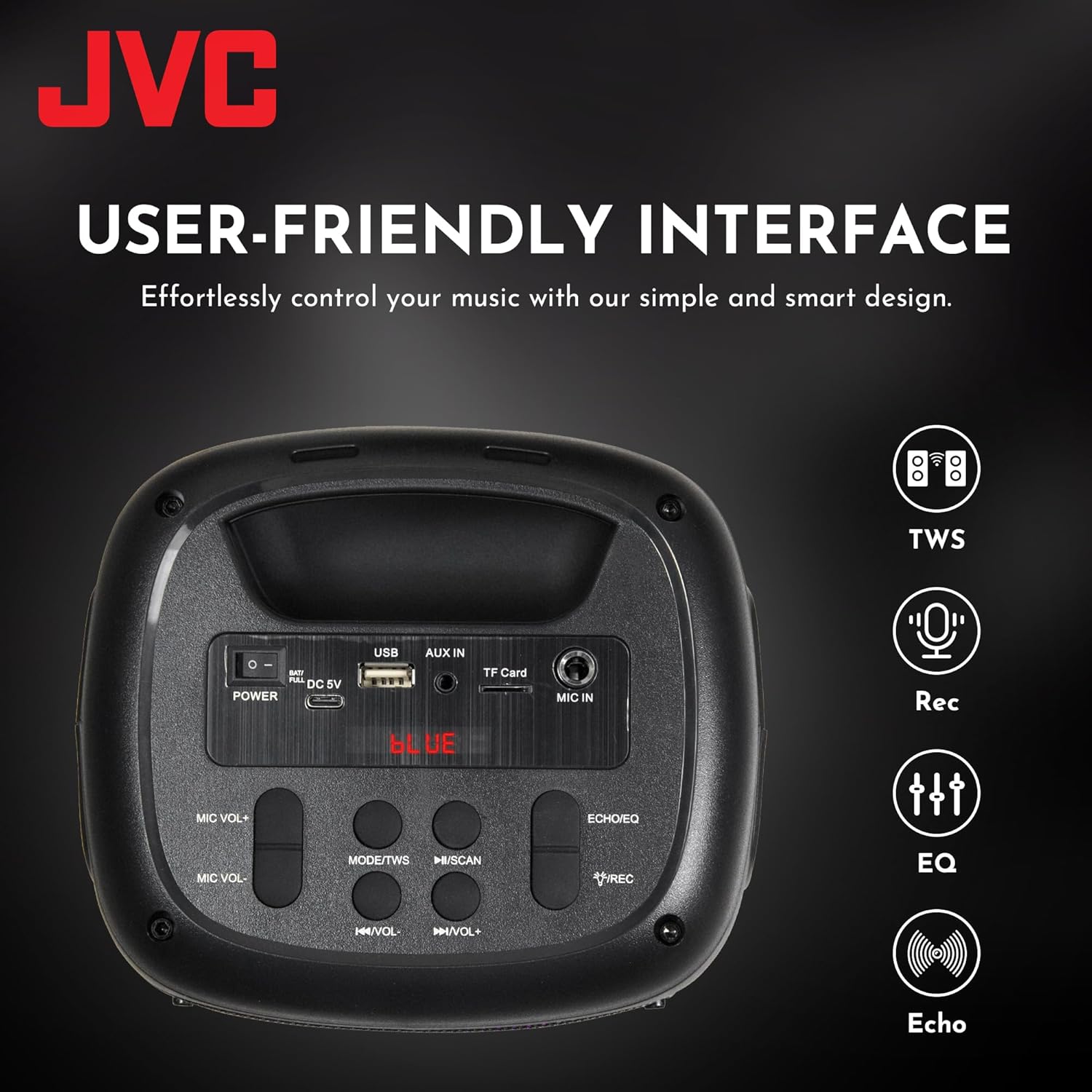
4.3 Top Panel Controls and Ports

This image displays the top control panel, including buttons for power, mode selection, volume, track control, and recording. It also shows the USB, AUX IN, TF Card, and MIC IN ports.
4.4 zadaj View

Zadnji del view of the speaker, highlighting its robust enclosure and design.
5. Nastavitev
5.1 Polnjenje zvočnika
Before first use, fully charge the speaker. Connect the provided USB charging cable to the DC 5V port on the speaker and the other end to a USB power adapter (not included) or a computer's USB port.
- Indikatorska lučka polnjenja bo med polnjenjem sveti.
- Lučka se bo po polnjenju izklopila ali spremenila barvo.
The speaker features a 1500 mAh dual battery system for extended playback.
5.2 Vklop/izklop
To power on the speaker, press and hold the Power button located on the top panel. To power off, press and hold the Power button again.
5.3 Bluetooth seznanjanje
- Vklopite zvočnik. Samodejno bo preklopil v način seznanjanja Bluetooth, kar bo označila utripajoča LED lučka.
- Omogočite Bluetooth na svoji mobilni napravi (pametnem telefonu, tablici itd.).
- Iskanje available Bluetooth devices and select "JVC XS-N1123PB" from the list.
- Ko je zvočnik seznanjen, bo oddal potrditveni zvok in LED lučka bo prenehala utripati.
5.4 Združevanje s pravim brezžičnim stereo sistemom (TWS)
TWS allows you to connect two JVC XS-N1123PB speakers for a stereo sound experience.

Pair two speakers wirelessly for a dynamic stereo sound experience.
- Prepričajte se, da sta oba zvočnika vklopljena in nista povezana z nobeno drugo napravo Bluetooth.
- On one speaker (this will be the primary speaker), press and hold the TWS button (if available, or a designated pairing button) until you hear a pairing tone.
- The two speakers will automatically connect to each other. A confirmation tone will sound once TWS pairing is successful.
- Zdaj povežite svojo mobilno napravo s primarnim zvočnikom prek povezave Bluetooth, kot je opisano v poglavju 5.3. Oba zvočnika bosta predvajala zvok v stereo načinu.
6. Navodila za uporabo
6.1 Izbira načina
Press the 'MODE' button on the top panel to switch between different input modes: Bluetooth, USB, TF Card, AUX, and FM Radio.
6.2 Predvajanje zvoka
- Način Bluetooth: Po uspešnem seznanjanju predvajajte zvok iz povezane naprave.
- Način kartice USB/TF: Insert a USB drive or TF card into the respective port. The speaker will automatically detect and play audio files.
- Način AUX: Connect an external audio device using a 3.5mm audio cable to the AUX IN port.
- Način FM radia: In FM mode, press the Play/Pause button to auto-scan and save available radio stations. Use the Previous/Next buttons to navigate between saved stations.
6.3 Nadzor glasnosti
Use the 'VOL-' and 'VOL+' buttons on the top panel to decrease or increase the volume.
6.4 Track Control
- Press the 'Previous Track' button to go to the beginning of the current track or the previous track.
- Press the 'Next Track' button to skip to the next track.
- Press the 'Play/Pause' button to play or pause audio.
6.5 Nadzor svetlobne predstave
The speaker features built-in RGB lights. Specific controls for the light show (e.g., changing patterns, turning on/off) may be integrated with the 'MODE' button or a dedicated light button if available. Refer to the quick start guide for specific light control functions.
6.6 Microphone and Guitar Input (Karaoke Function)

Connect a microphone or guitar to the respective input ports for karaoke or live performance. Adjust microphone volume using the MIC VOL+/- buttons.
7. Vzdrževanje
7.1 Čiščenje
Wipe the speaker with a soft, dry cloth. Do not use abrasive cleaners, waxes, or solvents as they may damage the finish.
7.2 Shranjevanje
When not in use for extended periods, store the speaker in a cool, dry place, away from direct sunlight and extreme temperatures. It is recommended to charge the battery periodically to maintain its lifespan.
8. Odpravljanje težav
| Težava | Možen vzrok | rešitev |
|---|---|---|
| Zvočnik se ne vklopi | Prazna baterija; gumb za vklop ni pravilno pritisnjen | Napolnite zvočnik; Pritisnite in nekaj sekund držite gumb za vklop |
| Brez zvoka | Glasnost je prenizka; Napačen način vnosa; Naprava ni povezana | Increase volume; Select correct input mode; Reconnect Bluetooth device or AUX cable |
| Bluetooth povezovanje ne uspe | Zvočnik ni v načinu seznanjanja; Naprava je predaleč; Motnje | Prepričajte se, da je zvočnik v načinu seznanjanja; premaknite napravo bližje; izklopite druge naprave Bluetooth |
| Seznanjanje TWS ne uspe | Zvočniki so preveč oddaljeni; En zvočnik je že priključen na napravo | Ensure speakers are within range; Disconnect any Bluetooth devices from both speakers before TWS pairing |
| Sprejem FM radia je slab | Šibek signal; Motnje | Premaknite zvočnik; Raztegnite anteno (če je primerno) |
9. Specifikacije
| Funkcija | Specifikacija |
|---|---|
| Številka modela | XS-N1123PB (AP-W113Y) |
| Izhodna moč | 15 W RMS (40 W največ) |
| Velikost zvočnika | 4 palcev |
| Povezljivost | Bluetooth, USB, TF Card, AUX-in, FM Radio |
| Način avdio izhoda | Stereo |
| Vhodna voltage | 5 volta |
| Baterija | 1 litij-ionska baterija (priložena) |
| Material | Plastika |
| Mere (D x Š x V) | 15.7 G x 13.3 Š x 21.8 V cm |
| Posebne lastnosti | Bass Boost, RGB Light Show, TWS Function, Microphone Input |
| Država izvora | Kitajska |

Product dimensions for the JVC XS-N1123PB speaker.
10. Garancija in podpora
10.1 Informacije o garanciji
This JVC XS-N1123PB Party Bluetooth Speaker comes with a 1 leta garancije from the date of purchase. Please retain your proof of purchase for warranty claims. The warranty covers manufacturing defects but does not cover damage caused by misuse, accidents, unauthorized modifications, or normal wear and tear.
10.2 Podpora strankam
For technical assistance, warranty claims, or further information, please contact JVC customer support through their official website or the retailer where the product was purchased. Please have your model number (XS-N1123PB) and proof of purchase ready when contacting support.