
1. Uvod
Welcome to the KRUPS Sensation C10 EA910A10 Superautomatic Coffee Machine user manual. This guide provides comprehensive instructions for the safe and efficient operation, maintenance, and troubleshooting of your new coffee machine. Please read this manual thoroughly before first use and keep it for future reference.
2. Pomembna varnostna navodila
Za zagotovitev varnega delovanja vedno upoštevajte te osnovne varnostne ukrepe:
- Pred uporabo aparata preberite vsa navodila.
- Naprave, napajalnega kabla ali vtiča ne potapljajte v vodo ali druge tekočine.
- Ta aparat je namenjen samo za uporabo v gospodinjstvu.
- Zagotovite voltagNavedena vrednost na napravi ustreza vaši omrežni napetosti.tage.
- Pred čiščenjem ali ko naprave ne uporabljate, jo vedno izključite iz električne vtičnice.
- Ne uporabljajte nobene naprave s poškodovanim kablom ali vtičem ali po tem, ko naprava ne deluje pravilno ali je bila kakor koli poškodovana.
- Med delovanjem naj se otroci ne približujejo napravi.
- Uporabljajte samo dodatke, ki jih priporoča proizvajalec.
- Avoid contact with hot surfaces, such as the coffee spouts or steam nozzle.
3. Sestavni deli izdelka
Familiarize yourself with the main components of your KRUPS Sensation C10 EA910A10 coffee machine:
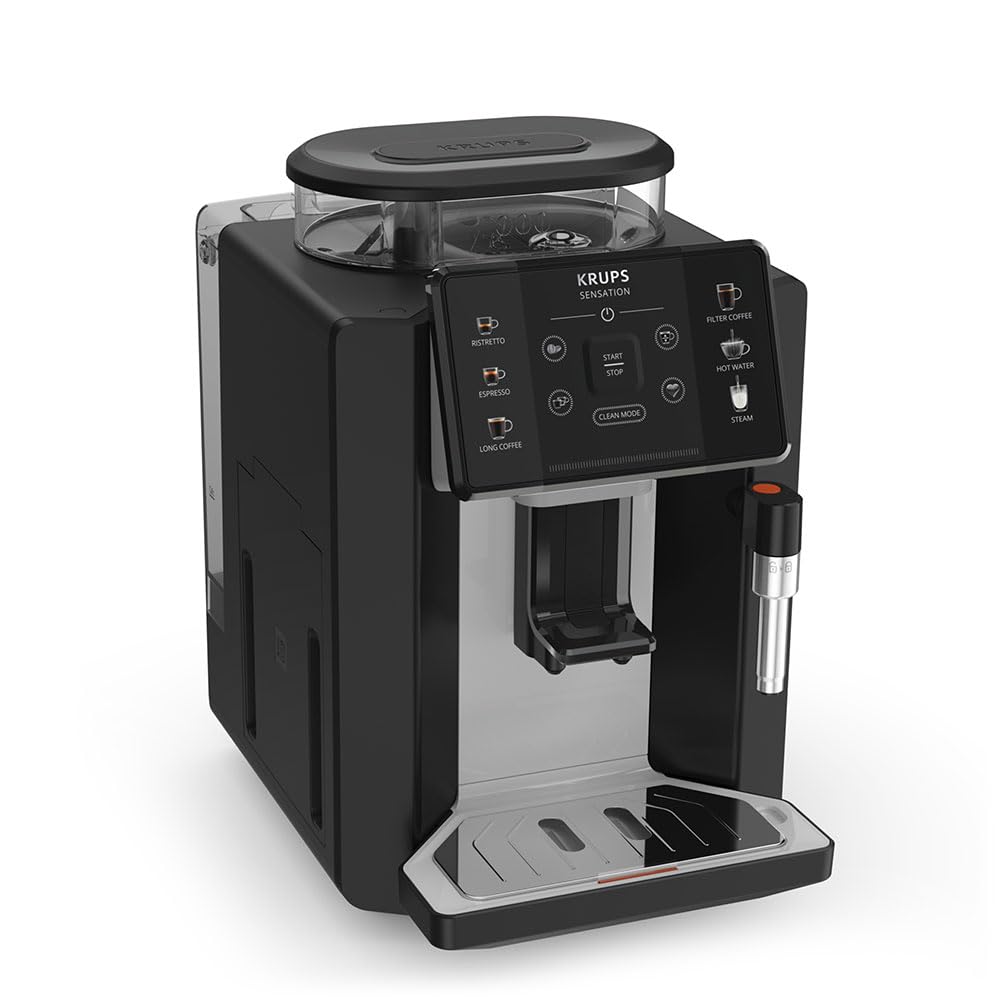
Slika: Spredaj desno view of the KRUPS Sensation C10 EA910A10 Superautomatic Coffee Machine, showing the bean hopper, control panel, coffee spouts, and drip tray. Two cups of coffee are being dispensed.
- Posoda za fižol s pokrovom
- Rezervoar za vodo
- Control Panel (Touchscreen)
- Coffee Spouts (Adjustable)
- Pladenj za kapljanje z rešetko
- Posoda za usedlino kave
- Steam Nozzle / Hot Water Spout
- Priključitev napajalnega kabla
4. Začetna nastavitev
4.1. Razpakiranje
- Previdno vzemite kavni aparat iz embalaže.
- Odstranite ves embalažni material, vključno z zaščitnimi folijami in nalepkami.
- Napravo postavite na stabilno, ravno in toplotno odporno površino, stran od virov vode in toplote.
4.2 Priprava pred prvo uporabo
- Izpiranje rezervoarja za vodo: Remove the water tank, rinse it thoroughly with fresh water, and fill it to the MAX level. Reinsert the tank securely.
- Napolnite posodo za fižol: Odprite pokrov posode za kavo v zrnju in jo napolnite s svežimi kavnimi zrni. V posodi za kavo v zrnju ne uporabljajte mlete kave.
- Napajalni priključek: Napajalni kabel priključite na napravo in nato v ozemljeno električno vtičnico.
- Začetni cikel izpiranja: The machine will prompt you to perform an initial rinse cycle. Follow the instructions on the touchscreen. This primes the system and cleans internal components.
5. Navodila za uporabo
5.1. Nadzorna plošča je končanaview

Image: A hand interacting with the intuitive touchscreen control panel of the KRUPS Sensation C10 EA910A10, highlighting its ease of use.
The KRUPS Sensation C10 EA910A10 features an intuitive touchscreen control panel for easy operation. Key functions include:
- Ristretto: For a very short, concentrated espresso.
- Espresso: For a classic espresso shot.
- Dolga kava: Za večjo količino kave.
- Filter kava: For a milder, filter-style coffee.
- Vroča voda: Za čaj ali druge tople napitke.
- Steam: Za penjenje mleka.
- Start/Stop: To begin or end a brewing cycle.
- Čisti način: Initiates cleaning cycles.
- Coffee Strength/Volume Adjustment: Icons to customize your drink.
5.2. Kuhanje kave
To brew a coffee beverage:
- Ensure the water tank is filled and the bean hopper contains sufficient beans.
- Place a cup under the coffee spouts. Adjust the spout height if necessary.
- Select your desired coffee type (e.g., Espresso, Long Coffee) from the touchscreen.
- Adjust coffee strength and volume using the on-screen options if desired.
- Press the "Start" button to begin brewing.
- Aparat bo zmlel zrna, skuhal kavo in jo natočil v vašo skodelico.
- The machine will automatically stop when the brewing is complete.

Image: A selection of coffee beverages, including espresso, long coffee, and a milk-based drink, demonstrating the versatility of the KRUPS Sensation C10 EA910A10.
5.3. Funkcija tople vode
- Pod dulec za vročo vodo postavite skodelico.
- Select the "Hot Water" option on the touchscreen.
- Press "Start" to dispense hot water. Press "Stop" to cease dispensing.
5.4. Steam Function (for milk frothing)
- Napolnite vrč s hladnim mlekom.
- Šobo za paro namestite v mleko.
- Select the "Steam" option on the touchscreen.
- Press "Start" to activate the steam. Move the pitcher up and down to froth the milk.
- Press "Stop" when desired froth is achieved.
- Pomembno: Clean the steam nozzle immediately after use to prevent milk residue buildup.
6. Vzdrževanje in čiščenje
Redno čiščenje in vzdrževanje zagotavljata optimalno delovanje in dolgo življenjsko dobo vašega kavnega aparata.
6.1. Dnevno čiščenje
- Pladenj za kapljanje in posoda za kavno usedlino: Pladenj za kapljanje in posodo za usedlino izpraznite in sperite vsak dan ali ko vas aparat k temu pozove.
- Izlivniki za kavo: Obrišite iztočne odprtine za kavo zamp krpo.
- Rezervoar za vodo: Rezervoar za vodo vsak dan sperite s svežo vodo.
6.2. Odstranjevanje vodnega kamna
The machine will indicate when descaling is required. Follow the on-screen instructions and use a KRUPS-approved descaling solution.

Image: A hand inserting a cleaning tablet into the designated slot of the KRUPS Sensation C10 EA910A10, illustrating the ease of the cleaning process.
6.3. Zamenjava vodnega filtra
If your machine uses a water filter, replace it every 2-3 months or as indicated by the machine to ensure optimal water quality and prevent limescale buildup.
7. Odpravljanje težav
Za pogoste težave in njihove rešitve glejte spodnjo tabelo.
| Težava | Možen vzrok/rešitev |
|---|---|
| Stroj se ne vklopi. | Check if the power cord is securely plugged into the machine and the electrical outlet. Ensure the outlet is functional. |
| Kava se ne toči. | Water tank empty: Fill the water tank. Bean hopper empty: Fill with coffee beans. Coffee grounds container full: Empty and clean. Descaling required: Perform descaling cycle. |
| Kava je prešibka. | Adjust coffee strength settings on the control panel. Check if the bean hopper is sufficiently filled. Ensure fresh beans are used. |
| Voda pušča iz stroja. | Check if the water tank is correctly inserted. Ensure the drip tray is properly positioned. If leakage persists, contact customer support. |
| "Clean Mode" alert persists. | Perform the indicated cleaning cycle (e.g., descaling, rinsing). Ensure all removable parts are clean and correctly reinserted. |
| Steam nozzle not frothing milk effectively. | Clean the steam nozzle thoroughly after each use to prevent blockages. Ensure cold milk is used. |
| Grinder is unusually loud or not grinding. | Check for foreign objects in the bean hopper. Ensure the bean hopper is not empty. Contact customer support if the issue persists. |
8. Tehnične specifikacije
| Funkcija | Specifikacija |
|---|---|
| Številka modela | EA910A10 |
| Znamka | KRUPS |
| voltage | 145 volta |
| Moč | 1450 vatov |
| Material | Jeklo |
| Teža izdelka | 7.5 kg |
| Vmesnik | Zaslon na dotik |

Image: The KRUPS Sensation C10 EA910A10 coffee machine with indicated dimensions: 24 cm width, 34.6 cm depth, and 36.4 cm height.
9. Informacije o garanciji
Your KRUPS Sensation C10 EA910A10 Superautomatic Coffee Machine is covered by a manufacturer's warranty. Please refer to the warranty card included in your product packaging for specific terms, conditions, and duration. Keep your proof of purchase for warranty claims.
10. Podpora strankam
For further assistance, technical support, or spare parts, please contact KRUPS customer service. Contact details can typically be found on the KRUPS official website or in the warranty documentation provided with your appliance.