
1. Uvod
Thank you for choosing the techno line WT2600 Digital Calendar. This device provides accurate time, date, indoor temperature, and humidity readings, along with alarm functions. This manual will guide you through the setup, operation, and maintenance of your new digital calendar.
2. Varnostne informacije
- Naprave ne izpostavljajte ekstremnim temperaturam, neposredni sončni svetlobi ali visoki vlažnosti.
- Izogibajte se padcem naprave in je ne izpostavljajte močnim udarcem.
- Naprave ne poskušajte razstavljati ali popravljati sami. Obrnite se na usposobljeno servisno osebje.
- Izrabljene baterije zavrzite odgovorno v skladu z lokalnimi predpisi.
- Napravo hranite izven dosega otrok.
3. Vsebina paketa
Prosimo, preverite, ali so v vašem paketu vsi artikli:
- techno line WT2600 Digital Calendar Unit
- Uporabniški priročnik (ta dokument)
- Batteries (may be included depending on region)
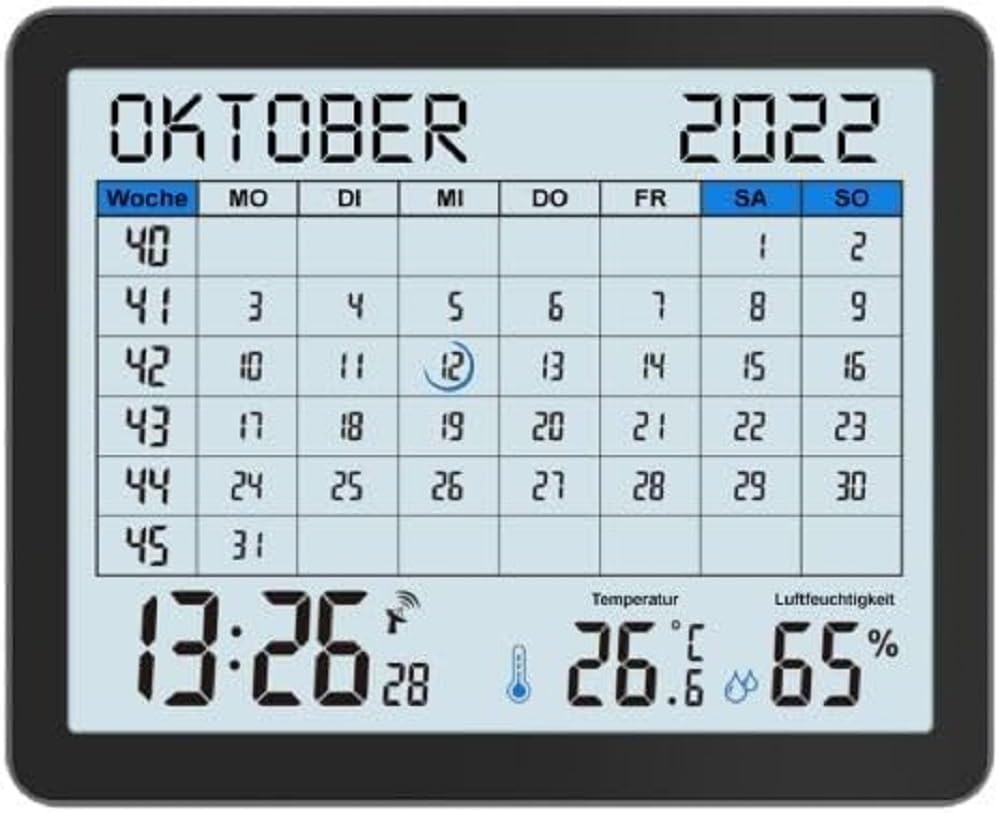
Image of the techno line WT2600 Digital Calendar packaging, showing the device and its key features.
4. Značilnosti izdelka
The techno line WT2600 Digital Calendar offers the following key features:
- DCF-77 Radio-Controlled Clock: Automatic time synchronization for precise timekeeping, with an option for manual setting.
- 12/24-urni prikaz časa: Select your preferred time format.
- Prikaz koledarja: Shows the current date, day of the week, and month.
- 7-Language Month Display: Choose from seven languages for the month display.
- Prikaz notranje temperature: Shows indoor temperature in Celsius (°C) or Fahrenheit (°F).
- Indoor Humidity Display: Displays the current indoor humidity level.
- MIN/MAX Display: Records and displays the minimum and maximum temperature and humidity values.
- Dvojni alarmi z dremežem: Nastavite dva neodvisna alarma s priročno funkcijo dremeža.
- Indikator prazne baterije: Opozori vas, kdaj je treba zamenjati baterije.
- Vsestranska postavitev: Designed for both wall mounting and table standing.

Spredaj view of the techno line WT2600 Digital Calendar display, showing the calendar grid, current time, temperature, and humidity.
5. Nastavitev
5.1 Namestitev baterije
- Poiščite predal za baterije na zadnji strani enote.
- Odprite pokrov prostora za baterije.
- Insert the required batteries (e.g., 2 x AAA, not specified in data, common for such devices) according to the polarity markings (+ and -).
- Trdno zaprite pokrov prostora za baterije.
5.2 Initial Power On and DCF-77 Signal Reception
Upon battery insertion, the device will power on and automatically begin searching for the DCF-77 radio signal. This process may take several minutes. For optimal reception, place the unit near a window and away from electronic interference.
- A signal icon (e.g., an antenna symbol) will flash during signal search.
- Once the signal is received, the time and date will be set automatically, and the signal icon will become solid.
- If no signal is received after 10-15 minutes, try repositioning the unit.
5.3 Ročna nastavitev časa in datuma
If automatic synchronization is not desired or unsuccessful, you can set the time and date manually.
- Press and hold the 'SET' button (or similar, refer to device buttons) for a few seconds to enter manual setting mode.
- Z gumboma '+' ali '-' prilagodite utripajočo vrednost (npr. uro, minuto, leto, mesec, dan).
- Press 'SET' again to confirm the current setting and move to the next adjustable parameter.
- Ponavljajte, dokler niso vse nastavitve dokončane.
5.4 Nastavitev jezika
To change the display language for the month:
- Enter the setting mode (e.g., by pressing 'SET').
- Navigate through the settings until the language option appears.
- Use the '+' or '-' buttons to cycle through the available 7 languages.
- Potrdite svojo izbiro.
6. Delovanje
6.1 ViewČas, datum, temperatura in vlažnost
The main display continuously shows the current time, date, indoor temperature, and indoor humidity. You can switch between 12-hour and 24-hour time formats by pressing a dedicated button (e.g., '12/24H' or 'MODE').
6.2 Nastavitev alarmov
The device features two independent alarms.
- Press the 'ALARM' button (or similar) to view 1-kratni alarm.
- Press and hold 'ALARM' to enter Alarm 1 setting mode.
- Use '+' or '-' to adjust the hour and minute, pressing 'ALARM' to confirm each.
- Repeat for Alarm 2.
- To activate/deactivate an alarm, press 'ALARM' repeatedly until the alarm icon appears/disappears.
6.3 Using Snooze
When an alarm sounds, press the 'SNOOZE' button (or similar, often a large button on top) to temporarily silence the alarm. The alarm will sound again after a few minutes (typically 5-10 minutes). To stop the alarm completely, press any other button.
6.4 MIN/MAX Display Function
The device records the minimum and maximum temperature and humidity values since the last reset.
- Press the 'MIN/MAX' button (or similar) once to view najvišje zabeležene vrednosti.
- Press it again to view najnižje zabeležene vrednosti.
- To reset the MIN/MAX records, press and hold the 'MIN/MAX' button while viewsnemanje zapisov.

Close-up of the techno line WT2600 Digital Calendar display, highlighting the time, temperature, and humidity readings.
7. Vzdrževanje
7.1 Čiščenje
Napravo obrišite z mehko damp krpo. Ne uporabljajte abrazivnih čistil ali topil, saj lahko poškodujejo zaslon aliasing.
7.2 Zamenjava baterije
When the low battery indicator appears on the display, replace all batteries with new ones of the same type. Follow the battery installation steps in Section 5.1.
8. Odpravljanje težav
- Brez zaslona: Preverite polarnost baterij in se prepričajte, da so baterije sveže.
- Napačen čas/datum: Ensure the DCF-77 signal icon is solid. If not, reposition the unit or set the time manually (Section 5.3). Check your time zone setting if applicable (not explicitly mentioned in data, but common).
- Temperature/Humidity Readings Seem Inaccurate: Ensure the unit is placed in a location with good air circulation, away from direct heat sources or drafts. Allow some time for readings to stabilize after initial setup or relocation.
- Alarm se ne oglasi: Verify that the alarm is activated (alarm icon displayed) and the alarm time is set correctly.
9. Specifikacije
| Funkcija | Specifikacija |
|---|---|
| Številka modela | WT2600 |
| Dimenzije (D x Š x V) | 17.3 x 3.81 x 14 cm |
| Teža | 380 g |
| barva | Črna |
| Material | Plastika |
| Vir napajanja | Baterijski pogon |
| Vrsta zaslona | Digitalno |
| Notranja/zunanja uporaba | Notranja |
10. Garancija in podpora
Information regarding product warranty and customer support was not available in the provided product data. Please refer to the retailer or manufacturer's official website for details on warranty coverage and support options.