
birdsnap Smart Bird Feeder with Camera
birdsnap® PAV - Pametna krmilnica za ptice s kamero Navodila za uporabo
Brand: birdsnap | Model: Smart Bird Feeder with Camera
Welcome to Your birdsnap® Smart Bird Feeder
Thank you for choosing the birdsnap® Smart Bird Feeder. This innovative device allows you to observe and interact with wild birds in your backyard like never before. Featuring a 2K HD camera, AI bird identification, and solar power, it brings the beauty of nature directly to your smartphone. This manual provides detailed instructions for setup, operation, and maintenance to ensure you get the most out of your new smart bird feeder.
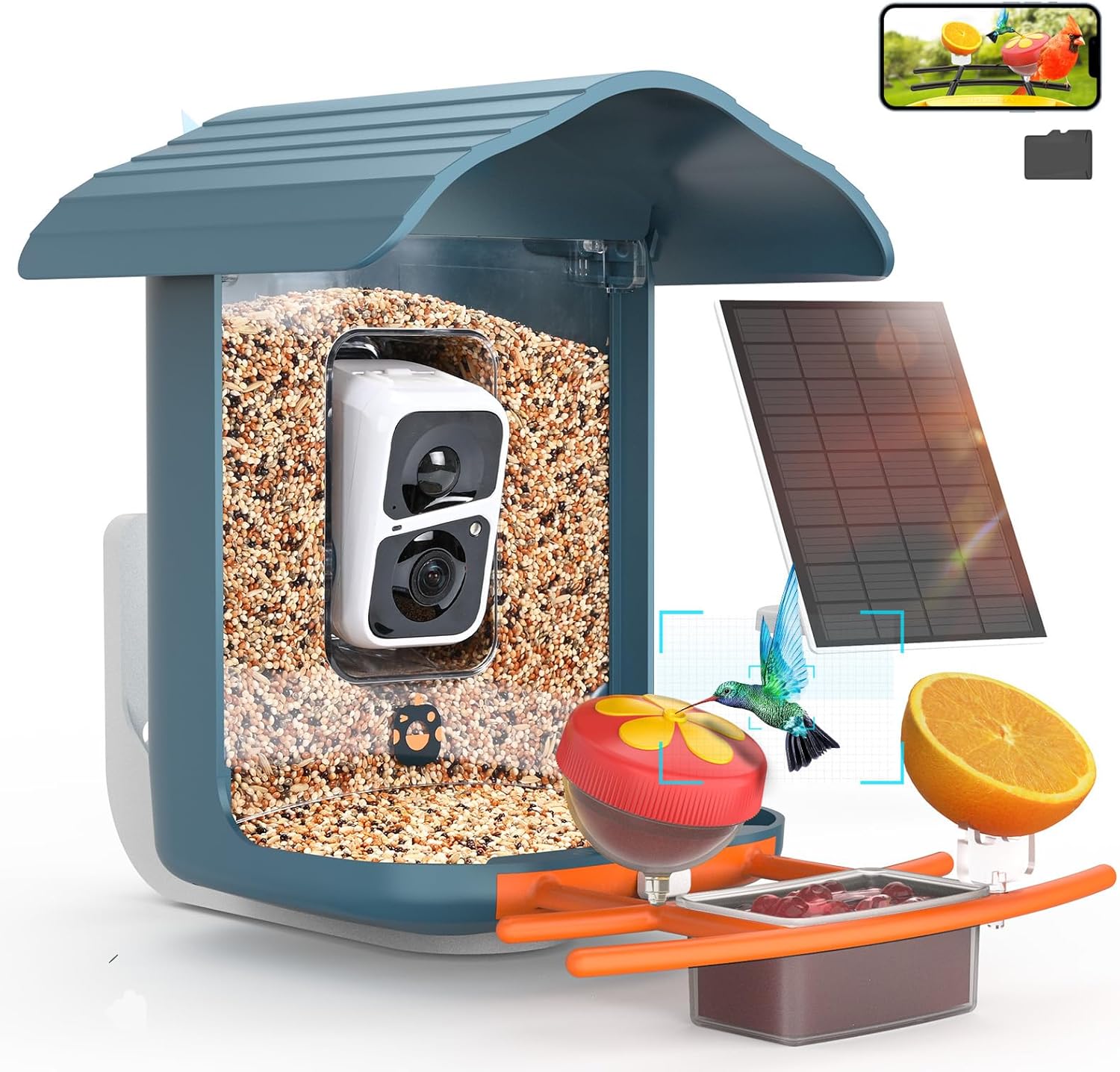
Slika 1: Konecview of the birdsnap® Smart Bird Feeder with Camera.
Ključne značilnosti
- 2K HD Camera with 160° Ultra Wide Angle: Capture clear, detailed images and videos of visiting birds.
- Identifikacija ptic z umetno inteligenco: Automatically identify over 10,000 bird species with instant notifications.
- Real-Time Live View: Watch birds in full color, day or night, directly on your smartphone app.
- Large Capacity & DIY Add-ons: Features a 1.8L seed container and 5 interchangeable accessories (fruit forks, hummingbird feeders, jelly box) to attract diverse bird species.

Figure 2: Customizable DIY Add-ons for attracting various bird species.
- Dvosmerni zvok: Listen to bird sounds and use the speaker to deter unwanted visitors like squirrels.
- 64GB Storage Card Included: Store thousands of 10-second video clips. Supports optional cloud storage.
- Vodoodporna zasnova IP65: Built to withstand various outdoor conditions, including sun, wind, rain, and snow.

Figure 3: The IP65 weatherproof design ensures durability in outdoor environments.
- Solar Powered with 5200mAh Battery: Efficient solar panel keeps the camera charged, reducing the need for manual recharging.
- Izboljšana povezljivost WiFi: 5dB antenna ensures stable connection to 2.4GHz WiFi networks.
- Deljenje z več uporabniki: Supports up to 4 users and easy sharing of bird videos on social media.
Vodnik za namestitev
1. Razpakiranje in preverjanje komponent
Carefully unpack all components from the box. Verify that all items listed below are present. If any parts are missing or damaged, please contact customer support.

Slika 4: Vsebina paketa.
2. Camera Installation and SD Card Insertion
Locate the camera module within the feeder. Insert the provided 64GB Micro SD card into the designated slot on the camera. Ensure it clicks into place. The camera is designed to fit snugly within the feeder's transparent housing.
3. Feeder Assembly and Mounting
Assemble the perch and any desired DIY add-ons (fruit forks, hummingbird feeders, jelly box) to the main feeder unit. Choose a suitable mounting location (wall, tree, fence, tripod, or pole) that provides a clear view of birds and receives ample sunlight for the solar panel. Use the appropriate mounting kit components for your chosen method. Ensure the feeder is securely attached and stable.

Slika 5: Nprample of feeder mounting on a fence.
4. Power Connection (Solar Panel)
Connect the solar panel to the camera unit. Position the solar panel to maximize direct sunlight exposure throughout the day. The adjustable design allows for optimal angle positioning.
5. Prenos aplikacije in povezava z omrežjem WiFi
Download the VicoHome app from your smartphone's app store (iOS or Android). Follow the in-app instructions to add your bird feeder camera. Ensure your smartphone is connected to a 2.4GHz WiFi network during the setup process (5GHz networks are not supported). The 5dB antenna helps maintain a strong signal.

Figure 6: Simplified setup steps for quick installation.
Operating Your Smart Bird Feeder
V živo View in Obvestila
Once connected, you can access the live feed from your camera via the VicoHome app. The camera will automatically detect motion and send instant notifications to your phone when birds approach the feeder. This ensures you never miss a moment.

Figure 7: Real-time motion detection and notifications.
Identifikacija ptic z umetno inteligenco
The integrated AI technology identifies bird species captured by the camera. You will receive detailed information about the identified birds through the app. A 30-day free trial for AI recognition is typically included, with subscription options available thereafter.

Figure 8: AI-powered bird identification provides detailed insights.
Two-Way Audio and Squirrel Deterrence
Use the built-in microphone to listen to the sounds of birds. If unwanted animals like squirrels approach, you can activate an audible alarm or speak through the app's speaker to deter them.

Figure 9: Utilize two-way audio for interaction and deterrence.
Snemanje in shranjevanje
The camera automatically records short video clips when motion is detected. These clips are saved to the included 64GB SD card. You can also opt for cloud storage for additional backup and accessibility. Videos can be downloaded and shared from the app.

Figure 10: Treasure every moment with local and cloud storage options.
Sharing Moments
The birdsnap® app allows you to easily share captured bird videos and images with friends and family, or directly to social media platforms. Up to four users can access the camera feed simultaneously.

Figure 11: Share your bird-watching experiences with others.
Vzdrževanje
Čiščenje podajalnika
Regularly clean the bird feeder to prevent mold and bacterial growth, which can harm birds. Disassemble the feeder components and wash them with warm, soapy water. Rinse thoroughly and allow to dry completely before refilling with seed.
Battery and Solar Panel Care
Ensure the solar panel remains clean and free of debris (leaves, dirt, snow) to maximize charging efficiency. Periodically check the cable connection between the solar panel and the camera for any damage. The 5200mAh battery is designed for long-lasting performance, but extreme temperatures can affect its capacity.
Storage Card Management
The 64GB SD card will store a significant amount of footage. If you do not use cloud storage, periodically review and delete old videos to free up space. You can also export videos to your computer for long-term storage.
Odpravljanje težav
- Ni v živo View/Offline Camera: Check WiFi connection (ensure it's 2.4GHz). Verify the camera battery is charged (check solar panel exposure). Restart the camera and router.
- Slaba kakovost videa: Ensure the camera lens is clean. Check app settings for resolution (set to 2K HD if available). Ensure adequate lighting.
- Brez obvestil: Preverite nastavitve obvestil aplikacije v telefonu in v aplikaciji VicoHome. Prepričajte se, da je zaznavanje gibanja omogočeno.
- Squirrels Still Visiting: Utilize the audible alarm and two-way audio features more frequently. Consider relocating the feeder or adding physical squirrel baffles (not included).
- SD Card Full/Not Recording: Ensure the SD card is properly inserted. Format the SD card via the app if issues persist (this will erase all data). Consider cloud storage for continuous recording.
Specifikacije izdelka
| Funkcija | Specifikacija |
|---|---|
| Znamka | birdsnap |
| Model | Pametna krmilnica za ptice s kamero |
| Ločljivost kamere | 2K HD |
| Kot kamere | 160° ultra širokokotni |
| Vir napajanja | Sončna energija (baterija 5200 mAh) |
| Shranjevanje | 64GB SD Card (Included), Cloud Storage (Optional) |
| WiFi povezljivost | 2.4GHz (5GHz not supported) |
| Odpornost na vremenske vplive | IP65 odporen na vremenske vplive |
| Kapaciteta podajalnika | 1.8 litra |
| Material | ABC + PC |
| Dimenzije izdelka | 12.52 cm D x 8.31 cm Š x 12.52 cm V |
| Teža predmeta | 2.6 funta |
| Vrsta namestitve | Wall/Tree/Fence/Tripod/Pole Mounting |
| UPC | 741365593072 |
Garancija in podpora
For detailed warranty information, please refer to the official product documentation or contact birdsnap customer support. A comprehensive User Guide (PDF) is available for download at: https://manuals.plus/m/fe470bb173be4179f1c628978c26e1c3972e0728790715a935ca60446544e5d3
For any technical assistance, troubleshooting, or inquiries, please contact birdsnap customer support via email: birdsnap@outlook.com
Ask a question about this manual
Ask about setup, troubleshooting, compatibility, parts, safety, or missing instructions. Manuals+ will review the question and use this page’s manual context to help answer it.