
1. Uvod
This manual provides detailed instructions for the setup, operation, and maintenance of your KOORUI MG27K1Q 27-inch QHD 240Hz VA Mini LED Gaming Monitor. Please read this manual thoroughly before using the product to ensure proper functionality and to prevent damage.
2. Vsebina paketa
Verify that all items listed below are included in your product package. If any items are missing or damaged, please contact KOORUI customer support.
- KOORUI MG27K1Q 27-inch Gaming Monitor
- Monitor Stand (Base and Support)
- Napajalni adapter
- Kabel DisplayPort (DP)
3. Nastavitev
3.1 Sestavljanje stojala
- Previdno vzemite komponente monitorja in stojala iz embalaže.
- Attach the stand support to the monitor panel. Ensure it clicks securely into place or is fastened with screws if provided.
- Connect the stand base to the stand support. Tighten any screws to secure the assembly.
- Sestavljeni monitor postavite na stabilno, ravno površino.
3.2 Povezovanje z napravami
The monitor offers multiple connectivity options for various devices. Ensure the monitor is powered off before making any connections.
- DisplayPort (DP 1.4): Connect the included DisplayPort cable from your computer's graphics card to the DisplayPort input on the monitor for optimal performance, including 240Hz refresh rate and Adaptive Sync.
- HDMI (HDMI 2.0): Connect an HDMI cable from your device (PC, gaming console) to one of the two HDMI 2.0 inputs on the monitor.
- Zvočni izhod: Use the 3.5mm audio jack to connect external speakers or headphones.
Slika: Zadaj view of the monitor illustrating the available connection ports (DisplayPort 1.4, 2x HDMI 2.0, Audio Out) and VESA mount points. Examples of compatible devices like PS5, Xbox, Laptop, and Nintendo Switch are shown.
3.3 Napajalni priključek
- Priključite napajalnik na vhod za napajanje monitorja.
- Priključite napajalnik v stensko vtičnico.
4. Upravljanje monitorja
4.1 Osnovna operacija
- Vklop/izklop: Pritisnite gumb za vklop, ki se običajno nahaja na zadnji ali spodnji desni strani monitorja, da vklopite ali izklopite monitor.
- Izbira vnosa: Use the On-Screen Display (OSD) menu to select the desired input source (DP, HDMI 1, HDMI 2).
4.2 Funkcije zaslona
The KOORUI MG27K1Q monitor is equipped with advanced display technologies for an enhanced visual experience.
- Ločljivost QHD (2560 x 1440): Zagotavlja ostre in podrobne slike.
- VA Mini LED Panel: Offers deep blacks, high contrast, and vibrant colors.
- HDR 1000: High Dynamic Range support for brighter whites and darker blacks, enhancing visual depth and realism.

Image: Visual comparison demonstrating the enhanced contrast and detail provided by HDR 1000 technology compared to a standard display.
4.3 Igralna zmogljivost
Designed for gaming, this monitor delivers smooth and responsive gameplay.
- Hitrost osveževanja 240 Hz: Ensures ultra-smooth motion and reduced input lag.
- Odzivni čas 1 ms: Zmanjša zamegljenost zaradi gibanja in podvajanje za jasno in hitro dogajanje.
- Adaptive Sync (G-SYNC Compatible): Sinhronizira hitrost osveževanja monitorja s hitrostjo sličic vašega grafičnega procesorja, da odpravi trganje in zatikanje zaslona.
- Exclusive Game Display Modes: Features like Crosshair, Timer, and FPS Counter can be enabled via the OSD for an advantage v igrah.

Image: The monitor displaying a high-speed racing game, emphasizing its 240Hz refresh rate and 1ms response time for a fluid gaming experience.
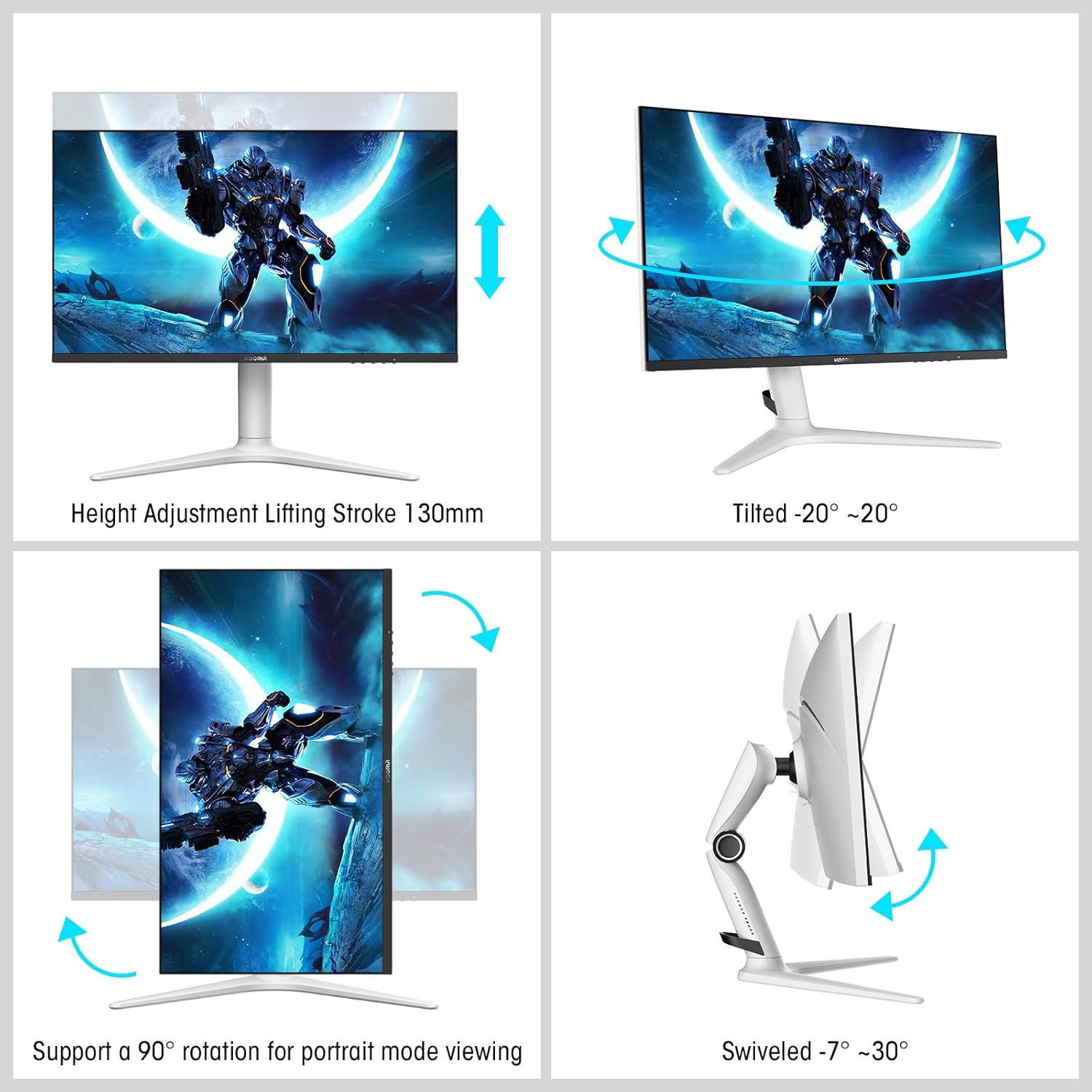
Image: A gaming scenario on the monitor, illustrating the 'Exclusive Game Display Mode' features such as Crosshair, Timer, FPS Counter, and RTS Counter, alongside Adaptive Sync functionality.
4.4 Funkcije za nego oči
The monitor includes features to reduce eye strain during prolonged use.
- Filter modre svetlobe: Reduces harmful blue light emissions. This can be adjusted or enabled/disabled through the OSD menu.
5. Prilagoditve
Stojalo za monitor omogoča različne ergonomske nastavitve za optimizacijo vašega viewudobje.
- Nastavitev višine: Adjust the monitor height up to 130mm.
- Nagib: Tilt the screen from -7° (downward) to 30° (upward).
- Vrtljiva: Rotate the monitor horizontally from -20° to 20°.
- Vrtenje: Zasuknite zaslon za 90° za pokončni način viewing.
- Nosilec VESA: Compatible with VESA 75x75mm mounting solutions for alternative setups.

Image: Diagrams demonstrating the monitor's ergonomic adjustments, including height, tilt, swivel, and pivot for portrait mode.
6. Specifikacije
| Funkcija | Specifikacija |
|---|---|
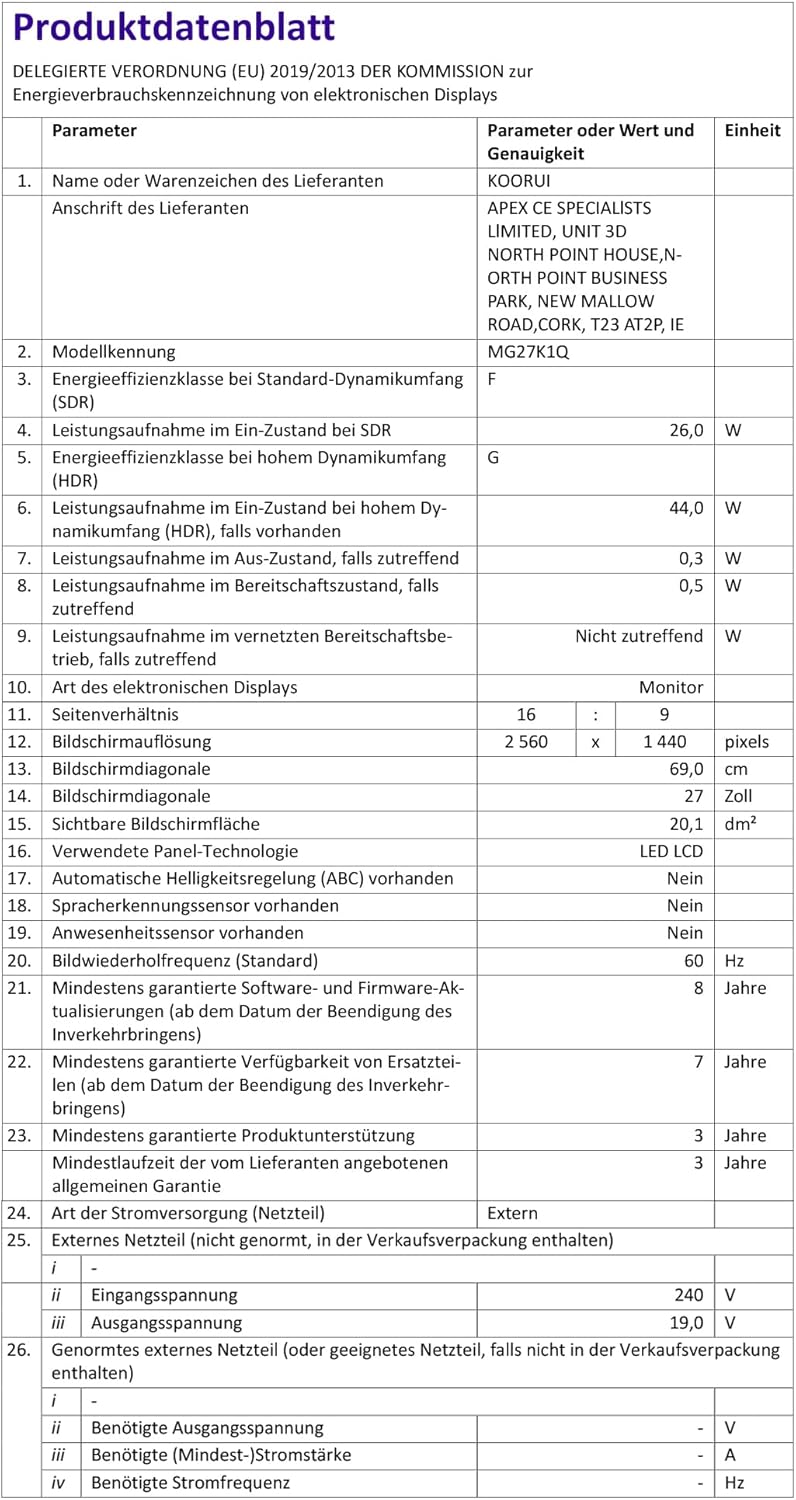
| Številka modela | MG27K1Q |
| Velikost zaslona | 27 palcev |
| Vrsta plošče | VA Mini-LED |
| Resolucija | QHD (2560 x 1440) |
| Razmerje stranic | 16:9 |
| Hitrost osveževanja | 240 Hz |
| Odzivni čas | 1 ms |
| Kontrastno razmerje (statično) | 3000:1 |
| Kontrastno razmerje (dinamično) | 20,000,000:1 |
| Svetlost | 275 nit |
| Viewkota | 178 stopinj |
| Podpora za HDR | HDR 1000 |
| Prilagodljiva sinhronizacija | Compatible with NVIDIA G-SYNC |
| Povezljivost | 2x HDMI 2.0, 1x DisplayPort 1.4, avdio izhod |
| VESA nosilec | 75x75 mm |
| Poraba energije | 90 vatov |
| Mere (D x Š x V) | 32 x 61.3 x 52.3 cm |
| Teža | 9.34 kilogramov |
| Posebne lastnosti | Blue Light Filter, Gaming Modes (Crosshair, Timer, FPS Counter) |
7. Odpravljanje težav
Če imate težave z monitorjem, si oglejte naslednje pogoste korake za odpravljanje težav:
- Brez napajanja: Prepričajte se, da je napajalnik varno priključen na monitor in delujočo električno vtičnico. Preverite, ali lučka za napajanje na monitorju sveti.
- Brez signala: Verify that the video cable (DP or HDMI) is correctly connected to both the monitor and your computer/device. Ensure the correct input source is selected in the monitor's OSD menu. Try a different video cable or port.
- Utripajoča/popačena slika: Check the video cable connections. Ensure your graphics card drivers are up to date. Try reducing the refresh rate in your display settings to see if the issue persists.
- Adaptive Sync Not Working: Ensure Adaptive Sync (G-SYNC Compatible) is enabled in both the monitor's OSD settings and your graphics card control panel. Use a DisplayPort cable for optimal performance.
- Mrtve slikovne pike: While rare, a small number of dead pixels may be considered within manufacturing tolerances. Refer to the warranty policy for specific details regarding pixel defects.
8. Garancija in podpora
KOORUI provides comprehensive support for your product.
- Garancija: This monitor comes with a 3-year warranty from the date of purchase.
- Nadomestna storitev: A 1-year replacement service is offered for qualifying issues.
- Podpora strankam: If you encounter any damages, malfunctions, or find missing accessories, please do not hesitate to contact KOORUI customer support for assistance.