
1. Uvod
The Qinlorgo PT 230 is a portable thermal printer designed for efficient black and white printing. It supports various printing tasks including receipts, restaurant orders, barcodes, QR codes, and text. This manual provides detailed instructions for setting up, operating, maintaining, and troubleshooting your device.

Image 1.1: The Qinlorgo PT 230 Portable Thermal Label Printer, showcasing njegovo kompaktno zasnovo.
2. Nastavitev
2.1 Razpakiranje in začetni pregled
Carefully remove all components from the packaging. Verify that all items listed in the package contents are present and undamaged. If any items are missing or damaged, contact customer support.
2.2 Vstavljanje termičnega papirja
- Odprite pokrov predala za papir v tiskalniku.
- Insert a roll of thermal paper, ensuring the printing side is facing the thermal print head.
- Pull a small amount of paper out past the print head and close the cover securely.

Image 2.1: The printer shown with a thermal paper roll and the included USB cable, ready for setup.
2.3 Vklop in polnjenje
The printer operates on a 3.7V Lithium Battery (not included in the specification list, but mentioned in the description as 'not included' in the package list, implying it's internal or needs to be purchased separately if not pre-installed). Connect the printer to a power source using the provided USB cable to charge the internal battery. The power indicator light will show charging status.
2.4 Priključitev tiskalnika
The PT 230 supports both USB and Bluetooth connectivity.
- USB povezava: Connect the printer to your computer using the USB cable. Drivers may be required for your operating system (Windows, Linux).
- Povezava Bluetooth: Enable Bluetooth on your mobile device (iOS, Android) or computer. Iskanje available devices and select the PT 230. Follow on-screen prompts to pair.

Slika 2.2: Bližnji posnetek view of the USB port located on the side of the printer, used for charging and data connection.
3. Navodila za uporabo
3.1 Osnovne kontrole
The printer features simple button operations for power and paper feed.

Image 3.1: Close-up of the orange power button (left) and feed button (right) on the printer's front panel.
- Gumb za vklop: Press and hold to turn the printer on or off.
- Gumb za dovajanje: Press to advance the paper by a small amount.
3.2 Postopek tiskanja
- Ensure the printer is powered on and connected via USB or Bluetooth to your device.
- Open the application or software from which you intend to print (e.g., a POS system, a label design app).
- Select the Qinlorgo PT 230 as your printer.
- Initiate the print command from your application. The printer will begin printing receipts, orders, barcodes, or text as configured.
3.3 Supported Platforms and Software
The printer is compatible with various operating systems and can be integrated with different applications for printing:
- Operacijski sistemi: For Linux, for Win7, for Win8, for Win10, for iOS, for Android.
- Print Instruction: ESC POS compatible instruction set.
- Podpora za slike: Supports JPG, BMP, TIF, JPEG and other image formats, including grayscale printing.
- Podpora za črtne kode: EAN 13, EAN 8, CODE39, TIF, CODABAR, CODE93, CODE128; UPC A, UPC E, CODEBAR.
- Podpora za QR kode: QRCOE, PDF417.
4. Vzdrževanje
4.1 Čiščenje tiskalnika
Redno čiščenje pomaga ohranjati kakovost tiskanja in podaljšuje življenjsko dobo tiskalnika.
- Izklopite tiskalnik in ga odklopite iz vira napajanja.
- Uporabite mehko krpo, ki ne pušča vlaken dampened with isopropyl alcohol to gently wipe the thermal print head.
- Clean the paper path and exterior casing with a dry, soft cloth.
- Allow all components to dry completely before reconnecting power and operating the printer.
4.2 Skrb za baterije
Za čim daljšo življenjsko dobo baterije:
- Izogibajte se pogostemu popolnemu praznjenju baterije.
- Ko tiskalnika dalj časa ne uporabljate, ga shranite na hladnem in suhem mestu.
- Charge the battery regularly, even if the printer is not in active use.
5. Odpravljanje težav
This section addresses common issues you might encounter with your Qinlorgo PT 230 printer.
- Tiskalnik se ne vklopi: Ensure the battery is charged. Connect the printer to a power source and try again.
- Brez izpisa: Check if the thermal paper is loaded correctly and the paper compartment cover is closed. Verify the printer is connected to your device and selected as the active printer in your application.
- Slaba kakovost tiskanja: The thermal print head may be dirty. Refer to the 'Cleaning the Printer' section. Ensure you are using high-quality thermal paper.
- Težave s povezavo (Bluetooth/USB): For Bluetooth, ensure the printer is discoverable and within range. For USB, check cable connections and ensure necessary drivers are installed on your computer.
- Tiskalnik se ne odziva: Try restarting the printer by turning it off and then on again.
6. Specifikacije
Detailed technical specifications for the Qinlorgo PT 230 Portable Thermal Label Printer.
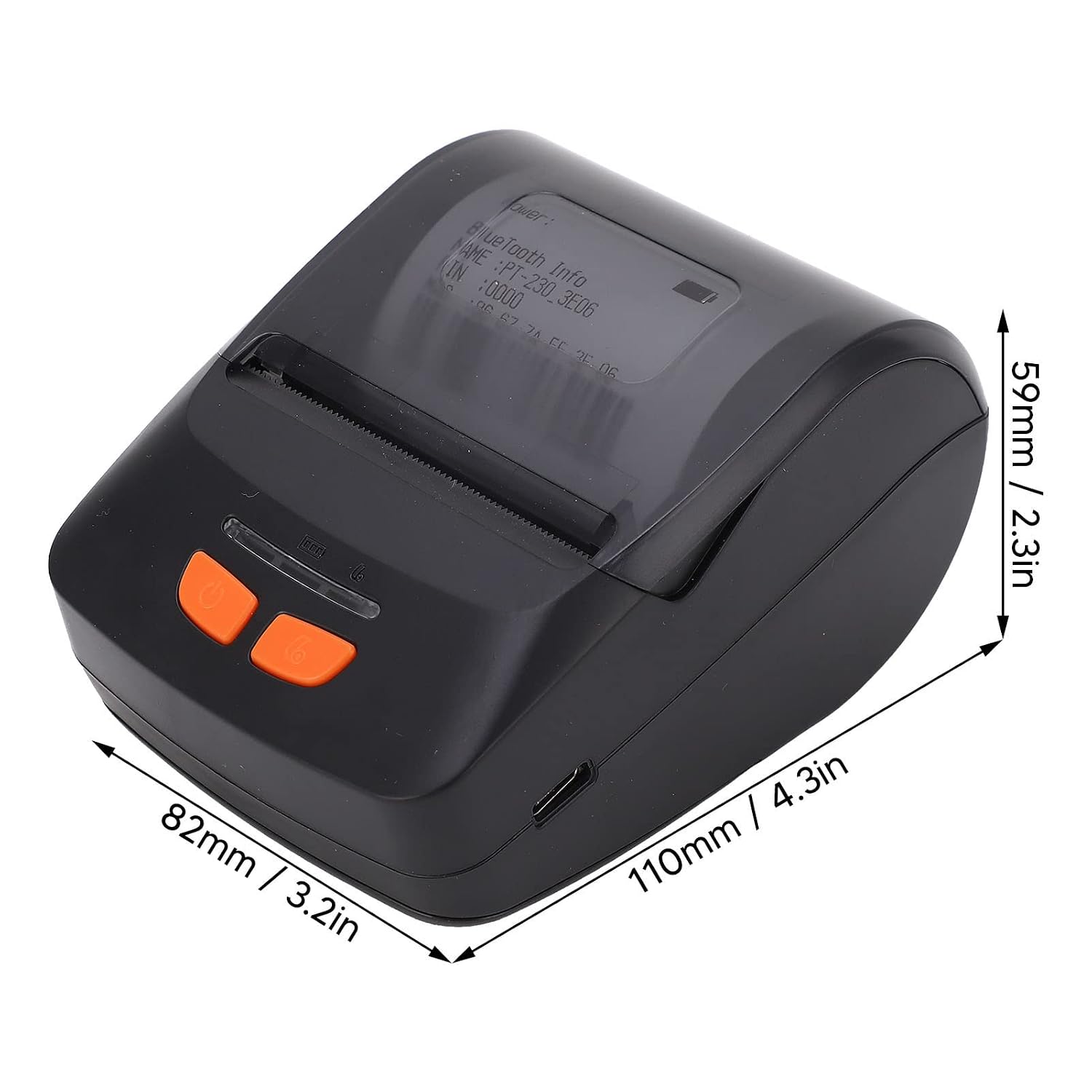
Image 6.1: Dimensions of the Qinlorgo PT 230 printer, measuring approximately 110mm (4.3in) in length, 82mm (3.2in) in width, and 59mm (2.3in) in height.
| Funkcija | Podrobnost |
|---|---|
| Model | PT 230 |
| Metoda tiskanja | Formal Thermal Sensitivity |
| Izhodni način | Črna Bela |
| Resolucija | 203 dpi (203 x 203 DPI) |
| Hitrost tiskanja | 60-150 mm/s |
| Širina tiskanja | 48±0.5mm (1.89±0.02in) |
| Povezljivost | USB, Bluetooth (Dual mode 4.0) |
| Baterija | 1 x 3.7V Lithium Battery (not included in package list, implying internal or separate purchase) |
| Čas pripravljenosti | 100H |
| Delovna temperatura | -10-50 ℃ |
| Temperatura shranjevanja | -20-70 ℃ |
| Delovna vlažnost | 20-50 % |
| Vlažnost pri shranjevanju | 5-95 % |
| Združljiv OS | Windows, iOS, Linux, Android |
| Nadzorna metoda | aplikacija |
| Izhod tiskalnika | Enobarvno |
| Posebne uporabe | Printing receipts, restaurant orders, barcodes, QR codes, text |
7. Garancija in podpora
For warranty information and customer support, please refer to the documentation provided with your purchase or contact your retailer. Keep your purchase receipt as proof of purchase.