
1. Končanoview
The Moukey MAMP1 is a compact yet powerful 2.0 channel Bluetooth audio stereo amplifier receiver designed for various home audio applications. It delivers 400 watts of maximum power output, providing a high-quality audio experience for karaoke, home theater, acoustic sound systems, and monitor headphones. Featuring multiple input and output modes, EQ controls, Bluetooth 5.0 connectivity, and an HD LED screen, the MAMP1 offers versatile and user-friendly operation.
2. Pomembne varnostne informacije
- Read and heed all instructions.
- Ne uporabljajte tega izdelka v bližini vode.
- Čistite samo s suho krpo.
- Zagotovite voltage of your local mains supply matches the product's requirements.
- Do not block any ventilation openings. Install according to manufacturer's instructions.
- Ne nameščajte v bližini virov toplote, kot so radiatorji, grelniki, peči ali druge naprave (vključno z amplifiers), ki proizvajajo toploto.
- Uporabljajte samo priključke/dodatke, ki jih je določil proizvajalec.
- Izključite ta izdelek med nevihtami ali ko ga dlje časa ne uporabljate.
- Za vse servise se obrnite na usposobljeno servisno osebje.
3. Vsebina paketa
- Moukey MAMP1 Audio Stereo Amplifier
- Daljinski upravljalnik
- FM antena
- Napajalni kabel
- Uporabniški priročnik
4. Značilnosti izdelka
- Največja moč 400 W: Compact yet powerful 2.0 Channel Bluetooth Audio Stereo Amplifier Receiver, ideal for karaoke, home theater, acoustic sound systems, and monitor headphones.
- Multiple Input and Output Modes: Supports 2 pairs of RCA audio inputs (for CD/DVD players), 2 x 1/4 inch (6.35mm) microphone inputs, USB (Max 64G), SD card (Max 32G), 3.5mm AUX IN, and FM radio. Features RCA Line Out and banana plug speaker outputs. Includes a 1/4 inch (6.35mm) headphone connection.
- Kontrolniki EQ: Features clear, responsive buttons and knobs for microphone echo/volume, balance, bass, treble, master volume, input source, and unique folder/track control.
- Povezljivost Bluetooth 5.0: Professional indoor stereo receiver with Bluetooth music streaming up to 40 feet / 10 meters or more. Easily pairs with smartphones, tablets, iPads, iPhones, and computers.
- HD LED Screen: Integrated FM radio with built-in LED display and front panel audio control center. FM Antenna and Remote Control included for distant audio adjustments.
5. Kontrole na sprednji plošči
The front panel provides access to all essential controls for operating your Moukey MAMP1 amplifier.
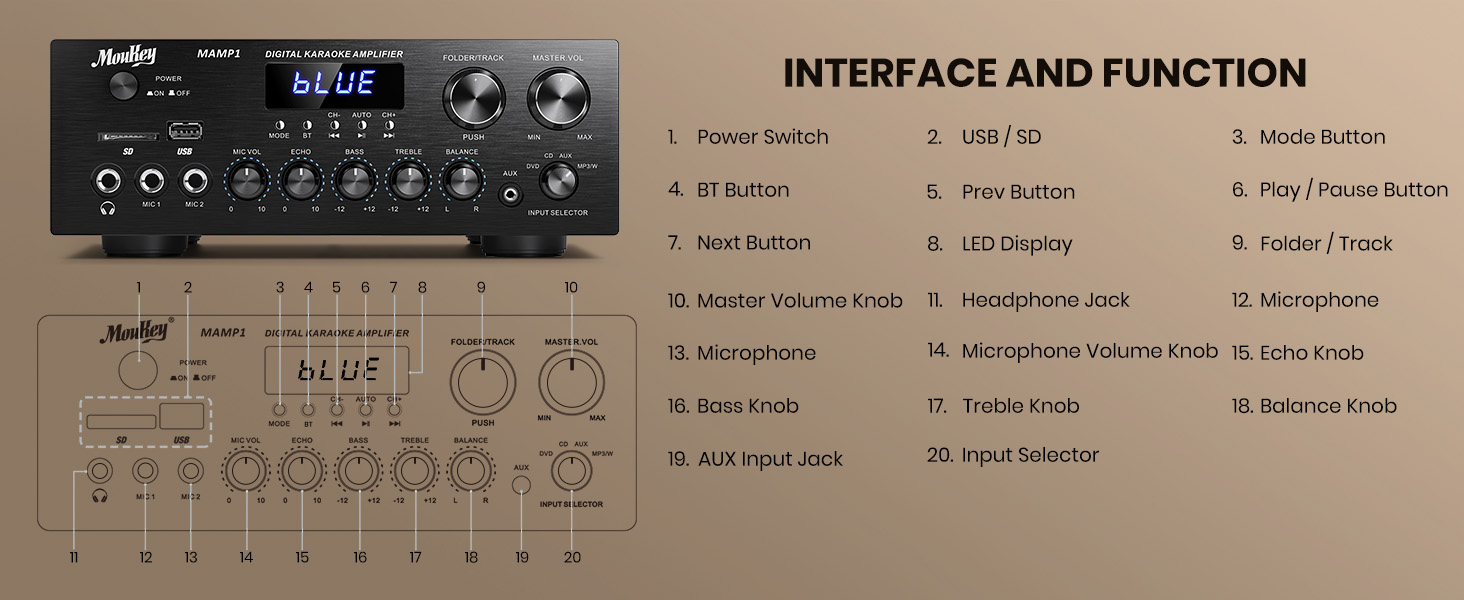
Figure 1: Moukey MAMP1 Razporeditev sprednje plošče
- Stikalo za vklop: Pritisnite za vklop ali izklop enote.
- USB / SD Card Slot: Insert USB flash drives (max 64GB) or SD cards (max 32G) for MP3 playback.
- Gumb za način: Press to cycle through input sources (USB/SD, Bluetooth, FM, AUX, CD, DVD).
- BT gumb: Pritisnite za izbiro načina Bluetooth.
- Prev/Next Buttons: Navigate tracks in USB/SD/Bluetooth mode or stations in FM mode.
- Gumb za predvajanje/pavzo: Predvajanje ali začasna ustavitev predvajanja zvoka.
- LED zaslon: Prikazuje trenutni način, informacije o skladbi ali FM frekvenco.
- Folder/Track Knob: Select folders or tracks.
- Glavni gumb za glasnost: Prilagodi skupno izhodno glasnost.
- Vhod za slušalke (6.35 mm): Priključite slušalke za zasebno poslušanje.
- Microphone Inputs (MIC1, MIC2 - 6.35mm): Connect up to two microphones for karaoke or public address.
- Gumb za glasnost mikrofona: Prilagodi glasnost priključenih mikrofonov.
- Gumb Echo: Prilagodi odmevni učinek za mikrofone.
- Gumb za bas: Prilagodi nizkofrekvenčni izhod.
- Visokotonski gumb: Prilagodi visokofrekvenčni izhod.
- Gumb za ravnotežje: Prilagodi ravnovesje levega/desnega kanala.
- Gumb za izbiro vhoda: Manually select input sources (CD, AUX, DVD, MP3/BT).
6. Priključki na zadnji plošči
The rear panel provides all necessary ports for connecting your audio sources and speakers.

Figure 2: Moukey MAMP1 Postavitev zadnje plošče
- Priključek za FM anteno: Za sprejem radia priključite priloženo FM anteno.
- Audio Input (DVD/CD - RCA): Connect external audio sources like DVD or CD players using RCA cables.
- Linijski izhod (RCA): Povežite se z drugim ampdvigalko ali snemalno napravo.
- Speaker Output (Banana Plugs): Connect your passive speakers. Ensure correct polarity (+ to + and - to -).
- Vhodna moč: Connect the power cable to a standard AC outlet.
7. Nastavitev
7.1 Priključitev zvočnikov
To connect your passive speakers to the Moukey MAMP1 amplifier, sledite tem korakom:

Figure 3: Speaker Connection Diagram
- Zagotovite ampje žar izklopljen in izključen iz električne vtičnice.
- Prepoznajte pozitivne (+) in negativne (-) priključke na zvočnikih in amplifier.
- For bare wire connections: Rotate and loosen the speaker knob on the amplifier. Insert the bare wire (remove approximately 10mm insulation). Tighten the knobs to secure the wires.
- Connect the positive (+) terminal of your speaker to the positive (+) terminal of the amplifier.
- Connect the negative (-) terminal of your speaker to the negative (-) terminal of the amplifier.
- Repeat for all speakers. Ensure all connections are secure to prevent short circuits.
7.2 Priklop avdio virov
- RCA Devices (CD/DVD Player): Use RCA cables to connect the audio output of your CD or DVD player to the corresponding RCA input jacks on the ampzadnja plošča rešilca.
- POMOČNE NAPRAVE: Connect devices with a 3.5mm audio output (e.g., smartphone, tablet) to the 3.5mm AUX IN jack on the front panel.
- Mikrofoni: Plug 1/4 inch (6.35mm) microphones into the MIC1 or MIC2 jacks on the front panel.
- FM antena: Connect the included FM antenna to the FM ANT jack on the rear panel for radio reception.
7.3 Napajalni priključek
- Ensure all audio and speaker connections are made.
- Connect the power cable to the AC POWER INPUT on the rear panel of the amplifier.
- Drugi konec napajalnega kabla priključite v ustrezno vtičnico za izmenični tok.
8. Navodila za uporabo
8.1 Vklop/izklop
Pritisnite MOČ stikalo na sprednji plošči, da vklopite amplifier ON or OFF. The LED display will illuminate when powered on.
8.2 Izbira vhodnega vira
Uporabite NAČIN gumb ali IZBORNIK VHODA knob on the front panel to choose your desired audio source (Bluetooth, USB, SD, AUX, FM, CD, DVD).
8.3 Nadzor glasnosti in tona
- Glavni obseg: Zavrtite MASTER VOL gumb za nastavitev celotne ravni zvoka.
- Glasnost mikrofona: Uporabite MIC VOL knob to adjust microphone volume independently.
- Echo: Adjust the microphone echo effect with the ODMEV gumb.
- Nizki/Visoki toni: Fine-tune the low and high frequencies using the BASS in TREPLE gumbi.
- Stanje: Adjust the left/right channel balance with the RAVNOTEŽJE gumb.
8.4 Bluetooth seznanjanje
- Pritisnite NAČIN gumb ali BT button to select Bluetooth mode. The LED display will show "BLUE".
- V mobilni napravi omogočite Bluetooth in poiščite razpoložljive naprave.
- Select "MAMP1" from the list to pair. A confirmation tone will sound upon successful connection.
8.5 Predvajanje z USB-ja/SD-kartice
- Insert a USB flash drive or SD card into the respective slot on the front panel.
- The amplifier will automatically switch to USB/SD mode and begin playback. If not, press the NAČIN gumb, da ga izberete.
- Uporabite PREJ/NAPREJ gumbi za preskakovanje skladb in PREDVAJAJ/PAVZA gumb za upravljanje predvajanja.
8.6 Delovanje FM-radia
- Ensure the FM antenna is connected to the rear panel.
- Pritisnite NAČIN button to select FM radio mode. The LED display will show the frequency.
- Pritisnite AUTO za samodejno iskanje in shranjevanje razpoložljivih FM postaj.
- Uporabite CH- in CH+ gumbe za navigacijo med shranjenimi postajami.
9. Vzdrževanje
- Enoto vzdržujte čisto tako, da jo obrišete z mehko, suho krpo.
- Izogibajte se uporabi močnih kemikalij ali abrazivnih čistil.
- Zagotovite ustrezno prezračevanje tako, da prezračevalne odprtine ostanejo brez ovir.
- Shranite ampShranjujte na hladnem in suhem mestu, stran od neposredne sončne svetlobe in ekstremnih temperatur.
10. Odpravljanje težav
| Težava | Možen vzrok | rešitev |
|---|---|---|
| Brez moči | Napajalni kabel ni priključen; Stikalo za napajanje je izklopljeno; Okvara vtičnice | Check power cable connection; Turn power switch ON; Test outlet with another device. |
| Ni zvoka | Incorrect input source; Volume too low; Speaker connections loose/incorrect; Faulty audio cable | Select correct input source; Increase master volume; Check speaker wiring; Replace audio cables. |
| Bluetooth se ne povezuje | Not in Bluetooth mode; Device too far; Device already connected to another unit | Switch to Bluetooth mode; Move device closer; Disconnect from other devices and try again. |
| Slab FM sprejem | Antenna not connected; Weak signal | Connect FM antenna; Adjust antenna position for better reception. |
11. Specifikacije
| Funkcija | Specifikacija |
|---|---|
| Znamka | Moukey |
| Model | MAMP1 |
| Izhodna moč | 400 W max |
| Kanali | 2.0 kanal |
| Različica Bluetooth | 5.0 |
| Bluetooth obseg | Do 40 metra |
| Vhodni vmesniki | 2x RCA (CD/DVD), 2x 1/4" (6.35mm) MIC, USB, SD, 3.5mm AUX IN, FM Antenna |
| Izhodni vmesniki | RCA Line Out, Banana Plug Speaker Outputs, 1/4" (6.35mm) Headphone |
| USB/SD Max Capacity | USB: 64G, SD: 32G |
| Frekvenčni odziv | 20Hz-20kHz |
| Tehnologija sprejemnika | FM |
| Dimenzije izdelka | 81.28 x 78.74 x 43.18 cm; 3.19 kg |
12. Garancija in podpora
Moukey products are designed and manufactured to the highest quality standards. For detailed warranty information and customer support, please refer to the warranty card included in your package or visit the official Moukey website. If you encounter any issues or have questions regarding your MAMP1 amplifier, please contact Moukey customer service for assistance.