
1. Uvod
Hvala za nakupasing the PPLEE RGB Digital Alarm Clock, Model CR1008R. This clock is designed to provide accurate timekeeping, customizable alarm functions, and convenient charging options. Please read this manual thoroughly before use to ensure proper operation and to maximize your product experience.
2. Varnostne informacije
- Ensure the power adapter is compatible with your local power supply (100-240V).
- Naprave ne izpostavljajte vodi ali prekomerni vlagi.
- Izogibajte se postavljanju ure v bližino virov toplote ali na neposredno sončno svetlobo.
- Uporabljajte samo priloženi napajalnik.
- Hraniti izven dosega otrok.
- Insert AAA batteries correctly for backup function (not included).
3. Vsebina paketa
Preverite, ali so v paketu vsi elementi:
- 1 x PPLEE RGB Digital Clock
- 1 x napajalnik
- 1 x napajalni kabel
- 1 x Uporabniški priročnik (ta dokument)

Image: The package includes the RGB digital clock, power adapter, power cord, and user manual.
4. Izdelek je končanview
Familiarize yourself with the main components of your alarm clock.

Slika: spredaj view of the PPLEE RGB Digital Alarm Clock displaying time with RGB digits and a smartphone charging via its USB port.
Sprednja plošča: Large LED display for time, AM/PM indicator, DST indicator, Alarm indicator.
Zgornja plošča: Snooze/Light bar, Hour button, Minute button.
Zadnja stran:
- DC IN Port: For power adapter connection.
- Polnilna vrata USB: Za polnjenje zunanjih naprav.
- Type-C Charging Port: For charging external devices.
- Alarm ON/OFF Switch.
- Alarm Volume Control (Low/Med/High).
- Dimmer Control (for display brightness).
- Time Format Switch (12H/24H).
- DST (Daylight Saving Time) Switch.
- Set Time Button.
- Set Alarm Button.
- Multi-Color Button (for display and night light).
- Battery Compartment (for 2x AAA backup batteries).

Slika: Zadaj view of the alarm clock highlighting the various control buttons and charging ports, including dimmer, alarm volume, time/alarm set, and time format switches.
5. Nastavitev
5.1 Napajalni priključek
- Connect the power cord to the DC IN port on the back of the clock.
- Plug the power adapter into a standard electrical outlet (AC 100-240V).
- Prikaz ure se bo prižgal.
5.2 Namestitev rezervnega napajanja z baterijo
For battery backup, which saves settings during power outages and can trigger the alarm, install 2 AAA batteries (not included) into the battery compartment on the back of the clock.
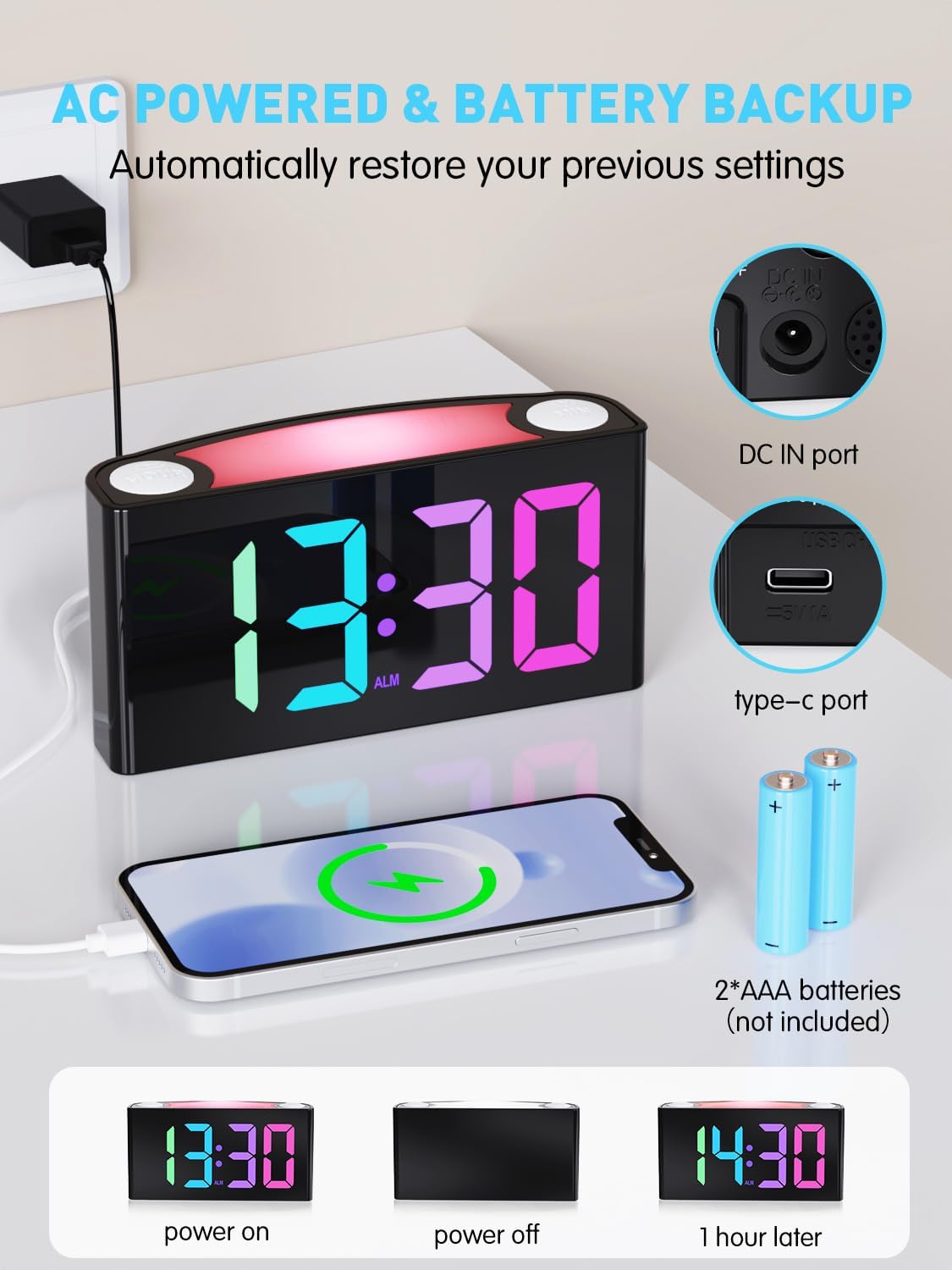
Image: The alarm clock is shown connected to AC power, with an open battery compartment indicating where to insert 2 AAA batteries for backup. The display shows "13:30" (power on), a blank screen (power off), and "14:30" (1 hour later, demonstrating time retention).
Opomba: The clock's main functions (display, USB charging, alarm) require AC power. Batteries only provide backup for time memory and alarm trigger during power interruptions.
6. Navodila za uporabo
6.1 Nastavitev časa
- Pritisnite "SET TIME" button on the rear panel. The display will start flashing.
- Pritisnite "HOUR" button (on top) to adjust the hour.
- Pritisnite "MIN" button (on top) to adjust the minute.
- Pritisnite "SET TIME" again to save, or wait 5 seconds for automatic confirmation.
Video: Demonstrates how to set the time on the PPLEE RGB Digital Alarm Clock, including adjusting hours and minutes and confirming the setting.
6.2 Nastavitev alarma
- Potisnite "VKLOP/IZKLOP ALARM" switch to the "ON" position. The alarm indicator will light up.
- Pritisnite "SET ALARM" button on the rear panel. The alarm time display will start flashing.
- Pritisnite "HOUR" button (on top) to adjust the alarm hour.
- Pritisnite "MIN" button (on top) to adjust the alarm minute.
- Pritisnite "SET ALARM" again to save, or wait 5 seconds for automatic confirmation.
Če želite izklopiti alarm, potisnite "VKLOP/IZKLOP ALARM" switch to the "OFF" position. The alarm indicator will disappear.
6.3 Svetlost zaslona (zatemnitev)
The clock features a 7-level dimmer for the time display (0%-100% brightness).
- Uporabite "DIMMER" button on the rear panel to cycle through brightness levels.

Image: The alarm clock display shows various brightness levels from 0% to 100%, illustrating the 7-level dimmer function.
6.4 načinov nočne svetlobe
The clock includes an 8-mode/7-color night light with 3 adjustable brightness settings.
- Pritisnite "DREMEŽ/LUČ" bar on top to turn the night light on/off and cycle through colors/modes.
- To adjust night light brightness, press and hold the "DREMEŽ/LUČ" bar.

Image: A person sleeping next to the alarm clock, which emits a soft yellow night light from its top bar. Below are icons indicating 3-level adjustable brightness for the night light.
6.5 Glasnost alarma
Adjust the alarm volume to your preference (Low, Medium, High).
- Uporabite "ALARM VOLUME" switch on the rear panel to select the desired volume level.

Image: A person reaching for the snooze bar on the alarm clock, which displays "8:30". The image also illustrates the 3-level adjustable alarm volume (90db, 103db, 110db).
6.6 Funkcija dremeža
Ko se oglasi alarm, pritisnite veliko "DREMEŽ/LUČ" bar on top to activate snooze for 9 extra minutes of sleep.
The alarm will sound again after 9 minutes. To completely turn off the alarm, use the "VKLOP/IZKLOP ALARM" stikalo.
6.7 12/24 Hour Format and DST
- Uporabite "TIME FORMAT" switch on the rear panel to toggle between 12-hour and 24-hour display.
- Uporabite "DST" switch on the rear panel to enable or disable Daylight Saving Time (adjusts time by 1 hour).
6.8 Dual Charging Ports
The clock is equipped with a Type-C output port and a USB output port for charging your devices.

Image: The alarm clock with its display showing "12:00" and two smartphones connected to its USB and Type-C charging ports, indicating active charging.
Simply connect your device's charging cable to the appropriate port on the back of the clock.
7. Vzdrževanje
- Uro očistite z mehko, suho krpo. Ne uporabljajte abrazivnih čistil ali topil.
- Pred čiščenjem se prepričajte, da je ura izklopljena iz električnega omrežja.
- If not in use for an extended period, remove the backup batteries.
8. Odpravljanje težav
| Težava | rešitev |
|---|---|
| Prikaz ure je prazen. | Check if the power adapter is securely plugged into both the clock and the wall outlet. Ensure the outlet has power. |
| Alarm se ne oglasi. | Verify the "ALARM ON/OFF" switch is in the "ON" position. Check the alarm volume setting. Ensure the alarm time is correctly set. |
| Čas je napačen po izpadu električne energijetage. | Ensure 2 AAA batteries are installed in the battery compartment for backup. If batteries were not present or depleted, reset the time manually. |
| Devices not charging via USB/Type-C. | Confirm the clock is connected to AC power. Check the charging cable and the device being charged. |
| Nočna lučka ne deluje. | Press the "SNOOZE/LIGHT" bar to cycle through modes and turn on the light. Check if the clock is powered. |
9. Specifikacije
| Številka modela | CR1008R |
| Znamka | Pplee |
| Vrsta zaslona | Digital LED (RGB) |
| Dimenzije izdelka | 6.46 cm Š x 3.39 cm V |
| Vir napajanja | Corded Electric (AC 100-240V) |
| Rezervna baterija | 2 x AAA baterije (niso priložene) |
| Vrata za polnjenje | 1 x USB, 1 x Type-C |
| Svetlost zaslona | 7-level adjustable dimmer |
| Nočna luč | 8 modes / 7 colors, 3-level adjustable brightness |
| Glasnost alarma | 3-level adjustable (Low, Medium, High) |
| Trajanje dremeža | 9 minut |
10. Garancija in podpora
For warranty information or technical support, please refer to the contact details provided with your purchase or visit the official PPLEE webmesto. Shranite račun za garancijske zahtevke.
E-pošta: support@pplec.net