
Formovie X5
Formovie X5 4K Laser TV Projector User Manual
Model: X5 | Znamka: Formovie
Uvod
The Formovie X5 4K Laser TV Projector is a portable mini smart projector designed to deliver a cinematic experience in your home. Featuring ALDP Laser Display Technology, 2450 lumens brightness, and built-in Denon speakers, it offers stunning 4K resolution and immersive audio. This manual provides essential information for setting up, operating, and maintaining your projector.
Konec izdelkaview
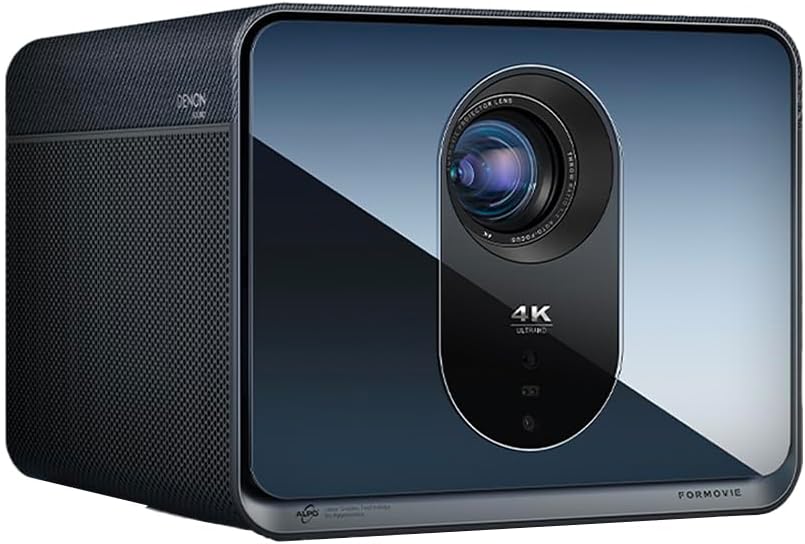
Spredaj view of the Formovie X5 projector, showcasinzaradi elegantne oblike in izrazite leče.
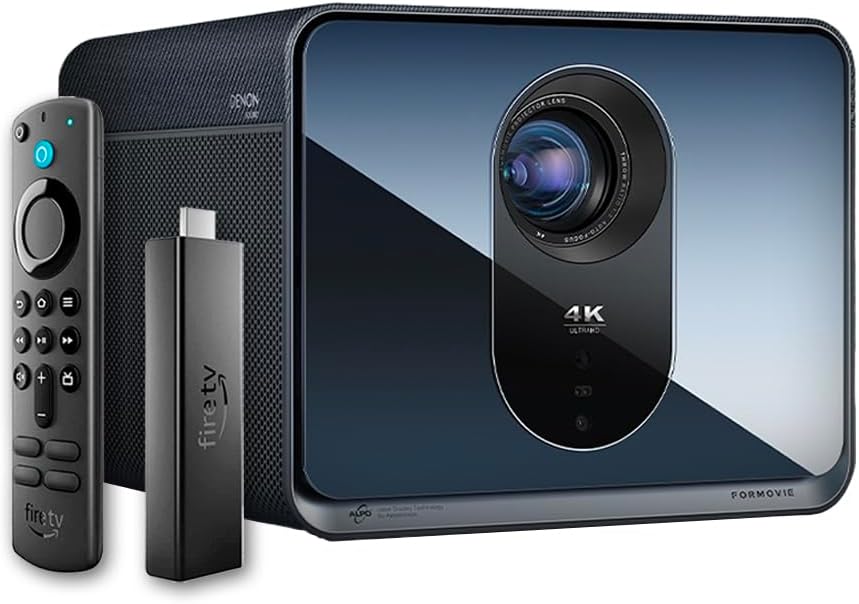
The Formovie X5 projector shown alongside its included Amazon Fire TV Stick 4K Max and remote control.

Zadaj view of the Formovie X5 projector, displaying various connectivity ports including LAN, USB, HDMI, and S/PDIF.
Vodnik za namestitev
1. Razpakiranje in namestitev
- Projektor in vso dodatno opremo previdno vzemite iz embalaže.
- Projektor postavite na stabilno, ravno površino. Zagotovite zadostno prezračevanje okoli enote.
- Position the projector directly in front of your desired projection surface (wall or screen) for optimal image geometry. While the projector has auto-correction, a direct alignment is recommended for the best experience.
2. Napajalni priključek
- Priključite napajalnik na vhod za napajanje projektorja.
- Priključite napajalnik v ustrezno električno vtičnico.
3. Initial Power On and Auto-Focus
- Pritisnite gumb za vklop na projektorju ali daljinskem upravljalniku, da vklopite napravo.
- The projector will automatically initiate its auto-focus and omnidirectional auto-correction features. Allow a few moments for the image to stabilize and sharpen.
4. Connecting the Fire TV Stick 4K Max
- Insert the Amazon Fire TV Stick 4K Max into an available HDMI port on the projector.
- Connect the Fire TV Stick to its power source.
- Select the corresponding HDMI input on the projector's menu.
Navodila za uporabo
Funkcije daljinskega upravljanja
The included remote control allows full navigation and control of the projector and the connected Fire TV Stick.
- Gumb za vklop: Vklopi/izklopi projektor.
- Navigacijska plošča: Uporablja se za navigacijo po menijih in izbiranje možnosti.
- Gumb za nazaj: Vrnitev na prejšnji zaslon.
- Domov gumb: Vrnitev v glavni meni.
- Gumbi za glasnost: Prilagodi glasnost zvoka.
- Gumb za glasovno upravljanje: Activates voice commands for the Fire TV Stick.
Prilagajanje nastavitev slike
The Formovie X5 features advanced automatic adjustment tools. For manual adjustments:
- Ročno ostrenje: If auto-focus is not satisfactory, access the projector settings to manually adjust focus.
- Trapezni popravek: While omnidirectional auto-correction is standard, manual keystone adjustment is available in the settings for fine-tuning image shape.
- Prilagodljivo glede na ambientalno svetlobo: The projector automatically adjusts brightness based on ambient light conditions. This can be toggled or fine-tuned in the display settings.
Ključne značilnosti
- 4K ALDP Laser Display Technology: Experience breathtaking visuals with true 4K resolution and a wide color gamut, ensuring crystal-clear and vibrant images.
- Cinema-Like Projection Size: Project images from 60 inches up to a massive 1,000 inches, providing an immersive viewing experience for movies, sports, and gaming.
- Powerful Adjustment Tools: Equipped with omnidirectional auto-correction, ambient light adaptive technology, laser autofocus, and automatic curtain alignment for hassle-free setup and optimal picture quality.
- Built-In Three-Way Denon Speakers: The X5 is the first projector to feature integrated three-way speakers powered by Denon, delivering rich, immersive audio without the need for external sound systems.
- Integrated Amazon Fire TV: Stream directly from your favorite apps like Netflix, Prime Video, Disney+, and more, with the convenience of the included Fire TV Stick 4K Max.
Vzdrževanje
- Čiščenje leč: Lečo projektorja nežno obrišite z mehko krpo, ki ne pušča vlaken in je posebej zasnovana za optične površine. Ne uporabljajte abrazivnih čistil ali prekomerne sile.
- Prezračevanje: Ensure the projector's ventilation ports are clear of dust and obstructions to prevent overheating. Regularly clean the vents with a soft brush or compressed air.
- Shranjevanje: Ko projektorja dalj časa ne uporabljate, ga shranite na hladnem in suhem mestu, stran od neposredne sončne svetlobe in ekstremnih temperatur.
Odpravljanje težav
| Težava | Možen vzrok | rešitev |
|---|---|---|
| Ni projicirane slike | Power cable disconnected, incorrect input source, projector in standby mode. | Check power connection, select correct HDMI input, press power button to wake. |
| Slika je zamegljena | Out of focus, lens dirty. | Allow auto-focus to complete or manually adjust focus. Clean the lens. |
| Slika je popačena (trapezoidna oblika) | Projector not perpendicular to screen, auto-correction issue. | Reposition projector directly in front of the screen. Use manual keystone correction if needed. |
| Brez zvoka | Volume too low, mute activated, external audio device not connected properly. | Increase volume, check mute status, ensure external audio (if used) is correctly connected. |
| Opozorilo na pregrevanje | Blokirano prezračevanje, dolgotrajna uporaba v vročem okolju. | Ensure vents are clear. Turn off projector and allow it to cool down. Operate in a well-ventilated area. |
Specifikacije
| Funkcija | Podrobnost |
|---|---|
| Znamka | Oblike |
| Številka modela | X5 |
| Ločljivost zaslona | 3840 x 2160 (4K) |
| Tehnologija svetlobnega vira | ALDP Laser |
| Svetlost (ANSI lumnov) | 2450 lumnov |
| Tehnologija povezljivosti | HDMI, USB, LAN |
| Posebne lastnosti | Portable, Omnidirectional Auto-Correction, Ambient Light Adaptive, Laser Autofocus, Automatic Curtain Alignment, Built-In Denon Three-Way Speakers, Integrated Amazon Fire TV |
| Teža predmeta | 15.14 funtov |
| Dimenzije izdelka | 8.27 x 8.54 x 6.57 palcev |
Garancija in podpora
For warranty information, please refer to the documentation included with your product or visit the official Formovie website. For technical support, troubleshooting assistance, or to access additional resources, please contact Formovie customer service.
- Uporabniški priročnik (PDF): Prenos
- Uporabniški priročnik (PDF): Prenos
- Visit the Formovie Store: Formovie Store
Ask a question about this manual
Ask about setup, troubleshooting, compatibility, parts, safety, or missing instructions. Manuals+ will review the question and use this page’s manual context to help answer it.