
BOXPUT X88 PRO 13
BOXPUT X88 PRO 13 Smart TV Box User Manual
Model: X88 PRO 13
1. Uvod
This manual provides detailed instructions for the setup, operation, and maintenance of your BOXPUT X88 PRO 13 Smart TV Box. Please read this manual thoroughly before using the device to ensure proper functionality and to maximize your user experience. Keep this manual for future reference.
2. Vsebina paketa
Preverite, ali so v paketu izdelka vsi spodaj navedeni elementi. Če kateri koli predmet manjka ali je poškodovan, se obrnite na prodajalca.
- BOXPUT X88 PRO 13 Smart TV Box
- Daljinski upravljalnik
- HDMI kabel
- Napajalnik (DC 5V/2A)
- Uporabniški priročnik
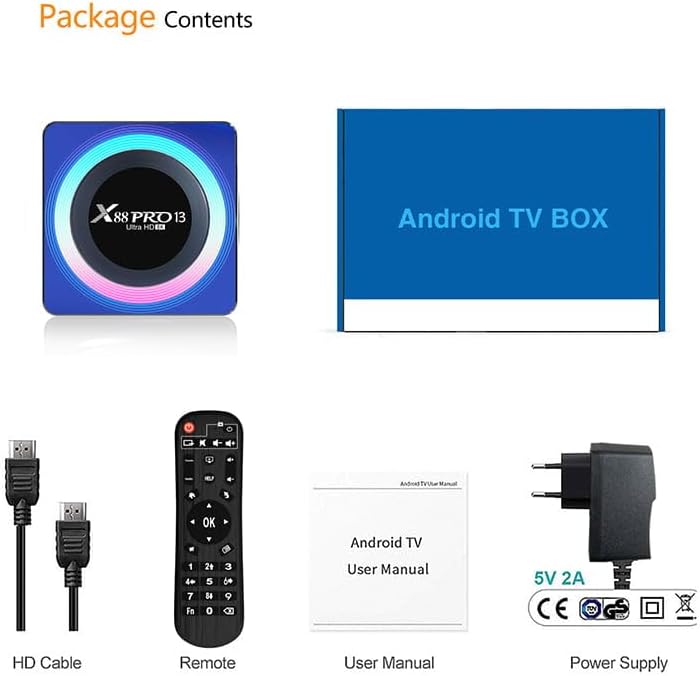
Image: Contents of the product package, including the TV box, HDMI cable, remote control, user manual, and power adapter.
3. Izdelek je končanview
The BOXPUT X88 PRO 13 is a high-performance Smart TV Box designed to deliver an enhanced media experience. It features the Android 13.0 operating system and a powerful RK3528 Quad-Core processor.

Image: The BOXPUT X88 PRO 13 Smart TV Box and its accompanying remote control.
Ključne značilnosti
- Operacijski sistem Android 13.0
- RK3528 Quad-Core 64bit Cortex-A53 Chipset
- Mali 450 MP2 GPU
- Support for 8K HD Video Decoding
- Dual-band Wi-Fi (2.4G/5G) with Wi-Fi 6
- Bluetooth V5.0
- Screen Cast Functionality

Image: Visual representation of key features including Android 13.0, 8K video support, RK3528 processor, WiFi 6, and Screen Cast.
4. Navodila za namestitev
Follow these steps to set up your BOXPUT X88 PRO 13 Smart TV Box.
- Povežite se s televizorjem: Connect one end of the HDMI cable to the HDMI port on the TV Box and the other end to an available HDMI input on your television.
- Priključite napajanje: Plug the power adapter into the DC 5V/2A port on the TV Box, then plug the adapter into a wall outlet.
- Vklop: The device should power on automatically or can be turned on using the power button on the remote control.
- Izberite vnos: On your television, select the correct HDMI input source using your TV's remote control.
- Začetna nastavitev: Sledite navodilom na zaslonu, da dokončate začetno nastavitev, vključno z izbiro jezika in konfiguracijo omrežja.
5. Navodila za uporabo
5.1 Osnovna navigacija
Use the provided remote control to navigate the Android interface. The directional buttons (up, down, left, right) are used to move the cursor, and the 'OK' button confirms selections. The 'Back' button returns to the previous screen, and the 'Home' button returns to the main menu.
5.2 Omrežna povezljivost
The TV Box supports both wired and wireless network connections.
- Žična povezava (Ethernet): Connect an Ethernet cable from your router to the LAN port on the TV Box.
- Brezžična povezava (Wi-Fi): Pojdi na Nastavitve > Omrežje in internet > Wi-Fi, select your network, and enter the password. The device supports 2.4GHz and 5GHz dual-band Wi-Fi 6 for faster and more stable connections.

Image: An illustration demonstrating the improved speed and stability offered by WiFi 6 technology.
5.3 Povezljivost Bluetooth
The TV Box features Bluetooth V5.0, allowing connection to various external devices.
- Pojdi na Settings > Connected Devices > Pair new device.
- Put your Bluetooth device (e.g., speaker, headphones, game controller) into pairing mode.
- Select the device from the list on your TV screen to pair.

Image: The TV box demonstrating Bluetooth 5.0 connectivity with a speaker, headphones, and a game controller.
5.4 Predvajanje medijev
The BOXPUT X88 PRO 13 supports advanced media formats, including 8K H.265 ultra-high-definition content and 3D video playback.
- 8K Video Decoding: Enjoy crystal-clear visuals with support for 8K resolution.
- Podpora za 3D: Experience immersive 3D content when connected to a compatible 3D television.

Slika: Predstava na televizijskem zaslonuasing a high-resolution winter scene, illustrating the 8K video decoding capability of the device.
5.5 Interakcija na več zaslonih
The device supports various multi-screen interaction protocols, allowing you to cast content from your mobile devices to your TV.
- predvajanje: Za naprave Apple.
- DLNA: For compatible devices across various platforms.
- Miracast: Za naprave Android.
To use these features, ensure your mobile device and the TV Box are connected to the same Wi-Fi network. Activate the casting feature on your mobile device and select the TV Box from the available devices.

Image: A television screen displaying a racing car, demonstrating multi-screen interaction capabilities such as Airplay, DLNA, and Miracast.
6. Vzdrževanje
To ensure the longevity and optimal performance of your TV Box, follow these maintenance guidelines:
- Čiščenje: Za čiščenje naprave uporabite mehko, suho krpo. Ne uporabljajte tekočih čistil ali aerosolov.
- Prezračevanje: Napravo postavite v dobro prezračevano območje, da preprečite pregrevanje. Ne blokirajte prezračevalnih odprtin.
- Posodobitve programske opreme: Periodically check for system updates via Settings > About > System update da zagotovite, da imate najnovejše funkcije in varnostne popravke.
- Shranjevanje: Avoid placing heavy objects on the device. Store in a cool, dry place away from direct sunlight and extreme temperatures.
7. Odpravljanje težav
If you encounter issues with your BOXPUT X88 PRO 13, refer to the following common problems and solutions:
- Brez napajanja:
- Prepričajte se, da je napajalnik varno priključen na napravo in delujočo električno vtičnico.
- Preverite, ali vtičnica deluje.
- Ni signala na televiziji:
- Check that the HDMI cable is properly connected to both the TV Box and the TV.
- Prepričajte se, da je vaš televizor nastavljen na pravilen vhodni vir HDMI.
- Poskusite z drugim kablom HDMI ali vrati HDMI na televizorju.
- Ni povezave Wi-Fi:
- Confirm your Wi-Fi router is powered on and functioning.
- Check Wi-Fi settings on the TV Box (Nastavitve > Omrežje in internet > Wi-Fi) and ensure the correct network is selected and password entered.
- Znova zaženite TV-sprejemnik in usmerjevalnik Wi-Fi.
- Daljinski upravljalnik se ne odziva:
- Zamenjajte baterije v daljinskem upravljalniku.
- Prepričajte se, da med daljinskim upravljalnikom in TV-sprejemnikom ni ovir.
- Zrušitve ali zamrznitev aplikacij:
- Zaprite in znova zaženite aplikacijo.
- Clear the cache of the problematic application via Nastavitve > Aplikacije > [Ime aplikacije] > Pomnilnik in predpomnilnik > Počisti predpomnilnik.
- Ensure the device has sufficient free storage space.
- Izvedite posodobitev sistema, če je na voljo.
8. Specifikacije
| Funkcija | Specifikacija |
|---|---|
| Model | X88 PRO 13 |
| Operacijski sistem | Android 13.0 |
| Čipset | RK3528 Quad-Core 64bit Cortex-A53 |
| GPU | Mali 450 MP2 |
| RAM | 4 GB |
| ROM (notranji pomnilnik) | 64 GB EMMC |
| Gostitelj USB | 1 * USB 3.0; 1 * USB 2.0 |
| LAN/Ethernet | 10/100M Standard RJ-45 |
| Wireless/Wi-Fi | 2.4G / 5G Dual-band Wi-Fi 802.11 a/b/g/n/ac/ax (Wi-Fi 6) |
| Bluetooth | V5.0 |
| Napajalnik | DC 5V/2A |
| Video dekodiranje | 8K H.265, 3D Support |
| Dimenzije izdelka | 107 x 107 x 21 mm |
9. Garancija in podpora
Za informacije o garanciji in tehnično podporo glejte dokumentacijo, ki ste jo prejeli ob nakupu, ali se obrnite na prodajalca. Potrdilo o nakupu shranite za uveljavljanje garancije.
Ask a question about this manual
Ask about setup, troubleshooting, compatibility, parts, safety, or missing instructions. Manuals+ will review the question and use this page’s manual context to help answer it.