
ROOFULL RF40-SU
Uporabniški priročnik za zunanji CD-DVD pogon ROOFULL
Model: RF40-SU
1. Izdelek je končanview
The ROOFULL External CD DVD Drive is a multifunctional device designed to provide comprehensive disc reading and writing capabilities, along with expanded connectivity options for modern laptops and computers. This 8-in-1 unit supports various disc formats and offers high-speed data transfer, making it an essential accessory for users without built-in optical drives or those requiring additional USB and card reader ports.

Figure 1.1: ROOFULL External CD DVD Drive and accessories.
2. Kaj je v škatli
- 1 x ROOFULL External CD/DVD Drive (RF40-SU)
- 1 x USB Power Supply Cord
- 1 x uporabniški priročnik

Figure 2.1: Package contents of the ROOFULL External CD DVD Drive.
3. Lastnosti
- 8-in-1 Multifunctionality: Functions as a CD/DVD-ROM reader, CD/DVD burner, writer, rewriter, ripper, and recorder.
- True USB 3.0 & Dual Connectors: Supports up to 5 Gbps high-speed transfer with a full 9-wire cable and dedicated controller chip. Includes both USB Type-A and Type-C connectors for broad compatibility without adapters.
- Built-in Hub & SD Card Reader: Features multiple USB 3.0/2.0 Type-A ports and integrated SD/microSD card readers for connecting peripherals and importing media.
- Široka združljivost: Supports Windows 11/10/8.1/7/Vista/XP, Linux PCs, and Apple MacBook Pro, Air, iMac, Mac Studio, and Mac Mini with macOS 10.16 or later.
- Plug & Play: No manual driver installation required; automatically recognized by compatible systems.
- Tanka in prenosna oblika: Kompakten in lahek za enostaven transport in shranjevanje.

Figure 3.1: Key features of the ROOFULL External CD DVD Drive.

Figure 3.2: Illustration of True USB 3.0 technology.
4. Združljivost
The ROOFULL RF40-SU is designed for broad compatibility with various operating systems and devices:
- Podprti operacijski sistemi: Windows 11, 10, 8.1, 7, Vista, XP; Linux OS; macOS 10.16 and later (for Apple MacBook Pro, Air, iMac, Mac Studio, Mac Mini).
- Podprte naprave: Laptops, Desktops, All-in-one PCs.
- Nepodprte naprave: Chromebooks (ChromeOS), smartphones, TVs, iPads, tablets, projectors, trucks, cars, some Surface models, Blu-ray/4K discs.

Figure 4.1: Wide compatibility with various operating systems.
5. Nastavitev
Follow these steps for initial setup of your ROOFULL External CD DVD Drive:
- Razpakirajte pogon: Remove the drive and all accessories from the packaging.
- Locate the Data Cable: The main data cable is conveniently stored underneath the drive. Gently pull it out from its slot.
- Povežite se z vašo napravo: Plug the data cable into an available USB port on your laptop or computer. The cable features both USB Type-A and Type-C connectors for versatile connection.
- Power Supply (if needed): If your computer's USB port cannot provide sufficient power, connect the included USB power supply cord to the drive's USB-C power port (not data port) and plug the other end into a USB power source (e.g., power bank, wall adapter).
- Samodejno prepoznavanje: The drive should be automatically recognized by your operating system. No manual driver installation is typically required.

Slika 5.1: Priklop pogona na prenosni računalnik.
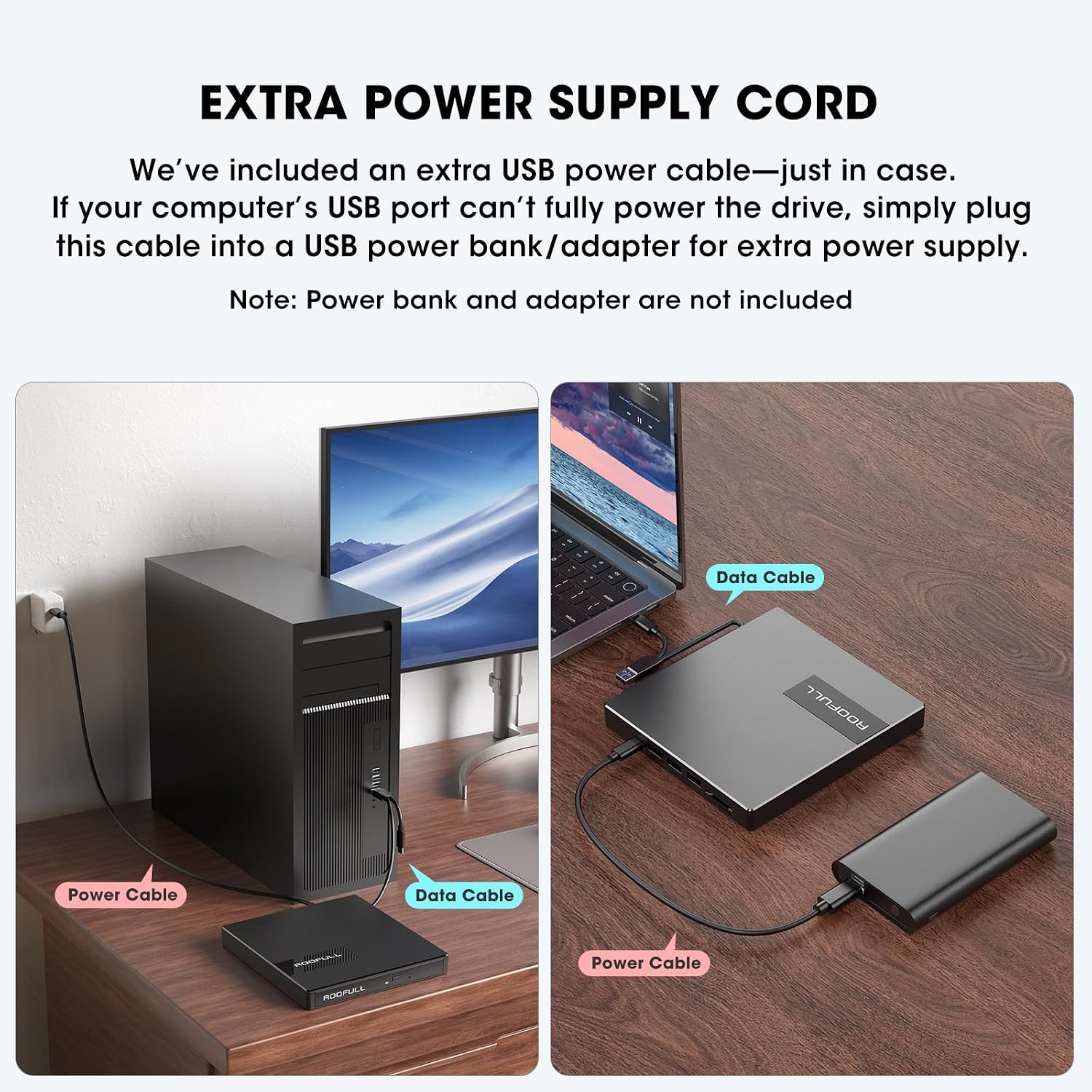
Figure 5.2: Using the extra power supply cord for stable operation.
DVD Region Code Setting
When inserting a DVD for the first time, your system may prompt you to select a DVD region. It is crucial to select the correct region corresponding to your DVD discs. Note that you can typically change the drive's region a limited number of times (e.g., 5 times). Refer to the map below for common DVD regions:

Figure 5.3: DVD Region Code Map.
| Regija | Geographical Area |
|---|---|
| Regija 1 | Kanada, Združene države Amerike |
| Regija 2 | Japan, Europe, South Africa, Middle East |
| Regija 3 | Southeast Asia, East Asia (including Hong Kong) |
| Regija 4 | Australia, New Zealand, Pacific Islands, Central America, Mexico, South America |
| Regija 5 | Eastern Europe, Russia, Indian Subcontinent, Africa, North Korea, and Mongolia |
| Regija 6 | Kitajska |
| Regija 7 | Reserved for unspecified special use |
| Regija 8 | Air and oceanic travel |
6. Delovanje
Using the CD/DVD Drive
- Odprite pladenj za diske: Pritisnite gumb za izmet na sprednji strani pogona, da odprete pladenj za disk.
- Vstavite disk: Carefully place your CD or DVD onto the tray, ensuring it is centered on the spindle.
- Zaprite pladenj: Pladenj nežno potisnite nazaj v pogon, dokler se ne zaskoči.
- Dostop do vsebine: Your computer will typically recognize the disc automatically. Use your preferred media player software (e.g., Windows Media Player, VLC, iTunes) to play music CDs, movie DVDs, or access data discs. For burning or ripping, dedicated software is required (e.g., BurnAware, Nero, HandBrake).

Figure 6.1: Front panel features including Tray Loading Design, Indicator Light, Ejection Button, and Forced Ejection Hole.
Video 6.1: Official demonstration of the ROOFULL External CD DVD Drive, showing connection, disc insertion, and basic functions.
Using USB Ports and SD/TF Card Slots
The drive features additional ports for enhanced connectivity:
- Vrata USB 3.0: Located on the side, this port can be used for high-speed data transfer with USB 3.0 devices.
- 3 vrata USB 2.0: These ports allow you to connect various USB peripherals such as wired mice, keyboards, flash drives, or 2.4G receivers.
- SD Card Slot & Micro-SD (TF) Card Slot: Insert your SD or microSD cards to import photos, videos, or access other data. Note that SD and TF cards cannot be used simultaneously.

Slika 6.2: stran view showing USB ports, SD/TF card slots, and USB-C power port.
7. Vzdrževanje
- Čiščenje: Za čiščenje zunanjosti pogona uporabite mehko, suho krpo. Ne uporabljajte tekočih čistil ali abrazivnih materialov.
- Nega diska: Diske vedno prijemajte za robove, da se izognete prstnim odtisom in praskam. Ko diskov ne uporabljate, jih shranjujte v zaščitnih ovitkih.
- Shranjevanje: When not in use, store the drive in a cool, dry place. Ensure the data cable is neatly tucked into its storage slot underneath the drive.
- Izogibajte se udarcem: Protect the drive from drops or impacts, as this can damage internal components.
8. Odpravljanje težav
- Pogon ni prepoznan: Ensure the data cable is securely connected to both the drive and your computer. Try a different USB port. If using a desktop PC, connect to a rear USB port on the motherboard for a more stable power supply. If power is an issue, use the included extra power supply cord.
- Disc Not Reading/Burning: Check if the disc is clean and free of scratches. Ensure the disc is correctly placed on the tray. Verify that you have the necessary software installed for playing, burning, or ripping discs.
- Tray Cannot Be Opened via Button (macOS): Due to macOS limitations, the tray button may not function after playing or burning a disc. To eject a disc on a Mac, right-click the disc icon on your desktop and select "Eject," or go to "File" > "Eject" from the menu bar in the active application.
- Brez napajanja/prekinjeno delovanje: Connect the extra USB power supply cord to the drive and a reliable USB power source. Some USB ports (especially on older laptops or front panel desktop ports) may not provide enough power.
- Počasne hitrosti prenosa: Ensure you are connected to a USB 3.0 port on your computer for optimal speed. Verify that the data cable is fully inserted.
- SD/TF kartica ni bila zaznana: Ensure only one card (either SD or TF) is inserted at a time, as they cannot be used simultaneously. Reinsert the card firmly.
9. Specifikacije
| Funkcija | Podrobnost |
|---|---|
| Znamka | POPOLNA STREHA |
| Številka modela | RF40-SU |
| Vrsta optičnega pogona | CD-ROM, CD-R, CD+/-RW, DVD-ROM, DVD+/-R, DVD+/-RW |
| Hitrost pisanja na optični pomnilnik | Max 24xCD / 8xDVD |
| Strojni vmesnik | USB 3.0 tipa A, USB 3.0 tipa C |
| Število vrat USB 3.0 | 1 |
| Združljivost operacijskega sistema | Windows 11/10/8/7, Mac, Linux |
| Platforma strojne opreme | Prenosni računalnik, PC |
| Teža predmeta | 10.6 unč |
| Dimenzije izdelka (DxŠxV) | 5.6 x 5.6 x 0.6 palcev |
| Država izvora | Kitajska |
10. Garancija in podpora
ROOFULL is committed to producing quality external CD/DVD-RW drives and offers comprehensive after-sales service.
- Garancija: The product comes with up to 2 years of comprehensive after-sales service.
- Tehnična podpora: If you experience any issues or require technical assistance, please contact ROOFULL customer support. Contact information can typically be found on the product packaging or the official ROOFULL webmesto.
- Brezplačna zamenjava: In case of product issues covered under warranty, a free replacement may be provided.
Ask a question about this manual
Ask about setup, troubleshooting, compatibility, parts, safety, or missing instructions. Manuals+ will review the question and use this page’s manual context to help answer it.