
1. Izdelek je končanview
The GOLOZA LA-C337 is a versatile digital alarm clock featuring a 180° rotatable projection, a large curved LED display, and a convenient USB charging port. It is designed for clear time display and easy operation.

Image 1.1: The GOLOZA Digital Projection Alarm Clock, showcasing its curved display and compact design, placed on a nightstand.
2. Vsebina paketa
Prosimo, preverite paket za naslednje artikle:
- GOLOZA Digital Projection Alarm Clock (LA-C337)
- Micro USB kabel
- Napajalni adapter
- Uporabniški priročnik
3. Značilnosti izdelka
- Curved LED Display: Large, clear digital time display with adjustable brightness.
- 180° projekcija: Projects time onto a wall or ceiling with adjustable brightness and rotation.
- Dvojni alarmi: Set two independent alarms with progressive volume.
- Funkcija dremeža: Allows for extra sleep time after the alarm sounds.
- Vrata za polnjenje USB: Conveniently charge your mobile devices.
- Pomnilniška baterija: Built-in button battery maintains time settings during power outages.
Slika 3.1: Bližnji posnetek view of the GOLOZA Digital Projection Alarm Clock's clear, blue LED display, showing the time.
4. Začetna nastavitev
4.1 Napajalni priključek
- Connect the Micro USB cable to the power input port on the back of the alarm clock.
- Drugi konec kabla USB priključite v priloženi napajalnik.
- Insert the power adapter into a standard electrical outlet. The clock display will light up.
Opomba: The built-in button battery serves as a backup for time and alarm settings during a power interruption. It does not power the main display or projection.
4.2 Nastavitev časa in datuma
Specific button names are not provided, but typically these clocks have 'TIME SET', 'MODE', or similar buttons. Refer to the physical unit for exact button labels.
- Pritisnite in držite Nastavitev časa button (or similar) to enter time setting mode. The hour digits will flash.
- Uporabite +/- or Gor/Dol gumbi za nastavitev ure.
- Pritisnite Nastavitev časa Ponovno pritisnite gumb , da potrdite uro in se premaknete na nastavitev minut. Številke minut bodo utripale.
- Uporabite +/- or Gor/Dol gumbe za nastavitev minut.
- Pritisnite Nastavitev časa button again to confirm minutes and exit time setting mode.
- Follow similar steps to set the date if your model supports it (usually by pressing the Time Set button multiple times to cycle through year, month, day).
5. Navodila za uporabo
5.1 Nastavitev alarmov
Ura podpira dva neodvisna alarma (Alarm 1 in Alarm 2).
- Pritisnite in držite Alarm 1 button (or similar) to enter Alarm 1 setting mode. The alarm hour digits will flash.
- Uporabite +/- or Gor/Dol gumbe za nastavitev ure budilke.
- Pritisnite Alarm 1 button again to confirm the hour and move to minute setting. The alarm minute digits will flash.
- Uporabite +/- or Gor/Dol gumbe za nastavitev minut alarma.
- Pritisnite Alarm 1 button again to confirm minutes and select the alarm sound (e.g., Beep, Chord, Bird Song).
- Pritisnite Alarm 1 button one more time to activate/deactivate Alarm 1 and exit setting mode. An alarm icon will appear on the display when active.
- Postopek ponovite za Alarm 2 using the corresponding button.
5.2 Prilagajanje svetlosti zaslona
The main LED display typically has multiple brightness levels.
- Pritisnite Svetlost button (or a dedicated dimmer button) repeatedly to cycle through the available brightness levels (e.g., High, Medium, Low, Off).
5.3 Using Projection Feature
The projection feature allows you to view the time on a wall or ceiling.
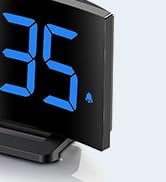
Image 5.1: The GOLOZA Digital Projection Alarm Clock actively projecting the time onto a surface, demonstrating its projection capability.
- Activating/Deactivating Projection: Pritisnite Projektor button (or similar) to turn the projection on or off.
- Adjusting Projection Brightness: While the projector is on, press the Svetlost projektorja button (or the same Projector button repeatedly) to cycle through brightness levels (e.g., High, Medium, Low).
- Vrteča se projekcija: The projector lens can be physically rotated 180° to adjust the projection angle. Some models may also have a button to flip the projected image.
5.4 Uporaba polnilnih vrat USB
The integrated USB port allows you to charge external devices.
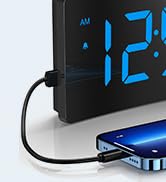
Image 5.2: The GOLOZA Digital Projection Alarm Clock with a smartphone connected to its USB charging port, illustrating its charging capability.
- Connect your device's USB charging cable to the USB output port on the alarm clock.
- Prepričajte se, da je budilka vklopljena.
- The clock's USB port provides power to charge your device.
5.5 Funkcija dremeža
Ko se oglasi alarm, pritisnite dremež button (often a large button on top) to temporarily silence the alarm. The alarm will sound again after a preset interval (e.g., 9 minutes).
5.6 Alarm Volume Adjustment
The alarm volume is progressive, meaning it starts soft and gradually increases. Some models may offer adjustable volume levels.
- If available, press the Glasnost button (or a dedicated switch) to adjust the alarm volume to your preferred level.
6. Vzdrževanje
- Čiščenje: Uro obrišite z mehko, suho krpo. Ne uporabljajte abrazivnih čistil ali topil.
- Umestitev: Place the clock on a stable, flat surface away from direct sunlight, heat sources, and moisture.
- Baterija: The internal button battery is for memory backup. If the clock consistently loses settings after a power outage, the battery may need replacement by a qualified technician.
7. Odpravljanje težav
| Težava | Možen vzrok | rešitev |
|---|---|---|
| Prikaz ure je izklopljen. | Ni priključka za napajanje. | Ensure the power adapter is securely plugged into the clock and a working electrical outlet. |
| Projekcija je temna ali nejasna. | Incorrect brightness setting; dirty lens; too much ambient light. | Adjust projection brightness. Clean the projector lens with a soft cloth. Reduce ambient light in the room. |
| Alarm se ne oglasi. | Alarm is not activated; alarm volume is too low. | Ensure the alarm icon is visible on the display. Check and adjust alarm volume. |
| Time settings are lost after power outage. | Internal backup battery is depleted or faulty. | The internal button battery may need replacement. Contact customer support. |
| Polnjenje prek USB-ja ne deluje. | Clock not powered; faulty USB cable; device not compatible. | Ensure the clock is powered. Try a different USB cable. Check device compatibility. |
8. Specifikacije
| Funkcija | Podrobnost |
|---|---|
| Številka modela | LA-C337 |
| Dimenzije (D x Š x V) | 17.7 x 3.81 x 7.8 cm |
| Teža | 310 gramov |
| Znamka | GOLOZA |
| barva | Modra |
| Slog | Modern/Elegant/Minimalist |
| Posebne lastnosti | Integrated Design, Built-in Button Battery (for memory), USB Charging Port, Super Clear Projection, Progressive Volume, Curved Display |
| Vir napajanja | Electrical (USB Powered) |
| oblika | Rectangular, Curved Screen |
| Baterije priložene | No (Internal button battery for memory backup is pre-installed but not user-replaceable) |
| UPC/GTIN | 647697054284 |
9. Garancija in podpora
GOLOZA is committed to providing quality products and customer satisfaction.
- Politika vračila: 6 Months Return period.
- Garancija: 24-mesečna garancija od datuma nakupa.
- Podpora: Lifetime Support is provided for this product.
For any questions, technical assistance, or warranty claims, please contact GOLOZA customer service through your purchase platform or the official GOLOZA webmesto.