
1. Uvod
Thank you for choosing the N-Gear Let's Go Party 5150 Portable Bluetooth Speaker. This manual provides essential information for the safe and efficient operation of your device. Please read it thoroughly before use and retain it for future reference.

Image 1.1: N-Gear Let's Go Party 5150 Portable Bluetooth Speaker with active LED lighting.
Ključne značilnosti:
- Powerful 200 Watt output with dual 6-inch speakers.
- Brezžična povezava Bluetooth za nemoteno pretakanje zvoka.
- Integrated LED disco lighting and light projection for enhanced ambiance.
- True Wireless Stereo (TWS) function to connect multiple speakers.
- Wireless microphone included for karaoke and announcements.
- MP3 playback via USB and MicroSD card.
- AUX audio input for wired connections.
- Built-in power bank function to charge external devices.
- Up to 5 hours of battery life (actual duration may vary).
- Daljinski upravljalnik za udobno upravljanje.
- Vodotesen dizajn za zunanjo uporabo.
2. Varnostne informacije
Da preprečite poškodbe naprave ali telesne poškodbe, upoštevajte naslednje varnostne ukrepe:
- Do not expose the speaker to extreme temperatures, direct sunlight, or excessive humidity.
- Ensure the charging port cover is securely closed when not charging, especially in wet environments, to maintain its waterproof rating.
- Naprave ne razstavljajte, popravljajte ali spreminjajte sami. Za vsa popravila se obrnite na usposobljeno servisno osebje.
- Keep the speaker away from sources of strong magnetic fields.
- Uporabljajte samo predpisani polnilni kabel in napajalnik.
- Izogibajte se poslušanju pri pretirano glasnih zvokih dlje časa, da preprečite poškodbe sluha.
- Hraniti izven dosega otrok.
3. Vsebina paketa
Preverite, ali so v paketu prisotni vsi elementi:
- N-Gear Let's Go Party 5150 Portable Bluetooth Speaker
- Brezžični mikrofon
- Daljinski upravljalnik
- Polnilni kabel za izmenični tok
- Uporabniški priročnik (ta dokument)

Image 3.1: Included Remote Control and Wireless Microphone.
4. Nastavitev
4.1 Polnjenje zvočnika
- Locate the AC charging port on the back panel of the speaker.
- Connect the supplied AC charging cable to the speaker and then to a power outlet.
- Indikatorska lučka polnjenja bo zasvetila. Popolno polnjenje traja približno 3–4 ure.
- Ko je naprava popolnoma napolnjena, odklopite polnilni kabel in se prepričajte, da je pokrovček priključka zaprt.
4.2 Vklop/izklop
- To power on: Press and hold the Power button (usually located on the control panel) for a few seconds until you hear an audible prompt or see the display light up.
- Za izklop: Ponovno pritisnite in držite gumb za vklop, dokler se zvočnik ne izklopi.
4.3 Bluetooth seznanjanje
- Ensure the speaker is powered on and in Bluetooth mode. If not, press the 'MODE' button on the speaker or remote control until "Bluetooth" or "BT" is displayed.
- Na mobilni napravi (pametnem telefonu, tabličnem računalniku itd.) omogočite Bluetooth in poiščite razpoložljive naprave.
- Select "N-Gear LGP 5150" from the list of devices.
- Once paired, the speaker will emit a confirmation sound, and the Bluetooth indicator will remain solid.
Opomba: Zvočnik se bo ob vklopu samodejno poskušal ponovno povezati z zadnjo seznanjeno napravo.
4.4 Connecting the Wireless Microphone
- Insert batteries into the wireless microphone (if not pre-installed).
- Power on the microphone using its dedicated power switch.
- The microphone should automatically connect to the speaker. Adjust the microphone volume using the dedicated knob on the speaker's control panel.
5. Navodila za uporabo
5.1 Izbira načina
Press the 'MODE' button on the speaker or remote control to cycle through available input modes:
- Bluetooth (BT): For wireless audio streaming from your paired device.
- USB: For playing MP3 files ključka USB.
- MicroSD (TF Card): For playing MP3 files from a MicroSD card.
- POMOŽ: For wired audio input using a 3.5mm audio cable.
5.2 Predvajanje zvoka
- Nadzor glasnosti: Use the main volume knob on the speaker or the VOL+/- buttons on the remote control.
- Track Navigation: Use the Previous/Next buttons on the speaker or remote control to skip tracks in Bluetooth, USB, or MicroSD modes.
- Predvajaj/Premor: Press the Play/Pause button to start or pause playback.
5.3 Krmiljenje LED osvetlitve
The speaker features integrated LED disco lights and a top light projector.
- Press the dedicated 'LIGHT' or 'LED' button on the speaker or remote control to cycle through different light modes or turn them off.
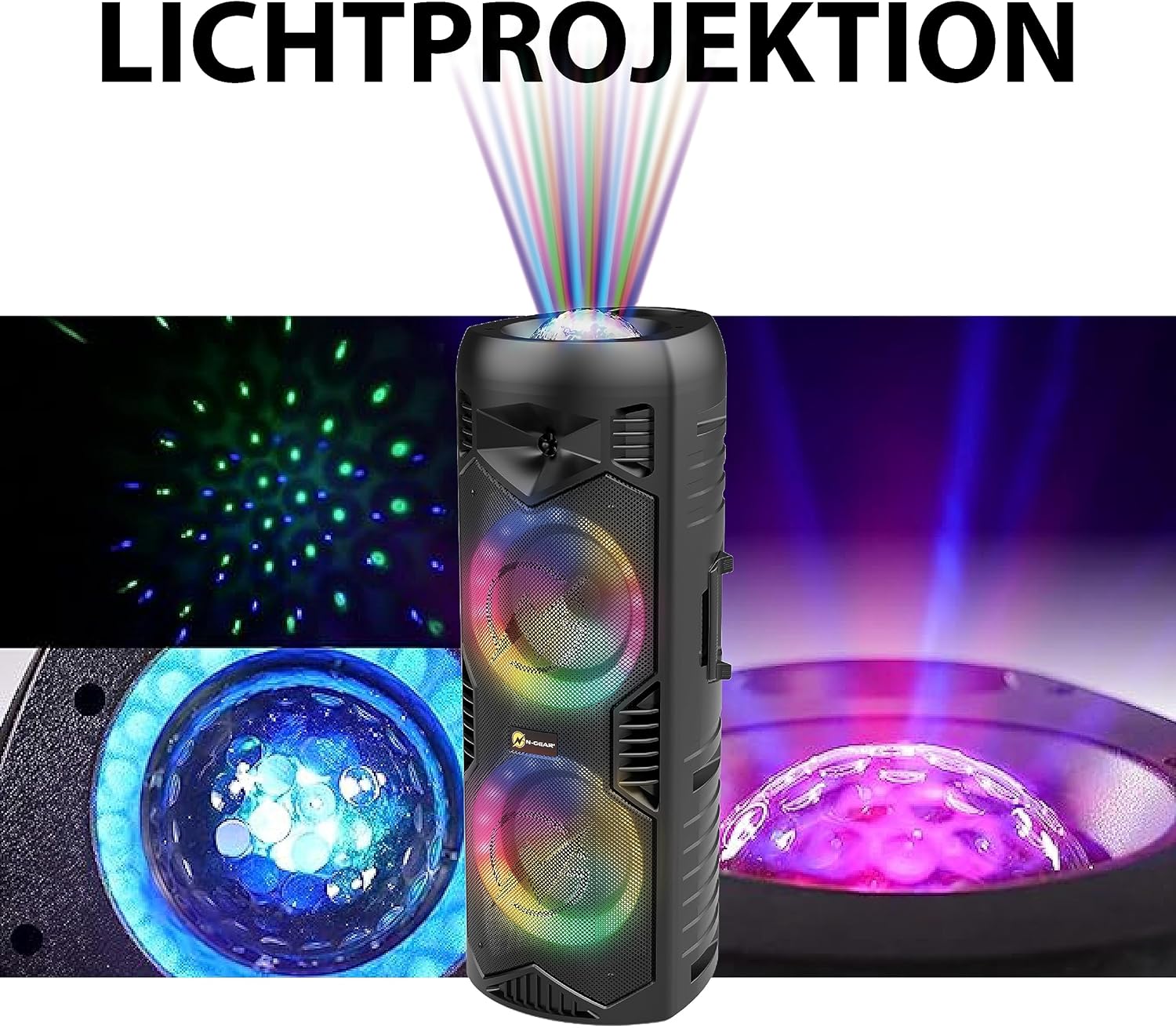
Image 5.1: Detail of the speaker's light projection and LED effects.
5.4 Funkcija pravega brezžičnega stereo sistema (TWS)
The TWS function allows you to pair two N-Gear Let's Go Party 5150 speakers together for a stereo sound experience.
- Prepričajte se, da sta oba zvočnika vklopljena in v načinu Bluetooth, vendar nista povezana z nobeno napravo.
- On one speaker (this will be the primary speaker), press and hold the 'TWS' button (if available) or a combination of buttons as indicated in the quick start guide.
- Primarni zvočnik bo poiskal sekundarni zvočnik. Ko bo vzpostavljena povezava, boste zaslišali potrditveni zvok.
- Now, connect your mobile device to the primary speaker via Bluetooth as described in section 4.3. Audio will play in stereo through both speakers.
5.5 Funkcija prenosne baterije
The speaker can be used to charge external devices via its USB output port.
- Connect your device's USB charging cable to the USB output port on the speaker.
- Zvočnik bo začel polniti vašo napravo.
6. Vzdrževanje
6.1 Čiščenje
- Zunanjost zvočnika obrišite z mehko krpoamp krpo. Ne uporabljajte abrazivnih čistil ali topil.
- Ensure all ports are dry before use, especially after exposure to water.
6.2 Shranjevanje
- Zvočnik shranjujte na hladnem in suhem mestu, stran od neposredne sončne svetlobe in ekstremnih temperatur.
- Če baterijo shranjujete dlje časa, jo napolnite do približno 50 % vsakih nekaj mesecev, da podaljšate njeno življenjsko dobo.
7. Odpravljanje težav
| Težava | Možen vzrok | rešitev |
|---|---|---|
| Zvočnik se ne vklopi. | Baterija je prazna. | Connect the speaker to a power source using the AC charging cable and allow it to charge. |
| Brez zvoka iz zvočnika. | Volume is too low; incorrect mode selected; device not properly connected. | Increase the volume. Ensure the correct input mode (Bluetooth, USB, AUX) is selected. Re-pair Bluetooth device or check cable connections. |
| Naprave Bluetooth ni mogoče seznaniti. | Zvočnik ni v načinu seznanjanja; naprava je predaleč; motnje. | Ensure speaker is in Bluetooth mode and discoverable. Move device closer to speaker. Turn off other Bluetooth devices. |
| Mikrofon ne deluje. | Microphone is off; batteries are low/dead; microphone volume is low. | Ensure microphone is powered on. Replace microphone batteries. Increase microphone volume on the speaker. |
| LED luči ne delujejo. | Luči so ugasnjene ali v statičnem načinu. | Press the 'LIGHT' or 'LED' button to cycle through modes or turn them on. |
8. Specifikacije
| Funkcija | Podrobnost |
|---|---|
| Številka modela | LGP 5150 BK |
| Znamka | N-Gear |
| Izhodna moč | 200 vatov |
| Velikost zvočnika | Dvojni 6-palčni zvočniki |
| Povezljivost | Bluetooth, USB, MicroSD, AUX (3.5mm) |
| Brezžična tehnologija | Bluetooth |
| Vrsta baterije | Litij-ionska (priložena) |
| Življenjska doba baterije | Do 5 ur (odvisno od uporabe) |
| Dimenzije (D x Š x V) | 26.5 x 32 x 68.5 cm (10.4 x 12.6 x 26.9 palca) |
| Teža | 5.5 kilogramov (12.1 lbs) |
| Vodotesen | ja |
| Vključene komponente | Speaker, Wireless Microphone, Remote Control, AC Charging Cable, User Manual |

Image 8.1: Speaker Dimensions.
9. Garancija in podpora
N-Gear products are designed and manufactured to the highest quality standards. For information regarding warranty coverage, please refer to the warranty card included with your purchase or visit the official N-Gear webmesto.
For technical support, troubleshooting assistance, or service inquiries, please contact N-Gear customer support through their official channels. Contact information can typically be found on the product packaging or the N-Gear webmesto.
Webspletno mesto: www.n-gear.eu