
GeekTale F02-02
Uporabniški priročnik za pametni zaklep GeekTale F02-02
Model: F02-02 | Brand: GeekTale
1. Uvod
This manual provides comprehensive instructions for the installation, operation, and maintenance of your GeekTale F02-02 Smart Deadbolt. Please read this manual thoroughly before installation and use to ensure proper function and safety.
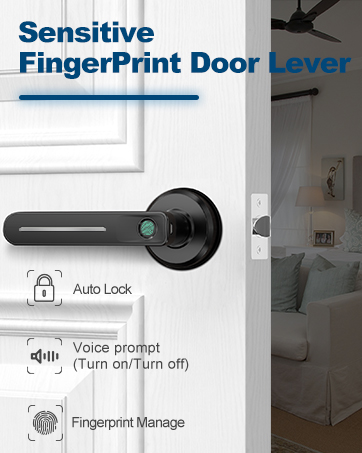
The GeekTale F02-02 is a 4-in-1 keyless entry door lock offering multiple access methods: fingerprint, keypad passcode, Bluetooth app control, and traditional physical keys. It is designed for enhanced security and convenience in residential settings.
2. Vsebina paketa
Pred začetkom namestitve preverite, ali so vse komponente prisotne.
- GeekTale F02-02 Smart Deadbolt (Exterior and Interior Assemblies)
- Mounting Hardware (Screws, Bolts)
- Zaporna plošča in ojačitvena plošča
- Fizični tipki (2)
- Predloga za namestitev
- Uporabniški priročnik

3. Specifikacije
| Funkcija | Podrobnost |
|---|---|
| Ime modela | F02-02 |
| Znamka | GeekTale |
| Vrsta ključavnice | Biometrični zapah |
| Material | Aluminij |
| Vrsta zaključka | Polished (Satin Nickel) |
| Nadzorna metoda | App, Touch (Fingerprint/Keypad) |
| Kapaciteta prstnih odtisov | Do 50 |
| Zmogljivost gesla | Do 20 |
| Vir napajanja | 4 AA baterij (niso priložene) |
| Zasilno napajanje | Vrata USB-C |
| Dimenzije (D x Š x V) | 2.95 x 2.16 x 5.31 palcev |
| Teža predmeta | 1.94 funtov (0.88 kg) |

4. Namestitev
The GeekTale F02-02 Smart Deadbolt is designed for easy installation and can replace most existing deadbolts. Ensure your door meets the specifications outlined in Section 3 before proceeding.
4.1 Priprava
- Potrebna orodja: Phillips head screwdriver, measuring tape.
- Združljivost vrat: Ensure your door thickness is between 1-3/8" (35mm) and 2-1/8" (54mm). The door hole diameter should be 2-1/8" (54mm). The backset (distance from door edge to center of bore hole) should be 2-3/4" (70mm) or 2-3/8" (60mm).
- Določite predajo vrat: The lock is reversible for left-handed and right-handed doors.
4.2 Namestitev po korakih
- Odstranite obstoječi zapah: Odvijte in odstranite trenutni zapah z vrat.
- Namestitev zapaha: Insert the new latch bolt into the door edge. Ensure the "UP" arrow on the latch bolt faces upwards. Secure with screws.
- Namestite zunanji sklop: Feed the cable from the exterior keypad unit through the door hole. Align the exterior unit with the latch bolt and secure it to the door.
- Namestitev notranje montažne plošče: Route the cable through the mounting plate. Secure the mounting plate to the exterior assembly using the provided screws.
- Priključitev kabla in namestitev notranjega sklopa: Connect the cable from the exterior unit to the interior unit's port. Ensure the thumb-turn spindle is correctly aligned with the latch bolt mechanism. Secure the interior assembly to the mounting plate with screws.
- Namestitev zaporne plošče: Install the strike plate and reinforcement plate on the door frame, aligning them with the latch bolt.
- Vstavite baterije: Open the battery cover on the interior unit and insert 4 AA alkaline batteries (not included). Close the cover.
- Testno delovanje: Manually test the deadbolt by rotating the thumb-turn. Ensure it extends and retracts smoothly.

5. Navodila za uporabo
The GeekTale F02-02 Smart Deadbolt offers multiple ways to lock and unlock your door.
5.1 Začetna nastavitev in seznanjanje aplikacij
- Prenesite aplikacijo: Iskanje the "GeekTale" app in your smartphone's app store (iOS/Android).
- Ustvari račun: Sledite navodilom v aplikaciji, da ustvarite uporabniški račun.
- Dodaj napravo: In the app, select "Add Device" and follow the prompts to pair your smart deadbolt via Bluetooth. Ensure Bluetooth is enabled on your phone and you are within range of the lock.
- Set Administrator: The first fingerprint or passcode registered through the app will typically be designated as the administrator.

5.2 Metode odklepanja
- Odklepanje prstnih odtisov: Place your registered finger on the fingerprint sensor on the exterior unit. The lock will unlock if the fingerprint is recognized.

Fingerprint unlocking in progress. - Odklepanje z geslom: Enter your registered 6-digit passcode on the keypad. The lock will unlock upon correct entry.

Keypad entry with anti-peep function, where random digits can be entered before or after the actual passcode. - App Bluetooth Unlock: Open the GeekTale app on your smartphone, ensure Bluetooth is active, and tap the unlock icon.
- Odklepanje s fizičnim ključem: In case of battery depletion or electronic malfunction, use the provided physical keys to unlock the deadbolt.
5.3 Metode zaklepanja
- Samodejno zaklepanje: The lock can be configured via the app to automatically lock after a set period (e.g., 5-60 seconds) once unlocked.

The auto-lock feature automatically secures the deadbolt after a preset time. - Zaklepanje z enim dotikom: Press the '#' key on the keypad to manually lock the door from the outside.
- App Bluetooth Lock: Open the GeekTale app on your smartphone and tap the lock icon.
- Ročno zaklepanje (notranjost): Rotate the thumb-turn on the interior unit to lock the door.
5.4 Funkcije aplikacije
- Upravljanje uporabnikov: Add, modify, or delete fingerprints and passcodes for up to 20 family members.
- Dnevnik dostopa: View a history of lock and unlock events, including method and user.
- Začasne gesla: Generate one-time or time-limited passcodes for guests or service providers.
- Način izklopa zvoka: Enable or disable sound feedback from the lock for quiet operation.
- Opozorilo o nizki bateriji: Prejemajte obvestila, ko je raven baterije nizka.
- Auto-Lock Timer: Adjust the duration for the auto-lock feature.


6. Vzdrževanje
- Zamenjava baterije: Replace all 4 AA batteries when the low battery alert is triggered. Use only new, high-quality alkaline batteries. Do not mix old and new batteries or different battery types.
- Čiščenje: Clean the lock's exterior surfaces with a soft, dry cloth. Avoid abrasive cleaners or solvents that could damage the finish or electronic components.
- Senzor prstnih odtisov: Za optimalno delovanje naj bo senzor prstnih odtisov čist in suh.
- Zasilno napajanje: If batteries deplete completely, connect a USB-C power bank to the emergency power port on the exterior unit to temporarily power the lock and gain access.
7. Odpravljanje težav
| Težava | Možen vzrok | rešitev |
|---|---|---|
| Zaklepanje se ne odziva. | Prazne baterije. | Replace batteries. Use emergency USB-C power if needed. |
| Prstni odtis ni prepoznan. | Finger dirty/wet, sensor dirty, fingerprint not properly registered. | Očistite prst in senzor. Če težava ne izgine, ponovno registrirajte prstni odtis. |
| Passcode not working. | Incorrect passcode entered, passcode expired (temporary). | Verify passcode. Check app for temporary passcode status. |
| Aplikacija se ne more povezati s ključavnico. | Bluetooth off, phone too far, app issue. | Ensure Bluetooth is on and phone is close. Restart app/phone. |
| Lock grinds or doesn't fully extend/retract. | Misalignment during installation, obstruction. | Check installation alignment. Ensure no obstructions in door frame/latch. |
8. Garancija in podpora
GeekTale provides localized after-sales customer service. For any issues or questions regarding your product, please contact GeekTale customer support through the official channels. Refer to your purchase documentation for specific warranty terms and contact information.
Kontaktni podatki: Obiščite GeekTale Store on Amazon or refer to the contact details provided with your product packaging.
Ask a question about this manual
Ask about setup, troubleshooting, compatibility, parts, safety, or missing instructions. Manuals+ will review the question and use this page’s manual context to help answer it.