
Uvod
This manual provides detailed instructions for the setup, operation, and maintenance of your ADAM elements USB-C Hub Stand Pro. This device combines an ergonomic laptop stand with a 6-in-1 multiport USB-C hub, designed to enhance connectivity and comfort for M2/M1 Mac, iPad, and other USB-C compatible laptops.
Konec izdelkaview
The ADAM elements USB-C Hub Stand Pro is a versatile accessory that integrates a laptop stand with a powerful USB-C hub. It features a detachable design, allowing the hub to be used independently. The stand offers adjustable height and a 360-degree rotatable base for optimal viewing kotov.
Ključne značilnosti:
- 6-in-1 Multiport Hub: Includes USB-C Host, 2x USB-A, USB-C PD, HDMI, and RJ45 Ethernet.
- Ergonomic Laptop Stand: Adjustable elevation up to 29 cm and 180-degree angle.
- 360-stopinjsko vrtenje: Swivel base for flexible viewing.
- 4K pri 60 Hz HDMI izhod: Supports high-resolution video with HDCP 2.2.
- 100 W moč: USB-C PD port for fast charging.
- Detachable Hub: Use the hub integrated with the stand or as a portable device.
- Durable All-Aluminum Design: Robust construction with anti-slip silicone pads.
- Right-Angle USB-C Cable: Reduces strain and ensures a secure connection.
Konfiguracija vrat:
| Vrsta pristanišča | Količina | Funkcionalnost |
|---|---|---|
| Gostitelj USB-C | 1 | Connects to laptop/device (USB-C 3.1 Gen 2) |
| USB-A | 2 | Prenos podatkov do 5Gbps |
| USB-C PD | 1 | Power Delivery Pass-Through charging up to 100W |
| HDMI | 1 | Video output up to 4K@60Hz |
| RJ45 Ethernet | 1 | Network connection (1000 Mbps Max) |

Image: The ADAM elements USB-C Hub Stand Pro, showcasing its ergonomic design and integrated hub.

Slika: Podrobna view of the 6 multi-function ports for charging, video, and data transmission.
Navodila za namestitev
- Razpakirajte napravo: Carefully remove the USB-C Hub Stand Pro from its packaging.
- Postavite stojalo: Stojalo postavite na stabilno, ravno površino.
- Prilagodite stojalo:
- Gently adjust the stand's arms to your desired height and angle. The stand supports an elevation angle of up to 180 degrees and a height of up to 29 cm.
- The base can be rotated 360 degrees horizontally for optimal viewing.
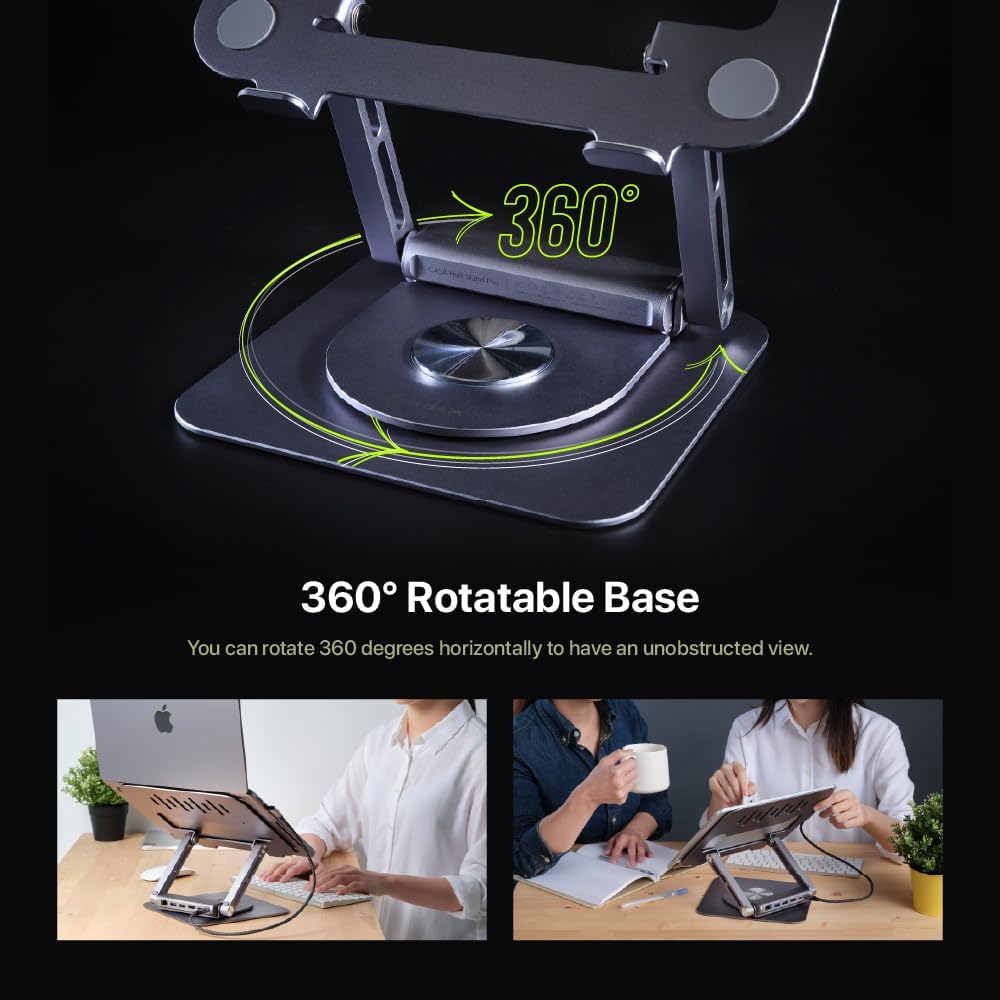
Image: Demonstrating the 360-degree rotatable base for flexible positioning.
- Attach/Detach the Hub:
- The hub is designed to be detachable. To attach, align the hub with the designated slot on the stand and slide it into place until it clicks securely.
- To detach, gently pull the hub away from the stand. This allows for independent use or portability.

Image: The detachable design of the hub, allowing it to be used separately.
- Povežite se z vašo napravo: Use the integrated right-angle USB-C cable to connect the hub to your laptop or iPad's USB-C port. Ensure the connection is firm.
- Povežite zunanje naprave: Plug your desired peripherals (e.g., external monitor, USB drives, Ethernet cable, power adapter) into the corresponding ports on the hub.
Navodila za uporabo
Using the USB-C Hub:
- Napajanje (PD): Connect your laptop's USB-C power adapter to the USB-C PD port on the hub to charge your device while using the hub's other functions. The hub supports up to 100W pass-through charging.
- Vrata USB-A: Use the two USB-A ports for connecting USB devices such as keyboards, mice, external hard drives, or flash drives. These ports support data transfer speeds up to 5Gbps.
- HDMI izhod: Connect an external monitor or projector to the HDMI port. The hub supports 4K resolution at 60Hz.
- To enjoy 4K@60Hz resolution, ensure your device supports DisplayPort (DP) 1.4 or higher.
- You can configure your display settings for Mirror Mode (duplicate your primary screen) or Extend Mode (expand your desktop across multiple screens) through your operating system's display settings.

Image: High-resolution 4K@60Hz video output capabilities.

Image: External display options: Mirror Mode and Extended Mode.
- RJ45 Ethernet vrata: Connect an Ethernet cable to this port for a stable wired network connection, supporting speeds up to 1000 Mbps.
Using the Laptop Stand:
- Ergonomska nastavitev: Adjust the height and angle of the stand to achieve an ergonomic viewing position, reducing strain on your neck and back.
- 360-stopinjsko vrtenje: Rotate the base of the stand to easily share your screen with others or change your viewing angle without moving the entire setup.
- Združljivost: The stand is designed to securely hold M2/M1 MacBook series, iPad, and other USB-C laptops. The anti-slip silicone pads ensure stability.

Image: The stand is suitable for MacBook and iPad series.
Vzdrževanje
- Čiščenje: Use a soft, dry cloth to wipe down the stand and hub. Avoid abrasive cleaners or solvents that may damage the finish.
- Shranjevanje: When not in use, store the device in a cool, dry place. The detachable hub can be stored separately for travel.
- Skrb za kabel: Ensure the right-angle USB-C cable is not excessively bent or strained to prevent damage.
- Izogibajte se preobremenitvi: Do not connect devices that exceed the hub's power capabilities.
Odpravljanje težav
| Težava | Možen vzrok | rešitev |
|---|---|---|
| Na zunanjem monitorju ni slike. | Incorrect cable connection, incompatible resolution, device not supporting DP 1.4. |
|
| Naprave USB niso prepoznane. | Loose connection, insufficient power, driver issues. |
|
| Prenosnik se ne polni prek PD vhoda. | Power adapter not connected, adapter not powerful enough, faulty cable. |
|
| Ethernet connection unstable or not working. | Loose cable, network issues, driver issues. |
|
Specifikacije
| Funkcija | Podrobnost |
|---|---|
| Številka modela | AAPADHUBSTDPGY |
| Dimenzije izdelka | 1.8 x 10.2 x 8.8 palcev (4.57 x 25.91 x 22.35 cm) |
| Teža predmeta | 2.3 funtov (1.04 kg) |
| Pristanišča | 1x USB-C Host (USB-C 3.1 Gen 2), 2x USB-A (5Gbps), 1x USB-C PD (up to 100W), 1x HDMI (4K@60Hz), 1x RJ45 Ethernet (1000 Mbps) |
| Ločljivost HDMI | Up to 4K@60Hz, HDCP 2.2 compatible |
| Dostava moči | Up to 100W Pass-Through |
| Hitrost prenosa podatkov (USB-A) | Do 5 Gbps |
| Ethernet hitrost | 10/100/1000 Mbps |
| Material | Iz aluminija |
| Združljive naprave | M2/M1 MacBook Series, iPad, USB-C Laptops |
Garancija in podpora
ADAM ELEMENTS products are designed for reliability and performance. For warranty information and technical support, please refer to the official ADAM ELEMENTS webspletno mesto ali se obrnite neposredno na njihovo službo za stranke.
For additional support or to inquire about replacement parts, please visit: www.adamelements.com