
1. Pomembne varnostne informacije
Please read these instructions carefully before installation. If you do not understand these instructions or have doubts about the safety of the installation, please contact a qualified installer. The manufacturer is not responsible for damage or injury caused by incorrect mounting or operation.
- Zmogljivost teže: This TV wall mount is designed for TVs weighing up to 110 lbs (50 kg)Ne prekoračite te omejitve teže.
- Združljivost TV velikosti: Združljiv z večino 40-82 palcev flat or curved TVs.
- Združljivost z VESA: Supports VESA mounting patterns from 200x100 mm do 600x400 mm. Verify your TV's VESA pattern before installation.
- Vrsta stene: This mount is designed for installation on leseni čepi or solid concrete/brick walls. NE nameščajte samo na suhomontažne plošče.
- UL na seznamu: This product is UL Listed, indicating it meets specific safety standards.
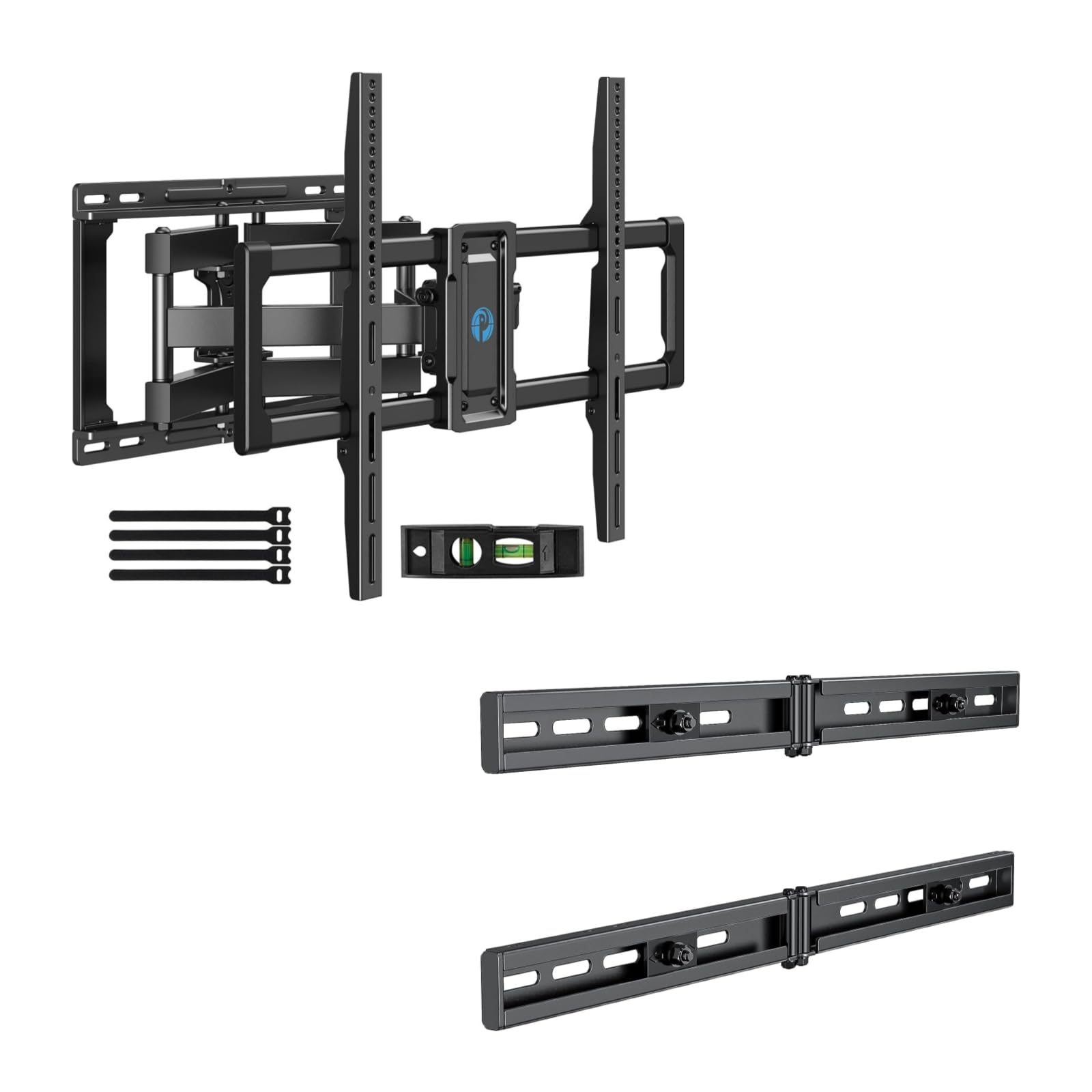
Image 1.1: Reinforced stability of the mount, highlighting heavy-duty steel arms and UL certification for safety and durability.
2. Vsebina paketa
Please check to ensure all components are present and undamaged before beginning installation. If any parts are missing or defective, contact Pipishell customer service.
2.1 Potrebno orodje (ni vključeno)
- Svinčnik
- Iskalnik žrebcev
- Drill with appropriate drill bits (e.g., 5/32" (4mm) for wood studs, 3/8" (10mm) for concrete)
- Raven
- Merilni trak
- Nasadni ključ ali nastavljivi ključ
- Phillips izvijač za glavo
2.2 Hardware and Components (Included)
- Sestavljanje stenske plošče
- TV nosilci (2)
- Extension Brackets (2)
- Various TV Screws, Washers, and Spacers (M4, M6, M8)
- Lag Bolts and Concrete Anchors
- Mehurček ravni
- Kabelske vezice
3. Nastavitev in namestitev
3.1 Preverjanja pred namestitvijo
- Verify your TV's weight, size, and VESA pattern are within the mount's specifications.
- Determine the desired viewing height for your TV.
- Locate the wall studs using a stud finder. Mark the center of the studs.
3.2 Namestitev stenske plošče
The extension bracket feature allows for installation on wood studs with spacing between 16 and 24 inches.
- Position the wall plate assembly on the wall at your desired height, ensuring it is level. Mark the drill holes.
- For wood stud installation, drill pilot holes (e.g., 5/32" or 4mm) into the center of the studs. For concrete/brick, drill pilot holes (e.g., 3/8" or 10mm) and insert concrete anchors.
- Attach the wall plate to the wall using the provided lag bolts. Tighten securely.

Image 3.1: The extended wall plate design provides a flexible solution for mounting on walls with stud spacing between 16 and 24 inches.

Image 3.2: This feature helps center your TV for optimal viewing, even when wall studs are not perfectly centered.
3.3 Pritrditev nosilcev televizorja na televizor
- Televizor previdno položite z zaslonom navzdol na mehko, čisto površino.
- Select the appropriate screws, washers, and spacers for your TV's VESA mounting holes.
- Attach the two TV brackets to the back of your TV. Ensure they are securely fastened and evenly spaced.
3.4 Montaža televizorja na stensko ploščo
- With assistance, carefully lift the TV and hook the TV brackets onto the wall plate.
- Prepričajte se, da je televizor varno pritrjen na stensko ploščo.
- Tighten the safety screws or locking mechanisms on the TV brackets to prevent accidental dislodgement.
4. Upravljanje nosilca za televizor
This full motion mount allows for flexible adjustment to achieve the best viewvhodni kot.
4.1 Nastavitev vrtenja
The mount allows for a swivel range of +/-45°. Gently push or pull the TV to the desired left or right angle.

Image 4.1: The mount offers a smooth swivel motion of up to 45 degrees in either direction for flexible viewing.
4.2 Nastavitev nagiba
Adjust the tilt angle from +5° do -15° to reduce glare and optimize viewing. This adjustment is tool-free.

Image 4.2: Easily adjust the TV's vertical angle from +5° to -15° without tools to minimize glare and improve comfort.
4.3 Izteg in umik
The mount allows the TV to extend from the wall by 2.89 do 16.3 palcev. Gently pull the TV forward or push it back towards the wall to adjust the distance.

Image 4.3: Adjust the TV's distance from the wall, extending up to 16.3 inches or retracting to 2.89 inches for optimal viewing prostora.
5. Vzdrževanje
- Redni pregledi: Občasno preverite vse vijake in povezave, da se prepričate, da so trdno priviti in varno pritrjeni.
- Čiščenje: Nosilec očistite z mehko, suho krpo. Izogibajte se abrazivnim čistilom ali topilom.
- Mazanje: The moving parts are designed for smooth operation. No lubrication is typically required. If movement becomes stiff, check for debris or loose components.
6. Odpravljanje težav
- Televizor ni poravnan: Check the level of the wall plate during installation. Most mounts have a post-installation leveling adjustment. Refer to the specific mechanism on your mount.
- Difficulty adjusting swivel/tilt/extension: Ensure no cables are snagged or obstructing movement. Check if any adjustment knobs or screws are overtightened. The mount features improved torque accuracy for smoother movement.
- Nosilec se na steni zdi ohlapen: Immediately remove the TV from the mount. Re-check all wall plate fasteners and ensure they are securely anchored into the studs or concrete. If issues persist, consult a professional installer.
- TV brackets do not fit TV: Verify your TV's VESA pattern matches the mount's compatibility (200x100mm to 600x400mm). Ensure you are using the correct screws and spacers for your TV model.
7. Specifikacije
| Funkcija | Specifikacija |
|---|---|
| Vrsta namestitve | Stenski nosilec |
| Vrsta gibanja | Artikuliranje (polno gibanje) |
| Znamka | Pipishell |
| Material | Legirano jeklo |
| Združljive naprave | televizija |
| Minimum Supported Screen Size | 40 palcev |
| Maximum Supported Screen Size | 82 palcev |
| Največja nosilnost | 110 lbs (50 kg) |
| Združljivost VESA | 200x100 mm do 600x400 mm |
| Vrtljiv domet | +/-45 stopinj |
| Razpon nagiba | +5 / -15 Degrees (Tool-Free) |
| Podaljšek od stene | 2.89 - 16.3 palcev |
8. Garancija in podpora strankam
Pipishell products are designed for durability and performance. For warranty information or technical assistance, please contact Pipishell customer support through their official webspletno mesto ali prodajalec, kjer je bil izdelek kupljen.
Ko se obrnete na podporo, imejte pri roki model izdelka in datum nakupa.