1. Uvod
This manual provides detailed instructions for the setup, operation, and maintenance of your new Generic Manta Smart TV Remote Control. Please read this manual thoroughly before using the remote to ensure proper functionality and to maximize your viewizkušnje.
2. Združljivost
This remote control is designed for use with Manta Smart TVs. For optimal compatibility, ensure that the physical appearance of this remote matches your original Manta Smart TV remote. Additionally, verify that the remote includes a 'Fav' button in the last row of buttons, as this indicates full compatibility with specific Manta Smart TV models.
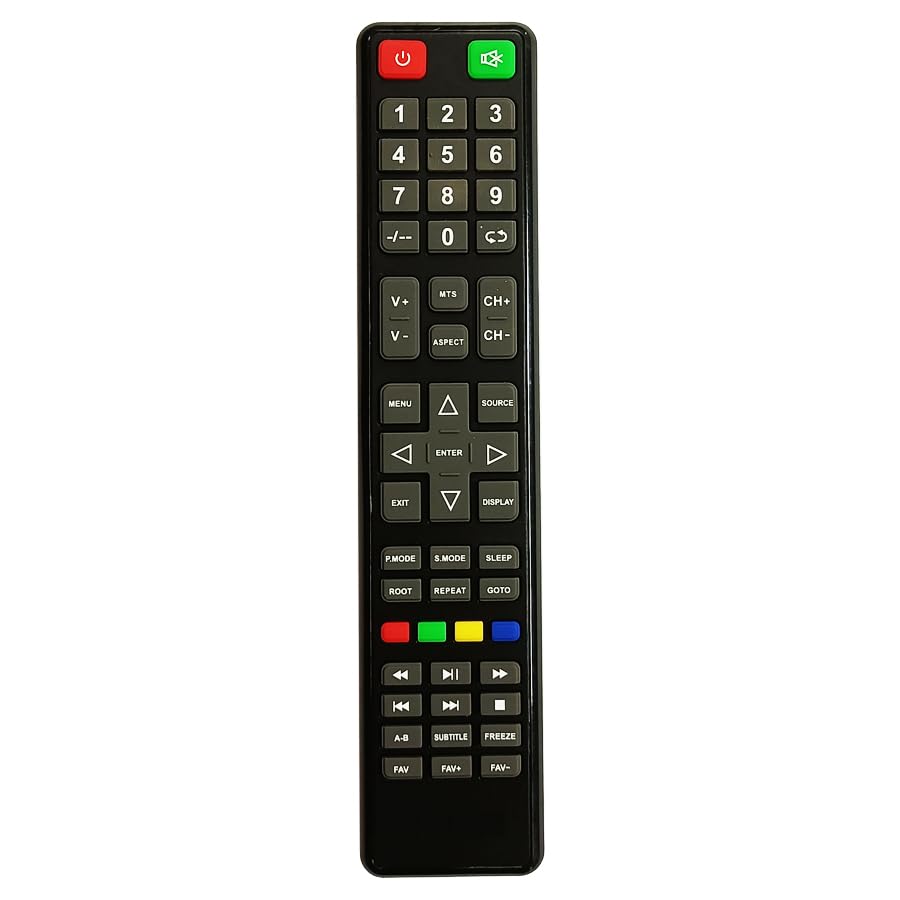
Figure 1: Manta Smart TV Remote Control. A black remote control with various buttons for TV operation, including a numeric keypad, navigation buttons, and dedicated smart TV function buttons.
3. Namestitev baterije
The remote control requires Lithium Ion batteries (not typically included). Follow these steps to install the batteries:
- Poiščite pokrov prostora za baterije na zadnji strani daljinskega upravljalnika.
- Potisnite pokrov navzdol ali pritisnite zapah, da odprete predal.
- Insert the Lithium Ion batteries, ensuring the positive (+) and negative (-) terminals align correctly with the markings inside the compartment.
- Zaprite pokrov predalčka za baterije tako, da ga potisnete nazaj na svoje mesto, dokler se ne zaskoči.
Opomba: Always replace all batteries at the same time. Do not mix old and new batteries, or different types of batteries.
4. Nastavitev in prva uporaba
This remote control uses infrared (IR) technology and typically does not require complex pairing. Once batteries are installed, it should be ready for use with compatible Manta Smart TVs.
- Ensure your Manta Smart TV is powered on or in standby mode.
- Point the remote control directly at the IR receiver on your Manta Smart TV.
- Pritisnite Moč button to turn on or off the TV. If the TV responds, the remote is successfully set up.
If the TV does not respond, refer to the Troubleshooting section.
5. Navodila za uporabo
Familiarize yourself with the main functions of the remote control:
- Gumb za vklop: Vklopi ali izklopi TV.
- Numerična tipkovnica (0-9): Uporablja se za neposredni vhod kanala.
- Povečanje/zmanjšanje glasnosti: Prilagodi raven zvoka.
- Kanal gor/dol: Zaporedno preklaplja TV-kanale.
- Gumb za izklop zvoka: Utiša ali vklopi zvok televizorja.
- Navigacijski gumbi (gor, dol, levo, desno, V redu): Used to navigate menus and select options on the screen.
- Gumb Nazaj/Izhod: Vrne se v prejšnji meni ali zapre trenutni meni.
- Gumb Pametni televizor/Domov: Dostopi do vmesnika Smart TV ali začetnega zaslona.
- Gumb Priljubljeni: Accesses your favorite channels list (if supported by your TV model).
- Barvni gumbi (rdeči, zeleni, rumeni, modri): Perform specific functions within menus or applications, as indicated on screen.
6. Odpravljanje težav
If you encounter issues with your remote control, refer to the following common problems and solutions:
| Težava | rešitev |
|---|---|
| Remote is not responding to the TV. |
|
| Nekateri gumbi ne delujejo. |
|
| Daljinski upravljalnik deluje občasno. |
|
7. Vzdrževanje
To ensure the longevity of your remote control:
- Keep the remote clean by wiping it with a soft, dry cloth.
- Daljinskega upravljalnika ne izpostavljajte ekstremnim temperaturam, neposredni sončni svetlobi ali vlagi.
- Daljinskega upravljalnika ne spuščajte in ga ne izpostavljajte močnim udarcem.
- Če daljinskega upravljalnika ne boste uporabljali dlje časa, odstranite baterije, da preprečite njihovo puščanje.
8. Specifikacije
| Funkcija | Podrobnost |
|---|---|
| Znamka | Generično |
| Proizvajalec | cheops |
| Država izvora | Kitajska |
| Tehnologija povezljivosti | Infrardeči |
| Vrsta krmilnika | Nadzor gumbov |
| Opis baterije | Litij ion |
| ASIN | B0CC31JXM4 |
9. Garancija in podpora
For warranty information and customer support, please refer to the documentation provided with your purchase or contact the seller directly. Specific warranty terms and support channels may vary depending on your region and point of purchase.


