
1. Pomembna varnostna navodila
Pred uporabo te naprave natančno preberite vsa navodila. Ta priročnik shranite za poznejšo uporabo.
- Ta aparat je namenjen samo za uporabo v gospodinjstvu.
- Naprave ne potapljajte v vodo ali druge tekočine.
- Keep the appliance away from water sources, especially when charging.
- Do not use the appliance if the cord or plug is damaged. Contact customer support for repair.
- Always ensure the appliance is switched off before cleaning or performing maintenance.
- Hraniti izven dosega otrok. Ta naprava ni igrača.
- Izogibajte se stiku z gibljivimi deli.
- Trimerja ne uporabljajte na razdraženi koži ali odprtih ranah.
- Only use the charging adapter supplied with the appliance.
2. Izdelek je končanview
The HTC AT-206A is a rechargeable hair trimmer designed for precise grooming tasks such as edging, outlining, dry shaving, and light shaping around areas like the neck, ears, and sideburns.

Image 2.1: HTC AT-206A Trimmer and its retail packaging, showing the device and included accessories.
Sestavine:
- Trimmer Unit (HTC AT-206A)
- Polnilni kabel
- Krtača za čiščenje
- Steklenica za mazalno olje
- Nastavek za glavnik
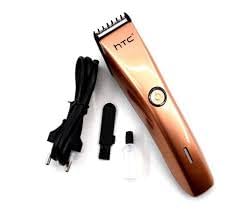
Image 2.2: The HTC AT-206A trimmer displayed with its charging cable, cleaning brush, oil bottle, and comb attachment.
3. Nastavitev in polnjenje
3.1 Začetno polnjenje
- Before first use, fully charge the trimmer for approximately 8-10 hours.
- Prepričajte se, da je prirezovalnik izklopljen.
- Priključite polnilni kabel na polnilno vtičnico trimerja.
- Priključite adapter v ustrezno električno vtičnico.
- Indikatorska lučka polnjenja (če je prisotna) bo zasvetila, kar pomeni, da polnjenje poteka.
- Once fully charged, disconnect the charger from the outlet and the trimmer.
3.2 Attaching the Comb Attachment
- Prepričajte se, da je prirezovalnik izklopljen.
- Align the comb attachment with the trimmer blade.
- Gently push the comb attachment onto the blade until it clicks into place.
- To remove, gently pull the comb attachment away from the blade.
4. Navodila za uporabo
4.1 Osnovna operacija
- Prepričajte se, da je prirezovalnik napolnjen.
- Pritisnite gumb za vklop, da vklopite prirezovalnik.
- Za izklop prirezovalnika ponovno pritisnite gumb za vklop.
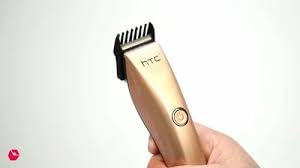
Image 4.1: The HTC AT-206A trimmer held in hand, demonstrating its ergonomic design for ease of use.
4.2 Tehnike obrezovanja
- Za najboljše rezultate uporabite prirezovalnik na čistih, suhih laseh.
- Prirezovalnik držite rahlo kotno ob koži.
- Trimer počasi in enakomerno premikajte v nasprotni smeri rasti dlak.
- Use the comb attachment for longer hair lengths (0.5mm-13mm).
- For edging and outlining, use the trimmer without the comb attachment for a closer trim.
- Stretch the skin taut with your free hand to ensure a smooth surface for trimming.
5. Vzdrževanje in čiščenje
Redno čiščenje in vzdrževanje bosta zagotovila optimalno delovanje in podaljšala življenjsko dobo vašega trimera.
5.1 Čiščenje rezil
- Ensure the trimmer is switched off and disconnected from the charger.
- Use the provided cleaning brush to remove any loose hairs from the blades.
- For a more thorough clean, you may carefully detach the blade head (refer to specific instructions if provided with your model for blade removal).
- Do not rinse the entire trimmer under water unless explicitly stated as waterproof.
5.2 Mazanje rezil
- After cleaning, apply 1-2 drops of the provided lubricating oil onto the blades.
- Vklopite trimer za nekaj sekund, da se olje enakomerno porazdeli.
- Odvečno olje obrišite z mehko krpo.
- Oiling the blades regularly (e.g., after every few uses) helps maintain cutting efficiency and prevents rust.
5.3 Shranjevanje
Store the trimmer in a cool, dry place, away from direct sunlight and moisture. Ensure it is fully charged before storing for extended periods.
6. Odpravljanje težav
If you encounter any issues with your trimmer, refer to the following common problems and solutions:
- Trimer se ne vklopi:
Ensure the trimmer is fully charged. Check if the charging cable is properly connected and the power outlet is functional. - Poor trimming performance / pulling hair:
The blades may be dull or clogged with hair. Clean and oil the blades as described in the Maintenance section. Ensure the trimmer is adequately charged. - Baterija ne drži napolnjenosti:
Ensure the trimmer is charged for the recommended duration. If the issue persists, the battery may need replacement. Contact customer support. - Prekomerni hrup ali tresljaji:
The blades might be misaligned or require oiling. Clean and oil the blades. If the problem continues, discontinue use and contact customer support.
7. Specifikacije
| Funkcija | Specifikacija |
|---|---|
| Številka modela | AT-206A (SA-144) |
| Vir napajanja | Akumulatorska baterija |
| Material rezila | Stainless Steel (Metal) |
| Cutting Length Range | 0.5mm - 13mm (with comb attachment) |
| Dimenzije (D x Š x V) | 18.7 x 4.9 x 11.2 cm |
| Priporočene uporabe | Dry Shaving, Edging, Light Shaping, Outlining (Neck, Ears, Sideburns, Face) |
| barva | Črna |
| Proizvajalec | KITAJSKA |
8. Garancija in podpora
This product is covered by a standard manufacturer's warranty. Please refer to the product packaging or contact your retailer for specific warranty terms and conditions.
For technical support, troubleshooting assistance, or warranty claims, please contact the retailer or manufacturer directly. Keep your proof of purchase for any warranty-related inquiries.


