
Uvod
This manual provides essential information for the safe and effective operation, maintenance, and troubleshooting of your DEWALT DCD794 20V Cordless 1/2" Drill Driver. The DCD794 is a compact and lightweight tool designed for drilling and fastening applications, delivering up to 1,650 RPMs with a 1/2" ratcheting chuck and an integrated LED work light.

Slika: spredaj view of the DEWALT DCD794 20V Cordless 1/2" Drill Driver.
Splošne varnostne informacije
Always observe basic safety precautions to reduce the risk of fire, electric shock, and personal injury. Keep your work area clean and well-lit. Do not operate power tools in explosive atmospheres, such as in the presence of flammable liquids, gases, or dust. Keep children and bystanders away while operating a power tool. Wear appropriate personal protective equipment, including eye protection, hearing protection, and gloves. Ensure the tool is switched off before making any adjustments, changing accessories, or storing it.
Konec izdelkaview
The DEWALT DCD794 Drill Driver is engineered for performance and durability. Key features include:
- 1/2" ragljasta vpenjalna glava: Provides high bit retention for secure accessory gripping.
- 2-stopenjski menjalnik: Allows for versatile drilling and fastening applications.
- 15 nastavitev sklopke: Offers precise control for various torque requirements.
- LED delovna luč: Osvetljuje delovno območje za boljšo vidljivost.
- Kompaktna in lahka oblika: Enhances user comfort and maneuverability.
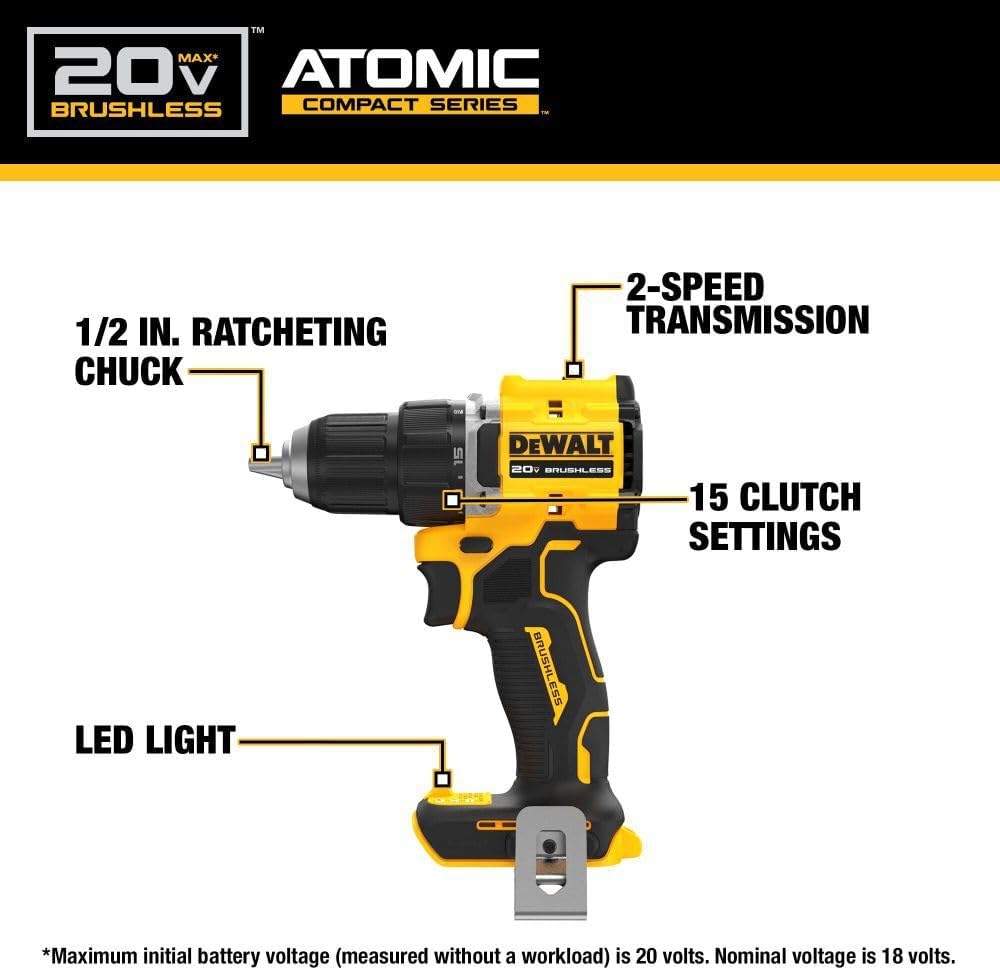
Image: Diagram highlighting the 1/2 inch ratcheting chuck, 2-speed transmission, 15 clutch settings, and LED light on the DEWALT DCD794 Drill Driver.
Nastavitev
Namestitev in odstranitev baterije
- To install the battery, align the battery pack with the rails inside the tool's handle. Slide the pack firmly into the tool until it locks into place.
- To remove the battery, press the release button on the battery pack and pull the pack out of the handle.

Image: The DEWALT DCD794 Drill Driver with a 20V battery pack attached to the base.
Namestitev in odstranitev bitov
- To install a drill bit or driver accessory, grasp the rear half of the chuck and rotate the front half counter-clockwise until the chuck jaws open wide enough to accept the accessory.
- Insert the accessory fully into the chuck.
- Grasp the rear half of the chuck and rotate the front half clockwise until the accessory is firmly clampizd.
- Če želite odstraniti, postopek obrnite.
Navodila za uporabo
Izbira hitrosti
The drill driver features a 2-speed transmission for optimal performance across different applications. Use the speed selector switch located on top of the tool:
- Položaj 1 (nizka hitrost): For high torque applications, such as driving screws or drilling large diameter holes.
- Položaj 2 (Visoka hitrost): Za hitrejše vrtanje z manjšimi svedri.

Image: The DEWALT DCD794 Drill Driver being used to drill into wood, illustrating its 2-speed transmission capability.
Nastavitve sklopke
The adjustable clutch ring allows you to select the appropriate torque setting for your task. Rotate the ring to align the desired number with the indicator mark. Lower numbers are for driving small screws or into soft materials, while higher numbers are for driving larger screws or into harder materials. The drill symbol setting provides maximum torque for drilling applications.
Trigger Switch and LED Light
The variable speed trigger switch controls the tool's speed. Press the trigger to start the tool and vary the pressure to adjust the speed. The integrated LED work light activates when the trigger is pressed, illuminating the work surface. The light remains on for a short period after the trigger is released.
Vzdrževanje
Redno vzdrževanje zagotavlja optimalno delovanje in podaljšuje življenjsko dobo vašega orodja.
- Čiščenje: Uporabite mehko, damp cloth to clean the exterior of the tool. Do not use harsh chemicals or abrasive cleaners. Keep the ventilation slots clear of dust and debris.
- Vzdrževanje vpenjalne glave: Občasno očistite čeljusti vpenjalne glave, da zagotovite pravilen oprijem.
- Vzdrževanje baterije: Baterije shranjujte na hladnem in suhem mestu, stran od neposredne sončne svetlobe. Baterij ne shranjujte v izpraznjenem stanju dlje časa.
- Pregled: Regularly inspect the tool for any damaged parts, loose screws, or worn components. Have any damaged parts repaired by a qualified service technician.
Odpravljanje težav
| Težava | Možen vzrok | rešitev |
|---|---|---|
| Orodje se ne zažene | Baterija ni napolnjena ali ni pravilno nameščena | Charge battery fully; ensure battery is securely inserted. |
| Izguba moči med delovanjem | Nizka napolnjenost baterije | Napolni baterijo. |
| Bit zdrsne v vpenjalni glavi | Chuck not tightened sufficiently or jaws are dirty | Trdno privijte vpenjalno glavo; očistite čeljusti vpenjalne glave. |
| Prekomerne vibracije | Ukrivljen sveder ali pribor | Replace with a straight, undamaged accessory. |
Specifikacije
| Funkcija | Specifikacija |
|---|---|
| Znamka | DEWALT |
| Številka modela | DCD794B-NBX |
| Vir napajanja | Napajanje na baterije (20 voltov) |
| Največja vrtilna hitrost | 1650 RPM |
| Največja velikost vpenjalne glave | 0.5 palcev |
| Največji navor | 1.5 Newton metrov |
| Največja moč | 300 vatov |
| Vrsta materiala | Plastika |
| Mere predmeta (D x Š x V) | 6 cm D x 3 cm Š x 8 cm V |
| Teža predmeta | 2.54 funta |
Informacije o garanciji
DEWALT provides a limited warranty for its products. For specific details regarding the warranty period, coverage, and terms for your DCD794 Drill Driver, please refer to the warranty card included with your purchase or visit the official DEWALT webspletnega mesta. Shranite dokazilo o nakupu za uveljavljanje garancije.
Podpora
For further assistance, technical support, or to locate authorized service centers, please visit the official DEWALT webali se obrnite na njihovo službo za stranke. Več informacij in virov najdete na Trgovina DEWALT na Amazonu or the main DEWALT corporate webmesto.