
Uvod
This manual provides detailed instructions for the installation, operation, and maintenance of your EBTOOLS 4.3-inch 1080P Mirror Dash Cam. This device is designed to record video footage from both the front and rear of your vehicle, offering features such as parking monitoring and loop recording for enhanced driving safety and evidence collection. Please read this manual thoroughly before using the product to ensure proper functionality and to avoid any damage.
Lastnosti izdelka
- Vzdržljiva konstrukcija: Manufactured from high-quality ABS material for robustness and extended durability.
- Wide-Angle Lenses: Equipped with wide-angle lenses to minimize blind spots and capture comprehensive road details.
- Snemanje v zanki: Ensures continuous recording by automatically overwriting the oldest video files when the memory card reaches its capacity.
- Zmogljivost v vseh vremenskih razmerah: Capable of recording clear video footage even in adverse weather conditions such as rain or fog.
- Uporabniku prijazen dizajn: Features a straightforward installation process and intuitive controls for ease of use.
Vsebina paketa
Prosimo, preverite, ali so v vašem paketu vključeni vsi naslednji elementi:
- EBTOOLS 4.3-inch Mirror Dash Cam Unit
- Zadajview Kamera
- Avto polnilec
- Priključni kabel za zadnjo kamero
- Mounting Straps/Adhesive
- Uporabniški priročnik (ta dokument)

Nastavitev
1. Namestitev kamere na armaturni plošči
Pritrdite kamero v ogledalu na obstoječi zadnji del vozilaview mirror using the provided mounting straps. Ensure it is firmly attached and does not obstruct your view.
2. Priključitev zadnje kamere
Route the rear camera cable from the dash cam to the desired mounting location at the rear of your vehicle. Connect the rear camera to the AV IN port on the main dash cam unit. For optimal performance, ensure the cable is neatly tucked away and secured.


3. Napajalni priključek
Connect the provided car charger to the dash cam's power input port and then plug the other end into your vehicle's 12V power outlet (cigarette lighter socket). The device will typically power on automatically with the vehicle's ignition.
4. Vstavite pomnilniško kartico
Insert a compatible Micro SD card (not included) into the TF CARD slot on the dash cam. Ensure the card is inserted correctly until it clicks into place. A high-speed Class 10 or higher card is recommended for reliable recording.

Navodila za uporabo
Vklop/izklop
- Samodejno: The dash cam will power on and begin recording automatically when your vehicle's ignition is turned on.
- Ročno: Press and hold the Power button (usually marked with a power symbol) to manually turn the device on or off.
Navigacija po meniju
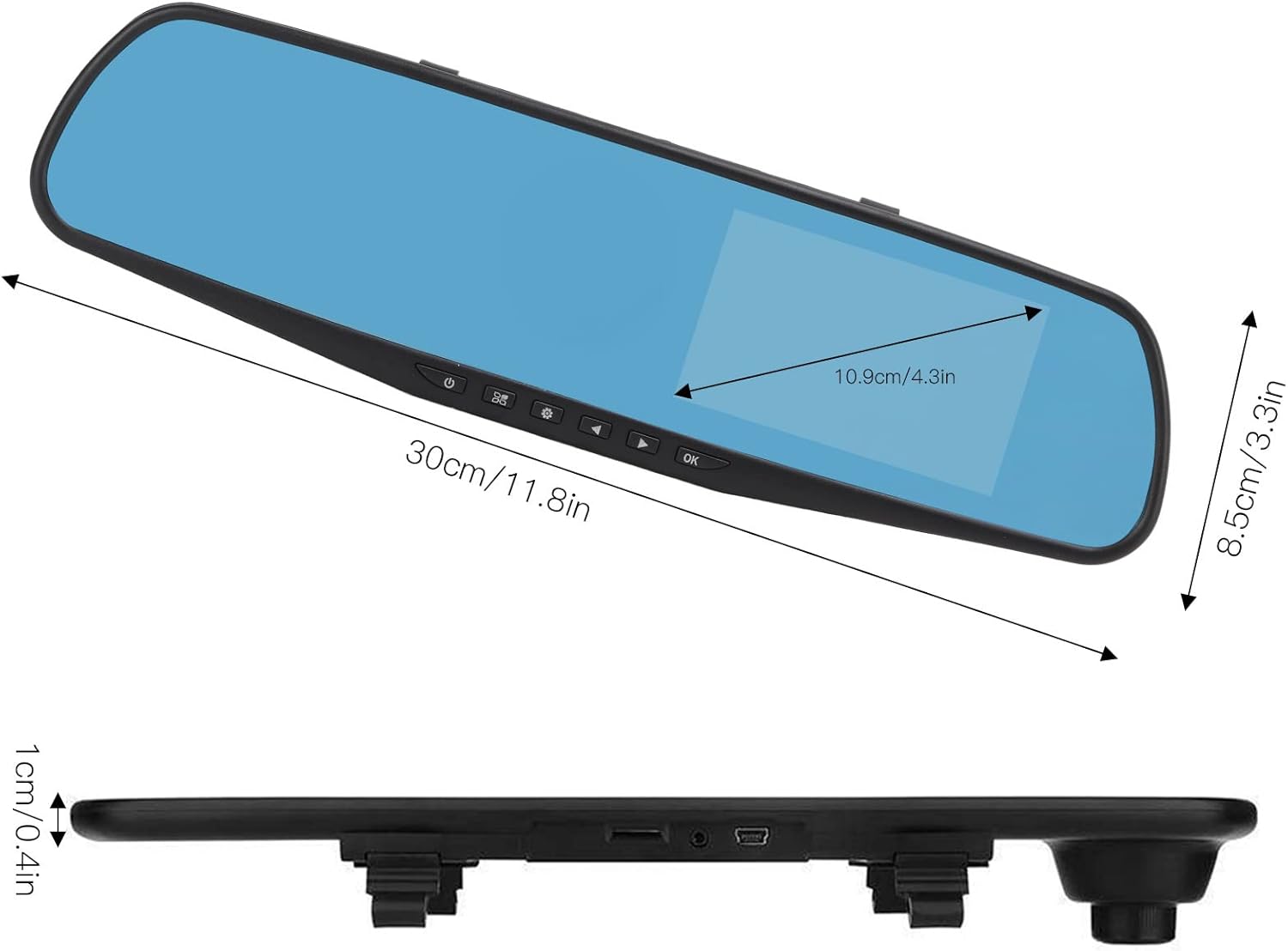
Use the physical buttons located on the bottom of the mirror unit to navigate through the menu options:
- Gumb menija: Pritisnite za vstop v meni z nastavitvami.
- Gumbi gor/dol: Use to scroll through menu options.
- Gumb V redu: Press to confirm a selection or setting.
Načini snemanja
- Snemanje v zanki: This feature records video in continuous segments (e.g., 1, 2, 3, or 5 minutes). When the memory card is full, the oldest filese samodejno prepišejo, da se naredi prostor za nove posnetke.
- Zaznavanje gibanja: When enabled, the dash cam will automatically start recording if it detects movement in front of the vehicle while parked. This feature is useful for parking surveillance.
Nastavitve video ločljivosti
You can adjust the video resolution for both front and rear cameras in the settings menu:
- Sprednja kamera: Select between 1080P (FHD 1400x1080) or 720P (HD 1280x720).
- Zadnja kamera: Records at 720P resolution.
Jezikovne nastavitve
The device supports multiple languages. Navigate to the language settings in the menu to select your preferred language, including English, German, French, Italian, Japanese, Korean, and Simplified Chinese.

Vzdrževanje
- Čiščenje: Za čiščenje zaslona in leč armaturne kamere uporabite mehko, suho krpo. Izogibajte se uporabi abrazivnih čistil ali topil.
- Pomnilniška kartica: Regularly format your Micro SD card (at least once a month) to ensure optimal performance and prevent data corruption. Back up any important footage pred formatiranjem.
- Temperatura: Avoid exposing the device to extreme temperatures, both hot and cold, as this can affect battery life and component integrity.
Odpravljanje težav
- Naprava se ne vklopi:
- Ensure the car charger is properly connected to both the dash cam and the vehicle's 12V power outlet. Check if the vehicle's ignition is on. Test the charger in another port or with another device if possible.
- Težave s snemanjem (npr. ustavitev snemanja, poškodba files):
- Verify that a compatible, high-speed Micro SD card (Class 10 or higher) is inserted correctly. Format the memory card through the dash cam's settings menu. If issues persist, try a different memory card.
- Screen display problems (e.g., black screen, distorted image):
- Check all cable connections, especially for the rear camera. Try resetting the device to factory settings via the menu. If the problem continues, contact customer support.
- Zadnja kamera ne prikazuje slike:
- Ensure the rear camera cable is securely connected to both the rear camera and the AV IN port on the main unit. Check for any damage to the cable or connectors.
Specifikacije
| Vrsta predmeta | 4.3-inch Mirror Dash Cam |
| Material | ABS |
| Velikost zaslona | 4.3 palcev |
| Vrsta zaslona | TFT LCD |
| Kot sprednje kamere | 110 stopinj |
| Kot zadnje kamere | 90-110 degrees (Adjustable) |
| Ločljivost sprednjega videa | 1080P (FHD 1400x1080), 720P (HD 1280x720) |
| Ločljivost zadnjega videa | 720P |
| Loop Recording Intervals | 1 minuta, 2 minut, 3 minut, 5 minut |
| Zaznavanje gibanja | Podprto |
| Ločljivost slike | 12 MP, 10 MP, 5 MP, 3 MP, 2 MP, 1.3 MP |
| Video format | AVI |
| Format slike | JPEG |
| Vrsta objektiva | F2.78 glass resolution multi-layer filter wide-angle lens |
| Podprti jeziki | English, German, French, Italian, Japanese, Korean, Simplified Chinese |
| Video izhod | Čitalnik kartic USB |
| Montažni način | Vrsta lepila |
| Dimenzije izdelka | Approx. 30cm (11.8in) L x 8.5cm (3.3in) W x 1cm (0.4in) T |
| Dimenzije paketa | 34 x 12 x 6 cm; 512 g |
Garancija in podpora
For warranty information or technical assistance, please refer to the warranty card included with your product or contact EBTOOLS customer support through the retailer's platform where the product was purchased. Our support team is available to help with any questions or issues you may encounter.