
Hoco WE-1005004459784466-002
Hoco Smart Ear Wireless Bluetooth 5.3 Earbuds User Manual
Model: WE-1005004459784466-002
Konec izdelkaview
The Hoco Smart Ear Wireless Bluetooth 5.3 Earbuds offer a seamless audio experience with advanced features. These smart touch stereo earbuds come with a digital LED display charging case, providing convenience and clear battery status at a glance. Designed for comfort and high-quality sound, they are ideal for daily use with mobile phones and other compatible devices.
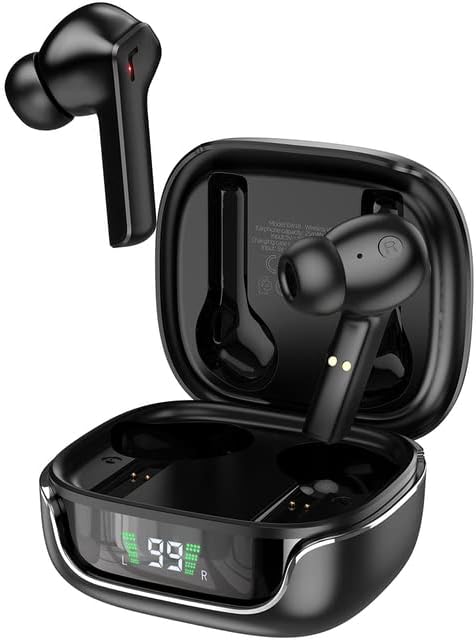
Image: The Hoco Smart Ear Wireless Bluetooth 5.3 Earbuds, showcasing both earbuds and their sleek charging case with a digital LED display.
Vsebina paketa
- Hoco Smart Ear Wireless Bluetooth 5.3 Earbuds
- etui za polnjenje
- Uporabniški priročnik
- Polnilni kabel
Nastavitev
Začetno seznanjanje
To pair your Hoco Smart Ear Earbuds for the first time, ensure they are fully charged. Open the charging case; the earbuds will automatically enter pairing mode. On your device (e.g., smartphone), navigate to Bluetooth settings and select 'Hoco EW18' or a similar name from the list of available devices. Once connected, the earbuds are ready for use.

Image: A visual representation of the Hoco earbuds establishing a wireless connection using Bluetooth 5.3 technology, highlighting stable and low-power consumption.

Image: The earbuds and charging case next to a smartphone, illustrating the automatic pairing feature and the ability to switch between devices seamlessly.
Ponovno povezovanje
After initial pairing, the earbuds will automatically reconnect to the last paired device when taken out of the charging case and Bluetooth is enabled on the device.
Navodila za uporabo
The Hoco Smart Ear Earbuds feature intuitive touch controls for various functions:

Image: A detailed diagram illustrating the touch control functions of the Hoco earbuds, including playback, track navigation, call management, power, and voice assistant activation.
- Predvajanje/pavza: Click the touch area once.
- Naslednja skladba: Double click the touch area.
- Prejšnja skladba: Triple click the touch area.
- Sprejmi klic: Click the touch area once.
- Prekinitev klica: Double click the touch area.
- Zavrni klic: Dolgo pritisnite območje na dotik za 2 sekundi.
- Vklopi: Open the cover of the charging case (automatic boot).
- Prebudite Siri/glasovni pomočnik: Dolgo pritisnite območje na dotik za 2 sekundi.
Vzdrževanje
Za zagotovitev dolge življenjske dobe in optimalne zmogljivosti vaših slušalk upoštevajte ta navodila za vzdrževanje:
- Čiščenje: Slušalke in polnilno ohišje redno čistite z mehko, suho krpo, ki ne pušča vlaken. Ne uporabljajte agresivnih kemikalij ali abrazivnih materialov.
- Kontakti za polnjenje: Periodically clean the charging contacts on both the earbuds and inside the case to ensure a proper connection.
- Shranjevanje: Ko slušalk ne uporabljate, jih shranite v polnilno škatlico, da jih zaščitite pred prahom in poškodbami.
- Izogibajte se vlagi: Keep the earbuds and case away from water and excessive moisture.
- Temperatura: Izogibajte se izpostavljanju izdelka ekstremnim temperaturam.
Odpravljanje težav
If you encounter issues with your Hoco Smart Ear Earbuds, refer to the following common solutions:
- Ni zvoka:
- Prepričajte se, da so slušalke napolnjene.
- Preverite glasnost naprave in glasnost slušalk.
- Verify Bluetooth connection. Try disconnecting and reconnecting.
- Slušalke se ne seznanjajo:
- Prepričajte se, da so slušalke v načinu seznanjanja (odprite ohišje).
- Izklopite in vklopite Bluetooth na svoji napravi.
- Pozabite napravo v nastavitvah Bluetooth v telefonu in jo znova seznanite.
- Prepričajte se, da na slušalke niso priključene nobene druge naprave.
- Težave s polnjenjem:
- Preverite, ali je polnilni kabel varno priključen.
- Ensure the charging contacts on both earbuds and case are clean.
- Poskusite z drugim polnilnim kablom ali napajalnikom.
- Prekinjena povezava:
- Ensure you are within the effective Bluetooth range.
- Zmanjšajte motnje zaradi drugih brezžičnih naprav.
Specifikacije
Detailed technical specifications for the Hoco Smart Ear Wireless Bluetooth 5.3 Earbuds:
| Funkcija | Specifikacija |
|---|---|
| Model | WE-1005004459784466-002 |
| Različica Bluetooth | 5.3 |
| Število voznikov | 2 |
| Premer gonilnika | 13 mm |
| Popolno harmonično popačenje | 15 % |
| Impedanca | 32 Ohm |
| Faktor oblike slušalk | In-Ear |
| Tehnologija povezljivosti | Bluetooth |
| Brezžična komunikacijska tehnologija | Bluetooth |
| Združljive naprave | Mobilni telefoni |
| Funkcija kabla | Cable-free (Wireless) |
| barva | Črna |
| Prvi razpoložljivi datum | 6. julij 2023 |

Slika: Eksplodirala view illustrating the 13mm moving coil driver and bio-carbon fiber composite diaphragm, designed for immersive sound quality.

Image: A person wearing the Hoco earbuds, highlighting the soft silicone ear caps and in-ear ergonomic design for comfortable wear and pure sound enjoyment.
Garancija in podpora
Hoco is committed to customer satisfaction and product quality. We offer the following:
- 12-mesečna garancija: All products come with a 12-month warranty.
- Storitev za stranke: If you experience any issues with defective or incorrect products, please contact us through the Amazon platform. We are dedicated to providing the best solution, including full refunds or product replacements, to ensure 100% customer satisfaction.
- Garancija dostave: We ensure product delivery within the specified timeframe on our sales page.
Ask a question about this manual
Ask about setup, troubleshooting, compatibility, parts, safety, or missing instructions. Manuals+ will review the question and use this page’s manual context to help answer it.