
1. Uvod
This manual provides detailed instructions for the setup, operation, and maintenance of your DOACT Projection Alarm Clock. Please read this manual thoroughly before using the device to ensure proper function and to avoid damage.
2. Varnostne informacije
- Naprave ne izpostavljajte ekstremnim temperaturam, neposredni sončni svetlobi ali visoki vlažnosti.
- Napravo hranite ločeno od vode in drugih tekočin.
- Use only the specified power supply (AAA*2 batteries or 5V USB).
- Naprave ne poskušajte razstavljati ali popravljati sami. Za servis se obrnite na usposobljeno osebje.
- Baterije hranite izven dosega otrok.
3. Vsebina paketa
Preverite, ali so v paketu prisotni vsi elementi:
- 1 x DOACT Projection Alarm Clock
- 1 x USB kabel
- 1 x Uporabniški priročnik (ta dokument)
4. Izdelek je končanview
Familiarize yourself with the components of your projection alarm clock.

Slika 4.1: Zadaj View in Kontrole
This image displays the back of the projection clock, highlighting key controls and ports. These include the Mode button, UP/DOWN buttons for time adjustment, MAX/MIN button for temperature/humidity display, SNZ (snooze) button, probe hole, AAA battery compartment, external power interface, and supporting base.
- Zaslon: Shows time, temperature, humidity, and weather forecast icons.
- Projekcijski objektiv: Projects time onto a surface.
- Gumb za način: Used to enter setup modes for time, alarm, etc.
- Gumba GOR/DOL: Adjust values during setup or switch display modes.
- Gumb MAX/MIN: Toggles between current, maximum, and minimum temperature/humidity readings.
- SNZ (Snooze) Button: Aktivira funkcijo dremeža za alarm.
- Predal za baterije: Napaja 2 x AAA bateriji (nista priloženi).
- Napajalna vrata USB: For continuous power supply via USB cable.
5. Nastavitev
5.1 Napajanje naprave
- Namestitev baterije: Open the battery compartment on the back of the clock. Insert 2 x AAA batteries (not included), ensuring correct polarity (+/-). Note: When using only batteries, the display will not be continuously on to conserve power. The display will be black when off and difficult to see.
- Napajanje USB: For continuous display and optimal functionality, connect the provided USB cable to the USB power port on the back of the clock and plug the other end into a 5V USB power adapter (not included) or a USB port. The display will remain continuously on when powered via USB.
5.2 Začetna nastavitev časa in datuma
- Pritisnite in držite NAČIN Gumb približno 3 sekunde držite, da vstopite v način nastavitve časa. Številke za ure bodo utripale.
- Uporabite UP or DOL gumbi za nastavitev ure.
- Pritisnite NAČIN ponovno pritisnite, da potrdite uro in se premaknete na nastavitev minut. Številke minut bodo utripale.
- Uporabite UP or DOL gumbe za nastavitev minut.
- Nadaljujte s pritiskom NAČIN to cycle through and set other parameters such as year, month, and day, adjusting each with the UP or DOL gumbi.
- Pritisnite NAČIN one last time or wait for 10 seconds without input to exit the setting mode.
6. Navodila za uporabo
6.1 Funkcija časovne projekcije
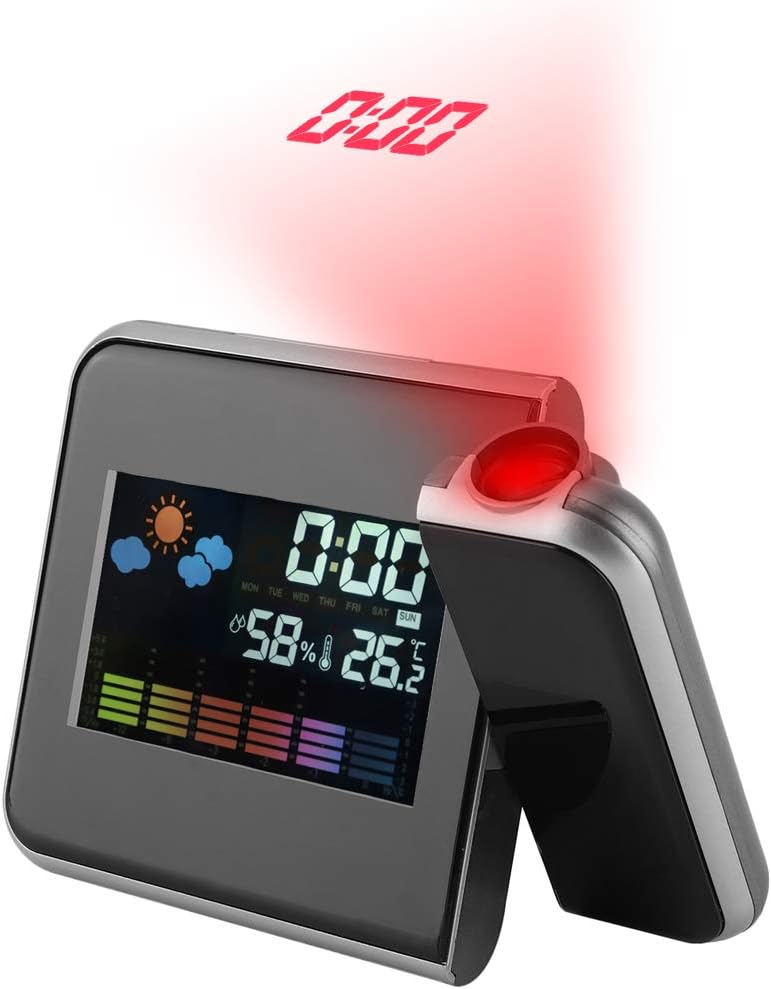
Figure 6.1: Time Projection
This image shows the projection clock actively displaying the time onto a surface, illustrating its projection capability. The projection distance is approximately 1 to 5 meters.
- The clock can project the time onto a ceiling or wall. The optimal projection distance is 1-5 meters.
- To activate the projection, ensure the clock is powered via USB or press a button if using batteries (projection is not continuous on battery power).
- Adjusting Projection Angle: The projection lens can be rotated 180 degrees to direct the time display to your desired surface. Gently rotate the projection arm to adjust.
6.2 Prikaz temperature in vlažnosti
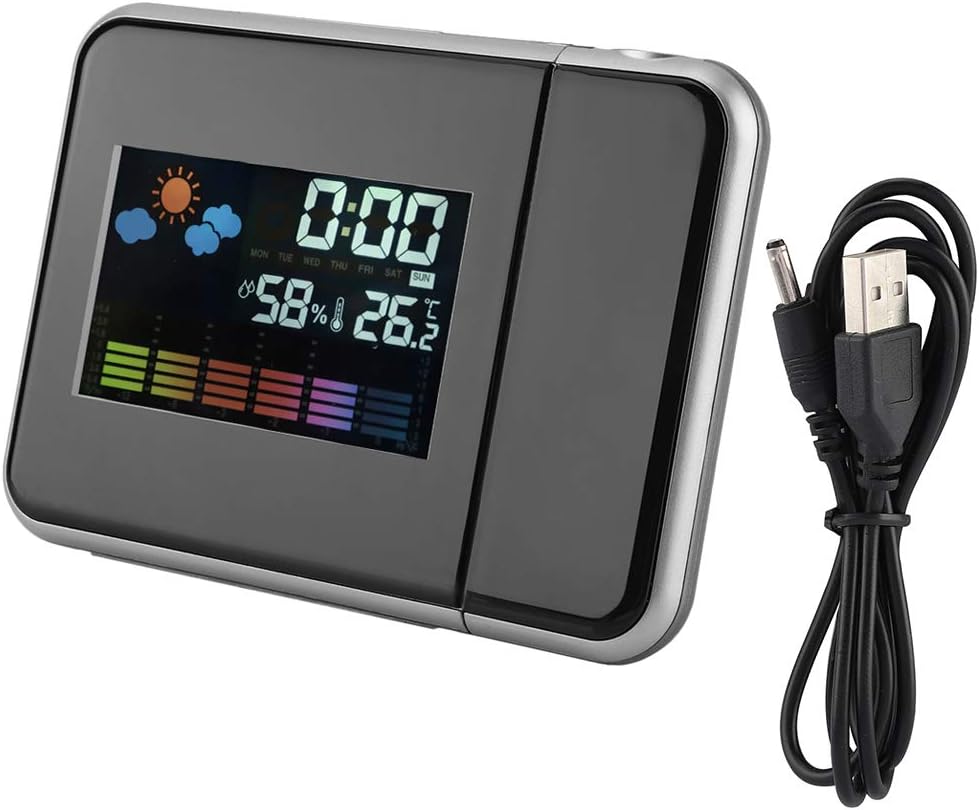
Slika 6.2: Glavni zaslon
Jasno view of the clock's front display, showing the digital time, current temperature, humidity percentage, and weather forecast icons. This illustrates the multi-functional display capabilities.
- The main display shows the current indoor temperature and humidity.
- Enota za temperaturo: Za preklop med Celzijem (°C) in Fahrenheitom (°F) pritisnite DOL gumb na kratko.
- Maximum/Minimum Readings: Pritisnite MAX/MIN gumb za view the maximum recorded temperature and humidity. Press again to view the minimum recorded temperature and humidity. Press a third time to return to current readings. The readings reset daily or when the device is reset.
6.3 Budilka in funkcija dremeža
- Nastavitev alarma:
- Pritisnite NAČIN button once to enter alarm setting mode. The alarm time will flash.
- Uporabite UP or DOL gumbe za nastavitev ure budilke.
- Pritisnite NAČIN again to confirm the hour and set the alarm minutes.
- Uporabite UP or DOL gumbe za nastavitev minut alarma.
- Pritisnite NAČIN again or wait for 10 seconds to exit alarm setting.
- Vklop/izklop alarma: V običajnem načinu prikaza časa pritisnite UP button briefly to toggle the alarm on or off. An alarm icon will appear on the display when activated.
- Funkcija dremeža: Ko se oglasi alarm, pritisnite tipko SNZ button to activate the snooze function. The alarm will temporarily stop and sound again after a few minutes (default snooze time is typically 5-10 minutes, refer to specific model details if available). To turn off the alarm completely, press any other button.
7. Vzdrževanje
- Napravo očistite z mehko, suho krpo. Ne uporabljajte abrazivnih čistil ali topil.
- Ensure the projection lens is clean for clear time projection.
- Če naprave ne boste uporabljali dlje časa, odstranite baterije, da preprečite puščanje.
8. Odpravljanje težav
| Težava | Možen vzrok | rešitev |
|---|---|---|
| Display is off or dim (on battery power) | Batteries are low or display is designed to turn off to save power. | Replace AAA batteries or connect the device to a USB power source for continuous display. |
| No time projection | Projection function not activated or device not powered via USB. | Ensure USB power is connected. If on battery, press a button to temporarily activate projection. Check if the projection lens is obstructed. |
| Napačen čas/datum | Ura/datum ni pravilno nastavljena ali pa je prišlo do prekinitve napajanja. | Za ponastavitev časa in datuma glejte poglavje 5.2. |
| Alarm se ne oglasi | Alarm ni aktiviran ali je napačno nastavljen. | Refer to Section 6.3 to ensure the alarm is set and activated (alarm icon visible). |
9. Specifikacije
| Funkcija | Podrobnost |
|---|---|
| Številka modela | DOACTcuf6pq3yvr-01 |
| Vrsta zaslona | Digital, LED Color Screen |
| Vir napajanja | 2 x AAA Batteries (not included), USB 5V (cable included) |
| Območje prikaza temperature | -9.9°C do +60°C (14.2°F do 140°F) |
| Razpon prikaza vlažnosti | 20% RH do 90% RH |
| Projekcijska razdalja | 1-5 metrov |
| Projekcijski kot | 180° vrtljiv |
| Dimenzije izdelka | 15 cm (5.9 in) W x 11 cm (4.3 in) H x 2 cm (0.8 in) D |
| Material | Plastika |
| Teža | Pribl. 246 g (8.7 oz) |
| Posebne lastnosti | Alarm, Snooze, Temperature Display, Humidity Display, Weather Forecast, Digital Time Display, Max/Min Temperature/Humidity |

Slika 9.1: Dimenzije izdelka
This image provides a visual representation of the clock's dimensions, indicating its width (15cm / 5.9in), height (11cm / 4.3in), and depth (2cm / 0.8in).
10. Garancija in podpora
For warranty information or technical support, please refer to the retailer's policy or contact the manufacturer directly. Keep your purchase receipt as proof of purchase.