
1. Uvod
The Ankilo Mini Bluetooth 5.3 Receiver/Transmitter is a versatile 2-in-1 audio adapter designed to add Bluetooth functionality to non-Bluetooth devices. Featuring the latest Bluetooth 5.3 technology, it ensures stable connections and a transmission range of up to 33 feet (10 meters). This device is suitable for use with cars, speakers, stereo systems, and headphones, allowing you to enjoy wireless audio streaming and hands-free calling.

Figure 1: Ankilo Mini Bluetooth 5.3 Receiver/Transmitter.

Figure 2: Highlighting Bluetooth 5.3 for stable connections, auto reconnect in RX mode, 33 ft signal range, and fast transmission.
2. Izdelek je končanview
Seznanite se s komponentami naprave:
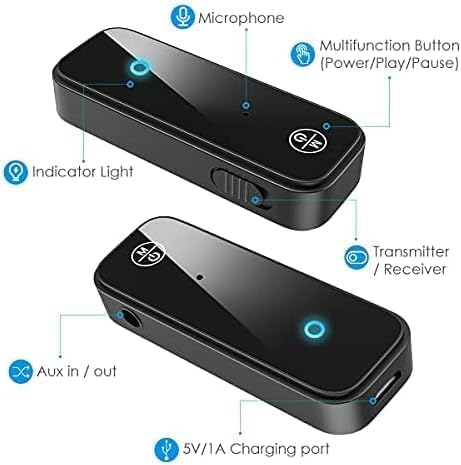
Figure 3: Labeled diagram of the Ankilo Bluetooth adapter. Key components include the Microphone, Multifunction Button (Power/Play/Pause), Indicator Light, Transmitter/Receiver (TX/RX) switch, Aux in/out port, and 5V/1A Charging port.
3. Vsebina paketa
Prepričajte se, da so v paketu prisotni vsi elementi:
- 1 x Ankilo Mini Bluetooth 5.3 Receiver/Transmitter
- 1 x 3.5mm Audio Connector (new and old versions may be sent randomly)
- 1 x USB polnilni kabel
- 1 x uporabniški priročnik
4. Nastavitev in povezava
4.1. Način sprejemnika (RX)
Use Receiver Mode to stream audio from your Bluetooth-enabled device (e.g., smartphone, laptop) to a non-Bluetooth audio system (e.g., car stereo, wired speakers, wired headphones).
- Preklopi v način RX: Locate the TX/RX switch on the side of the adapter and slide it to the "RX" position.
- Povežite se z avdio sistemom: Plug the 3.5mm audio connector into the Aux in/out port of the Bluetooth adapter. Then, plug the other end of the 3.5mm audio connector into the auxiliary input port of your non-Bluetooth audio system.
- Vklop in seznanitev: Press and hold the Multifunction Button (power button) for 3 seconds to turn on the device. The indicator light will flash red and blue alternately, indicating it is in pairing mode.
- Seznani z vašo napravo: On your smartphone or other Bluetooth-enabled device, go to Bluetooth settings and search for "Ankilo" or "ZF-360" (or similar device name). Select it to connect. Once connected, the indicator light on the adapter will turn solid blue.

Figure 4: Step-by-step visual guide for connecting in both Receiver (RX) and Transmitter (TX) modes.
4.2. Način oddajnika (TX)
Use Transmitter Mode to stream audio from a non-Bluetooth audio source (e.g., TV, computer, MP3 player) to your Bluetooth headphones or speakers.
- Preklopi v način oddajanja: Locate the TX/RX switch on the side of the adapter and slide it to the "TX" position.
- Povežite se z zvočnim virom: Plug the 3.5mm audio connector into the Aux in/out port of the Bluetooth adapter. Then, plug the other end of the 3.5mm audio connector into the auxiliary output port of your non-Bluetooth audio source (e.g., TV headphone jack).
- Vklop in seznanitev: Press and hold the Multifunction Button (power button) for 3 seconds to turn on the device. The indicator light will flash red and blue alternately, indicating it is in pairing mode.
- Združevanje z Bluetooth slušalkami/zvočniki: Put your Bluetooth headphones or speakers into pairing mode. The adapter will automatically search and connect to your headphones/speakers. Once connected, the indicator light on the adapter will turn solid red.
Video 1: General guide on how to use an Aux Bluetooth Adapter for Car. (Note: Product shown may vary slightly from Ankilo model.)
Video 2: Demonstration of ensuring the audio plug is firmly inserted for optimal sound quality. (Note: Product shown may vary slightly from Ankilo model.)
5. Načini delovanja in funkcije
5.1. Prostoročno telefoniranje
The adapter features a built-in HD microphone for convenient hands-free calling while driving or performing other tasks.
- Odgovori/prekini klic: Enkrat pritisnite večnamenski gumb.
- Zavrni klic: Pritisnite in držite večnamenski gumb 2 sekundi.
- Ponovno klicanje zadnje številke: Dvakrat pritisnite večnamenski gumb.
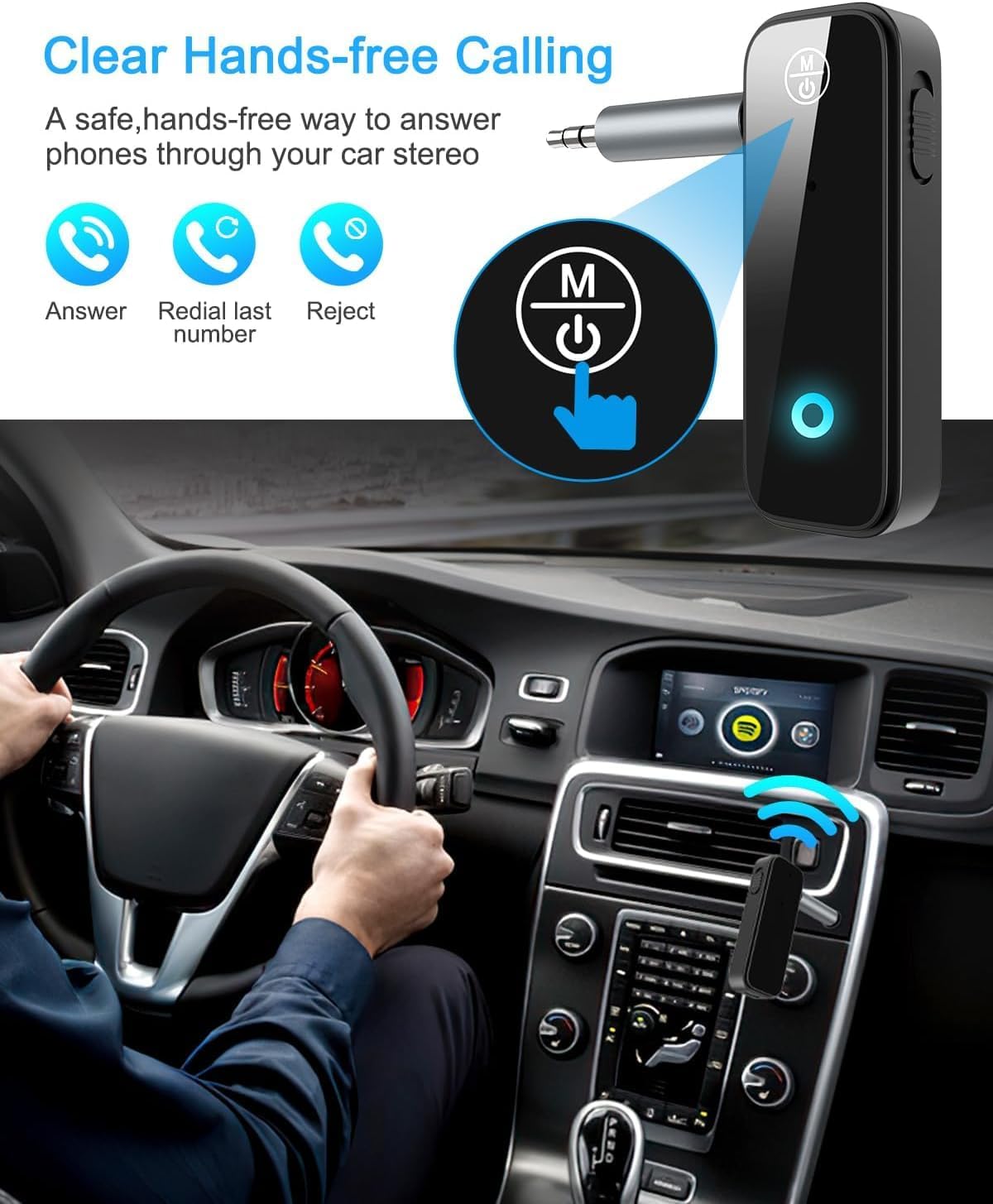
Figure 5: Visual representation of hands-free calling functionality in a vehicle.
5.2. Nadzor predvajanja glasbe
- Predvajanje/pavza: Enkrat pritisnite večnamenski gumb.
- Naslednja skladba: Enkrat pritisnite gumb "+".
- Prejšnja skladba: Enkrat pritisnite gumb "-".
- Povečaj glasnost: Pritisnite in držite gumb "+".
- Znižaj glasnost: Pritisnite in držite gumb "-".
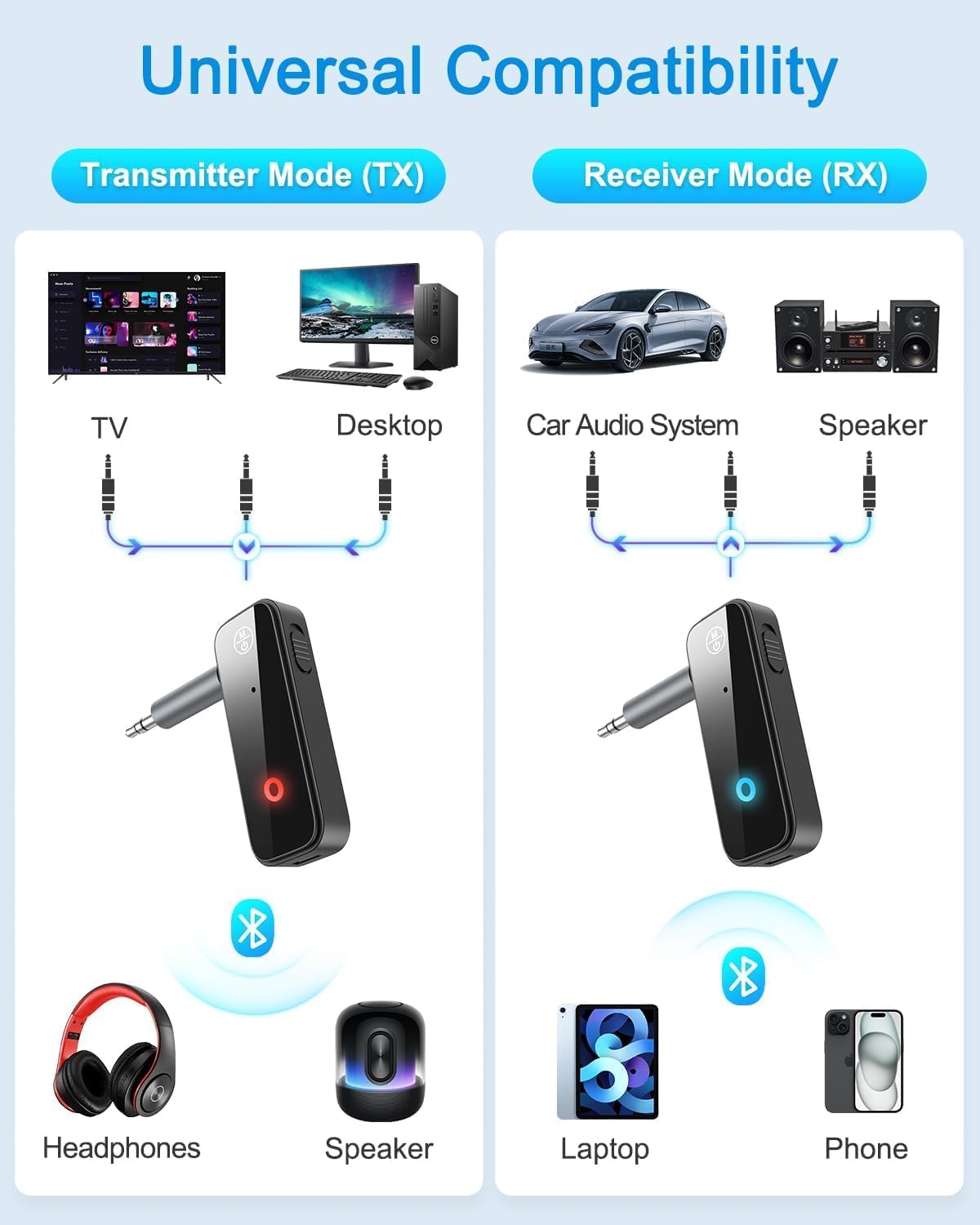
Figure 6: Illustrates the universal compatibility of the device in both Transmitter (TX) and Receiver (RX) modes with various devices like TVs, desktops, car audio systems, speakers, headphones, laptops, and phones.
6. Polnjenje in življenjska doba baterije
The Ankilo Mini Bluetooth adapter is equipped with a built-in rechargeable battery. A full charge takes approximately 2 hours and provides up to 8 hours of music playback or call time.
- Polnjenje: Connect the provided USB charging cable to the 5V/1A Charging port on the adapter and to a USB power source. The red indicator light will be solid during charging and turn off when fully charged.
- Indikacija prazne baterije: When the battery is low, the red indicator light will flash.

Figure 7: Details on the device's 8-hour battery life, 2-hour fast charging, and USB charging port.
7. Specifikacije
| Funkcija | Podrobnost |
|---|---|
| Znamka | Ankilo |
| Model | CP210-MA06CA-KH |
| Različica Bluetooth | 5.3 |
| Načini delovanja | Receiver (RX) & Transmitter (TX) |
| Obseg prenosa | Do 33 čevljev (10 metrov) |
| Življenjska doba baterije | Approx. 8 hours (music/call) |
| Čas polnjenja | Pribl. 2 ur |
| Vrata za polnjenje | 5V/1A (USB) |
| Avdio vhod/izhod | 3.5 mm pomožni |
| Vgrajen mikrofon | Yes (HD) |
| Material | Plastika |
| Dimenzije izdelka | 6.7 x 1.8 x 10 cm; 30 g |
8. Odpravljanje težav
- Naprava se ne vklopi: Ensure the device is fully charged. Connect it to a power source using the USB cable.
- Seznanjanje z napravo ni mogoče:
- Prepričajte se, da je adapter v pravilnem načinu TX ali RX.
- Make sure the adapter is in pairing mode (red and blue lights flashing alternately).
- Ensure the target device (phone, headphones, speaker) is also in pairing mode.
- Turn off and on the Bluetooth function on your device and try searching again.
- Clear previous Bluetooth connections on both devices if necessary.
- Ni zvoka ali zvok je tih:
- Check that the 3.5mm audio connector is fully and firmly inserted into both the adapter and the audio system/source.
- Prepričajte se, da je glasnost na adapterju in priključeni zvočni napravi povečana.
- Verify that the adapter is correctly connected to the audio source/system (TX mode for output, RX mode for input).
- Prekinjena povezava: Ensure there are no significant obstacles (like walls) between the adapter and the connected Bluetooth device. Keep devices within the 33-foot (10-meter) range.
9. Varnostne informacije
- Do not expose the device to extreme temperatures, moisture, or corrosive environments.
- Naprave ne razstavljajte in ne poskušajte sami popraviti.
- Hraniti izven dosega otrok.
- Note: This adapter is not suitable for SONY devices. Please confirm compatibility before purchase.
10. Garancija in podpora
Ankilo offers a 12-month quality protection warranty and 60 days free replacement for this product. For any questions or concerns, please contact our customer support. We are committed to responding within 24 hours to assist you.