
1. Uvod
Hvala za nakupasing the Sofirn SC18 Rechargeable Flashlight. This compact and powerful EDC (Everyday Carry) flashlight is designed for various applications, offering high brightness, convenient USB-C charging, and durable construction. Please read this manual carefully before use to ensure proper operation and maintenance.
2. Varnostne informacije
- Varnost za oči: Do not shine the flashlight directly into eyes or at other people. The high lumen output can cause temporary vision impairment.
- otroci: Hranite izven dosega otrok, da preprečite nenamerno aktivacijo ali zlorabo.
- Toplota: The flashlight head may become hot during prolonged use at high brightness levels. Exercise caution to avoid burns.
- Varnost baterije: Use only the recommended rechargeable battery. Do not disassemble, crush, or expose the battery to extreme temperatures or fire.
- Demontaža: Do not disassemble the flashlight head as this may damage the light and void the warranty.
3. Vsebina paketa
Preverite, ali so v paketu vsi elementi:
- Svetilka Sofirn SC18
- Polnilna baterija (predhodno nameščena ali ločena)
- Polnilni kabel USB-C
- Vrvica
- Uporabniški priročnik

Image: The Sofirn SC18 flashlight shown with its included accessories, typically a USB-C cable, lanyard, and battery.
4. Nastavitev
4.1 Namestitev baterije
The Sofirn SC18 typically comes with the battery pre-installed. If not, unscrew the tail cap, insert the 18650 rechargeable battery with the positive (+) end facing towards the head of the flashlight, and then screw the tail cap back on tightly.
4.2 Začetno polnjenje
Before first use, fully charge the flashlight. The SC18 features a built-in USB-C charging port.
- Locate the rubber cover on the side of the flashlight head.
- Nežno odprite gumijasti pokrovček, da odkrijete vrata USB-C.
- Connect the provided USB-C cable to the flashlight and plug the other end into a USB power source (e.g., phone charger, power bank, computer USB port).
- Indikatorska lučka na stranskem stikalu bo prikazovala stanje polnjenja:
- Rdeča: Polnjenje
- zelena: Popolnoma napolnjen
- Once charging is complete, disconnect the cable and firmly close the rubber cover to maintain water resistance.

Image: The Sofirn SC18 flashlight with its USB-C port exposed and connected to a charging cable, illustrating the charging process and battery indicator.
5. Navodila za uporabo
The Sofirn SC18 uses a single side switch for all operations.
5.1 Osnovna operacija
- Vklop/izklop: Za vklop ali izklop luči kliknite na stransko stikalo.
- Spremeni načine svetlosti: While the light is on, press and hold the side switch to cycle through Moon, Low, Medium, and High modes. Release the switch to select the desired mode. The flashlight has a Smart Memory function and will turn on at the last used brightness level (except Turbo and Strobe).

Image: A person holding the Sofirn SC18 flashlight, illuminating a dark path with its powerful 1800 lumen beam, demonstrating its effective beam distance.
5.2 Posebni načini
- Način mesečine: Izklopljeno pritisnite in držite stransko stikalo 1 sekundo, da aktivirate način Moonlight.
- Turbo način: Dvokliknite stransko stikalo v katerem koli stanju (VKLOP ali IZKLOP), da aktivirate način Turbo. Z ponovnim dvoklikom se vrnete v prej uporabljeni način.
- Strobe način: Triple-click the side switch from any state (ON or OFF) to activate Strobe mode. Single click to turn off or double-click to return to the previously used mode.
5.3 Funkcija zaklepanja
The lockout function prevents accidental activation, which is useful when carrying the flashlight in a pocket or bag.
- Aktiviraj zaklepanje: Izklopljeno štirikrat kliknite stransko stikalo. Glavna LED lučka bo dvakrat utripnila, kar pomeni, da je zaklep aktiven.
- Deaktiviraj zaklepanje: Quadruple-click the side switch again. The main LED will flash twice, and the flashlight will turn on in Moonlight mode, indicating lockout is deactivated.

Image: An illustration of the Sofirn SC18 flashlight with a protective shield graphic, demonstrating the safety lock mode feature to prevent accidental activation.
6. Vzdrževanje
6.1 Čiščenje
Ohišje svetilke očistite z mehko krpoamp cloth. Do not use abrasive cleaners or solvents. Keep the threads and O-rings clean and lubricated with silicone grease to ensure smooth operation and water resistance.
6.2 Vodoodpornost
The Sofirn SC18 is rated IP68 waterproof, meaning it is protected against dust ingress and can withstand immersion in water up to 2 meters for 30 minutes. Ensure the USB-C port cover is fully sealed before exposing the flashlight to water.

Image: The Sofirn SC18 flashlight shown in two scenarios: one being splashed with water and another on wet rocks, highlighting its IP68 waterproof and drop-resistant design.
6.3 Skrb za baterije
To prolong battery life, charge the battery regularly and avoid fully discharging it. If the flashlight will not be used for an extended period, remove the battery or activate the lockout function to prevent parasitic drain.
7. Odpravljanje težav
| Težava | Možen vzrok | rešitev |
|---|---|---|
| Svetilka se ne prižge. | Baterija je prazna ali nepravilno vstavljena. Svetilka je v načinu zaklepanja. | Charge the battery or reinsert it with the correct polarity. Deaktivirajte način zaklepanja (štirikratni klik). |
| Lučka utripa ali se nepričakovano izklopi. | Nizka baterija. Ohlapna repna kapa ali glava. Umazani kontakti. | Ponovno napolnite baterijo. Tighten the tail cap and head. Očistite kontakte in navoje baterije. |
| Cannot charge the flashlight. | Težava s kablom USB-C ali napajalnikom. Oviranje polnilne odprtine. | Poskusite z drugim kablom USB-C ali napajalnikom. Preverite, ali so v polnilnem priključku umazanija. |
8. Specifikacije
| Funkcija | Podrobnost |
|---|---|
| Model | SC18 |
| Vir svetlobe | LED |
| Največji izhod | 1800 lumnov |
| Največja razdalja žarka | 217 metra (712 čevljev) |
| Vir napajanja | 1x 18650 Lithium-Ion Battery (included) |
| Polnjenje | USB-C za polnjenje |
| Vodoodpornost | IP68 (potopno do 2 metra) |
| Odpornost na padce | 1 meter |
| Material | Aluminijeva zlitina |
| Dimenzije (D x G) | Approx. 10.14 cm x 2.46 cm (3.99" x 0.97") |
| Teža | Approx. 55g (1.94oz) without battery |
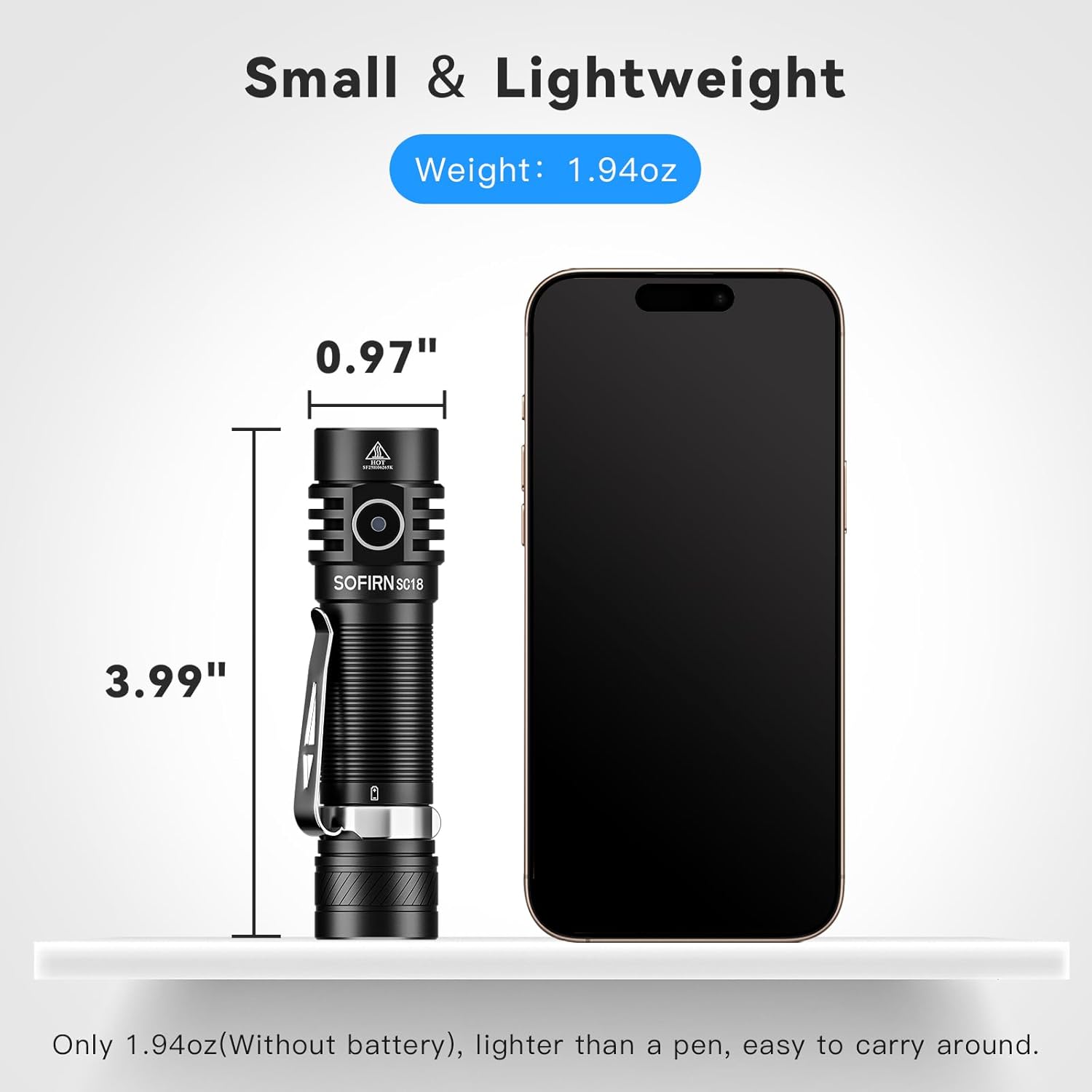
Image: The Sofirn SC18 flashlight displayed next to a smartphone, illustrating its compact size and dimensions (3.99 inches long, 0.97 inches diameter).
Brightness and Runtime Table
| Način | Izhod (lumni) | Runtime | Razdalja žarka |
|---|---|---|---|
| Mesečina | 3lm | 230h | 11m |
| Nizka | 100lm | 23h | 51m |
| Srednje | 350lm | 6.3h | 97m |
| visoko | 800lm | 2.6h | 150m |
| Turbo | 1800lm | 2.3h | 217m |
| Stroboskop | 1800lm | 5h | - |
Note: Runtimes are approximate and may vary based on environmental conditions and battery age.
9. Garancija in podpora
The Sofirn SC18 Rechargeable Flashlight comes with a 1-letna garancija proizvajalca from the date of purchase, covering defects in materials and workmanship. This warranty does not cover damage caused by misuse, unauthorized modifications, or normal wear and tear.
For warranty claims, technical support, or any questions regarding your product, please contact Sofirn customer service through the retailer where you purchased the product or visit the official Sofirn webspletno mesto za kontaktne podatke.
Spletni viri:
10. Videoposnetki izdelkov
Sofirn SC18 Product Overview
Video: An official product video from Sofirn showcasing the features and functionality of the SC18 flashlight, including its design, charging, and various light modes.