
Della 048-OPAC-6H
Della 10000 BTU Portable Air Conditioner User Manual
Model: 048-OPAC-6H | Blagovna znamka: Della
1. Pomembne varnostne informacije
Please read this manual carefully before operating your portable air conditioner. Keep this manual for future reference. Always follow basic safety precautions to reduce the risk of fire, electric shock, or injury.
- Prepričajte se, da je enota postavljena na ravno in stabilno površino, da preprečite prevračanje.
- Ne uporabljajte enote s poškodovanim kablom ali vtičem.
- Ne vstavljajte prstov ali predmetov v dovod ali odvod zraka.
- Napravo hranite stran od vnetljivih materialov in odprtega ognja.
- Pred čiščenjem ali kakršnim koli vzdrževanjem vedno izključite enoto iz električnega omrežja.
- Ta naprava ni namenjena uporabi s strani oseb (vključno z otroki) z zmanjšanimi fizičnimi, senzoričnimi ali duševnimi sposobnostmi ali s pomanjkanjem izkušenj in znanja, razen če jih oseba, ki je odgovorna za njihovo varnost, nadzoruje ali jim daje navodila glede uporabe naprave.
2. Izdelek je končanview
The Della 10000 BTU Portable Air Conditioner is a versatile unit designed to provide cooling, heating, dehumidification, and fan functions for spaces up to 450 sq. ft. It features smart WiFi connectivity for convenient control via a mobile app, a remote control, and an intuitive soft-touch control panel.

Image: Della Portable Air Conditioner unit, remote control, and smartphone displaying the control app.
Key components include the main unit with integrated handle, exhaust hose, window installation kit, and remote control.

Image: Diagram showing the dimensions of the portable air conditioner: 12.2 inches (width) x 12.2 inches (depth) x 27.6 inches (height).
3. Nastavitev
3.1 Razpakiranje
Carefully remove the unit and all accessories from the packaging. Retain the original packaging for future storage or transport. Allow the unit to stand upright for at least 24 hours before initial use to allow the refrigerant to settle.
3.2 Namestitev
Place the air conditioner on a firm, level surface in a location that allows for proper air circulation. Ensure there is at least 20 inches (50 cm) of space from walls or other objects to allow for adequate airflow around the unit.
3.3 Namestitev okenskega kompleta
The included window kit is designed for easy installation in both horizontal and vertical sliding windows. No drilling is required.

Image: Diagrams illustrating the installation of the window kit in both horizontal and vertical sliding windows, showing compatibility with window openings from 25.5 to 64.1 inches.
- Assemble the window slider kit by sliding the adjustable panels together to fit your window opening. The kit is compatible with window sizes from 25.5 to 64.1 inches.
- Secure the panels with the provided screws.
- Open the window and place the assembled window kit into the window frame. Extend the panels to fit snugly and close the window against the kit to secure it.
- Ensure the window kit is sealed properly to prevent air leakage. Use foam seals if necessary.
3.4 Priključek izpušne cevi
- Attach the exhaust hose connector to one end of the exhaust hose.
- Na drugi konec izpušne cevi pritrdite adapter kompleta za okna.
- Insert the exhaust hose connector into the exhaust outlet on the back of the air conditioner unit.
- Insert the window kit adapter into the opening on the window slider kit.
- Prepričajte se, da so vse povezave varne, da preprečite ponovni vdor vročega zraka v prostor.
3.5 Napajalni priključek
Napajalni kabel priključite v ozemljeno električno vtičnico 115 V/60 Hz. Ne uporabljajte podaljškov ali razdelilnikov.
4. Navodila za uporabo
4.1 Nadzorna plošča
The unit features an intuitive soft-touch control panel on the top of the unit.
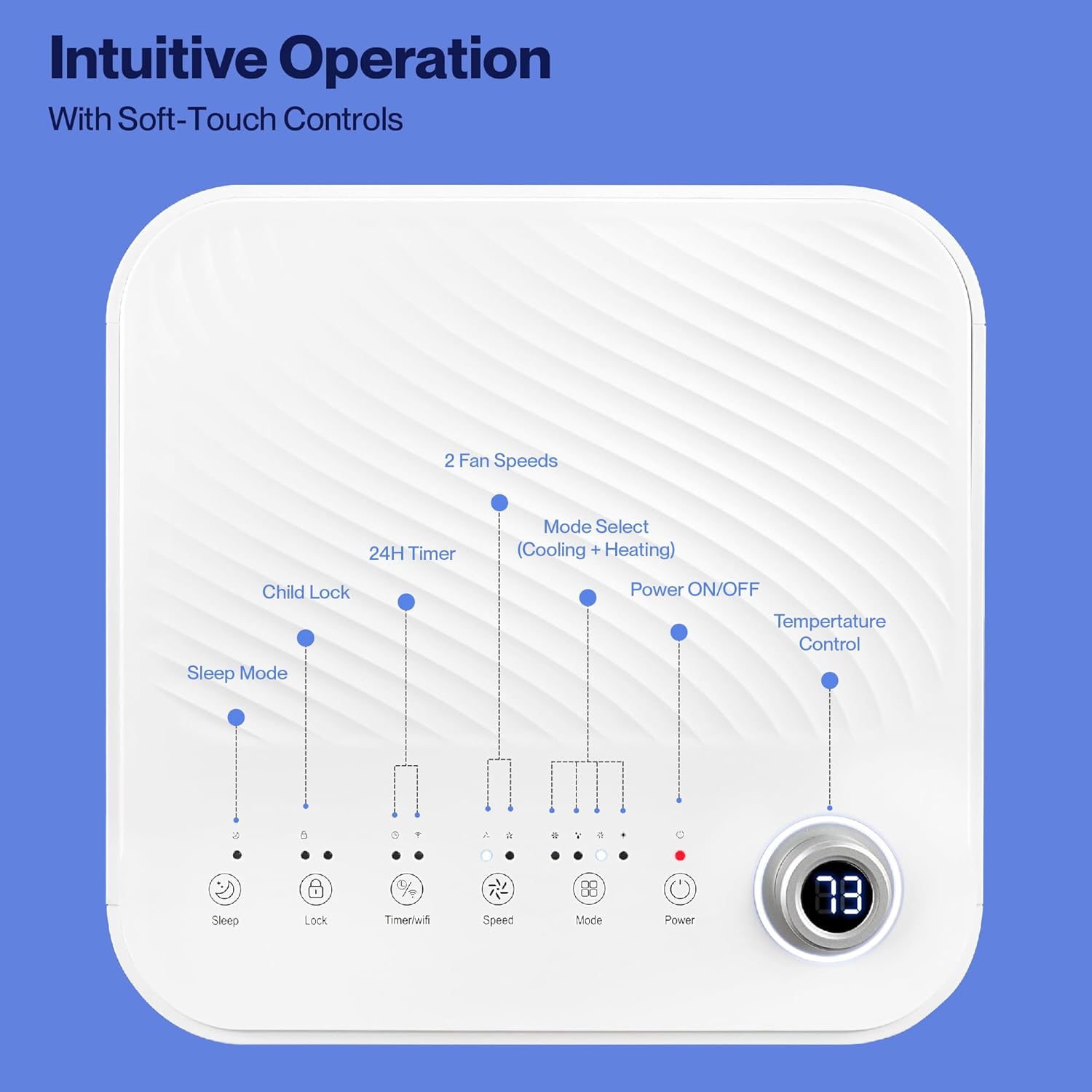
Image: Detailed diagram of the control panel with labels for each button: Sleep, Child Lock, Timer/WiFi, Fan Speed, Mode Select (Cooling + Heating), Power ON/OFF, and Temperature Control with digital display.
- VKLOP/IZKLOP: Pritisnite za vklop ali izklop enote.
- Izbira načina: Cycle through Cooling, Heating, Dehumidification, Ventilation (Fan), and Sleep modes.
- Nadzor temperature: Use the up/down arrows to adjust the desired temperature.
- Hitrost ventilatorja: Select between 2 fan speeds (Low, High).
- Časovnik: Nastavite 24-urni časovnik za samodejni vklop/izklop.
- Otroška ključavnica: Vklopi ali izklopi funkcijo otroške ključavnice.
- Spanje: Aktivira način mirovanja za tišje delovanje in postopno prilagajanje temperature.
4.2 Daljinski upravljalnik
The unit comes with a remote control for convenient operation from a distance. All functions available on the control panel can be accessed via the remote.
4.3 WiFi/Smart App Control
Control your Della Portable Air Conditioner from anywhere using the free DELLA+ app on your smartphone. The unit is compatible with Google Assistant and Amazon Alexa for voice control.

Image: A person relaxing on a couch, using a smartphone to control the air conditioner, with text indicating compatibility with Google Assistant and Amazon Alexa.
- Download the DELLA+ app from your smartphone's app store.
- Sledite navodilom v aplikaciji, da klimatsko napravo povežete z domačim omrežjem Wi-Fi.
- Ko je povezava vzpostavljena, lahko na daljavo upravljate načine, temperaturo, hitrost ventilatorja in nastavljate urnike.
The app also supports Smart Geo Location, allowing the unit to automatically turn on or off based on your proximity to home.

Image: A smartphone screen showing a map with a car icon and a notification indicating the AC unit automatically turned on due to Smart Geo Location.
5. Vzdrževanje
Regular maintenance ensures optimal performance and extends the lifespan of your unit. Always unplug the unit before cleaning.
5.1 Čiščenje zračnega filtra
Zračni filter je treba čistiti vsaka dva tedna ali pogosteje, odvisno od uporabe in kakovosti zraka.
- Poiščite ploščo zračnega filtra (običajno na zadnji ali stranski strani enote).
- Odstranite filter.
- Filter operite s toplo milnico. Preden ga ponovno vstavite, ga temeljito sperite in pustite, da se popolnoma posuši na zraku.
5.2 Izpust vode
The unit has a self-evaporating system, but in high humidity conditions, water may accumulate. The "Water-full indicator" will illuminate when the water tank needs draining.
- Pod odtočno odprtino (ki se nahaja na spodnji zadnji strani enote) postavite plitvo posodo ali pladenj.
- Odstranite odtočni čep.
- Allow all accumulated water to drain out.
- Varno namestite izpustni čep.
5.3 Shranjevanje
Če enoto shranjujete dlje časa:
- Odcedite vso nabrano vodo.
- Očistite zračni filter.
- Napravo zaženite nekaj ur v načinu samo z ventilatorjem, da se notranjost posuši.
- Izključite napajalni kabel in ga lepo zvijte.
- Enoto hranite na hladnem in suhem mestu, po možnosti v originalni embalaži.
6. Odpravljanje težav
Za pogoste težave in njihove rešitve glejte ta razdelek.
| Težava | Možen vzrok | rešitev |
|---|---|---|
| Enota se ne vklopi | No power; Power cord unplugged; Circuit breaker tripped; Water tank full | Check power outlet; Plug in power cord; Reset circuit breaker; Drain water tank |
| Enota se ne hladi učinkovito | Air filter dirty; Exhaust hose not properly installed; Room too large; Doors/windows open; Temperature setting too high | Clean air filter; Ensure exhaust hose is sealed; Close doors/windows; Lower temperature setting |
| Enota je hrupna | Unit not on level surface; Air filter dirty; Obstruction in fan | Place unit on level surface; Clean air filter; Check for obstructions |
| Puščanje vode | Drain plug loose or missing; Unit tilted | Secure drain plug; Ensure unit is level |
| Težave s povezavo Wi-Fi | Incorrect WiFi password; Unit too far from router; Router issues | Verify password; Move unit closer to router; Restart router |
Če težava po poskusu teh rešitev še vedno obstaja, se obrnite na podporo strankam.
7. Specifikacije
| Funkcija | Specifikacija |
|---|---|
| Številka modela | 048-OPAC-6H |
| Hladilna zmogljivost | 10000 BTU |
| Območje pokritosti | Do 450 kvadratnih metrov. Ft. |
| Funkcije | Cooling, Heating, Dehumidifier, Fan, Sleep Mode |
| voltage | 115 volta |
| Nivo hrupa | 54 dB |
| Hladilno sredstvo | R 410A |
| Dimenzije (D x Š x V) | 12.2 x 12.2 x 27.6 palcev |
| Material | ABS plastika |
| Posebne lastnosti | Portable, Dehumidifier, WiFi Enabled, Remote Control, Built-in Handle, 24-hour timer, Child Lock |
8. Garancija in podpora strankam
For warranty information or technical assistance, please refer to the warranty card included with your product or visit the official Della website. You may also contact Della customer support directly for further assistance with troubleshooting or parts replacement.
Ask a question about this manual
Ask about setup, troubleshooting, compatibility, parts, safety, or missing instructions. Manuals+ will review the question and use this page’s manual context to help answer it.