
Uvod
Hvala za nakupasing the Kisonli SC-21 Wireless Solar Bluetooth Speaker. This portable speaker offers versatile audio playback options including Bluetooth, USB, TF card, and FM radio, along with the convenience of solar charging. Please read this manual carefully before use to ensure proper operation and to maximize your listening experience.

Image: The Kisonli SC-21 Wireless Solar Bluetooth Speaker, showcasing its design with solar panels and the Kisonli brand logo.
Varnostna navodila
- Do not expose the speaker to extreme temperatures or direct sunlight for prolonged periods, especially when not charging.
- Izogibajte se padcem ali izpostavljanju zvočnika močnim udarcem.
- Keep the speaker away from water and liquids. Although it is water-resistant, it is not fully waterproof.
- Zvočnika ne poskušajte razstavljati ali popravljati sami. Za pomoč se obrnite na usposobljeno servisno osebje.
- Use only the specified charging cables and adapters.
- Hraniti izven dosega otrok.
Vsebina paketa
Prosimo, preverite paket za naslednje artikle:
- Kisonli SC-21 Wireless Solar Bluetooth Speaker
- USB polnilni kabel
- Portable Shoulder Strap
- Uporabniški priročnik (ta dokument)
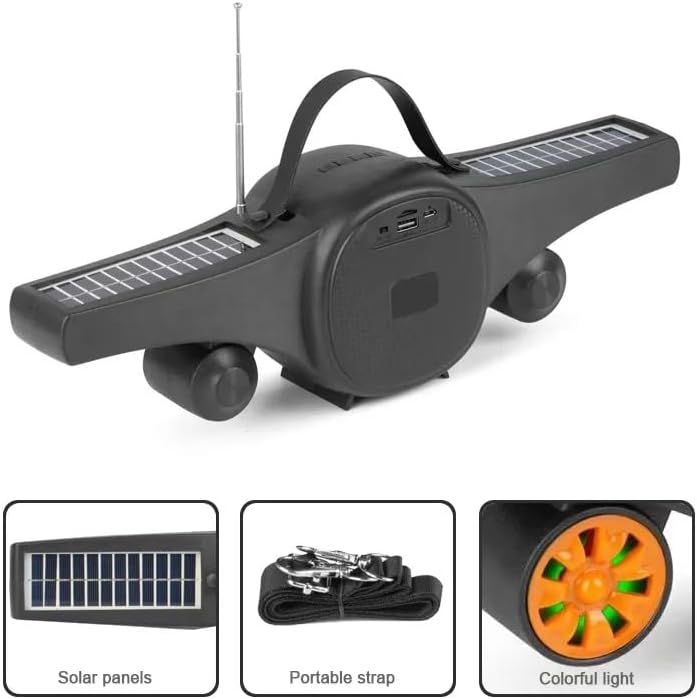
Image: The Kisonli SC-21 speaker showing its solar panels, antenna, USB port, and the included portable strap.
Konec izdelkaview
Familiarize yourself with the various parts and controls of your Kisonli SC-21 speaker.
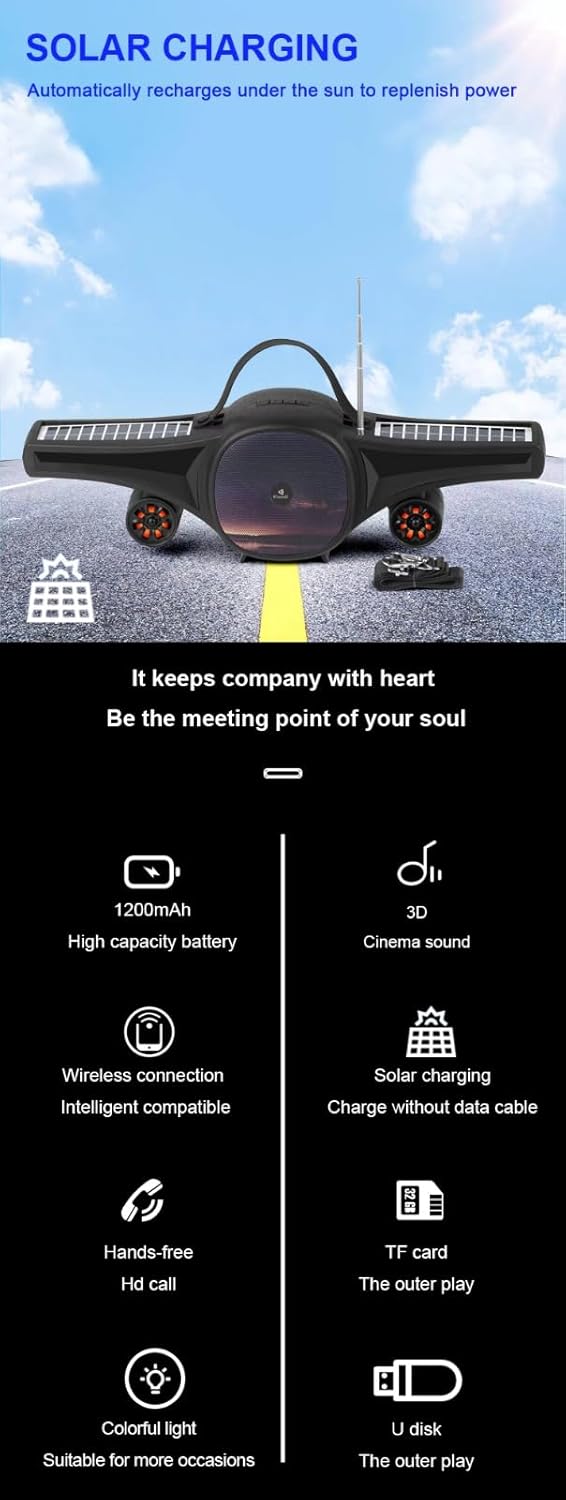
Image: A detailed display of the speaker's features, including the carrying handle, portable strap, control buttons, multiple playback ports (USB, TF card), colorful LED lights, and solar panels.
Kontrole in vrata:
- Stikalo za vklop: Gumb za VKLOP/IZKLOP.
- Gumb za način (M): Preklaplja med načini Bluetooth, FM radio, USB in TF kartica.
- Gumb za predvajanje/pavzo (►/−): Predvaja ali začasno ustavi zvok. V načinu FM pritisnite in držite za samodejno iskanje postaj.
- Prejšnja skladba/Zmanjšanje glasnosti (-): Kratek pritisk za prejšnjo skladbo/postajo, dolg pritisk za zmanjšanje glasnosti.
- Naslednja skladba/Povečaj glasnost (+): Kratek pritisk za naslednjo skladbo/postajo, dolg pritisk za povečanje glasnosti.
- LED Light Button (☀): Toggles the colorful LED lights.
- Vrata USB: Za predvajanje z USB ključka.
- Reža za TF kartice: Za predvajanje s kartice TF (MicroSD).
- DC 5V polnilna vrata: Za polnjenje zvočnika s priloženim kablom USB.
- Sončni kolektorji: Located on the wings for solar charging.
- Antena: Extendable antenna for improved FM radio reception.
Nastavitev
1. Polnjenje zvočnika
Before first use, fully charge the speaker. The speaker can be charged via USB or solar power.
- USB polnjenje: Connect the provided USB charging cable to the DC 5V port on the speaker and to a USB power adapter (not included) or a computer's USB port. The charging indicator light will illuminate. Charging time is approximately 2-3 hours.
- Sončno polnjenje: Place the speaker in direct sunlight. Ensure the solar panels are facing upwards and are not obstructed. The speaker will automatically recharge. Solar charging is slower than USB charging and is ideal for maintaining charge or for use in outdoor environments.

Image: The Kisonli SC-21 speaker positioned to demonstrate its solar charging capability under sunlight.
2. Vklop/izklop
To power on the speaker, slide the Power Switch to the "ON" position. To power off, slide it to the "OFF" position.
Navodila za uporabo
1. Način Bluetooth
- Vklopite zvočnik. Samodejno bo preklopil v način seznanjanja Bluetooth, kar bo označila utripajoča LED lučka.
- V napravi (pametnem telefonu, tablici, prenosniku) omogočite Bluetooth in poiščite razpoložljive naprave.
- Select "SC-21" from the list of devices.
- Once paired, the speaker will emit a confirmation sound, and the LED light will stop flashing. You can now play audio from your device through the speaker.
2. Predvajanje z USB/TF kartice
- Insert a USB flash drive or a TF (MicroSD) card containing MP3/MAV audio filev ustrezno pristanišče.
- The speaker will automatically switch to USB or TF card mode and begin playing audio. If it doesn't, press the "M" (Mode) button to cycle through modes until you reach the correct playback mode.
- Use the Previous/Next Track buttons to navigate through your music.
3. Način radia FM
- Za boljši sprejem raztegnite anteno.
- Press the "M" (Mode) button until you hear the FM radio.
- Long press the Play/Pause button (►/−) to initiate an automatic scan for available radio stations. The speaker will save the stations it finds.
- Short press the Previous/Next Track buttons to switch between saved radio stations.
4. Nadzor glasnosti
Long press the "+" button to increase the volume. Long press the "-" button to decrease the volume.
5. Kontrola LED luči
Press the LED Light button (☀) to turn the colorful LED lights on or off.
Vzdrževanje
- Čiščenje: Za čiščenje površine zvočnika uporabite mehko, suho krpo. Ne uporabljajte abrazivnih čistil ali topil.
- Shranjevanje: Zvočnik shranjujte na hladnem in suhem mestu, stran od neposredne sončne svetlobe in ekstremnih temperatur, ko ga dlje časa ne uporabljate.
- Vzdrževanje baterije: Da podaljšate življenjsko dobo baterije, se izogibajte pogostemu popolnemu praznjenju baterije. Zvočnik redno polnite, tudi če ga ne uporabljate.
Odpravljanje težav
| Težava | Možen vzrok | rešitev |
|---|---|---|
| Zvočnik se ne vklopi. | Baterija je skoraj prazna ali izpraznjena. | Charge the speaker using the USB cable or place it in direct sunlight. |
| Brez zvoka iz zvočnika. | Volume is too low; device not paired; incorrect mode selected. | Increase volume; ensure Bluetooth device is paired; press "M" button to select correct mode (Bluetooth, USB, TF, FM). |
| Bluetooth seznanjanje ne uspe. | Zvočnik ni v načinu seznanjanja; naprava je predaleč; motnje. | Ensure speaker is in Bluetooth mode (flashing LED); move device closer; turn off other Bluetooth devices. |
| Slab sprejem FM radia. | Antena ni iztegnjena; šibek signal. | Extend the antenna fully; try moving the speaker to a different location. |
| USB/TF kartica ne predvaja. | Nepravilno file format; card/drive not inserted correctly; speaker not in correct mode. | Zagotovite files are MP3/MAV format; reinsert card/drive; press "M" button to select USB/TF mode. |
Specifikacije
Detailed technical specifications for the Kisonli SC-21 speaker.

Image: A table displaying the product parameters for the Kisonli SC-21 speaker.
| Funkcija | Podrobnost |
|---|---|
| Model | SC-21 |
| Različica Bluetooth | BT 5.0 |
| Izhodna moč | 5W x 1 |
| Čas polnjenja | 2-3 ur |
| Čas predvajanja | 3-5 ur |
| Kapaciteta baterije | 1200 mAh |
| Mere izdelka (D x Š x V) | 400 x 92 x 116 mm |
| Teža izdelka | 100 grams (device only) / 800 grams (package weight) |
| Načini predvajanja | Bluetooth, TF Card, USB Disk, FM Radio |
| Podprti glasbeni formati | MP3, MAV |
| Vir napajanja | Solar Powered, DC 5V USB |
| Posebne lastnosti | LED Light, Portable, Water Resistant |
| Združljive naprave | Pametni telefoni, tablice, prenosniki |
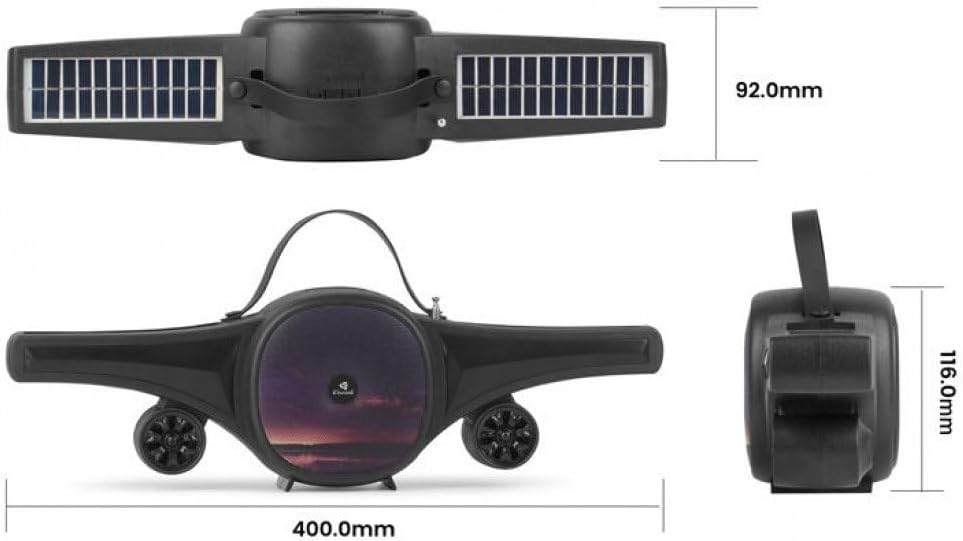
Image: Technical drawing of the Kisonli SC-21 speaker showing its dimensions (400mm length, 92mm width, 116mm height).
Garancija in podpora
Kisonli products are designed for reliability and performance. For warranty information or technical support, please refer to the retailer where you purchased the product or visit the official Kisonli webspletnega mesta. Prosimo, shranite dokazilo o nakupu za uveljavljanje garancije.