
HIKMICRO FQ35
Uporabniški priročnik za termovizijsko kamero HIKMICRO Falcon FQ35
Model: FQ35
1. Uvod
The HIKMICRO Falcon FQ35 Thermal Imaging Camera is a portable night vision device designed for various outdoor activities, including surveillance, security, and recreation. It features a high-resolution infrared sensor and an advanced OLED display, making it a top-tier option for thermal observation.

Figure 1: HIKMICRO Falcon FQ35 Thermal Imaging Camera
2. Značilnosti izdelka
2.1. Precision and Image Clarity
- Equipped with a 640 x 512 pixel infrared detector for high image resolution.
- Features a 1024 x 768 pixel OLED screen for clear and precise images, even in low light or complete darkness.
- Capable of detecting temperatures ranging from -20°C to 550°C, suitable for diverse applications.
2.2. Portability and Ease of Use
- Compact and lightweight design ensures easy transport.
- Rechargeable battery provides up to 5 hours of continuous use.
- Intuitive and user-friendly interface for immediate operation.
- Observation and hotspot functions are ready-to-use.
2.3. High Thermal Sensitivity
- Integrated highly sensitive thermal detector for precise temperature detection.
- Image enhancement function ensures clear images even in challenging conditions like high humidity or smoke.

Slika 2: stran view showing HIKMICRO branding
3. Nastavitev
3.1. Razpakiranje in prvi pregled
Carefully unpack all components from the box. Verify that all items listed in the packing list are present and undamaged. This typically includes the thermal camera, USB cable, power adapter, and user manual.
3.2. Polnjenje baterije
Before first use, fully charge the device. Connect the USB cable to the camera's charging port and the other end to the power adapter. Plug the adapter into a power outlet. The charging indicator light will show the charging status (e.g., red for charging, green for fully charged). A full charge can take several hours.
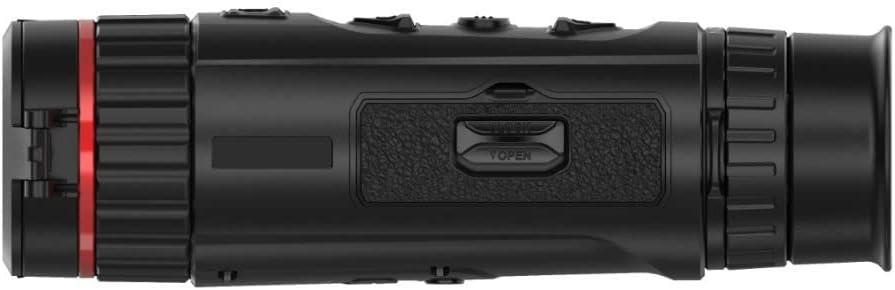
Slika 3: stran view showing the battery compartment/port area
3.3. Vklop/izklop
To power on the device, press and hold the power button (usually marked with a power symbol) for a few seconds until the screen illuminates. To power off, press and hold the power button again until the device shuts down.
3.4. Začetna konfiguracija
Upon first power-on, you may be prompted to set up basic parameters such as language, date, and time. Follow the on-screen instructions to complete these settings.
4. Navodila za uporabo
4.1. Osnovno Viewing in osredotočanje
Hold the camera to your eye and adjust the eyepiece for comfortable viewing. Rotate the focus ring on the objective lens until the image appears sharp and clear. This manual focus ensures optimal image quality for different distances.
4.2. Navigacija po meniju in nastavitve
The device features several buttons on the top panel for navigation and control. Typically, there is a menu button to access settings, arrow buttons for navigation, and an OK/confirm button. Explore the menu to adjust settings such as brightness, contrast, color palettes (e.g., White Hot, Black Hot, Red Hot, Fusion), and digital zoom levels.
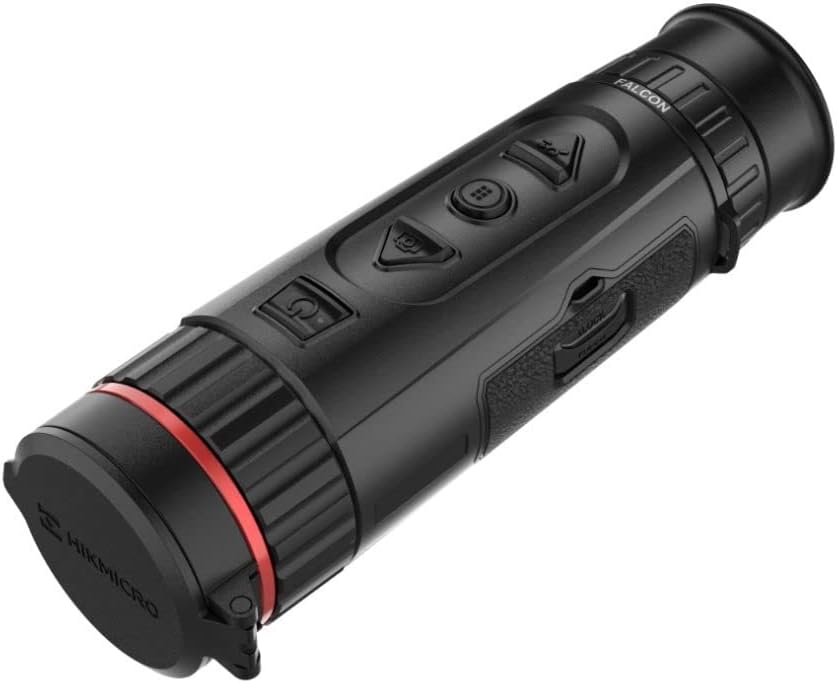
Slika 4: Zgornji del view showing the control buttons
4.3. Image and Video Recording
Most thermal cameras have dedicated buttons for capturing still images and recording videos. Press the photo button to take a snapshot. Press the video button once to start recording and again to stop. Recorded media is typically stored on internal memory or a removable SD card (if applicable).
4.4. Hotspot Tracking
The FQ35 features an automatic hotspot tracking function that identifies and highlights the hottest point in the field of view. This is particularly useful for quickly locating objects with higher temperatures.
4.5. Connectivity (Smartphone)
The camera can connect to a smartphone via Wi-Fi for live view, remote control, and media transfer. Download the official HIKMICRO app from your device's app store and follow the in-app instructions to establish a connection.
5. Vzdrževanje
5.1. Čiščenje naprave
- Objektiv: Use a soft, lint-free cloth specifically designed for optical lenses. Gently wipe the lens surface. Avoid using abrasive materials or harsh chemicals.
- Telo: Ohišje fotoaparata obrišite z mehko krpoamp cloth. Do not use solvents, alcohol, or corrosive cleaners.
5.2. Skrb za baterijo
- Redno polnite baterijo, tudi če naprave ne uporabljate pogosto, da ohranite njeno zdravje.
- Izogibajte se pogostemu popolnemu praznjenju baterije.
- Do not expose the battery to extreme temperatures (hot or cold) for prolonged periods.
5.3. Shranjevanje
When not in use, store the thermal camera in its protective case in a cool, dry place, away from direct sunlight and excessive humidity. Ensure the lens cap is on to protect the objective lens.

Slika 5: Spredaj view with lens cap open
6. Odpravljanje težav
This section addresses common issues you might encounter with your HIKMICRO Falcon FQ35.
| Težava | Možen vzrok | rešitev |
|---|---|---|
| Naprava se ne vklopi. | Prazna ali izpraznjena baterija. | Baterijo popolnoma napolnite. |
| Slika je zamegljena ali neizostrena. | Incorrect focus adjustment. Dirty lens. | Adjust the focus ring. Clean the objective lens. |
| Kratka življenjska doba baterije. | Battery not fully charged. High screen brightness. | Ensure battery is fully charged. Reduce screen brightness in settings. |
| Cannot capture images/videos. | Premalo prostora za shranjevanje. | Izbriši staro files or transfer them to another device. |
| Težave z Wi-Fi povezavo. | Incorrect Wi-Fi settings. App issues. | Ensure Wi-Fi is enabled on both devices. Restart the camera and app. Refer to app instructions. |
7. Specifikacije
Below are the key technical specifications for the HIKMICRO Falcon FQ35 Thermal Imaging Camera.
| Funkcija | Specifikacija |
|---|---|
| Znamka | HIKMICRO |
| Ime modela | FQ35 |
| Številka dela proizvajalca | HK022 |
| Infrared Detector Resolution | 640 x 512 slikovnih pik |
| OLED Screen Resolution | 1024 x 768 slikovnih pik |
| Območje zaznavanja temperature | -20°C do 550°C |
| Opis leče okularja | High-performance germanium aspherical lens |
| Opis nosilca teleskopa | Mount |
| Vrsta ostrenja | Ročno ostrenje |
| Polje od View | 20 stopinj |
| Združljive naprave | Kamera, pametni telefon |
| Življenjska doba baterije | Do 5 ur (neprekinjena uporaba) |
| Država izvora | Kitajska |
8. Garancija in podpora
For warranty information, technical support, or service inquiries, please refer to the warranty card included with your product or visit the official HIKMICRO webspletnega mesta. Račun shranite kot dokazilo o nakupu za uveljavljanje garancije.
Official HIKMICRO Webspletno mesto: www.hikmicrotech.com
Ask a question about this manual
Ask about setup, troubleshooting, compatibility, parts, safety, or missing instructions. Manuals+ will review the question and use this page’s manual context to help answer it.