
DXPICR DXPICR Smart Watch
DXPICR Smart Watch User Manual
Model: DXPICR Smart Watch
Uvod
This manual provides comprehensive instructions for the setup, operation, maintenance, and troubleshooting of your DXPICR Smart Watch. Please read this manual carefully to ensure proper use and to maximize the functionality of your device.
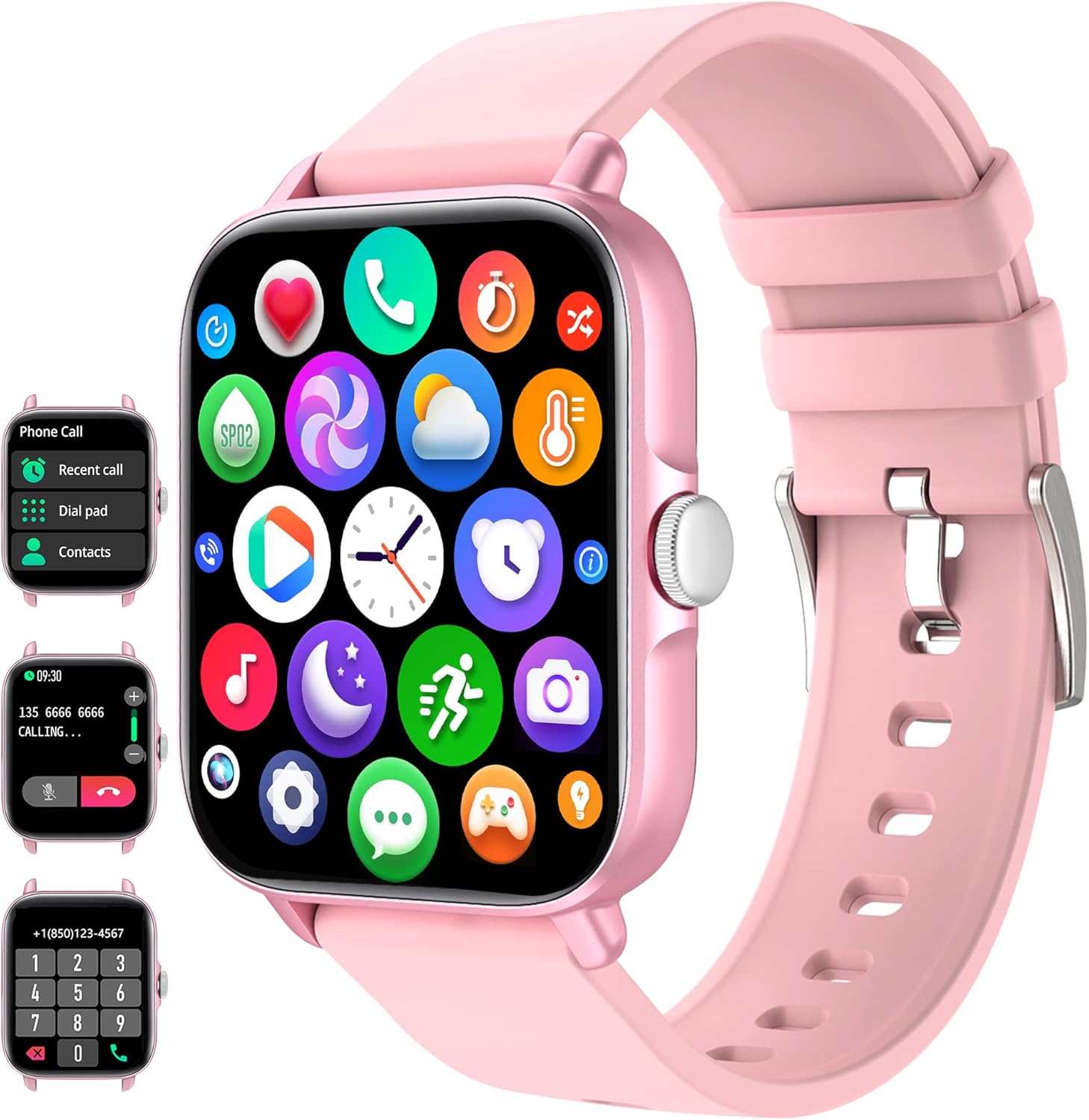
Figure 1: DXPICR Smart Watch Overview
The DXPICR Smart Watch features a full touch screen, Bluetooth call capabilities, and a range of health and fitness tracking functions. The image displays the watch's main interface, including icons for various applications and a detailed view of the call and dial pad screens.
Nastavitev
1. Začetno polnjenje
Before first use, fully charge your DXPICR Smart Watch. Connect the magnetic charging cable to the charging points on the back of the watch and plug the USB end into a standard USB power adapter (not included).
- Polno polnjenje običajno traja približno 2 uri.
- Zaslon ure bo prikazoval stanje polnjenja.
2. Prenos in namestitev aplikacije
To unlock the full features of your smartwatch, download the companion application on your smartphone.
- Scan the QR code provided in the watch's quick start guide or search for the app name (usually indicated on the watch screen or packaging) in your phone's app store (Google Play Store for Android, Apple App Store for iOS).
- Namestite aplikacijo na svoj pametni telefon.
- Grant necessary permissions when prompted by the app for full functionality (e.g., Bluetooth, notifications, location).
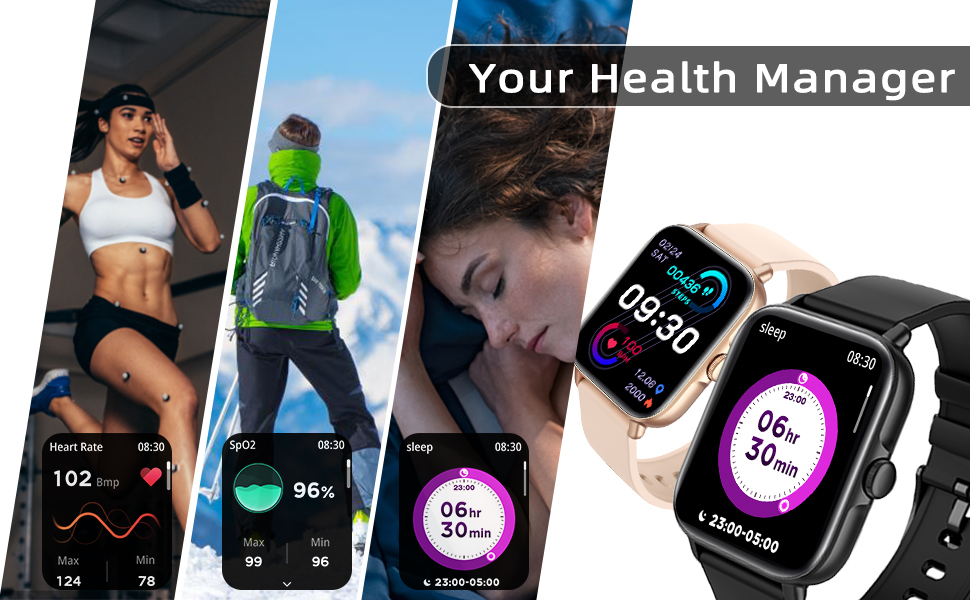
Figure 2: Smart Watch Connection Guide
This diagram illustrates the step-by-step process for connecting your DXPICR Smart Watch to your smartphone. It highlights downloading the app, enabling Bluetooth, and pairing the device for full functionality, including call answering and dialing.
3. Seznanjanje naprav (povezava Bluetooth)
After installing the app, pair your smartwatch with your phone via Bluetooth.
- Prepričajte se, da je Bluetooth na vašem pametnem telefonu omogočen.
- Open the installed app and navigate to the "Add Device" or "Connect Device" section.
- The app will search for available devices. Select "DXPICR Smart Watch" or a similar device name (e.g., "Y20 GT") from the list.
- Follow any on-screen prompts to confirm the pairing on both your phone and the watch.
- For the Bluetooth call function, you may need to connect to a second Bluetooth device named "Y20 GT_Phone" in your phone's Bluetooth settings after the initial app connection. This enables call audio through the watch.
Navodila za uporabo
1. Osnovna navigacija
- Zaslon na dotik: Za navigacijo po menijih in funkcijah podrsajte levo/desno, gor/dol. Dotaknite se za izbiro.
- Stranski gumb: Typically used to return to the home screen, wake/sleep the display, or access the main menu.
2. Bluetooth Call and Smart Notifications
The DXPICR Smart Watch allows you to make and receive calls directly from your wrist and receive notifications from your smartphone.
- Klicanje/sprejemanje klicev: Once the "Y20 GT_Phone" Bluetooth connection is established, you can dial numbers or answer incoming calls directly on the watch.
- Obvestila: The watch will vibrate and display notifications for incoming calls, messages (SMS), and app alerts (e.g., Facebook, WhatsApp, Twitter) from your connected phone. Ensure notification permissions are enabled in the app.

Slika 3: Funkcionalnost klicev prek Bluetootha
This image demonstrates the convenience of answering or dialing calls directly from your DXPICR Smart Watch, highlighting the watch's call interface and its integration with your phone's Bluetooth.

Slika 4: Prikaz pametnih obvestil
The DXPICR Smart Watch provides timely smart notifications, ensuring you stay updated with messages, calls, and app alerts directly on your wrist, as depicted by the various notification icons.
3. Spremljanje zdravja
The watch is equipped with sensors to monitor various health metrics.
- Spremljanje srčnega utripa: Access the heart rate function on the watch to measure your current heart rate. The app provides historical data and analysis.
- Spremljanje kisika v krvi (SpO2): Measure your blood oxygen saturation levels. Ensure the watch is worn snugly on your wrist for accurate readings.
- Spremljanje spanja: The watch automatically tracks your sleep patterns, including awake time, light sleep, and deep sleep. View podrobna analiza spanja v aplikaciji.

Slika 5: Spremljanje srčnega utripa
The DXPICR Smart Watch continuously monitors your heart rate, providing real-time data and historical trends to help you understand your cardiovascular health during various activities and rest periods.

Slika 6: Spremljanje spanja
The watch tracks your sleep quality, differentiating between awake time, light sleep, and deep sleep, providing insights into your rest patterns for improved well-being.
4. Športni načini in sledenje aktivnosti
The watch supports 28 sports modes to track your workouts and daily activity.
- Select the desired sport mode (e.g., walking, running, cycling, swimming) before starting your activity.
- The watch will record data such as steps, calories burned, distance, and active hours in real-time.
- Review your fitness data analysis in the app to track progress and achieve exercise goals.

Figure 7: 28 Sports Modes and Activity Tracking
The DXPICR Smart Watch offers 28 dedicated sports modes to accurately track your physical activities, providing detailed metrics such as steps, calories, distance, and heart rate to help you monitor and improve your performance.
5. Druge praktične funkcije
Your DXPICR Smart Watch includes several additional features for daily convenience:
- Glasovni pomočnik AI: Z glasovnim asistentom telefona komunicirajte neposredno iz ure.
- Vadba dihanja: Vodene dihalne vaje, ki vam bodo pomagale pri sprostitvi.
- Nadzor glasbe: Upravljajte predvajanje glasbe na pametnem telefonu (predvajanje, začasna ustavitev, preskakovanje skladb).
- Nadzor kamere: Uporabite uro kot daljinski sprožilec za kamero telefona.
- Najdi telefon: Locate your misplaced phone by triggering an alarm sound.
- Sedentarni opomniki: Prejemajte opozorila za gibanje, če ste bili predolgo neaktivni.
- Budilka: Nastavite alarme, ki vibrirajo na vašem zapestju.
- Štoparica in časovnik: Osnovne funkcije merjenja časa.
- Prikaz vremena: View trenutne vremenske razmere in napovedi.
- Svetilka: Preprosta funkcija svetilke na zaslonu.

Figure 8: Life Partner Features
This image highlights the DXPICR Smart Watch's practical features that enhance daily life, such as weather updates, blood oxygen tracking, music playback control, and alarm functionalities.
6. Prilagodite številčnico ure
Personalize your watch by choosing from various watch faces available in the app, or upload your own photos.
Vzdrževanje
1. Čiščenje ure
- Zaslon in pašček ure redno obrišite z mehko krpoamp, krpo, ki ne pušča vlaken.
- Izogibajte se uporabi agresivnih kemikalij, abrazivnih čistil ali topil.
- Pred polnjenjem se prepričajte, da so polnilni kontakti čisti in suhi.
2. Najboljše prakse zaračunavanja
- Uporabljajte samo priloženi magnetni polnilni kabel.
- Do not charge the watch in wet conditions.
- Med polnjenjem se izogibajte izpostavljanju ure ekstremnim temperaturam.
3. Vodoodpornost
The DXPICR Smart Watch is designed to be waterproof, suitable for daily use like hand washing or light rain. However, it is not recommended for hot showers, saunas, or diving, as steam and hot water can compromise the seals.
Odpravljanje težav
If you encounter issues with your DXPICR Smart Watch, refer to the following common problems and solutions:
1. Connectivity Issues (Frequent Disconnections)
- Prepričajte se, da je Bluetooth vklopljen: Verify Bluetooth is active on both your watch and smartphone.
- Aplikacija se izvaja v ozadju: Make sure the companion app is running in the background and not closed by your phone's system.
- Ponovna povezava naprave: If disconnections persist, try unpairing the watch from your phone's Bluetooth settings and then re-pairing it through the app.
- Nastavitve telefona: Check your phone's battery optimization settings; some phones may restrict background app activity, affecting connectivity.
2. Watch Not Charging
- Preverite kabel in adapter: Ensure the charging cable is securely connected to both the watch and the power adapter. Try a different USB port or power adapter.
- Čisti stiki: Inspect the magnetic charging contacts on the watch and cable for dirt or debris. Clean gently with a dry cloth.
- Ponovni zagon ure: Sometimes a simple restart of the watch can resolve charging issues.
3. Notifications Not Appearing/Vibrating
- Dovoljenja aplikacije: Verify that the companion app has all necessary notification permissions enabled in your phone's settings.
- App Notification Settings: Within the app, ensure that notifications for specific applications (e.g., SMS, social media) are turned on.
- Watch Do Not Disturb: Check if "Do Not Disturb" mode or a similar silent mode is active on your watch.
- Povezava Bluetooth: Ensure the watch is properly connected via Bluetooth to your phone.
4. Inaccurate Activity/Health Readings (Steps, Heart Rate, Sleep)
- Pravilno prileganje: Ensure the watch is worn snugly on your wrist, about one finger's width above the wrist bone. It should not be too loose or too tight.
- Movement for Steps: For step tracking, ensure natural arm swing. Excessive stillness or very slight movements may not be registered.
- Čistost senzorja: Keep the optical sensors on the back of the watch clean and free from sweat or dirt.
- Sinhronizacija aplikacije: Regularly sync data with the app to get the most accurate and updated readings.
5. Bluetooth Audio Conflicts (Car/Earbuds)
- Ročna izbira: When connecting to car Bluetooth or wireless earbuds, you may need to manually select the desired audio output device in your phone's Bluetooth settings. The watch's call audio connection ("Y20 GT_Phone") might take precedence.
- Disable Watch Call Audio: If you primarily use other devices for calls, you can disable the "Y20 GT_Phone" Bluetooth connection in your phone's settings to prevent conflicts, while keeping the main watch connection active for data sync and notifications.
Specifikacije
| Funkcija | Specifikacija |
|---|---|
| Znamka | DXPICR |
| Model | DXPICR Smart Watch |
| Operacijski sistem | Android and iOS (Compatible with iOS 8.0+/Android 4.4+ and Bluetooth 4.0+) |
| Velikost zaslona | 1.7 palcev |
| Vrsta zaslona | Digitalni LCD |
| Povezljivost | Bluetooth |
| Vrsta baterije | Litijev polimer (priložen) |
| Posebne lastnosti | Bluetooth Call, Heart Rate Monitor, Sleep Monitor, Blood Oxymeter (SpO2), Music Player, Camera Control, Sedentary Reminder, Alarm Clock, Calorie Tracker, Time Display, Voice Call, Waterproof, Multisport Tracker (28 modes), Notifications, Activity Tracker, Breath Monitor |
| Dimenzije izdelka | 9.4 x 8.64 x 4.32 cm |
| Teža predmeta | 100 g |
Garancija in podpora
DXPICR provides a standard warranty for its products. For specific warranty terms and conditions, please refer to the warranty card included with your product or contact the seller directly.
If you require technical assistance, have questions about your device, or need to report an issue, please contact DXPICR customer support or the retailer from whom you purchased the product. Provide your model number and a detailed description of the issue for faster service.
Ask a question about this manual
Ask about setup, troubleshooting, compatibility, parts, safety, or missing instructions. Manuals+ will review the question and use this page’s manual context to help answer it.