
1. Uvod
Thank you for choosing the XTUGA D900 Dual UHF Wireless Microphone System. This system is designed to provide high-quality audio transmission for various applications, including karaoke, DJ events, weddings, church services, business meetings, classroom activities, and live performances. This manual will guide you through the setup, operation, and maintenance of your new wireless microphone system.
The XTUGA D900 features dual handheld microphones with adjustable echo, treble, and bass controls, paired with a versatile mini receiver that offers both 3.5mm and 6.35mm output options for broad compatibility with audio devices.

Image: The XTUGA D900 system is suitable for performances, family entertainment, classroom speeches, and program hosting.
2. Vsebina paketa
Prosimo, preverite paket, da se prepričate, da so prisotni vsi elementi:
- 2 x XTUGA D900 Handheld Wireless Microphones
- 1 x Mini Wireless Receiver (with 3.5mm jack)
- 1 x 6.35mm Adapter (for receiver)
- 1 x USB Charging Cable (for receiver)
- 2 x Anti-roll Rings (for microphones)
- Uporabniški priročnik
3. Značilnosti izdelka
- Visokokakovosten zvok: Clear voice transmission without feedback or distortion.
- Dual UHF Wireless System: Two microphones operating on independent UHF channels (ChA and ChB), each with 50 adjustable frequencies (573-599 MHz range) to prevent interference.
- On-Microphone Controls: Each handheld microphone features direct controls for volume, 7 levels of echo adjustment, and 5 levels of treble/bass adjustment.
- Versatile Receiver: Mini wireless receiver with a 3.5mm output, convertible to 6.35mm for wide compatibility with various audio equipment.
- Dolg brezžični doseg: Stable signal transmission up to 20 meters (65 feet).
- Rechargeable Receiver: Built-in battery provides up to 8 hours of use on a 4-hour charge.
- Bluetooth predvajanje: The receiver supports Bluetooth connectivity for playing background music from a smartphone or other devices.

Image: Close-up of the XTUGA D900 microphone displaying its multifunctional adjustment capabilities for echo, volume, treble, and bass.
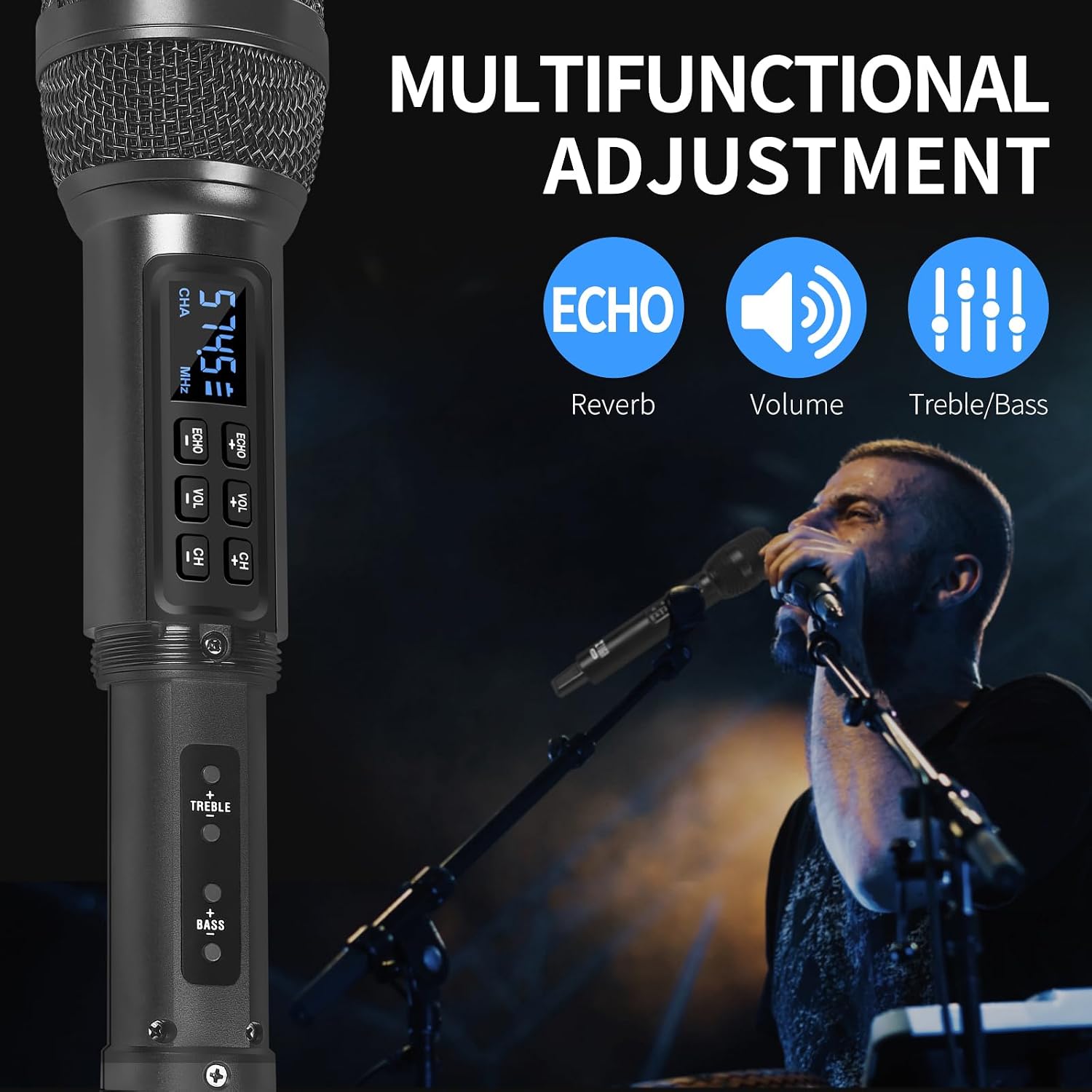
Image: The XTUGA D900 handheld microphone featuring a digital display for frequency and channel information.
4. Navodila za namestitev
4.1. Povezava sprejemnika
- Identify Output: Determine if your audio device (e.g., amplifier, mixer, speaker, soundbar, PC) requires a 3.5mm or 6.35mm input.
- Priključitev sprejemnika:
- For 3.5mm input: Directly plug the mini wireless receiver's 3.5mm jack into your device's audio input port.
- For 6.35mm input: Attach the provided 6.35mm adapter to the receiver's 3.5mm jack, then plug it into your device's 6.35mm audio input port.
- Sprejemnik ob vklopu: Press and hold the POWER button on the receiver until the indicator lights illuminate.
4.2. Nastavitev mikrofona
- Vstavite baterije: Open the battery compartment of each microphone and insert two AA batteries (not included), ensuring correct polarity.
- Vklopni mikrofoni: Press and hold the power button on each microphone. The display will light up, showing the channel and frequency.
- Samodejno seznanjanje: The microphones and receiver should automatically pair. The RF indicator lights (A.RF, B.RF) on the receiver will turn solid blue when a microphone is successfully connected.

Image: Connectivity diagram illustrating how to connect the XTUGA D900 microphone and receiver to different audio systems using 3.5mm or 6.35mm inputs. Note: Not recommended for small speakers under 15 watts.

Image: The XTUGA D900 system, showing two microphones and the receiver, highlighting a stable 20-meter wireless signal range.
5. Navodila za uporabo
5.1. Upravljanje mikrofona
- Vklop/izklop: Press and hold the power button on the microphone for 2-3 seconds.
- Prilagoditev glasnosti: Press the 'VOL +' or 'VOL -' buttons on the microphone to adjust the microphone's output volume.
- Prilagoditev odmeva: Press the 'ECHO +' or 'ECHO -' buttons to cycle through 7 levels of echo effect.
- Prilagoditev visokih/nizkih tonov: Press the 'TREBLE +' or 'TREBLE -' buttons to adjust the treble. Press the 'BASS +' or 'BASS -' buttons to adjust the bass. There are 5 levels for each.
- Prilagoditev frekvence: Press the 'CH +' or 'CH -' buttons to change the operating frequency. Each microphone (ChA and ChB) has 50 selectable frequencies to avoid interference.

Image: Two XTUGA D900 microphones illustrating the frequency adjustment buttons (CH+/-) and their digital displays.
5.2. Receiver Bluetooth Playback
The receiver supports Bluetooth connectivity for playing background music from a compatible device.
- Aktiviraj Bluetooth: Prepričajte se, da je sprejemnik vklopljen.
- Seznanjanje: On your smartphone or Bluetooth-enabled device, search for Bluetooth devices and select "X168" to connect.
- Predvajaj glasbo: Once connected, you can play music from your device, and the audio will be transmitted through the receiver to your connected sound system.

Image: The XTUGA D900 receiver demonstrating Bluetooth playback functionality, connected to a smartphone.
6. Informacije o bateriji
6.1. Receiver Battery
- The receiver has a built-in rechargeable battery.
- To charge, connect the receiver to a USB power source using the provided USB charging cable.
- A full charge typically takes approximately 4 hours and provides up to 8 hours of continuous use.
- The POWER indicator light on the receiver will show charging status.
6.2. Microphone Batteries
- Each microphone requires two AA batteries (not included).
- Replace batteries when the microphone display indicates low power or when audio quality degrades.
- Always use fresh, high-quality batteries for optimal performance.

Image: The XTUGA D900 receiver highlighting its strong battery life, offering up to 8 hours of operation after a 4-hour charge.
7. Vzdrževanje
- Čiščenje: Wipe the microphones and receiver with a soft, dry cloth. Do not use liquid cleaners or solvents.
- Shranjevanje: Sistem shranjujte na hladnem in suhem mestu, stran od neposredne sončne svetlobe in ekstremnih temperatur.
- Vzdrževanje baterije: Remove AA batteries from microphones if not used for an extended period to prevent leakage. Charge the receiver's battery periodically if stored for long durations to maintain battery health.
- Ravnanje: Avoid dropping the microphones or receiver, as this can damage internal components.
8. Odpravljanje težav
| Težava | Možen vzrok | rešitev |
|---|---|---|
| Ni zvoka iz mikrofona |
|
|
| Popačenje ali motnje zvoka |
|
|
| Receiver Bluetooth not connecting |
|
|
9. Specifikacije
| Funkcija | Podrobnost |
|---|---|
| Znamka | XTUGA |
| Ime modela | XTUGA D900 |
| Tehnologija povezljivosti | UHF Wireless, Auxiliary, Bluetooth (Receiver) |
| Vrsta priključka | 3.5 mm vtičnica, 6.35 mm vtičnica (z adapterjem) |
| Faktor oblike mikrofona | Ročni |
| Frekvenčno območje | 573 MHz - 599 MHz (30 adjustable frequencies per channel) |
| Število frekvenc | 50 frequencies per channel (ChA and ChB) |
| Brezžično Domet | Do 20 metrov (65 čevljev) |
| Življenjska doba baterije sprejemnika | Do 8 ur (po 4 urah polnjenja) |
| Vir napajanja mikrofona | 2 x AA Batteries (per microphone, not included) |
| Združljive naprave | PC, Smartphone, TV, Tablets, Laptops, Power Amplifiers, Mixers, Speakers, Soundbars, Bus Audio |
| Posebne lastnosti | Volume Control, 7-level Echo Adjustment, 5-level Treble Adjustment, 5-level Bass Adjustment |
| Vključene komponente | 2 Microphones, 1 Mini Wireless Receiver, 1 6.35mm Adapter, 1 USB Charging Cable |
| Država izvora | Kitajska |
10. Varnostne informacije
- Naprave ne izpostavljajte dežju ali vlagi.
- Ne razstavljajte enote. Vsa servisna dela prepustite usposobljenemu osebju.
- Hraniti ločeno od virov toplote in odprtega ognja.
- Baterije odvrzite odgovorno v skladu z lokalnimi predpisi.
- Avoid using the system near strong electromagnetic fields, which may cause interference.
11. Garancija in podpora
XTUGA products are designed for reliability and performance. For warranty information or technical support, please refer to the warranty card included with your purchase or contact XTUGA customer service through the retailer where you purchased the product.
Prosimo, shranite dokazilo o nakupu za morebitne garancijske zahtevke.