
bopmen STAR 10
Star10 Wireless Bluetooth Karaoke Microphone User Manual
Model: STAR 10 | Brand: bopmen
Uvod
The bopmen Star10 Wireless Bluetooth Karaoke Microphone is a versatile 4-in-1 device designed for singing, acting as a portable handheld microphone, speaker, and featuring an integrated disco light. It offers high-resolution audio quality and extensive compatibility, making it suitable for various entertainment settings including car travel, home parties, and general use for adults and children.

Image: The Star10 Wireless Bluetooth Karaoke Microphone in Rose Gold, showcasing its sleek design and integrated disco ball.
Varnostne informacije
- Naprave ne izpostavljajte ekstremnim temperaturam ali vlagi.
- Izogibajte se padcem ali izpostavljanju naprave močnim udarcem.
- Hraniti izven dosega majhnih otrok, da preprečite nevarnost zadušitve z majhnimi deli.
- Use only the provided USB C-A cable for charging.
- Ne poskušajte razstaviti ali spremeniti naprave.
- Napravo očistite z mehko, suho krpo. Izogibajte se uporabi agresivnih kemikalij ali abrazivnih čistil.
Vsebina paketa
Označite polje za naslednje elemente:
- 1 x Karaoke microphone (Star10)
- 1 x USB C-A charging cable
- 1 x uporabniški priročnik
Konec izdelkaview
Familiarize yourself with the main controls and ports of your Star10 microphone.

Image: Detailed diagram illustrating the main control panel and bottom ports of the Star10 microphone, including Microphone Volume, On/Off/Play/Pause, Reverb On/Off, Volume Up/Down, Next/Previous Song, Tone Mode, Disco Light Control, USB Port, 3.5mm Earphone Jack, and TF Card slot.
Glavne kontrole:
- Microphone Volume / Accompaniment Mode On/Off: Adjusts microphone volume or toggles accompaniment.
- On/Off, Play/Pause: Powers the device on/off and controls music playback.
- Reverb On/Off / Bluetooth & TF Card Mode: Toggles reverb effect and switches between input modes.
- Povečanje/zmanjšanje glasnosti: Prilagodi splošno glasnost zvočnika.
- Prejšnja/naslednja pesem: Navigira po skladbah.
- Tonski način: Cycles through different voice effects.
- Disco Light Control / Twins Pairing: Controls the disco light and initiates Twins Mode pairing.
Bottom Ports:
- Indikatorska lučka: Shows device status (e.g., charging, connected).
- 3.5 mm Earphone Jack / Re-Set button inside: For private listening or resetting the device.
- Vrata USB: Za polnjenje mikrofona.
- Reža za TF kartice: For playing music directly from a micro TF card (up to 32GB, not included).
Nastavitev
Polnjenje mikrofona:
- Connect the provided USB C-A cable to the USB port on the bottom of the microphone.
- Drugi konec kabla priključite na združljiv USB-napajalnik (ni priložen) ali USB-vhod računalnika.
- The indicator light will show charging status. A full charge provides up to 10 hours of use (minimum 5 hours).
Vklop/izklop:
- Pritisnite in držite Vklop/izklop/predvajanje/pavza button for a few seconds to power on the microphone. You will hear an audible prompt.
- To power off, press and hold the same button until you hear the power-off prompt.
Navodila za uporabo
Povezava Bluetooth:
The Star10 microphone uses Bluetooth 5.2 for seamless connection to your devices.
- Power on the microphone. It will automatically enter Bluetooth pairing mode.
- On your smartphone, tablet, or other Bluetooth-enabled device, open the Bluetooth settings.
- Iskanje "STAR 10" in the list of available devices and select it to pair.
- Once connected, you will hear a confirmation prompt. You can now play music from your device through the microphone's speaker and sing along.

Image: The Star10 microphone demonstrating its wide compatibility, connecting wirelessly to smartphones, tablets, and laptops via Bluetooth.
Način kartice TF:
Play music directly from a micro TF card.
- Insert a micro TF card (up to 32GB, not included) with your music files into the TF Card slot on the bottom of the microphone.
- The microphone will automatically switch to TF Card mode. If not, press the Reverb On/Off / Bluetooth & TF Card Mode button to cycle modes.
- Uporabite Prejšnja / naslednja pesem buttons to navigate tracks and Predvajaj/Premor za nadzor predvajanja.
Disco Light Control:
Enhance your karaoke experience with the built-in disco light.
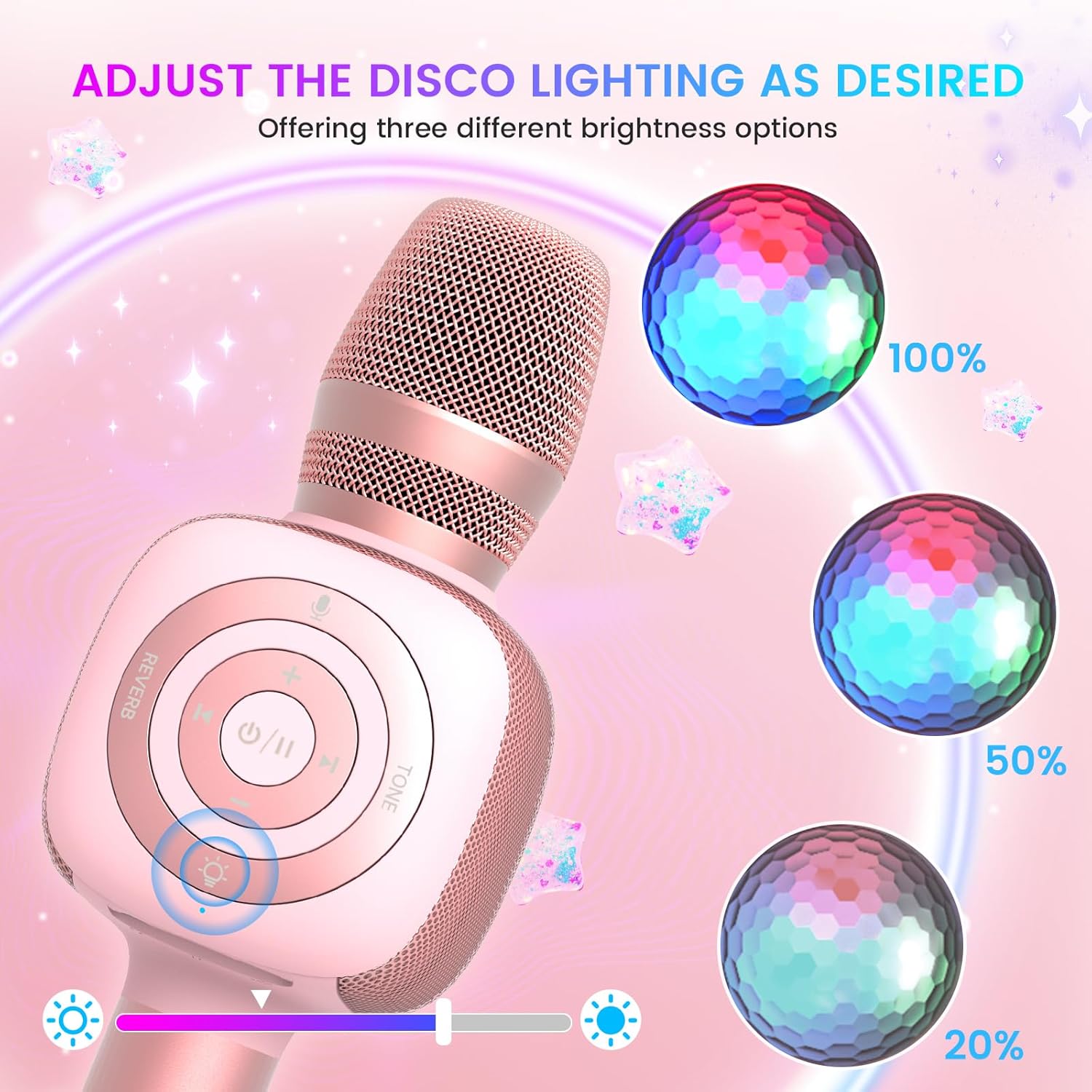
Image: The Star10 microphone's disco light feature, illustrating three adjustable brightness levels (100%, 50%, 20%) to suit different ambiance needs.
- Pritisnite Disco Light Control button (light bulb icon) to cycle through three RGB color modes and brightness levels.
- Press again to turn the disco light off.
Tone Modes (Magic Mode):
Experiment with different voice effects for added fun.

Image: The Star10 microphone's "Magic Mode" feature, depicting icons for Male Voice, Female Voice, Cartoon Voice, and Monster Sound effects.
- Pritisnite Tonski način button to cycle through various voice effects such as Male Voice, Female Voice, Cartoon Voice, and Monster Sound.
- Continue pressing to return to the original tone.
Twins Mode (Duet Mode):
Pair two Star10 microphones for a duet experience.

Image: Two individuals enjoying a duet, each holding a Star10 microphone, illustrating the "Twins Mode" functionality for shared singing experiences.
- Ensure both Star10 microphones are powered on.
- On one microphone, press and hold the Disco Light Control button for 2 seconds until a prompt tone "LINK CONNECTED" is heard. This microphone is now in Twins Mode pairing.
- On your cellphone/device, perform Bluetooth pairing selection and choose either of the two microphones. Both microphones will now be connected and output audio.
- To exit Twins Mode, press and hold the Disco Light Control button on the paired microphone for 2 seconds.
Vzdrževanje
- Čiščenje: Wipe the microphone with a soft, dry cloth. Do not use liquid cleaners or aerosols.
- Shranjevanje: Mikrofon shranjujte na hladnem in suhem mestu, stran od neposredne sončne svetlobe in ekstremnih temperatur.
- Vzdrževanje baterije: For optimal battery life, charge the microphone regularly, even if not in frequent use. Avoid fully discharging the battery for extended periods.
Odpravljanje težav
| Težava | Možen vzrok | rešitev |
|---|---|---|
| Mikrofon se ne vklopi. | Prazna baterija; gumb za vklop ni bil pritisnjen dovolj dolgo. | Charge the microphone fully; Press and hold the power button for 3-5 seconds. |
| Povezave ni mogoče vzpostaviti prek Bluetootha. | Microphone not in pairing mode; Device Bluetooth off; Interference. | Ensure microphone is on and in pairing mode; Enable Bluetooth on your device; Move closer to the microphone; Restart both devices. |
| Iz zvočnika ni zvoka. | Volume too low; Device volume too low; Incorrect mode. | Increase microphone volume; Increase device volume; Ensure correct mode (Bluetooth/TF Card). |
| Voice effects not working. | Napačen pritisk gumba. | Press the 'Tone Mode' button repeatedly to cycle through effects. |
| Disco light not working. | Light turned off. | Press the 'Disco Light Control' button to turn on/cycle modes. |
Specifikacije
- Model: ZVEZDA 10
- Znamka: bopmen
- Faktor oblike mikrofona: Ročni
- Tehnologija povezljivosti: Bluetooth 5.2
- vir energije: Napajanje z baterijami (2 litij-ionski bateriji sta priloženi)
- Življenjska doba baterije: Up to 10 hours (minimum 5 hours)
- Dimenzije izdelka: 18.7 x 16.54 x 12.2 palcev
- Teža artikla: 1.19 funtov (540 gramov)
- Razmerje med signalom in šumom: 52 dB
- Frekvenčni odziv: 10 KHz
- Združljive naprave: Personal Computer, Smartphone, Karaoke Machine
- Posebna lastnost: Mute Function, Disco Light, Voice Changer, Twins Mode
- barva: Rose Gold
- Priporočena uporaba: Notranji/zunanji
Garancija in podpora
Your bopmen Star10 Karaoke Microphone comes with a standard manufacturer's warranty. For detailed warranty information, please refer to the warranty card included in your package or visit the official bopmen webmesto.
If you encounter any issues or have questions regarding your product, please do not hesitate to contact our professional customer service team. We are committed to providing support and assistance within 24 hours to ensure your satisfaction.
Kontaktni podatki: Please refer to the contact details provided in your product packaging or on the official bopmen support page for the most up-to-date information.
Ask a question about this manual
Ask about setup, troubleshooting, compatibility, parts, safety, or missing instructions. Manuals+ will review the question and use this page’s manual context to help answer it.