
1. Izdelek je končanview
The Cudy GS108D is an 8-port Gigabit Ethernet Network Switch designed for expanding your network connectivity. It offers high-speed data transfer for devices such as computers, IPTVs, printers, NAS, game consoles, and routers. Featuring a plug-and-play design, fanless operation, and energy-efficient technology, this switch provides a reliable and quiet solution for both home and office networks.

Slika: spredaj view of the Cudy GS108D switch, highlighting its 8 Gigabit Ethernet ports and LED indicators.
Ključne značilnosti:
- 8 gigabitnih ethernetnih vrat: Provides high-speed wired connections for multiple devices.
- Plug and Play: Requires no software installation or configuration for immediate use.
- Zasnova brez ventilatorja: Ensures quiet operation, suitable for any environment.
- Energijsko učinkovit: Compliant with IEEE802.3az standard, saving power when ports are idle.
- Vsestranska montaža: Podpira tako postavitev na mizo kot tudi montažo na steno.
2. Vsebina paketa
Preverite, ali vaš paket vsebuje naslednje elemente:
- Cudy GS108D 8-Port Gigabit Ethernet Network Switch
- Napajalni adapter
- Navodila za uporabo (ta dokument)
- Ethernet Cable (may vary by region/package)

Image: Contents of the Cudy GS108D package, showing the switch, power adapter, and an Ethernet cable.
3. Fizični opis
Sprednja plošča:
The front panel features eight 10/100/1000 Mbps RJ45 ports. Each port has an associated LED indicator to show link/activity status.
- LED za napajanje: Označuje stanje napajanja stikala.
- LED-diode za povezavo/dejanje (1–8):
- Svetlo zeleno: A device is connected and the link is active.
- Utripajoča zelena: Podatki se prenašajo ali prejemajo na vratih.
- Izklop: No device is connected or the link is inactive.

Slika: Podrobna view of the Cudy GS108D's front panel, showing the 8 RJ45 ports and their corresponding LED indicators.
Zadnja stran:
The rear panel typically contains the power input port.
Dimenzije:
The compact design of the GS108D allows for flexible placement. Approximate dimensions are 138mm (5.43") L x 61.5mm (2.42") W x 24mm (0.94") H.
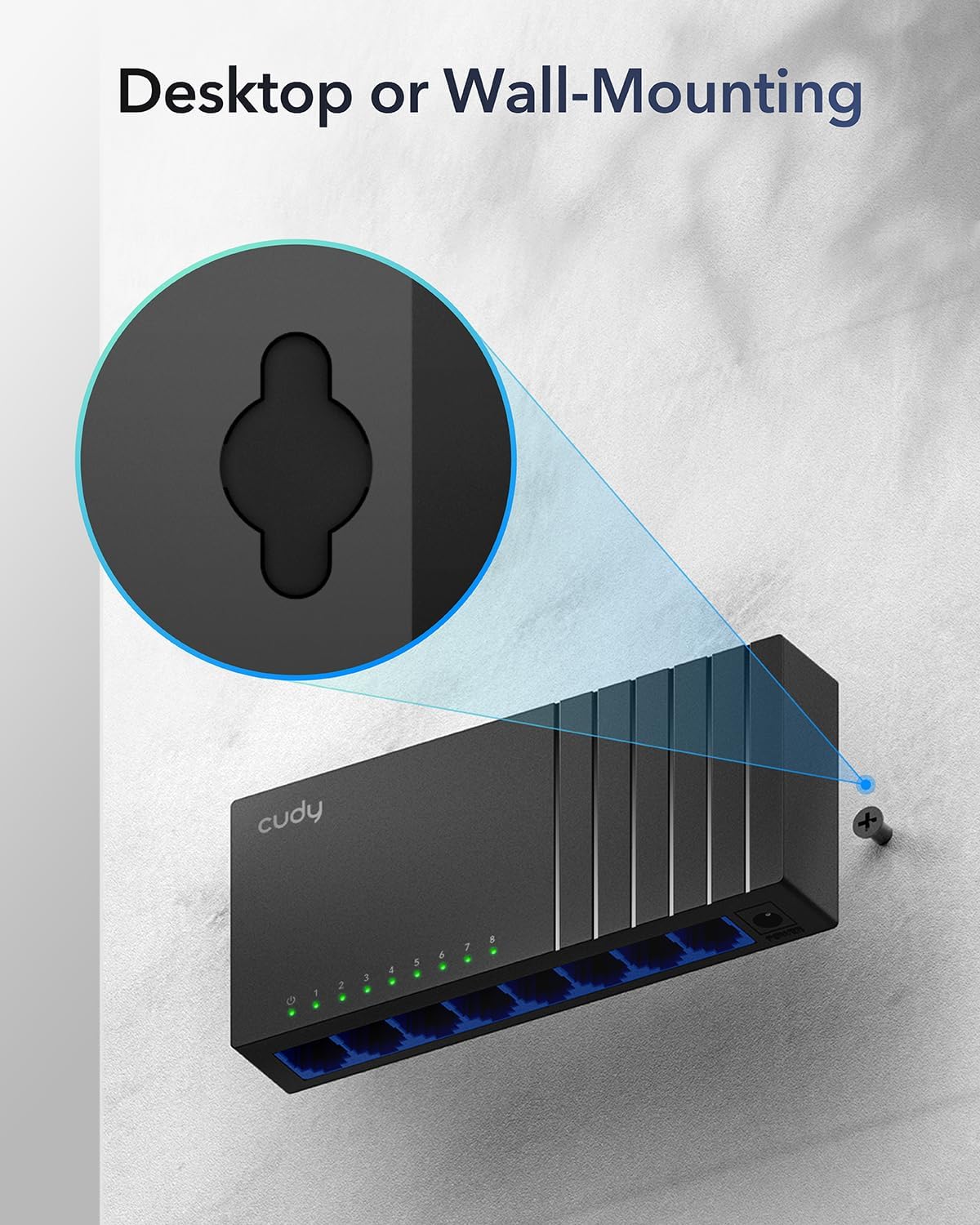
Image: The Cudy GS108D switch with its compact dimensions clearly indicated.
4. Navodila za nastavitev
The Cudy GS108D switch is designed for simple plug-and-play installation. No complex configuration is required.
1. korak: Napajalni priključek
- Connect one end of the provided power adapter to the power port on the rear panel of the GS108D switch.
- Drugi konec napajalnika priključite v standardno električno vtičnico.
- Preverite, ali LED-lučka za napajanje na sprednji plošči sveti, kar pomeni, da stikalo prejema napajanje.

Image: The Cudy GS108D switch with its power adapter connected and ready for use.
2. korak: Povezava naprave
- Connect your network devices (e.g., computer, router, NAS, game console) to any of the 8 RJ45 ports on the front panel using standard Ethernet cables (Cat5e or higher recommended for Gigabit speeds).
- Ensure the Link/Act LED for each connected port illuminates, indicating a successful connection. If the LED is flashing, data is being transmitted.

Image: A laptop being connected to the Cudy GS108D switch with an Ethernet cable, demonstrating a typical setup.
3. korak: Možnosti namestitve
The GS108D supports both desktop placement and wall mounting.
- Postavitev na namizje: Stikalo preprosto postavite na ravno, stabilno površino.
- Montaža na steno: The switch features mounting slots on its underside. Use appropriate screws (not included) to secure the switch to a wall.

Image: The Cudy GS108D switch shown with its wall-mounting slots, illustrating how it can be securely attached to a wall.
5. Navodila za uporabo
Once connected, the Cudy GS108D operates automatically without further user intervention.
Samodejno pogajanje
Each port on the switch automatically detects the network speed (10/100/1000 Mbps) and duplex mode (Half/Full Duplex) of the connected device and adjusts accordingly for optimal performance.
Optimizacija prometa
The switch features a 4 Mbit packet buffer to ensure stable and efficient data forwarding, reducing packet loss and improving overall network performance, especially during high traffic loads.
Energy Efficiency (IEEE 802.3az)
The GS108D incorporates energy-efficient Ethernet technology. It automatically adjusts power consumption based on cable length and network traffic, reducing energy usage when ports are idle or when connected devices are turned off.

Image: Visual representation of the power-saving feature, showing reduced energy consumption when ports are idle.
Prenos na dolge razdalje
The switch supports long-distance Ethernet cable runs, allowing for reliable data transmission up to 170 meters (557 feet) with Cat5e or higher Ethernet cables.

Image: Illustration of the Cudy GS108D's capability for long-distance transmission, up to 170 meters, requiring Cat5e or higher cables.
6. Vzdrževanje
To ensure optimal performance and longevity of your Cudy GS108D switch, follow these maintenance guidelines:
- Umestitev: Place the switch in a cool, dry location away from direct sunlight, heat sources, and excessive moisture. Ensure adequate ventilation around the device.
- Čiščenje: Za čiščenje zunanjosti stikala uporabite mehko, suho krpo. Ne uporabljajte tekočih ali aerosolnih čistil.
- moč: Use only the provided power adapter. Disconnect the power adapter during electrical storms or when unused for long periods.
- Kabli: Ensure all Ethernet cables are securely connected and free from damage.
7. Odpravljanje težav
If you encounter issues with your Cudy GS108D switch, refer to the following common troubleshooting steps:
Brez moči
- Prepričajte se, da je napajalnik varno priključen tako na stikalo kot na delujočo električno vtičnico.
- Preverite, ali vtičnica deluje, tako da vanjo priključite drugo napravo.
- Verify that the Power LED on the switch is illuminated. If not, try a different power outlet.
Ni povezave/aktivnosti na vratih
- Prepričajte se, da je ethernetni kabel varno priključen tako v vrata stikala kot v priključeno napravo.
- Poskusite uporabiti drug ethernetni kabel, da izključite morebitno poškodbo kabla.
- Napravo priključite na druga vrata na stikalu.
- Verify that the connected device (e.g., computer, router) is powered on and its network adapter is enabled.
- If connecting to a router, ensure the router's port is active.
Počasna hitrost omrežja
- Ensure you are using Cat5e or higher Ethernet cables for Gigabit speeds. Older Cat5 cables may limit speed.
- Check the Link/Act LED for the port. A solid green light indicates a Gigabit connection. If it's amber or off, there might be a speed mismatch or connection issue.
- Verify that the connected devices also support Gigabit Ethernet.
- Reduce network congestion by limiting simultaneous high-bandwidth activities.
8. Specifikacije
| Funkcija | Opis |
|---|---|
| Znamka | Cudy |
| Številka modela | GS108D |
| Število vrat | 8 |
| Vmesnik | RJ45 |
| Hitrost prenosa podatkov | 1000 megabitov na sekundo (gigabit) |
| Tip stikala | Ethernet stikalo |
| Združljive naprave | Camera, Desktop, Laptop, Router |
| voltage | 28 Volts (Input for power adapter) |
| Delovna temperatura | 40°F do 104°F (4.4°C do 40°C) |
| Vrsta materiala ohišja | Plastika |
| Mere predmeta (D x Š x V) | 7.87" x 5.91" x 5.91" (Product packaging dimensions, actual device is smaller) |
| Teža predmeta | 200 gramov |
9. Garancija in podpora
Informacije o garanciji:
The Cudy GS108D 8-Port Gigabit Ethernet Network Switch comes with a 2-letna garancija od datuma nakupa. Za uveljavljanje garancije shranite dokazilo o nakupu. Ta garancija krije napake v materialu in izdelavi pri normalni uporabi.
Tehnična podpora:
For technical assistance, troubleshooting, or further inquiries, please visit the official Cudy website or contact Cudy customer support. Cudy is committed to delivering high-performance, user-friendly communication technology and provides resources to help you with your product.
Pogosto lahko najdete vire za podporo, pogosta vprašanja in kontaktne podatke na Trgovina Cudy na Amazonu or the main Cudy webmesto.