
Uvod
Thank you for choosing the Faber 34L Double Glazed 1600W Oven Toaster Grill (OTG). This manual provides essential information for the safe and efficient operation, maintenance, and troubleshooting of your appliance. Please read these instructions thoroughly before first use and retain them for future reference.

Slika: spredaj view of the Faber 34L OTG with its control panel and glass door.
Pomembna varnostna navodila
Pri uporabi električnih naprav vedno upoštevajte osnovne varnostne ukrepe, da zmanjšate tveganje požara, električnega udara in poškodb oseb.
- Read all instructions before operating the OTG.
- Ne dotikajte se vročih površin. Uporabljajte ročaje ali gumbe. Pri rokovanju z vročimi materiali vedno uporabljajte rokavice za pečico.
- To protect against electrical shock, do not immerse cord, plug, or any non-removable parts of the oven in water or other liquid.
- Potreben je natančen nadzor, kadar katero koli napravo uporabljajo otroci ali v njeni bližini.
- Izvlecite vtič iz vtičnice, ko ga ne uporabljate in pred čiščenjem. Pustite, da se ohladi, preden nadenete ali snamete dele.
- Ne uporabljajte nobene naprave s poškodovanim kablom ali vtičem ali po tem, ko naprava ne deluje pravilno ali je bila kakor koli poškodovana.
- Ne uporabljajte na prostem.
- Kabel ne sme viseti čez rob mize ali pulta ali se dotikati vročih površin.
- Ne postavljajte na ali blizu vročega plinskega ali električnega gorilnika ali v segreto pečico.
- Pri premikanju naprave, ki vsebuje vroče olje ali druge vroče tekočine, morate biti zelo previdni.
- Naprave ne uporabljajte za namene, ki niso predvideni.
- V opekač kruha ne smete vstavljati prevelikih živil ali kovinskih pripomočkov, ker lahko povzročijo požar ali nevarnost električnega udara.
- Če je pečica med delovanjem pokrita ali se dotika vnetljivega materiala, vključno z zavesami, draperijami, stenami in podobnim, lahko pride do požara.
- V pečico ne postavljajte nobenega od naslednjih materialov: papirja, kartona, plastike ali podobnih materialov.
- Ko pečica ni v uporabi, v njej ne shranjujte nobenih drugih materialov, razen dodatkov, ki jih priporoča proizvajalec.
- Always wear protective, heat-resistant gloves when inserting or removing items from the hot oven.
- Med delovanjem poskrbite za ustrezno prezračevanje okoli naprave.
Sestavni deli in dodatki izdelka
Your Faber OTG comes with the following components and accessories:
- Faber 34L OTG Unit
- Enamelled Bake Tray
- Pladenj za žar
- Pladenj za drobtine
- Pizza Plate (9-inch)
- Rotisserie Rod
- Rotisserie Handle (Tongs)
- SS Wire Tray
- Silicon Heat Guard Glove

Image: All included accessories for the Faber 34L OTG, laid out for clear identification.
Nastavitev in prva uporaba
Razpakiranje
- Previdno vzemite OTG in vso dodatno opremo iz embalaže.
- Remove any protective films, stickers, or packaging materials from the appliance and accessories.
- Preverite napravo glede morebitnih poškodb. Ne uporabljajte je, če je poškodovana.
Umestitev
- Place the OTG on a stable, flat, heat-resistant surface.
- Ensure there is adequate space (at least 10-15 cm) around all sides of the oven for proper ventilation. Do not place it directly against a wall or under cabinets.
- Keep the appliance away from flammable materials like curtains, tablecloths, and paper.
Začetno čiščenje
- Pred prvo uporabo obrišite notranjost in zunanjost pečice zamp krpo.
- Wash all accessories (bake tray, grill tray, rotisserie rod, etc.) in warm, soapy water, rinse thoroughly, and dry completely.
- Pladenj za drobtine vstavite na dno pečice.
First Use Burn-in
It is recommended to run the oven empty for about 15 minutes on its highest temperature setting (250°C) with the Function Selector set to 'Top + Bottom Heating' to burn off any manufacturing residues. A slight odor or smoke may be present during this process; this is normal. Ensure the area is well-ventilated.
Navodila za uporabo
The Faber OTG features intuitive controls for various cooking functions.

Slika: Bližnji posnetek view of the control knobs on the Faber 34L OTG, indicating their respective functions.
Nadzorna plošča je končanaview
- Funkcijski gumb: Selects the cooking function (Off, Rotisserie, Convection, Rotisserie + Convection).
- Gumb za temperaturo: Prilagodi temperaturo kuhanja od 100 °C do 250 °C.
- Izbirni gumb: Chooses the heating mode (Defrost, Top Heating, Bottom Heating, Top + Bottom Heating).
- Gumb za merjenje časa: Sets the cooking time up to 60 minutes. Includes an auto-cutoff feature.
Cooking Functions and Modes
Your OTG supports 6 cooking functions and various heating modes:

Image: Visual representation of the various cooking modes available with the Faber 34L OTG, including baking, roasting, and grilling.
- Peka: Ideal for cakes, cookies, and bread. Use Top + Bottom Heating with or without Convection.
- Praženje: Perfect for meats and vegetables. Use Top + Bottom Heating, often with Convection.
- Pečenje na žaru: For browning and crisping. Use Top Heating.
- Toast: For bread and similar items. Use Top Heating.
- Odtajanje: Thaws frozen foods. Use the Defrost setting on the Selector Knob.
- Pogrevanje: Warms up cooked food. Use Top + Bottom Heating at a lower temperature.
Funkcija Rotisserie
The auto motorized rotisserie allows for even grilling of whole chickens or large cuts of meat.
- Skewer the food onto the rotisserie rod, securing it with the forks.
- Place the rotisserie rod into the designated slots inside the oven.
- Set the Function Knob to 'Rotisserie' or 'Rotisserie + Convection'.
- Adjust Temperature and Timer as required for your recipe.
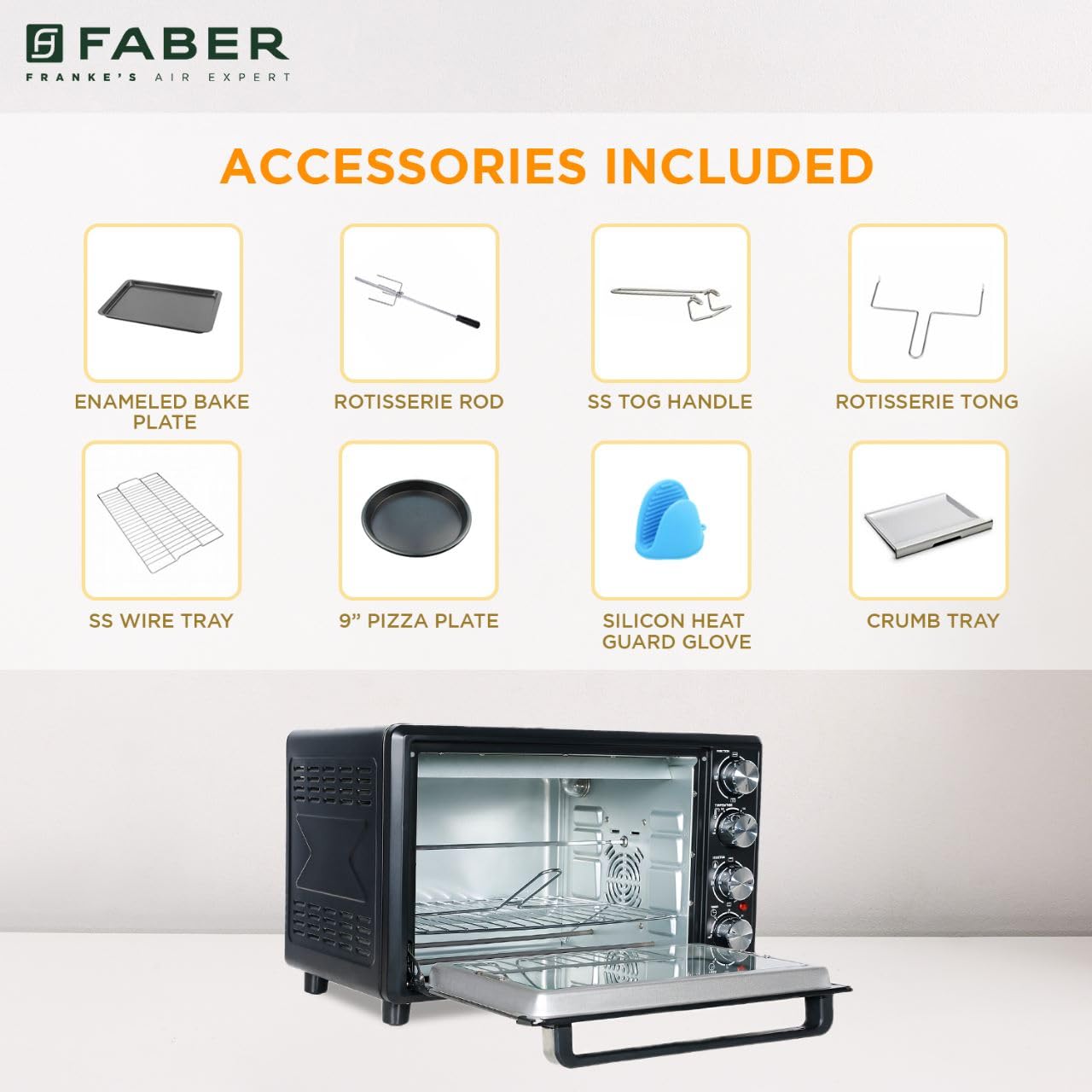
Image: The auto motorized rotisserie feature of the OTG, demonstrating two chickens being evenly grilled.
360° Convection Technology
The 360° Convection Technology ensures uniform cooking by circulating hot air throughout the oven chamber. This results in optimum browning, better crispiness, and higher nutrient retention.
- To activate convection, turn the Function Knob to 'Convection' or 'Rotisserie + Convection'.
- Convection cooking often requires slightly lower temperatures and shorter cooking times compared to conventional baking.

Image: Diagram illustrating the 360° convection technology, showing hot air circulating inside the oven for even cooking.
Timer with Auto Cut-off
The mechanical timer can be set for up to 60 minutes. Once the set time elapses, the oven will automatically switch off, indicated by a bell sound.
- Turn the Timer Knob clockwise to set the desired cooking duration.
- For shorter times (less than 10 minutes), turn the knob past 10 minutes and then back to the desired time for better accuracy.
Vzdrževanje in čiščenje
Regular cleaning and maintenance will ensure the longevity and optimal performance of your OTG.
Generalno čiščenje
- Pred čiščenjem vedno izključite pečico iz električne vtičnice in jo pustite, da se popolnoma ohladi.
- Obrišite zunanje površine z mehko damp krpo. Ne uporabljajte abrazivnih čistil ali gob za ribanje.
- Clean the interior walls, floor, and ceiling with a damp cloth and mild detergent. For stubborn stains, a non-abrasive oven cleaner designed for OTGs can be used, following the product instructions carefully.
- The double glazed glass door can be cleaned with a glass cleaner. The double glazing helps retain heat and prevents burns from touching the outer glass.
- Remove and empty the crumb tray regularly. Wash it in warm, soapy water, rinse, and dry thoroughly.
Čiščenje pripomočkov
- All removable accessories (bake tray, grill tray, wire rack, rotisserie rod, pizza plate, tongs, silicon glove) can be washed in warm, soapy water. Rinse well and dry completely before storing or reusing.
- Do not use metal scouring pads or abrasive cleaners on non-stick surfaces (if applicable) to avoid damage.

Slika: Notranjost view of the Faber 34L OTG with the chamber light on, highlighting the clean racks and crumb tray, ready for use or after cleaning.
Odpravljanje težav
If you encounter any issues with your Faber OTG, refer to the following table for common problems and solutions.
| Težava | Možen vzrok | rešitev |
|---|---|---|
| Pečica se ne vklopi. | Ni priključeno; napajanje izklopljenotage; pokvarjena vtičnica; časovnik ni nastavljen. | Ensure the power cord is securely plugged into a working outlet. Check your household's circuit breaker. Set the timer knob to the desired cooking duration. |
| Hrana se ne kuha enakomerno. | Incorrect temperature/mode; overcrowding; improper rack position; convection fan issue. | Verify temperature and heating mode settings. Avoid overcrowding the oven. Use the appropriate rack position. Ensure the convection fan is not obstructed (if using convection). |
| Prekomerno dimljenje med delovanjem. | Food spills; grease buildup; initial burn-off. | Clean the oven interior and accessories thoroughly. Ensure the crumb tray is clean. If it's the first use, some smoke is normal. |
| Raženj se ne vrti. | Rotisserie rod not properly seated; Function Knob not set to Rotisserie. | Ensure the rotisserie rod is correctly inserted into the drive socket and support. Set the Function Knob to 'Rotisserie' or 'Rotisserie + Convection'. |
| Časovnik ne deluje. | Knob not turned past 10 minutes for short times; mechanical issue. | For times under 10 minutes, turn the knob past 10 and then back to the desired time. If the issue persists, contact customer support. |
If the problem persists after attempting these solutions, please contact Faber customer support.
Specifikacije
Detailed technical specifications for the Faber 34L OTG:
- Znamka: Faber
- Številka modela: 131.0676.817
- Kapaciteta: 34 litrov
- Wattage: 1600 vatov
- barva: Črna
- Posebna lastnost: Temperature Control, 360° Convection, Rotisserie, Double Glazed Glass
- Vrsta nadzora: Gumb
- Slog vrat: Spustna vrata
- Vrsta materiala vrat: Kaljeno steklo
- vir energije: Električni na kabel
- Teža artikla: 10 kg 900 g
- Mere predmeta (DxŠxV): 51 x 39 x 32 centimetrov
- Država izvora: Kitajska

Image: Diagram showing the physical dimensions (Length, Width, Height) of the Faber 34L OTG.
Garancija in podpora
Informacije o garanciji
Your Faber OTG is covered by a manufacturer's warranty. Please refer to the warranty card included with your product for specific terms, conditions, and duration of the warranty. Keep your purchase receipt as proof of purchase for warranty claims.
Podpora uporabnikom
For any service, repair, or technical assistance, please contact Faber customer support. You can find contact details on the warranty card or the official Faber webmesto.
- Spletna podpora: Visit the official Faber webspletno mesto za pogosta vprašanja in vire za podporo.
- Servisni center: Locate authorized service centers in your region.