
1. Uvod
The UNI-T UT60S is a smart, true RMS digital multimeter designed for accurate and reliable electrical measurements. Featuring 9999 counts, this device can measure AC/DC voltage, AC/DC current, resistance, diode, capacitance, temperature, and frequency. Its fully automatic anti-burn intelligent design helps prevent operational errors and device damage, making it suitable for both professional technicians and everyday users.

Slika 1: Spredaj view of the UNI-T UT60S Digital Multimeter.
2. Varnostne informacije
Always adhere to safety precautions when using the multimeter. Failure to do so may result in electric shock, injury, or damage to the meter or equipment under test.
- Preberite priročnik: Pred uporabo natančno preberite in razumite vsa navodila in varnostna opozorila v tem priročniku.
- Nazivna voltage: Ne nanašajte več kot nazivna voltage, as marked on the meter, between terminals or between any terminal and earth ground. The UT60S is capable of withstanding a maximum overvoltage impulse of 1000V.
- Preglejte pred uporabo: Pred vsako uporabo preverite merilnik, merilne kable in dodatno opremo glede morebitnih poškodb. Ne uporabljajte jih, če so poškodovani.
- Proper Terminals: Ensure test leads are connected to the correct input terminals for the measurement function selected.
- Izklop tokokroga: Always de-energize the circuit and discharge all high-voltage capacitors before performing resistance, continuity, diode, or capacitance measurements.
- Live Circuit Work: When working on live circuits, work alone as little as possible, and ensure another person is present to provide assistance if needed.
- Prenapetostna zaščita: The meter features overcurrent alarms and protection functions. Do not exceed the maximum current ratings for the input terminals.
- Okoljski pogoji: Use the meter only as specified in this manual. Do not use the meter in explosive gas, vapor, or dusty environments.
- Osebna zaščitna oprema: Pri delu z električnimi tokokrogi vedno nosite ustrezno osebno zaščitno opremo (OZO), kot so zaščitna očala in izolirane rokavice.
3. Značilnosti izdelka
The UNI-T UT60S Digital Multimeter offers a range of features for versatile and safe electrical testing:
- Prikaz 9999 štetij: Provides high-resolution measurements for precision.
- Resnična meritev RMS: Zagotavlja natančne odčitke za nesinusoidne valovne oblike.
- Fully Automatic Anti-Burn Design: Intelligent protection against operational errors and potential device damage.
- Wide Measurement Capabilities: Mere AC/DC voltage (up to 1000V), AC/DC current, resistance, diode, capacitance, temperature, and frequency.
- Large LCD Screen with Dual Display: Allows simultaneous display of AC voltage and frequency, enhancing readability.
- Full Button Design: Offers intuitive control and automatic recognition of current input jacks.
- Fast ADC (Analog to Digital Converter): Provides rapid measurement updates (3 times/second).
- Misoperation Protection: Capable of withstanding a maximum overvoltage impulse of 1000V, with overvoltage and overcurrent alarms.
- NCV (brezkontaktna voltage) Funkcija: Zazna AC voltage without physical contact, featuring audible and visual alarms for safety.
- Samodejno varčevanje z energijo: Low power consumption (7mA during operation, 5uA in sleep state) and automatic backlight display in dark environments, extending battery life. Automatic shut-down feature.

Figure 2: The UT60S display with 9999 counts for precise readings.
4. Kaj je v škatli
Ko odprete paket, bi morali najti naslednje elemente:
- Digitalni multimeter UNI-T UT60S
- Thermocouple (for temperature measurements)
- Multimeter Test Leads (red and black)
- 1.5V AAA Batteries (pre-installed or included separately)

Figure 3: Contents of the UNI-T UT60S package, including the multimeter, test leads, and thermocouple.
5. Nastavitev
5.1. Namestitev baterije
The UT60S typically uses 1.5V AAA batteries. To install or replace batteries:
- Prepričajte se, da je multimeter izklopljen in da so merilni kabli odklopljeni.
- Poiščite predal za baterije na zadnji strani merilnika.
- Z izvijačem odprite pokrov predalčka za baterije.
- Insert the AAA batteries, observing correct polarity (+ and -).
- Ponovno namestite pokrov prostora za baterije in ga pritrdite z vijakom.
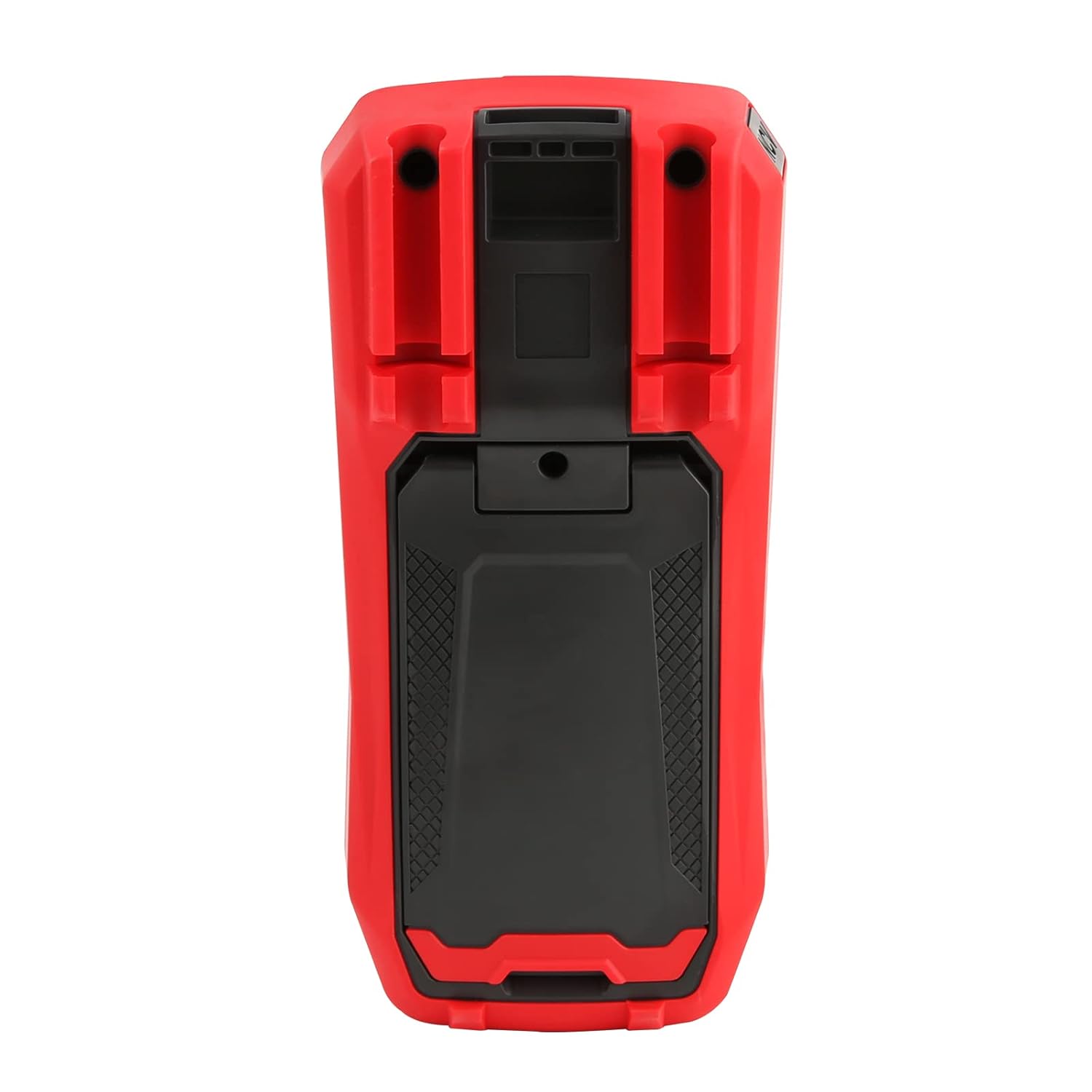
Slika 4: Zadaj view of the UT60S, indicating the battery compartment location.
5.2. Priključitev merilnih vodnikov
Connect the test leads to the appropriate input terminals:
- The black test lead (common) should always be connected to the COM terminal.
- Za voltage, resistance, capacitance, frequency, diode, and continuity measurements, connect the red test lead to the VΩHzCAP terminal.
- For current measurements (mA/A), connect the red test lead to the mA/A terminal.
- Za mikroampere current measurements (μA), connect the red test lead to the μA terminal.

Figure 5: Input terminals of the UT60S for connecting test leads.
6. Navodila za uporabo
The UT60S features a full button design for selecting measurement functions. The meter's intelligent anti-burn design automatically recognizes the input jack and selected function.
6.1. Vklop/izklop
Pritisnite MOČ button to turn the meter on or off. The meter will automatically shut down after a period of inactivity to save battery life.
6.2. Samodejni način
In Auto mode, the meter automatically identifies the measurement type (voltage, resistance, continuity) and selects the appropriate range. This simplifies operation for general troubleshooting.
6.3. Merjenje AC/DC volumnatage
Za merjenje voltage:
- Priključite črni preskusni kabel na COM priključek in rdeči preskusni kabel do VΩHzCAP terminal.
- Pritisnite V~ / Hz button to select AC voltage measurement, or the V= / NCV button for DC voltage. The meter may automatically select the correct mode in Auto range.
- Merilne sonde priključite na vezje ali komponento, ki jo želite izmeriti.
- Preberite zvtage value on the display. For AC voltage, the frequency may also be displayed simultaneously.

Slika 6: Merjenje volumna izmeničnega tokatage and frequency with the UT60S.
6.4. Measuring AC/DC Current
Za merjenje toka:
- POMEMBNO: To measure current, the meter must be connected in series with the circuit. Always turn off power to the circuit before connecting the meter.
- Priključite črni preskusni kabel na COM terminal.
- For current up to 10A, connect the red test lead to the mA/A terminal. For microampere current, connect to the μA terminal.
- Pritisnite ACA/DCA button to select AC or DC current measurement.
- Break the circuit and connect the test leads in series with the load.
- Priklopite napajanje na vezje in na zaslonu odčitajte trenutno vrednost.
6.5. Measuring Resistance, Diode, and Continuity
To measure resistance, diode, or continuity:
- Ensure the circuit is de-energized and capacitors are discharged.
- Priključite črni preskusni kabel na COM priključek in rdeči preskusni kabel do VΩHzCAP terminal.
- Pritisnite Ω→+ button to cycle through resistance, diode, and continuity functions.
- Merilne sonde priključite na komponento.
- Read the measurement. For continuity, an audible buzzer will sound if continuity is detected.
6.6. Measuring Capacitance
Za merjenje kapacitivnosti:
- Pred testiranjem se prepričajte, da je kondenzator popolnoma izpraznjen.
- Priključite črni preskusni kabel na COM priključek in rdeči preskusni kabel do VΩHzCAP terminal.
- Pritisnite mV~°C°F button to select temperature measurement.
- Merilne sonde priključite na priključke kondenzatorja.
- Preberite vrednost kapacitivnosti na zaslonu.

Figure 7: The UT60S performing a capacitance measurement.
6.7. Merjenje temperature
Za merjenje temperature:
- Connect the thermocouple to the appropriate input terminals (usually the VΩHzCAP in COM terminals, or dedicated temperature inputs if available).
- Pritisnite mV~°C°F button to select temperature measurement.
- Place the thermocouple probe at the point where temperature needs to be measured.
- Read the temperature value on the display in Celsius or Fahrenheit.
6.8. NCV (brezkontaktna voltage) Funkcija
The NCV function allows detection of AC voltage brez neposrednega stika z vodniki.
- Pritisnite V= / NCV button to activate the NCV function.
- Move the top of the meter close to the conductor or outlet.
- The meter will provide an audible alarm and visual indication (flashing light) if AC voltage is detected. The intensity of the alarm and light may vary with voltagmoč.

Figure 8: Using the NCV function to detect live AC voltage.
6.9. Zadrževanje podatkov
Pritisnite PRIDRŽI gumb za zamrznitev trenutnega odčitka na zaslonu. Ponovno ga pritisnite, da sprostite funkcijo zadrževanja.
6.10. Range Selection
While the meter typically operates in Auto range, you can manually select a range by pressing the RANGE button. This can be useful for specific applications or to speed up measurements in stable conditions. Press and hold the RANGE button to return to Auto range.
6.11. USB Communication (if applicable)
The UT60S series may support USB communication for data logging and analysis on a computer. If your model includes this feature, connect the meter to your computer using the provided USB cable and install the UNI-T software. Refer to the software manual for detailed instructions.
Video 1: Demonstration of features like NCV, LoZ, and USB communication on a UNI-T UT161 series multimeter. The UT60S shares similar functionalities.
7. Vzdrževanje
7.1. Čiščenje
Obrišite ohišje merilnika z oglasomamp krpo in blagim detergentom. Ne uporabljajte abrazivnih sredstev ali topil. Pred uporabo se prepričajte, da je merilnik popolnoma suh.
7.2. Zamenjava baterije
Baterije zamenjajte, ko se na zaslonu prikaže indikator nizke napolnjenosti baterij. Za navodila za namestitev baterij glejte poglavje 5.1.
7.3. Zamenjava varovalke
If the current measurement function stops working, the fuse may need replacement. Refer to the full user manual for specific fuse ratings and replacement procedures. Always use fuses with the specified voltage in trenutne ocene.
8. Odpravljanje težav
If you encounter issues with your UNI-T UT60S, try the following basic troubleshooting steps:
- Brez zaslona/vklop: Preverite namestitev baterij in se prepričajte, da niso izpraznjene. Po potrebi jih zamenjajte.
- Nepravilni odčitki: Verify that the test leads are correctly connected to the appropriate terminals for the selected function. Ensure the function dial is set correctly. Check for damaged test leads.
- Trenutna meritev ne deluje: Check the fuse. If blown, replace it with a fuse of the correct rating. Ensure the meter is connected in series with the circuit.
- "OL" ali indikator preobremenitve: This indicates that the measured value is outside the selected range or the maximum capability of the meter. Try selecting a higher range (if in manual range mode) or ensure the component is within the meter's specifications.
- NCV ne zazna: Ensure the NCV function is activated and the meter is brought close enough to the AC voltage vir.
For more complex issues, refer to the detailed troubleshooting section in the complete user manual or contact UNI-T customer support.
9. Specifikacije
Key specifications for the UNI-T UT60S Digital Multimeter:
| Funkcija | Specifikacija |
|---|---|
| Število prikazov | 9999 |
| Pravi RMS | ja |
| AC/DC Voltage | Do 1000V |
| AC / DC tok | Up to 10A (mA/A terminals), Up to 1000μA (μA terminal) |
| Odpornost | 0.1 Ω - 40 MΩ |
| Kapacitivnost | 1nF - 4000μF |
| Temperatura | Yes (with thermocouple) |
| Pogostost | ja |
| Diodni test | ja |
| Test kontinuitete | ja |
| NCV (brezkontaktna voltage) | ja |
| Vir napajanja | Battery Powered (1.5V AAA batteries) |
| Teža predmeta | 370 gramov |
| Varnostna skladnost | UL 61010-1, IEC 61010-2-030, CAT III 1000V, CAT II 600V |
10. Garancija in podpora
UNI-T provides customer support for their products. If you encounter any problems during use, please contact UNI-T customer service directly via email. They offer 7/24 1-to-1 user support to address your concerns promptly.
For specific warranty details, please refer to the warranty card included with your product or visit the official UNI-T webmesto.