
1. Uvod
The DIGITUS DN-45004 Mobile Desktop Charging Cabinet is designed for storing and charging portable devices such as tablets and smartphones. It features 10 USB-C charging ports and an integrated UV-C lamp for enhanced hygiene. This cabinet is suitable for public institutions like schools, providing a centralized and secure location for device management and charging.
2. Varnostna opozorila
- This product must be placed on a flat, stable surface to prevent slipping or tipping.
- Ensure the power cable is securely connected to a grounded outlet.
- Ne preobremenite električnega tokokroga.
- Keep the cabinet away from water or excessive moisture.
- Do not attempt to open or repair the cabinet yourself. Refer to qualified service personnel.
- UV-C lamp emits ultraviolet light. Avoid direct exposure to eyes and skin. Ensure the cabinet door is closed during UV-C operation.
3. Vsebina paketa
Preverite, ali so v paketu prisotni vsi elementi:
- 1 x Digitus DN-45004 Charging Cabinet
- 2 x Keys for the front door
- 1 x Power Cable (C19 to protective contact plug, 2m)
- 1 x uporabniški priročnik
4. Nastavitev
- Razpakiranje: Carefully remove the charging cabinet from its packaging.
- Umestitev: Place the cabinet on a flat, stable, and dry surface. Ensure adequate ventilation around the unit. The anti-slip feet provide stability.
- Napajalni priključek: Connect the provided power cable to the C19 input on the rear of the cabinet and then to a suitable electrical outlet (110/220 VAC, 50/60 Hz).
- Initial Power Check: If the unit does not power on, check the internal circuit breaker located behind the rear panel. This breaker may trip during transport. To access, unscrew the four screws on the rear panel, remove it, and reset the blue lever on the circuit breaker to the 'On' position.

5. Navodila za uporabo
5.1 Polnilne naprave
- Odpri vrata: Use the provided keys to unlock and open the front door of the cabinet.
- Vstavite naprave: Place your tablets or smartphones into the designated slots. Note that this cabinet is primarily designed for tablets and smartphones; larger laptops may not fit.
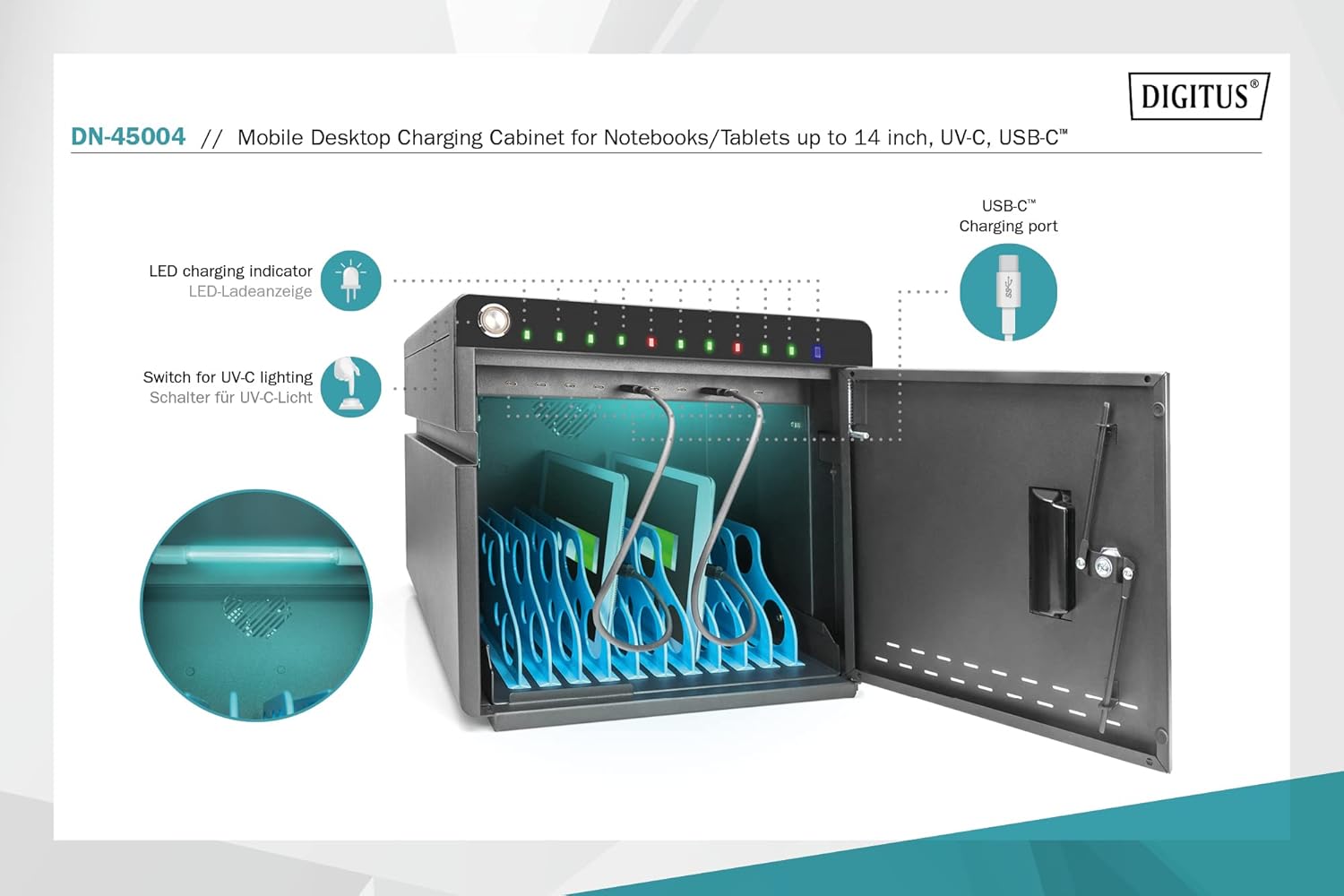
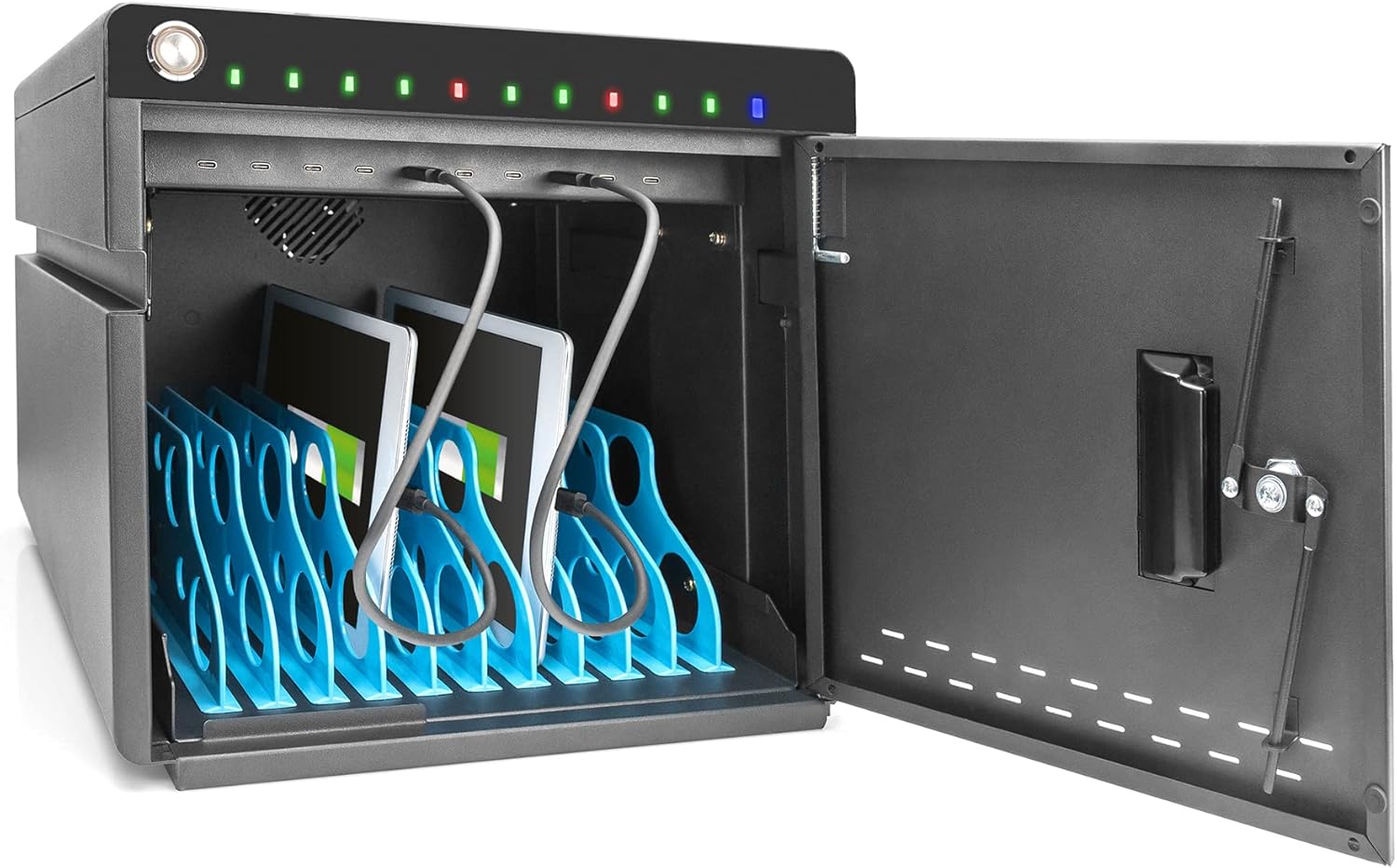
- Connect to USB-C Ports: Connect your devices to the USB-C charging ports located at the front of each slot.
- Nadzor stanja polnjenja: Integrated LED indicators above each port show the charging status:
- Rdeča: Naprava se trenutno polni.
- zelena: Charging process is complete, or no device is connected.
- Zapri in zakleni: Once devices are connected, close and lock the front door for security.
5.2 UV-C Lamp Delovanje
The integrated UV-C lamps provide a sterile environment for your devices.
- Activate UV-C: Locate the switch for UV-C lighting (refer to Figure 5.1). Toggle the switch to activate the UV-C lamps.
- Ensure Door is Closed: For safety and effective sanitation, ensure the cabinet door is securely closed while the UV-C lamp je aktiven.
- Deactivate UV-C: Toggle the switch again to turn off the UV-C lamps.


5.3 Hladilni sistem
The cabinet includes an integrated fan and ventilation slots for active cooling. The fan automatically activates when the internal temperature exceeds 40°C to prevent overheating of devices and internal components.
6. Vzdrževanje
- Čiščenje: Disconnect the power before cleaning. Use a soft, dry cloth to wipe the exterior surfaces. Do not use abrasive cleaners or solvents.
- Prezračevanje: Ensure ventilation slots are not obstructed to maintain proper airflow.
- UV-C Lamp: UV-C lamp has a limited lifespan. If the lamp stops working, contact customer support for replacement options.
7. Odpravljanje težav
| Težava | Možen vzrok | rešitev |
|---|---|---|
| Cabinet does not power on. | Power cable not connected, power outlet issue, or internal circuit breaker tripped. | Ensure power cable is firmly connected. Test the power outlet. Check and reset the internal circuit breaker (refer to Section 4. Setup). |
| Naprava se ne polni. | Device not properly connected, faulty USB-C cable, or device issue. | Ensure the device is correctly plugged into the USB-C port. Try a different USB-C cable. Test the device with another charger. Check the LED indicator (should be red when charging). |
| UV-C lamp se ne vklopi. | UV-C switch off, lamp failure, or door not fully closed. | Ensure the UV-C switch is in the 'On' position. Verify the cabinet door is securely closed. If the issue persists, the lamp morda potrebna zamenjava. |
| Laptops do not fit in the slots. | The cabinet is designed for smaller portable devices. | This model is optimized for tablets and smartphones. Please check device dimensions against cabinet specifications. |
8. Specifikacije
| Funkcija | Podrobnost |
|---|---|
| Znamka | ŠTEVILKA |
| Številka modela | DN-45004 |
| barva | Črna (RAL 9005) |
| Material | Legirano jeklo |
| Dimenzije (V x Š x G) | 345 x 360 x 370 mm |
| Internal Shelf Depth | 294 mm |
| Vrata za polnjenje USB-C | 10 |
| USB-C Output per Port | 18 W (5 V / 3 A, 9 V / 2 A, 12 V / 1.5 A) |
| Največji izhod USB-C | 180 W |
| Vhodna moč | C19; 110 / 220 VAC, 50/60 Hz, 16 A |
| Skupna izhodna moč | 3500 W |
| Hlajenje | Integrated fan, automatic activation at >40°C |
| Varnost | Steel front door with 3-point lock |
| Posebne lastnosti | UV-C lamps for hygiene, LED charging indicators |
| Združljive naprave | Pametni telefoni, tablice |
9. Garancija in podpora
Warranty information for the Digitus DN-45004 Mobile Desktop Charging Cabinet is not available in the provided product data. Please refer to the manufacturer's official webZa podrobne garancijske pogoje se obrnite na spletno mesto ali na prodajno mesto.
For technical support, troubleshooting assistance, or inquiries regarding spare parts, please contact DIGITUS customer service directly. You can often find contact information on the manufacturer's webmestu ali v embalaži izdelka.
For more information about DIGITUS solutions, visit: Assmann Solutions