
Sirui AT-125+E-10
Uporabniški priročnik za potovalni stativ SIRUI iz karbonskih vlaken AT-125+E-10
Model: AT-125+E-10
1. Uvod
This manual provides detailed instructions for the proper setup, operation, and maintenance of your SIRUI Carbon Fiber Travel Tripod with E-10 360° Ball Head (Model AT-125+E-10). Designed for portability and stability, this tripod features carbon-fiber legs, a versatile center column, and a robust ball head, making it suitable for various photographic applications.

Image: The SIRUI AT-125+E-10 Carbon Fiber Travel Tripod, including the E-10 ball head and a carry bag.
Glavne lastnosti vključujejo:
- Lightweight carbon fiber construction for enhanced portability.
- Quick leg setup with a single twist lock mechanism.
- Versatile two-section center column, reversible for macro and low-angle shooting.
- E-10 360° ball head for precise camera positioning.
- Stabilizing hook for added stability in challenging conditions.
2. Sestavni deli izdelka
Familiarize yourself with the main parts of your SIRUI AT-125+E-10 tripod system:

Image: Numbered diagram illustrating the various components of the SIRUI AT-125+E-10 tripod.
- Arca Swiss Compatible Plate: Za hitro pritrditev in odstranitev fotoaparata.
- 1/4" Standard Screw: Located on the quick release plate for camera mounting.
- 360° Ball Head (E-10): Allows for flexible camera positioning and panoramic shots.
- 3/8" Hole Adapter Platform: For mounting the ball head to the tripod.
- Leg Angle Adjuster: Buttons to set the leg spread to different angles.
- Center Column with Hook: Extends height and provides a hook for ballast.
- Twist Leg Lock: Mechanism for extending and retracting leg sections.
- Carbon Fiber Leg: Lightweight and durable tripod legs.
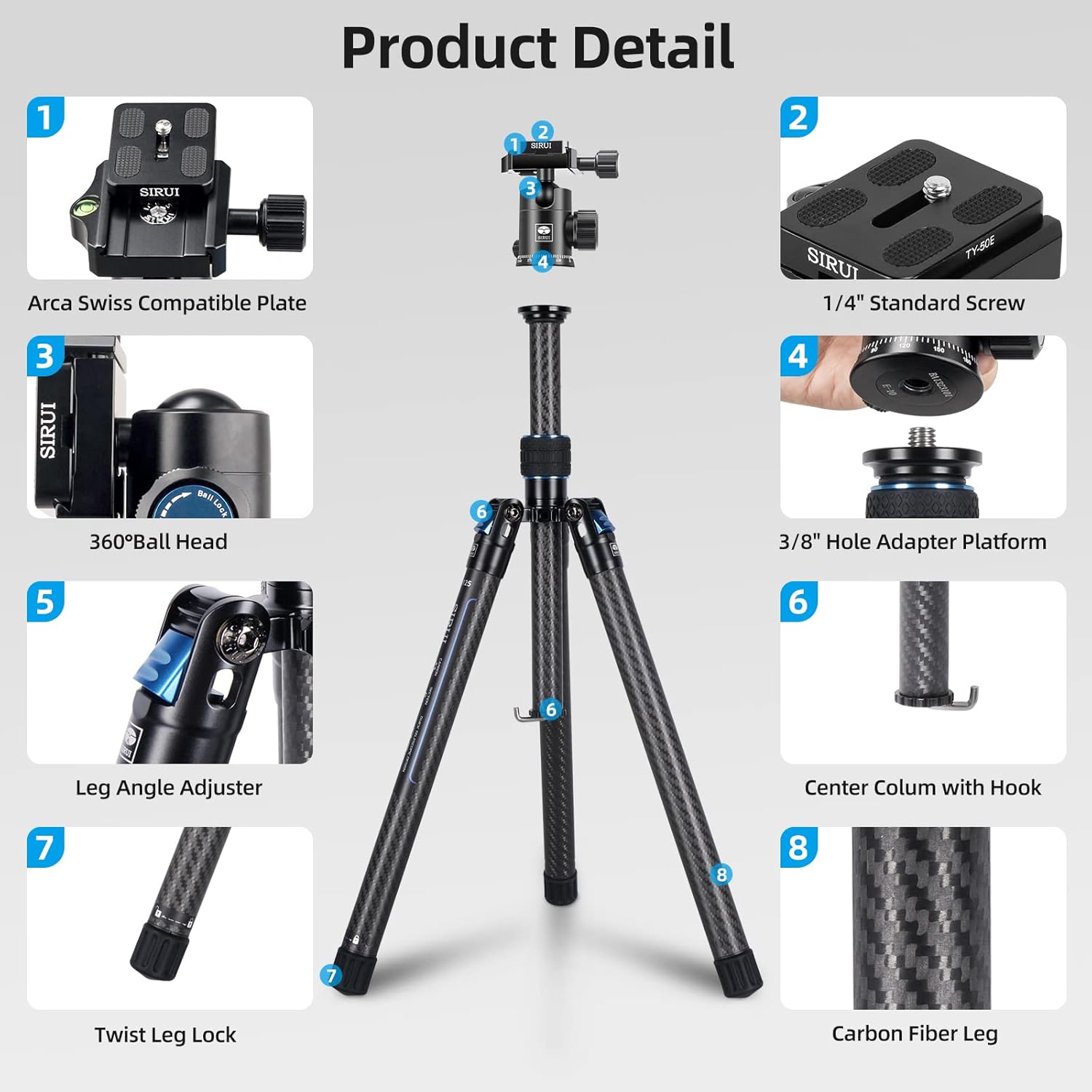
Image: Detailed breakdown of the SIRUI E-10 Ball Head features, including the 1/4" screw, bubble level, QR plateform, plate knob, panning knob, ball lock, 3/8" hole, and 360° panorama base.
3. Navodila za nastavitev
3.1 Razstavljanje stojala
- Grasp the tripod legs and rotate them 180 degrees outwards from their folded position until they lock into place.
- Press the leg angle adjustment buttons on each leg to select the desired spread angle. There are typically multiple angle stops for versatility.

Image: Illustration of the compact folding size achieved by 180-degree reverse folding of the tripod legs.
3.2 Nastavitev višine nog
- To extend a leg section, twist the leg lock counter-clockwise until it loosens.
- Del za noge povlecite navzven do želene dolžine.
- Twist the leg lock clockwise to secure the section firmly in place. Repeat for all leg sections and legs as needed.

Image: Visual guide for quick height and angle setup, demonstrating leg angle adjustments and the twist-to-lock mechanism for leg extension.
3.3 Attaching the Ball Head and Camera
- Ensure the E-10 ball head is securely screwed onto the tripod's 3/8" mounting screw.
- Attach the quick release plate to the bottom of your camera by screwing the 1/4" standard screw into the camera's tripod socket. Ensure it is tightened securely.
- Odprite hitro sprostitev klamp on the ball head. Slide the camera with the attached quick release plate into the clamp.
- Zaprite hitro sprostitev klamp lever to lock the camera in place. Verify the camera is secure before releasinprimi svoj oprijem.
4. Upravljanje stativa
4.1 Prilagajanje višine sredinskega stebra
The center column can be extended for additional height. Loosen the center column locking knob, raise the column to the desired height, and then tighten the knob firmly.
4.2 Macro and Low-Angle Shooting
The two-section center column can be reversed or shortened for macro and low-angle photography:
- Short Center Column: The center column can be twisted off to remove the longer section, allowing for a shorter column and lower shooting angles.
- Reversible Center Column: For extreme low-angle or macro shots, the entire center column can be removed and re-inserted upside down, allowing the camera to hang below the tripod's apex.

Image: Instructions for using the two-section center column, showing how to twist off/on for long or short column configurations.

Slika: nprample of macro shooting setup using the reversible center column, allowing the camera to be positioned very close to the ground.
4.3 Using the E-10 Ball Head
The E-10 ball head offers precise control over camera movement:
- Gumb za zaklepanje kroglice: Loosen to adjust the camera's angle (tilt and swivel). Tighten to lock the camera firmly in position.
- Panning Knob: Loosen to rotate the camera horizontally 360 degrees for panoramic shots without affecting the tilt. Tighten to lock the panning movement.
- Plošča za hitro sprostitev: Allows for rapid attachment and detachment of your camera. Ensure the safety lock is engaged when the camera is mounted.

Image: Illustration of 360-degree panoramic shooting capabilities and the ball head's 90-degree tilt range, along with locking and sliding mechanisms.
4.4 Stabilizing Hook
A stabilizing hook is located at the bottom of the center column. You can hang a weight, such as a camera bag, from this hook to increase the tripod's stability, especially in windy conditions or when using heavy camera equipment.
5. Vzdrževanje
Proper maintenance ensures the longevity and optimal performance of your SIRUI tripod:
- Čiščenje: After use, especially in dusty, sandy, or wet environments, wipe down the tripod legs and ball head with a soft, dry cloth. If necessary, use a slightly damp krpo in nato temeljito posušite.
- Mazanje: Avoid applying lubricants to the leg locking mechanisms or ball head components unless specifically instructed by SIRUI. Improper lubrication can attract dirt and impair function.
- Shranjevanje: Store the tripod in its carry bag in a dry, cool place away from direct sunlight and extreme temperatures.
- Pregled: Občasno preverite vse vijake in povezave, da se prepričate, da so trdno priviti. Ne zategujte jih premočno.
6. Odpravljanje težav
Tukaj so rešitve za pogoste težave, na katere lahko naletite:
- Legs not extending/retracting smoothly: Ensure the twist locks are fully loosened before attempting to extend or retract. Clean any dirt or debris from the leg sections and locking mechanisms.
- Camera not stable on ball head: Verify that the quick release plate is securely attached to the camera and that the quick release clamp on the ball head is fully tightened. Ensure the ball lock knob is also tightened.
- Gibanje kroglične glave je oteženo ali ohlapno: Check the ball lock knob. If it's too loose, the ball head will move freely. If it's too tight, movement will be restricted. Adjust to your preference.
- Nestabilnost stativa: Ensure all leg sections are fully extended and locked, and leg angles are set evenly. For added stability, use the stabilizing hook with a counterweight.
7. Specifikacije
| Funkcija | Podrobnost |
|---|---|
| Ime modela | Traveler X-II (AT-125+E-10) |
| Material | Ogljikova vlakna |
| Teža predmeta | 2.11 funtov (0.96 kilograma) |
| Omejitev teže | 17 funta |
| Največja višina | 59.8 palcev (154 centimetrov) |
| Najmanjša višina | 8.3 palcev (21 centimetrov) |
| Dimenzije izdelka (zložen) | 16.3 x 4 x 4.2 palcev |
| Tip glave stativa | Ball Head (E-10) |
| Posebne lastnosti | Adjustable, Compact, Flexi, Lightweight |
8. Garancija in podpora
SIRUI products are manufactured to high-quality standards. For specific warranty information, including terms and conditions, please refer to the warranty card included with your product or visit the official SIRUI website. For technical support, spare parts, or service inquiries, please contact SIRUI customer service through their official channels.
You can find more information and support on the official Sirui webspletno mesto: Visit the Sirui Store on Amazon
Povezani dokumenti - AT-125+E-10
 |
Uporabniški priročnik in specifikacije kroglične glave SIRUI AT-10 Celovit vodnik za kroglično glavo SIRUI AT-10, ki zajema nastavitev, funkcije in tehnične specifikacije. Naučite se namestiti in uporabljati glavo AT-10 za optimalno fotografiranje. |
 |
Oben CQL-13/CQL-20 5-Section Carbon-Fiber Tripod with 2-Way Ball Head: User Guide and Specifications Comprehensive guide for the Oben CQL-13 and CQL-20 compact carbon-fiber tripods. Covers product overview, detailed operation instructions for ball head and tripod adjustments, low-angle setups, specifications, and the five-year limited warranty. |
 |
Prenosni komplet stojala iz ogljikovih vlaken SmallRig 5028 - navodila za uporabo Podrobna navodila za uporabo prenosnega kompleta stojala iz karbonskih vlaken SmallRig 5028, ki ima 5-delno zasnovo, lahko konstrukcijo iz karbonskih vlaken in je primeren za potovalno fotografijo. |
 |
Uporabniški priročnik za serijo Vanguard VEO 3T ripr - nastavitev, funkcije in specifikacije Obsežen uporabniški priročnik za potovalni stativ in monopod Vanguard VEO 3T ripr serije iz karbona. Vključuje podrobna navodila za nastavitev, funkcije, varnostne ukrepe, specifikacije in odpravljanje težav. |
 |
COMAN T1/T1S Tripod User Manual: Features and Operation Explore the COMAN T1 and T1S tripods with this user manual. Learn about their features, quick setup, angle adjustments, and secure camera mounting for professional photography and videography. |
 |
Oben CQL-13 5-delni stativ iz karbonskih vlaken z 2-smerno kroglično glavo Uporabniški priročnik Celovit vodnik za kompaktni stojalo iz karbonskih vlaken Oben CQL-13, ki podrobno opisuje njegove funkcije, delovanje, specifikacije in garancijo. Naučite se, kako nastaviti in uporabljati stojalo Oben za stabilno fotografiranje. |
Ask a question about this manual
Ask about setup, troubleshooting, compatibility, parts, safety, or missing instructions. Manuals+ will review the question and use this page’s manual context to help answer it.