
1. Uvod
Thank you for choosing the HIKMICRO HEIMDAL H4D Digital Night Vision Monocular. This device is designed for observation in low light and complete darkness, featuring a high-resolution sensor and AMOLED display for clear imaging.
Ključne značilnosti:
- 1.39" AMOLED display with 454 x 454 resolution
- High-resolution 2560 x 1440 sensor
- Integrated 850 nm infrared illuminator with smart IR function
- Day/Night/Auto/Defog modes
- Elektronska stabilizacija slike (EIS)
- Detection range up to 200 meters
- Replaceable and rechargeable battery with over 4 hours of use
- Compact and portable design, waterproof and dustproof (IP67)
- Integrated 32 GB EMMC for storing recorded videos and photos
- Wireless connection via HIKMICRO Sight app, local album function
Vsebina paketa:
- HIKMICRO HEIMDAL H4D Digital Night Vision Monocular
- Baterija
- Krpa za prah
- Zaščitna torba
- Zapestni trak
- USB-C kabel
- Kratek vodnik
2. Izdelek je končanview
Familiarize yourself with the components and controls of your HIKMICRO HEIMDAL H4D monocular.
Postavitev naprave
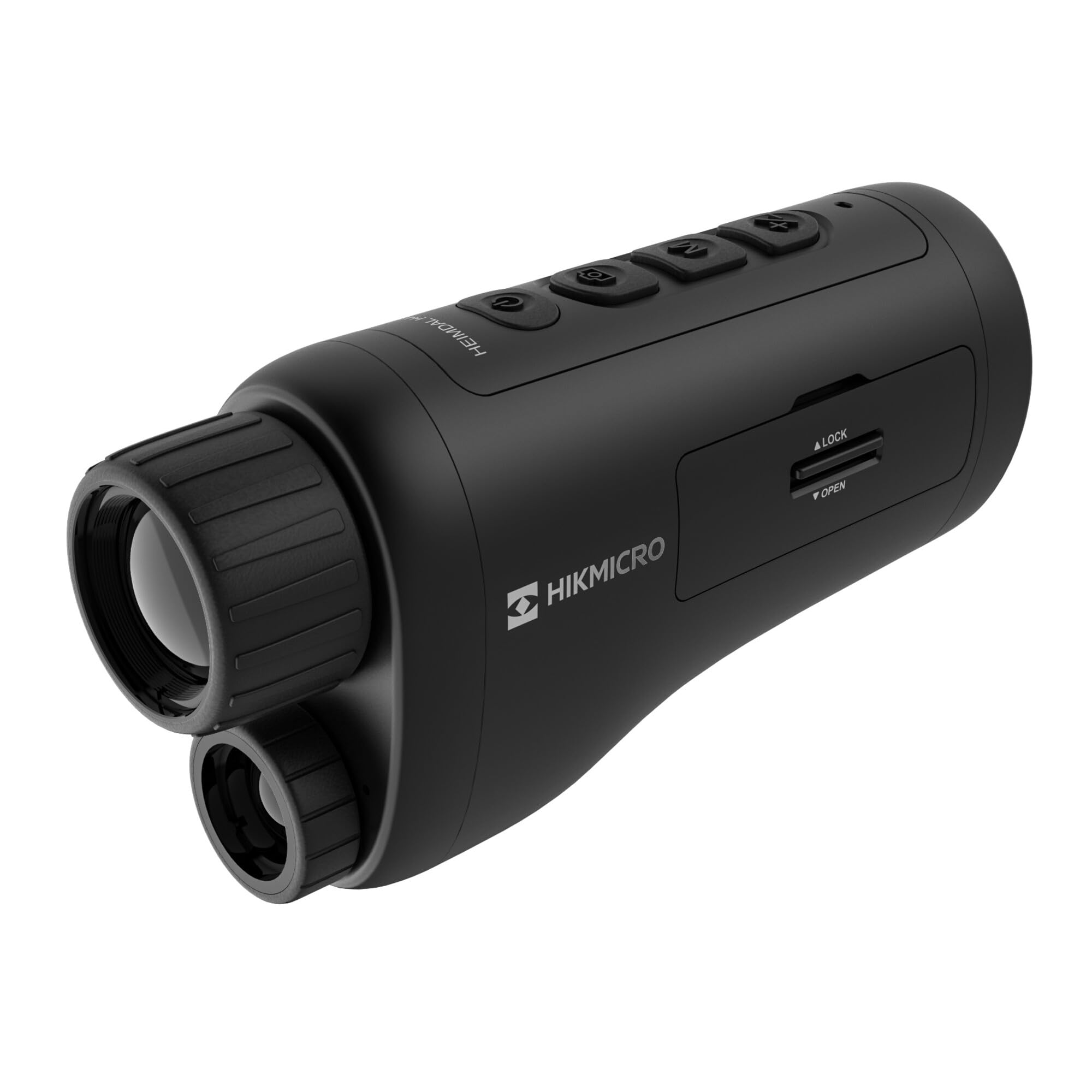
Kot view of the HIKMICRO HEIMDAL H4D monocular, showing its compact, ergonomic design and the main lens.
Kontrole in gumbi

Vrh view of the monocular showing the power button, photo/video record button, mode button, and zoom/IR adjustment buttons.
Lenses and Focus

Spredaj view displaying the objective lens and the integrated infrared illuminator.
Predal za baterije

Stran view showing the battery compartment with 'LOCK' and 'OPEN' indicators.
3. Nastavitev
Namestitev baterije
- Poiščite predal za baterijo na strani naprave.
- Slide the lock mechanism to the 'OPEN' position.
- Vstavite polnilno baterijo in pri tem pazite na pravilno polarnost.
- Close the compartment and slide the lock mechanism to the 'LOCK' position.
Polnjenje baterije
Connect the device to a power source using the provided USB-C cable. The charging indicator will show the charging status.
Začetni vklop
Pritisnite in držite gumb za vklop (običajno označen z Ⓘ) until the HIKMICRO logo appears on the display.
4. Navodila za uporabo
Vklop/izklop
- Vklop: Pritisnite in držite gumb za vklop približno 3 sekundi.
- Ugasniti: Press and hold the power button for approximately 3 seconds until the device shuts down.
Prilagoditev ostrenja
Rotate the focus ring on the objective lens to achieve a clear image of your target.
Izbira načina
Press the 'M' (Mode) button to cycle through observation modes: Day, Night, Auto, and Defog.
Zoom and IR Adjustment
Use the '+' and '-' buttons to adjust the digital zoom level. These buttons also control the intensity of the infrared illuminator in night mode.
Photo and Video Recording
- Posnemi fotografijo: Press the photo/video button (usually marked with 📷) once to capture an image.
- Posnemi video: Press and hold the photo/video button to start recording. Press again to stop.
Connecting to HIKMICRO Sight App
Download the HIKMICRO Sight app from your device's app store. Follow the in-app instructions to connect your monocular for live view, remote control, and media management.
5. Vzdrževanje
Čiščenje
- Use the provided dust cloth or a soft, lint-free cloth to clean the lenses.
- For stubborn dirt, use a lens cleaning solution specifically designed for optics.
- Ohišje naprave obrišite z mehko krpoamp krpo. Ne uporabljajte abrazivnih čistil ali topil.
Shranjevanje
- Store the monocular in its protective bag in a cool, dry place when not in use.
- Odstranite baterijo, če naprave ne boste uporabljali dlje časa.
Skrb za baterijo
- Charge the battery regularly, even if not in frequent use, to maintain its lifespan.
- Med polnjenjem in shranjevanjem se izogibajte ekstremnim temperaturam.
6. Odpravljanje težav
Pogoste težave in rešitve
| Težava | Možen vzrok | rešitev |
|---|---|---|
| Naprava se ne vklopi. | Baterija je izpraznjena ali nepravilno vstavljena. | Napolnite baterijo. Prepričajte se, da je baterija vstavljena s pravilno polarnostjo. |
| Slika je zamegljena. | Focus is not adjusted. | Rotate the focus ring on the objective lens until the image is clear. |
| Slaba kakovost slike v temi. | IR osvetljevalec je izklopljen ali nastavljen na nizko intenzivnost. | Activate the IR illuminator or increase its intensity using the '+' button. Ensure you are in Night mode. |
| Cannot connect to HIKMICRO Sight app. | Bluetooth/Wi-Fi is off on device or phone, or app is not updated. | Ensure Bluetooth/Wi-Fi is enabled on both devices. Restart the app and monocular. Check for app updates. |
| Naprava se zamrzne ali se ne odziva. | Začasna programska napaka. | Izvedite mehko ponastavitev tako, da pridržite gumb za vklop, dokler se naprava ne zažene znova. Če težava ne izgine, se obrnite na podporo. |
7. Specifikacije
| Funkcija | Podrobnost |
|---|---|
| Ločljivost senzorja | 2560 x 1440 |
| Vrsta zaslona | AMOLED |
| Ločljivost zaslona | 454 x 454 |
| Velikost zaslona | 1.39 palcev (3.5 cm) |
| Infrardeči osvetljevalec | Integrated 850 nm |
| Obseg zaznavanja | Do 200 metre |
| Shranjevanje | 32 GB EMMC (internal) |
| Življenjska doba baterije | More than 4 hours (replaceable, rechargeable) |
| Ocena vodotesnosti | IP67 |
| Dimenzije | 153 mm x 50 mm x 80 mm (6.02" x 1.97" x 3.15") |
| Teža | 375 gramov (0.83 lbs) |
| Material | Plastika |
| Združljive naprave | Rifle, Compound Bow |
| Vrsta namestitve | Picatinny nosilec |
| Sport Use | Camping, Pohodništvo |
| barva | Bela |
8. Garancija in podpora
HIKMICRO products are covered by a limited warranty. For detailed warranty information, please refer to the official HIKMICRO webali se obrnite na lokalnega prodajalca.
For technical support, troubleshooting assistance, or service inquiries, please visit the official HIKMICRO support page or contact their customer service department.
Uradno Webspletno mesto: www.hikmicrotech.com