
1. Uvod
This manual provides detailed instructions for the LUCORB Portable Gym Timer, model B0BYH9SP13. This device is designed to assist with various fitness activities by providing accurate timekeeping for interval training, countdowns, count-ups, and stopwatch functions. Please read this manual thoroughly before using the product to ensure proper operation and to maximize its lifespan.
2. Varnostne informacije
- Pred uporabo naprave natančno preberite vsa navodila.
- Keep the timer away from water and excessive moisture to prevent damage.
- Naprave ne poskušajte razstavljati ali spreminjati. S tem boste razveljavili garancijo.
- Za polnjenje uporabljajte samo priloženi polnilni kabel USB ali certificiran ekvivalent.
- Avoid exposing the timer to extreme temperatures or direct sunlight for prolonged periods.
3. Izdelek je končanview
The LUCORB Portable Gym Timer is a compact and versatile device designed for various workout needs. It features a clear LED display, multiple timing modes, and a magnetic back for convenient placement.
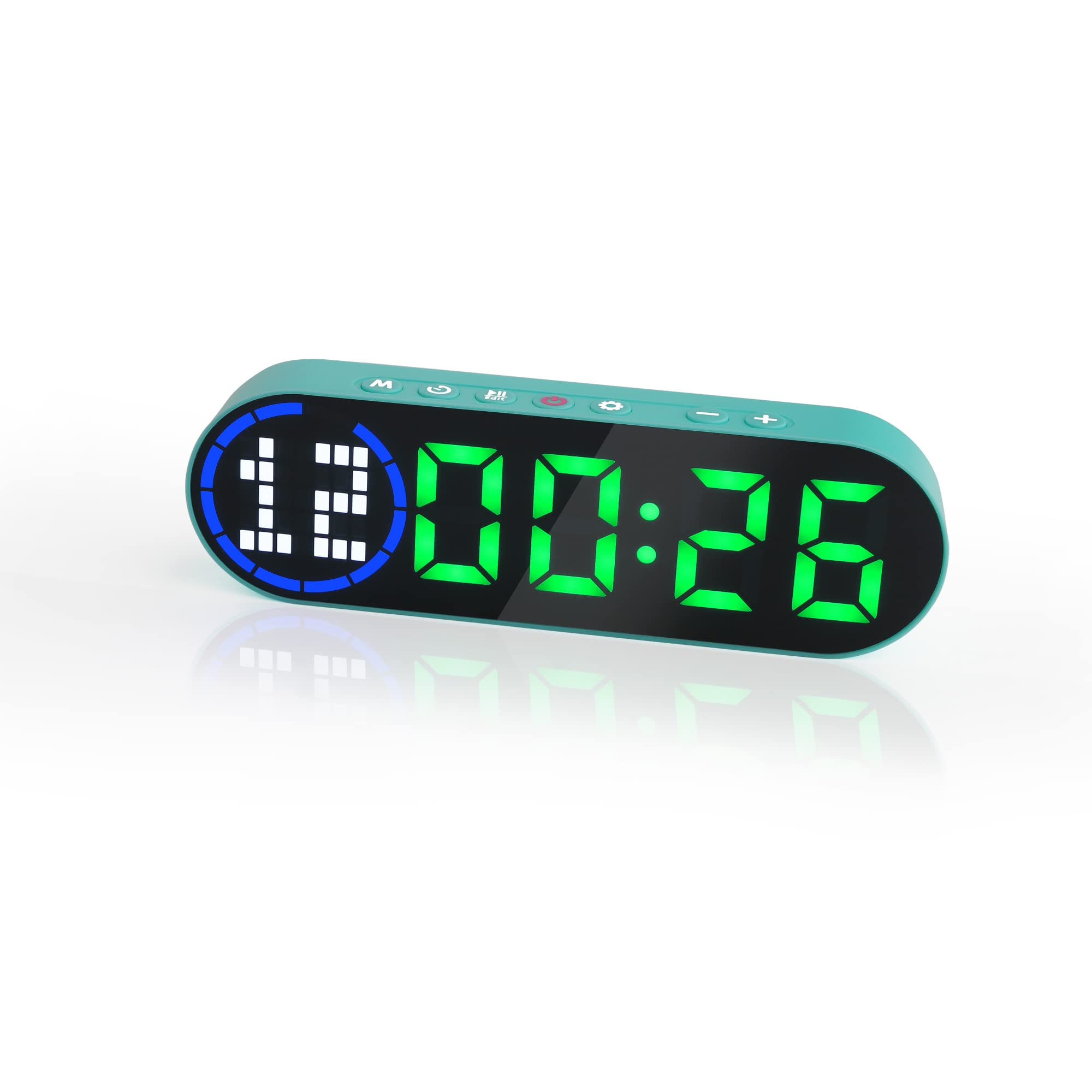
Image 3.1: The LUCORB Portable Gym Timer, highlighting its compact and portable dimensions (approximately 6.3 inches long, 2 inches wide, and 0.9 inches thick). The image also indicates it is rechargeable and battery-powered.
Ključne značilnosti:
- Kompakten in prenosen dizajn: Enostaven za prenašanje in uporabo kjerkoli.
- Magnetna hrbtna stran: Omogoča varno pritrditev na kovinske površine.
- Akumulatorska baterija: Provides long-lasting power for workouts.
- Več časovnih načinov: Includes Interval Timer, Countdown, Count Up, and Stopwatch.
- Time Progress Bar: Visual indicator for workout progress.
- Adjustable Sound and Countdown: Customizable settings for personalized use.
4. Vsebina paketa
Prosimo, preverite paket za naslednje artikle:
- LUCORB Portable Gym Timer (1)
- USB polnilni kabel (1)
- Uporabniški priročnik (1)
5. Nastavitev
5.1 Charging the Timer
Before first use, fully charge the timer. Connect the provided USB charging cable to the timer's charging port and plug the other end into a standard USB power adapter (not included) or a computer's USB port. The display will indicate charging status. A full charge typically takes 2-3 hours.
5.2 Vklop/izklop
- Za vklop: Pritisnite in držite Gumb za vklop (usually located on the side or top) for 3 seconds until the display lights up.
- Za izklop: Pritisnite in držite Gumb za vklop for 3 seconds until the display turns off.
5.3 Namestitev
The LUCORB Gym Timer features a strong magnetic back, allowing it to be securely attached to any metal surface, such as gym equipment, racks, or whiteboards. Ensure the surface is clean and stable before attaching.
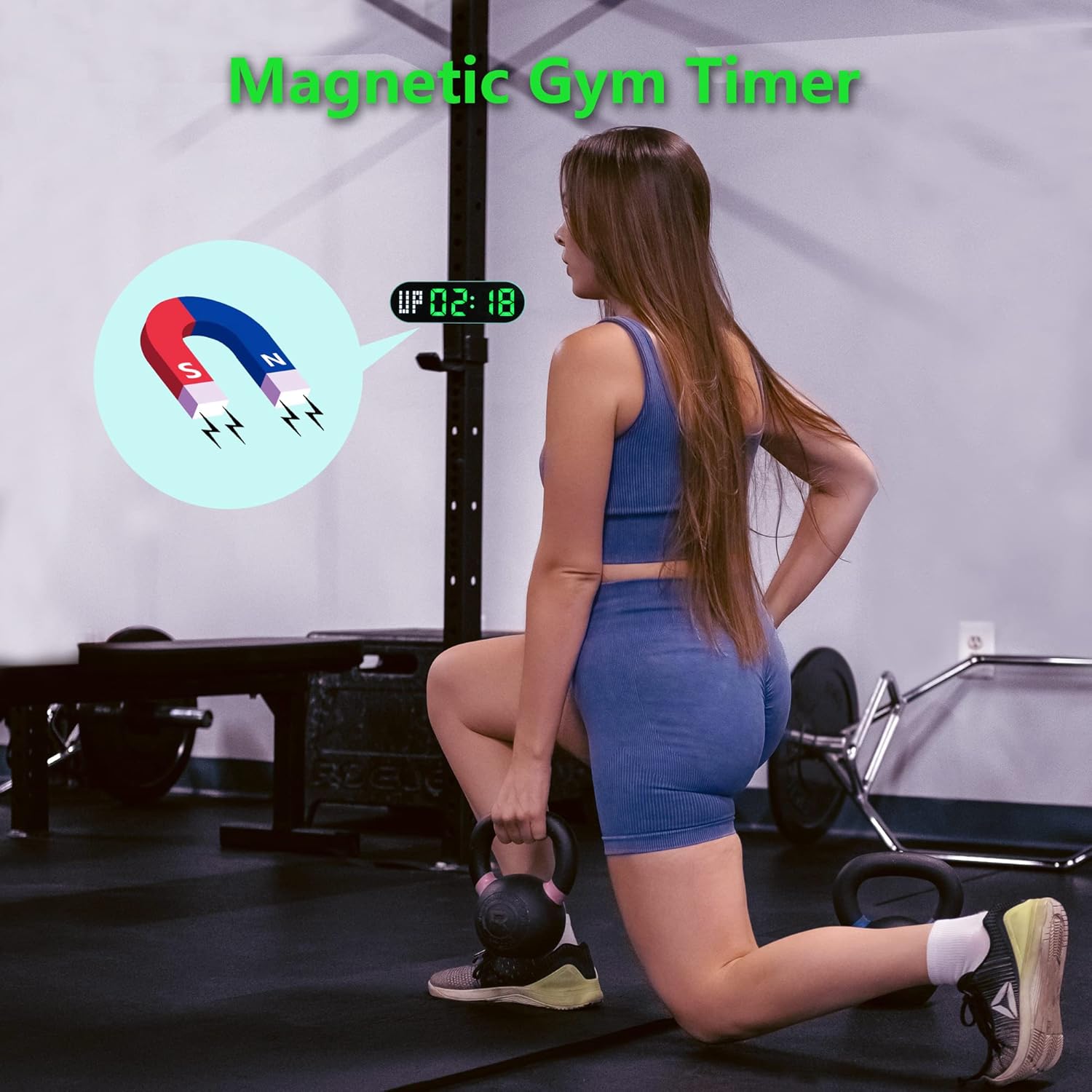
Image 5.1: The timer demonstrating its magnetic attachment capability to a metal gym rack, providing convenient visibility during workouts.
6. Navodila za uporabo
The timer has several buttons for navigation and settings. Refer to the diagram below for button identification (buttons are typically located on the top edge of the device).
- Gumb MODE: Cycles through different timing modes (Interval, Countdown, Count Up, Stopwatch).
- Gumb SET: Enters setting mode for the current timing program.
- Gumb START/PAVZA: Starts or pauses the current timer.
- Gumbi +/-: Prilagodi vrednosti v načinu nastavitev.
6.1 Razumevanje zaslona
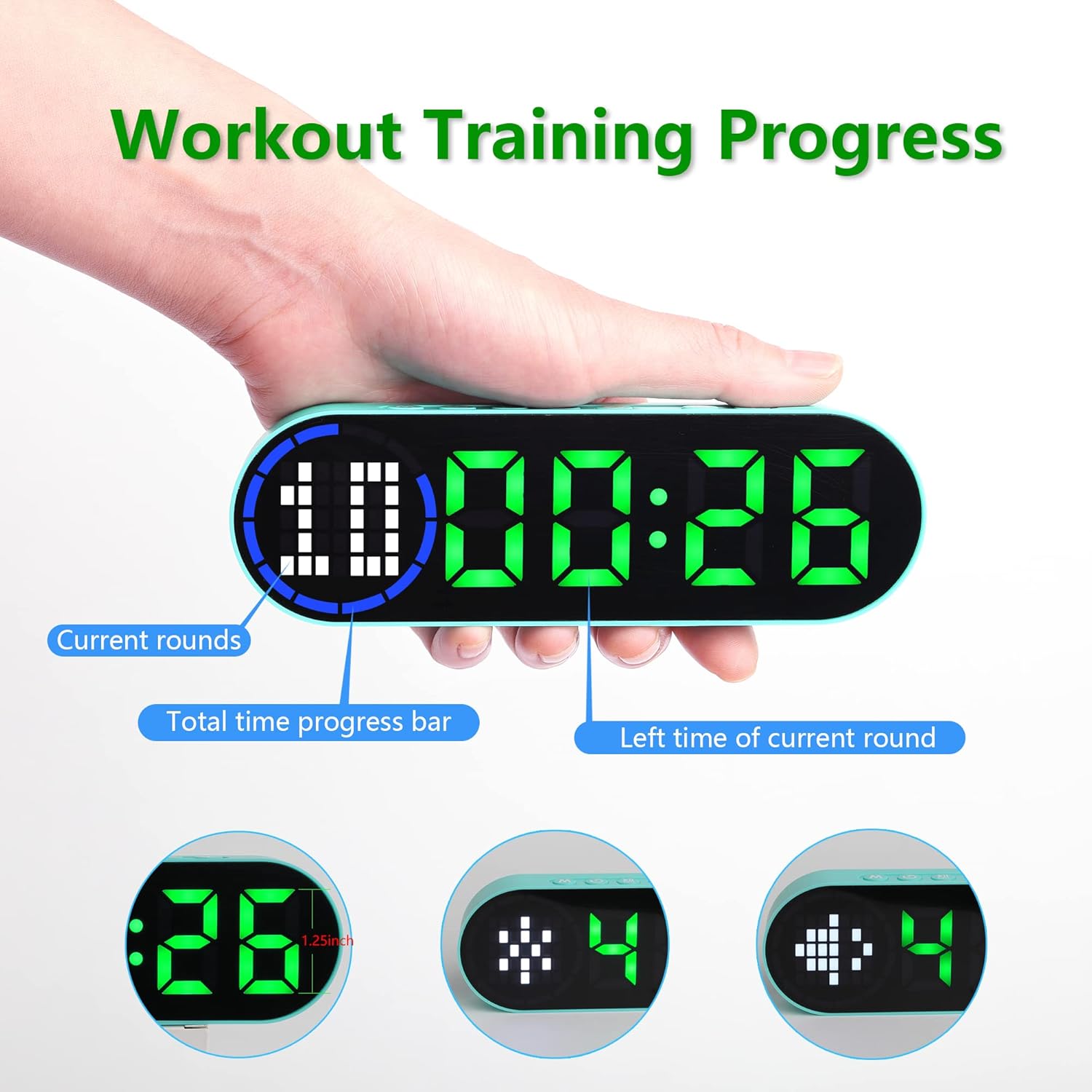
Image 6.1: The timer display indicating "Current rounds" (left), "Total time progress bar" (top segment), and "Left time of current round" (right). This visual feedback helps track workout progress.
6.2 načini merjenja časa
Pritisnite Gumb MODE to cycle through the available timing modes:

Image 6.2: The timer displaying examples of its four main modes: Interval Timer, Count Down, Count Up, and Stopwatch, each with distinct visual indicators.
6.2.1 Interval Timer (e.g., HIIT, Tabata)
- Pritisnite NAČIN until "F" (Work) and "C" (Rest) indicators appear.
- Pritisnite NASTAVI to enter setting mode. The time for the first interval (Work) will flash.
- Uporaba +/- Gumbi to adjust minutes and seconds for the Work period. Press NASTAVI to confirm and move to the Rest period.
- Adjust minutes and seconds for the Rest period using +/- Gumbi. Pritisnite NASTAVI to confirm and move to the number of rounds.
- Adjust the number of rounds. Press NASTAVI da shranite nastavitve in zaprete.
- Pritisnite START/PAVZA to begin the interval workout. The timer will count down the Work period, then the Rest period, for the set number of rounds.
6.2.2 Odštevalnik časa
- Pritisnite NAČIN until "dn" or a countdown format (e.g., 00:00) is displayed.
- Pritisnite NASTAVI to enter setting mode. The time will flash.
- Uporaba +/- Gumbi to set the desired countdown time (minutes and seconds). Press NASTAVI za potrditev vsakega segmenta.
- Pritisnite START/PAVZA za začetek odštevanja.
6.2.3 Count Up Timer
- Pritisnite NAČIN until "UP" or a count-up format (e.g., 00:00) is displayed.
- The timer will typically start from 00:00.
- Pritisnite START/PAVZA to begin counting up. Press again to pause.
- To reset, press and hold the START/PAVZA gumb ali namensko PONASTAVI button (if available) while paused.
6.2.4 Štoparica
- Pritisnite NAČIN until "ST" or a stopwatch format (e.g., 00:00:00) is displayed.
- Pritisnite START/PAVZA to begin counting. Press again to pause.
- To reset the stopwatch to zero, press and hold the START/PAVZA gumb ali namensko PONASTAVI button (if available) while paused.
6.3 Nastavljive nastavitve
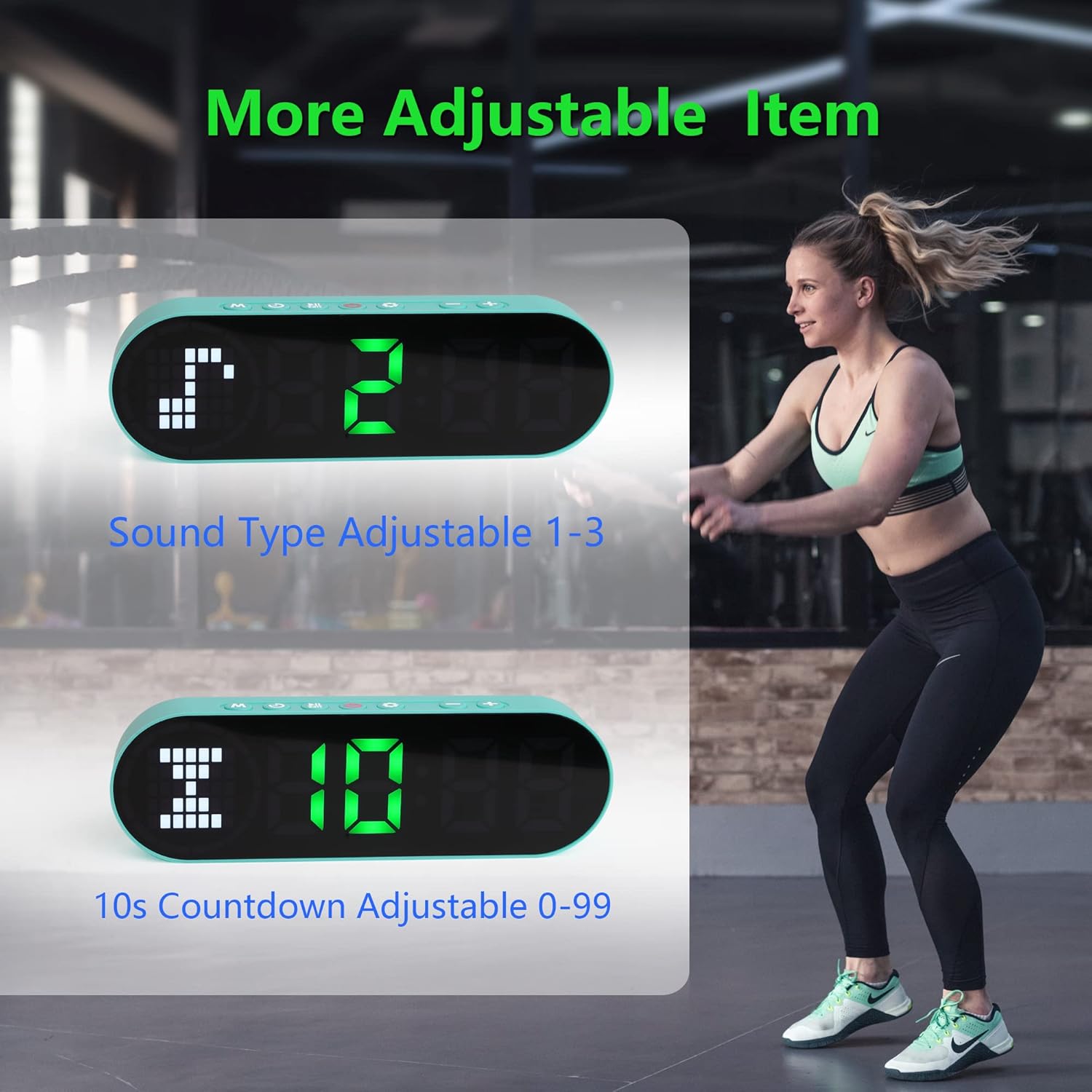
Image 6.3: The timer illustrating adjustable features, including Sound Type (1-3) and a customizable 10-second countdown (0-99 seconds) before a program starts.
6.3.1 Sound Type Adjustment
Some modes allow adjustment of the sound type or volume. While in a setting mode (e.g., Interval Timer setup), look for an option to adjust "Sound Type" (often indicated by a speaker icon or "SND"). Use the +/- Gumbi to cycle through available sound options (e.g., 1, 2, 3 for different tones or volumes). Press NASTAVI za potrditev.
6.3.2 Initial Countdown Adjustment
Before starting a timed program (like Interval or Countdown), the timer may offer an initial preparation countdown (e.g., 10 seconds). This can often be adjusted from 0 to 99 seconds. While in a setting mode, look for a "10s Countdown" or "PREP" setting. Use the +/- Gumbi to set the desired pre-countdown duration. Press NASTAVI za potrditev.
7. Vzdrževanje
7.1 Čiščenje
To clean the timer, gently wipe the surface with a dry, soft cloth. Do not use abrasive cleaners, solvents, or harsh chemicals, as these can damage the display or casing.
7.2 Shranjevanje
When not in use for extended periods, store the timer in a cool, dry place, away from direct sunlight and extreme temperatures. Ensure the battery is partially charged before storing to maintain battery health.
8. Odpravljanje težav
- Časovnik se ne vklopi:
- Ensure the battery is charged. Connect the timer to a power source using the USB cable.
- Pritisnite in držite gumb za vklop 3 sekunde.
- Zaslon je zatemnjen ali se ne odziva:
- Ponovno napolnite baterijo.
- Poskusite izklopiti in znova vklopiti napravo.
- Gumbi se ne odzivajo:
- Restart the timer by powering it off and then on.
- Ensure your fingers are dry and clean when pressing buttons.
- Timer not holding a charge:
- Prepričajte se, da je polnilni kabel dobro priključen.
- Poskusite z drugim napajalnikom ali vrati USB.
- Če težave ne odpravite, se obrnite na podporo strankam.
9. Specifikacije
| Znamka | LUCORB |
| Številka modela (ASIN) | B0BYH9SP13 |
| Teža predmeta | 127 g |
| Dimenzije artikla (DxŠxV) | 160 x 50 x 23 milimetrov |
| barva | Svetlo zelena |
| Vir napajanja | Napajanje na baterije (polnljivo prek USB-ja) |
10. Garancija in podpora
For warranty information, technical support, or any inquiries regarding your LUCORB Portable Gym Timer, please refer to the product packaging or contact LUCORB customer service through the retailer where the product was purchased. Please have your model number (B0BYH9SP13) and purchase date available when contacting support.