
Uvod
Welcome to your new TechniSat Viola CD-1. This portable stereo CD player offers versatile audio playback options including CD, FM radio, and Bluetooth streaming. Its compact design and battery operation make it suitable for both home and on-the-go use. This manual provides essential information for setting up, operating, and maintaining your device.
Pomembne varnostne informacije
- Pred uporabo naprave natančno preberite vsa navodila.
- Shranite ta priročnik za prihodnjo uporabo.
- Naprave ne izpostavljajte dežju, vlagi ali prekomerni vlažnosti.
- Prepričajte se, da prezračevalne odprtine niso blokirane, da preprečite pregrevanje.
- Uporabljajte samo priključke in dodatke, ki jih je določil proizvajalec.
- Za vse servise se obrnite na usposobljeno servisno osebje.
Konec izdelkaview
Familiarize yourself with the main components and controls of your Viola CD-1.

Spredaj view of the TechniSat Viola CD-1, highlighting its main controls and central display.

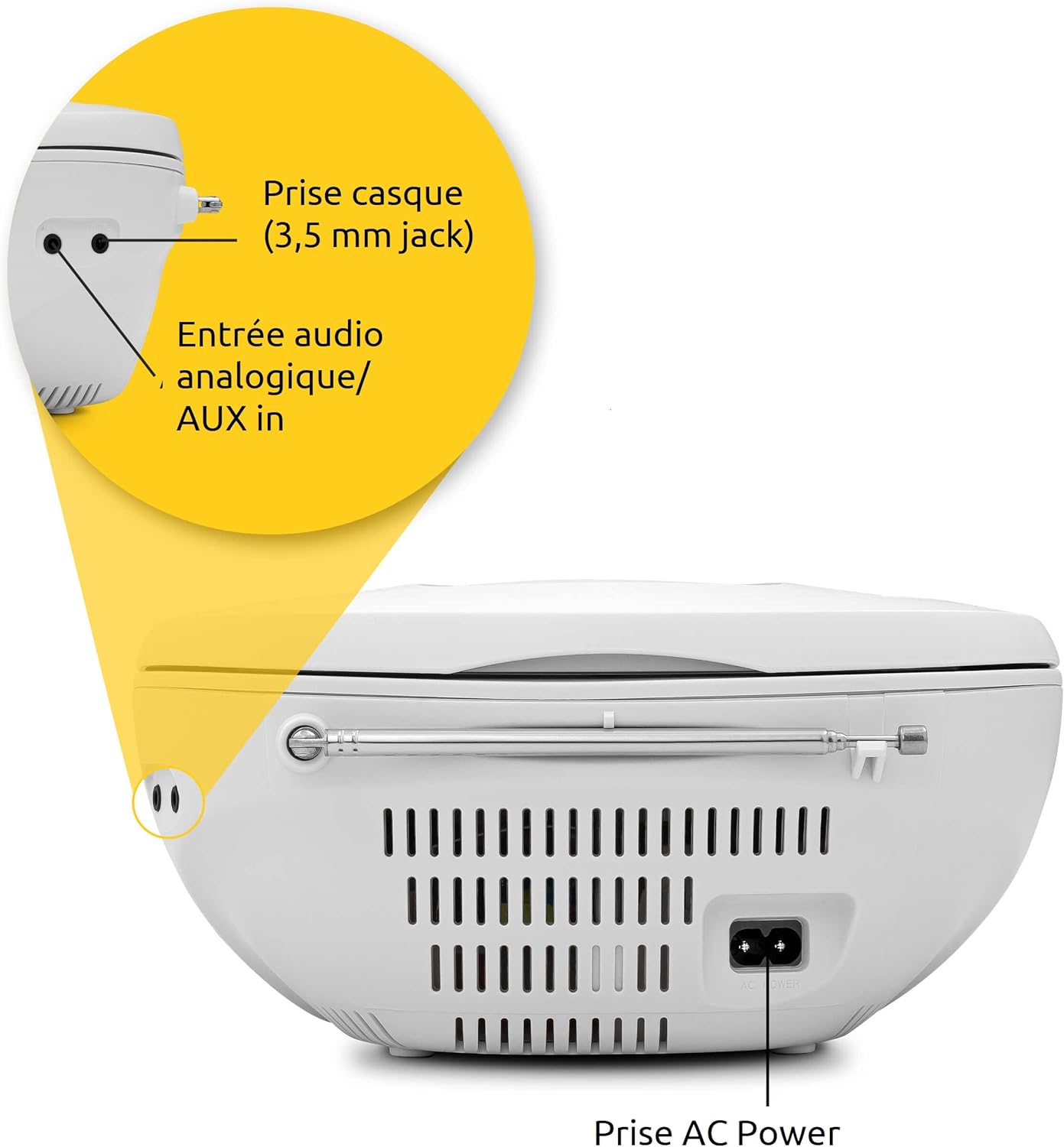
The rear panel of the Viola CD-1 features the AC power input, a 3.5mm AUX in port for external devices, and a 3.5mm headphone jack.
Ključne kontrole in funkcije:
- Gumb za vklop: Vklopi ali izklopi enoto.
- Gumb za način: Switches between CD, FM, Bluetooth, and AUX input modes.
- Gumbi za glasnost +/-: Prilagodi izhodni nivo zvoka.
- Gumb za predvajanje/pavzo: Starts or pauses playback in CD and Bluetooth modes.
- Gumbi za preskok/uglaševanje: Navigates tracks on a CD or tunes radio stations.
- Gumb za skeniranje: Initiates automatic station search in FM mode.
- Gumb albuma: For MP3 CDs, navigates between folders.
- Teleskopska antena: Za sprejem FM radia.
- Ročaj za nošenje: Za enostavno prenosljivost.
Nastavitev
Napajalnik
The Viola CD-1 can be powered by either AC mains or batteries.
- AC napajanje: Connect the provided power cable to the AC power input on the rear of the unit and then to a standard wall outlet (230V).
- Moč baterije: For portable use, open the battery compartment located on the bottom of the unit. Insert 6 x 1.5V C-type batteries (R14), ensuring correct polarity (+/-). Close the compartment securely.
Nastavitev antene
For optimal FM radio reception, fully extend the telescopic antenna.
Navodila za uporabo
Predvajanje CD-ja
- Open the CD compartment lid located on the top of the unit.
- Carefully place a CD (standard audio CD or MP3 CD) onto the spindle with the label side facing up.
- Pokrov predala za CD-je trdno zaprite.
- Pritisnite Način večkrat pritisnite gumb, dokler se na zaslonu ne prikaže "CD".
- Pritisnite Predvajaj/Premor gumb za začetek predvajanja.
- Uporabite Preskoči buttons (forward/backward) to navigate between tracks.
- If playing an MP3 CD with multiple folders, use the Album gumb za preklapljanje med mapami.

To insert a CD, lift the compartment lid as shown and place the disc with the label facing upwards.

The integrated CD player supports standard audio CDs, CD-R, CD-RW, and MP3 CDs.
Delovanje radia FM
- Za najboljši sprejem popolnoma raztegnite teleskopsko anteno.
- Pritisnite Način večkrat pritisnite gumb, dokler se na zaslonu ne prikaže "FM".
- Pritisnite in držite Skeniraj button to automatically search for and store available FM stations.
- Uporabite Preskoči buttons (forward/backward) to select a stored station.
The Viola CD-1 features an FM radio tuner, allowing reception of various regional radio stations. Extend the telescopic antenna for best reception.
Bluetooth avdio pretakanje
- Pritisnite Način button repeatedly until "BT" appears on the display. The "BT" indicator will flash, signifying that the unit is in pairing mode.
- On your smartphone or other Bluetooth-enabled mobile device, enable Bluetooth and search for available devices.
- Select "TechniSat Viola CD-1" from the list of devices to initiate pairing.
- Once successfully paired, the "BT" indicator will stop flashing, and you can stream audio wirelessly from your device to the Viola CD-1.

Wirelessly stream music from your smartphone or tablet to the Viola CD-1 via Bluetooth.
AUX vhod
- Priključite zunanjo avdio napravo (npr. predvajalnik MP3, pametni telefon) na AUX vhod jack on the rear of the unit using a 3.5mm audio cable.
- Pritisnite Način button repeatedly until "AUX" appears on the display.
- Control audio playback and volume directly from your external device.
Uporaba slušalk
Connect headphones with a 3.5mm jack to the headphone output on the rear of the unit for private listening. When headphones are connected, sound from the speakers will be muted.

The practical carry handle makes transporting the boombox comfortable and easy.

Integrated stereo speakers provide clear audio with a total output of 2 x 1 Watt.
Vzdrževanje
Čiščenje
- Wipe the exterior of the unit with a soft, dry cloth. Do not use abrasive cleaners, solvents, or chemical sprays, as these can damage the finish.
- For cleaning the CD lens, use a specialized CD lens cleaner disc according to its instructions.
Zamenjava baterije
When using battery power, replace all 6 C-type batteries when the unit's performance (e.g., sound quality, volume) begins to degrade. Always replace all batteries at once with new ones of the same type.
Odpravljanje težav
If you encounter issues with your Viola CD-1, refer to the table below for common problems and solutions.
| Težava | Možen vzrok | rešitev |
|---|---|---|
| Enota se ne vklopi. | No power supply or dead batteries. | Check AC power connection or replace all batteries. |
| CD se ne predvaja. | CD inserted incorrectly, dirty, scratched, or unsupported format. | Ensure CD is inserted correctly (label side up). Clean the CD. Try a different CD. Ensure it's an audio CD or MP3 CD. |
| Slab sprejem FM radia. | Antena ni iztegnjena ali pa je signal šibek. | Popolnoma izvlecite teleskopsko anteno. Za boljši signal poskusite premakniti enoto. |
| Naprave Bluetooth ni mogoče seznaniti. | Unit not in pairing mode, device too far, or previously paired. | Ensure Viola CD-1 is in Bluetooth pairing mode (BT flashing). Move devices closer. On your device, forget/unpair the Viola CD-1 and try pairing again. |
| Ni zvoka iz zvočnikov. | Volume too low, headphones connected, or incorrect mode selected. | Increase volume. Disconnect headphones. Press the Način gumb za izbiro pravilnega vhodnega vira. |
Specifikacije
Detailed technical specifications for the TechniSat Viola CD-1.
| Funkcija | Podrobnost |
|---|---|
| Znamka | TechniSat |
| Številka modela | 0001/2980 |
| barva | Bela |
| Tehnologija povezljivosti | Auxiliary, Bluetooth (reception) |
| Posebne lastnosti | AC and Battery operation, MP3 CD Player, Convenient carry handle, Bluetooth audio streaming (reception) |
| Združljive naprave | Slušalke |
| Vir napajanja | AC and Battery operation |
| Vrsta zvočnika | Stereo |
| Izhodna moč | 2 x 1 W RMS |
| Dimenzije (DxŠxV) | 21.5 x 21.5 x 10 cm |
| Teža predmeta | 828 gramov |
| Zahteva za baterijo | 6 x 1.5V C-type batteries (R14) |
Garancija in podpora
Informacije o garanciji
This product comes with a manufacturer's warranty. Please refer to the warranty card included in the product packaging for specific terms, conditions, and duration of the warranty. (Note: Specific warranty details were not available in the provided product data.)
Podpora uporabnikom
For technical assistance, troubleshooting beyond this manual, or service inquiries, please visit the official TechniSat webspletno mesto ali se obrnite neposredno na njihovo podporo strankam.
Uradno Webspletno mesto: www.technisat.com