
1. Uvod
Hvala za nakupasing the LFF LDR113-EU Kitchen Radio. This manual provides essential information for the safe and efficient operation of your device. Please read it thoroughly before use and retain it for future reference.
The LFF LDR113-EU is a versatile kitchen radio featuring DAB+, FM, and Bluetooth connectivity. It includes dual alarms, a sleep timer, and 60 station presets, designed for both tabletop use and under-cabinet mounting.
2. Varnostne informacije
- vir energije: Uporabljajte samo priloženi napajalnik. Prepričajte se, da je glasnosttage ustreza vašemu lokalnemu napajalniku.
- Voda in vlaga: Do not expose the device to water, rain, or excessive moisture. Avoid placing liquids near the radio.
- Prezračevanje: Ensure adequate ventilation around the device. Do not block ventilation openings.
- Toplota: Napravo hranite stran od virov toplote, kot so radiatorji, grelniki, štedilniki ali druge naprave, ki proizvajajo toploto.
- Čiščenje: Pred čiščenjem izključite napravo iz električnega omrežja. Uporabite mehko, suho krpo. Ne uporabljajte tekočih ali aerosolnih čistil.
- Servisiranje: Tega izdelka ne poskušajte servisirati sami. Vsa servisna dela prepustite usposobljenemu servisnemu osebju.
- Umestitev: Place the radio on a stable, level surface or mount it securely according to the instructions.
3. Vsebina paketa
Prosimo, preverite, ali so v paketu vsi elementi:
- LFF LDR113-EU Kitchen Radio
- Napajalni adapter
- Mounting Kit (screws, spacers, mounting template)
- Uporabniški priročnik (ta dokument)
4. Izdelek je končanview
Seznanite se s komponentami in upravljalnimi elementi radia.

Slika 4.1: Spredaj view of the LFF LDR113-EU Kitchen Radio, showing the LCD display on the left, control buttons in the center, and a large rotary knob on the right. The buttons include power, mode, menu, info, preset, timer/sleep, and navigation arrows. The rotary knob is for volume and selection.

Slika 4.2: Diagram illustrating the key features of the LFF Kitchen Radio, including DAB/DAB+ radio, FM radio, two alarms, sleep timer, Bluetooth connectivity, and 60 station presets.
4.1. Krmilniki in zaslon
- LCD barvni zaslon: Shows current mode, station information, time, and settings.
- Gumb za vklop: Vklopi/izklopi radio.
- Gumb za način: Switches between DAB+, FM, and Bluetooth modes.
- Gumb za meni/informacije: Accesses menu options or displays station information.
- Prednastavljeni gumbi (1–5): Quick access to saved stations.
- Timer/Sleep Button: Nastavi časovnik za spanje ali funkcije alarma.
- Navigacijski gumbi (gor/dol/levo/desno): Navigates through menus and station lists.
- Rotary Knob (Volume/Enter): Adjusts volume, scrolls through options, and confirms selections.
5. Nastavitev
5.1. Napajalni priključek
- Priključite napajalnik v vrata DC IN na zadnji strani radia.
- Priključite napajalnik v stensko vtičnico.
- Radio se bo vklopil ali preklopil v stanje pripravljenosti.
5.2. Initial Scan (DAB+ and FM)
Upon first power-on, the radio will typically perform an automatic scan for DAB+ and FM stations. If not, follow these steps:
- Pritisnite Način gumb za izbiro načina DAB+ ali FM.
- For DAB+, the radio will usually initiate a full scan automatically. If not, navigate to the 'Full Scan' option in the DAB+ menu and press the rotary knob to confirm.
- For FM, navigate to the 'Auto Scan' option in the FM menu and press the rotary knob to confirm.
- The radio will search for available stations and store them.

Slika 5.1: The LFF Kitchen Radio's LCD color screen displaying the main menu with icons for Digital Radio (DAB+), FM Radio, and Bluetooth, indicating available modes.
6. Navodila za uporabo
6.1. Vklop/izklop
Pritisnite Moč button to turn the radio on or off (standby mode).
6.2. Izbira načina
Pritisnite Način Večkrat pritisnite gumb , da preklapljate med načini DAB+, FM in Bluetooth.
6.3. Delovanje radia DAB+
- In DAB+ mode, use the Gor/Dol navigation buttons or the rotary knob to browse available stations.
- Press the rotary knob to select a station.
- Pritisnite Meni/Informacije do view informacije o postaji (npr. vrsta programa, moč signala).
6.4. Delovanje radia FM
- V načinu FM uporabite Gor/Dol navigation buttons to tune to stations manually.
- Pritisnite in držite Gor/Dol buttons for automatic station seeking.
- Pritisnite Meni/Informacije do view informacije o postaji.
6.5. Bluetooth povezljivost
Connect your smartphone or other Bluetooth-enabled device to the radio.
- Pritisnite Način button to select Bluetooth mode. The display will show 'Bluetooth Pairing'.
- V mobilni napravi omogočite Bluetooth in poiščite razpoložljive naprave.
- Select 'LFF LDR113-EU' from the list of devices.
- Once connected, the radio display will show 'Bluetooth Connected'. You can now play audio from your device through the radio.
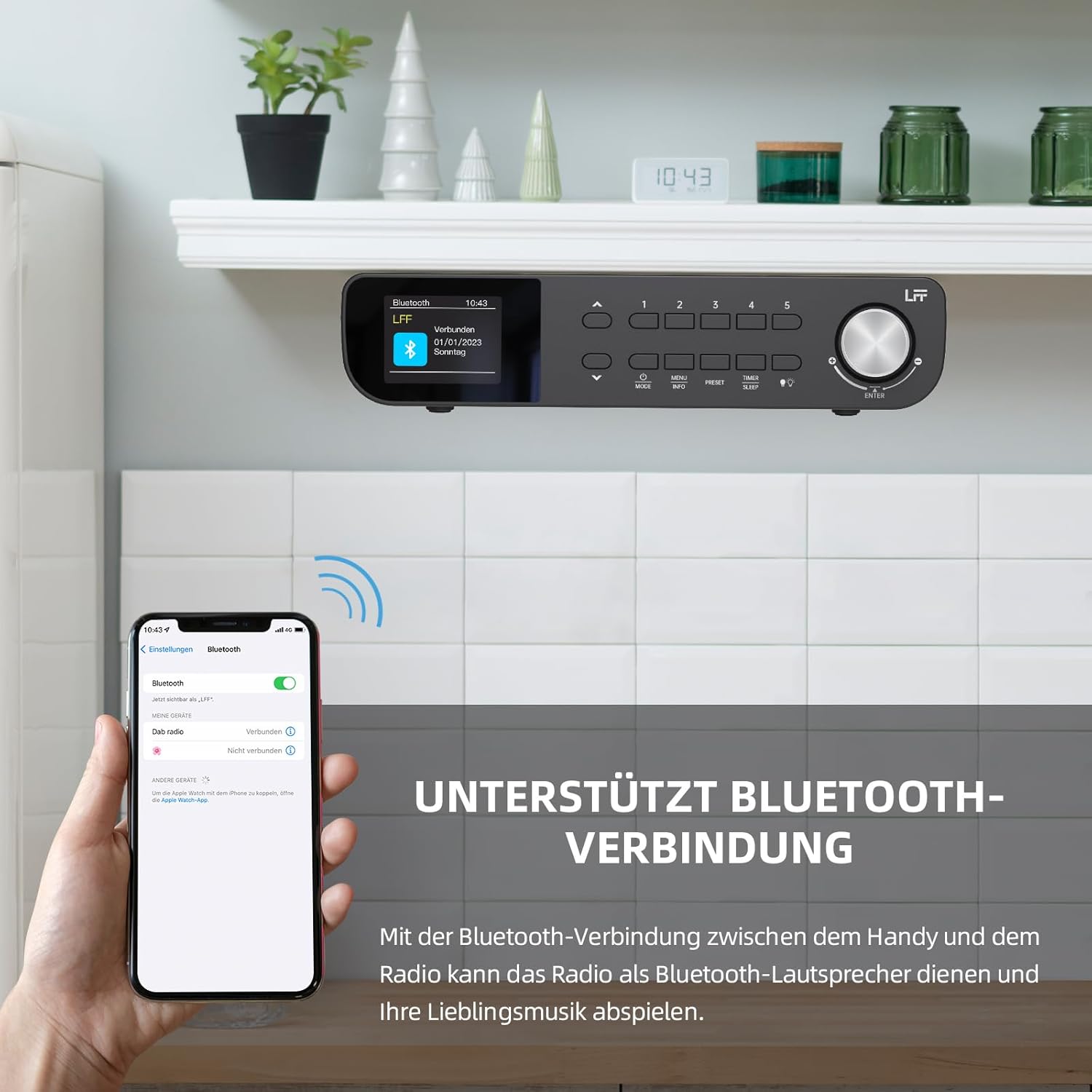
Slika 6.1: The LFF Kitchen Radio displaying a successful Bluetooth connection, with a smartphone screen showing the radio as a connected device.

Slika 6.2: Od blizu view of the radio's display indicating 'LFF' and 'Connected' under the Bluetooth menu, confirming a successful pairing.
6.6. Nastavitev alarmov
The radio features two independent alarms.
- Pritisnite Časovnik/Spanje button repeatedly until 'Alarm 1' or 'Alarm 2' appears.
- Use the navigation buttons and rotary knob to set the alarm time, source (DAB+, FM, or Buzzer), and frequency (daily, weekdays, weekends, once).
- Confirm settings by pressing the rotary knob.

Slika 6.3: Close-up of the radio's display showing the current time and options to activate or deactivate Alarm 1 and Alarm 2.
6.7. Časovnik za spanje
Časovnik za spanje omogoča, da se radio po določenem času samodejno izklopi.
- Pritisnite Časovnik/Spanje button repeatedly until 'Sleep Timer' appears.
- Use the navigation buttons or rotary knob to select the desired sleep duration (e.g., 15, 30, 60 minutes).
- Potrdite s pritiskom na vrtljivi gumb.

Slika 6.4: Close-up of the radio's display showing the 'Sleep Timer' setting, with an option to set the duration, for example, to 30 minutes.
6.8. Prednastavitve
Save up to 60 favorite stations for quick access.
- Če želite shraniti prednastavitev: Uglasite želeno postajo. Pritisnite in držite enega od gumbov Prednastavitev (1–5) buttons until 'Preset Saved' appears. For additional presets, use the 'Preset Store' option in the menu.
- Če želite priklicati prednastavitev: Na kratko pritisnite enega od Prednastavitev (1–5) buttons. For other presets, navigate to 'Preset Recall' in the menu.
6.9. LED luč
The radio includes an integrated LED light, useful for illuminating the area below if mounted under a cabinet.
- Pritisnite Svetloba button (if available, or navigate through menu) to turn the LED light on or off.

Slika 6.5: The LFF Kitchen Radio mounted under a kitchen cabinet, with its integrated LED light providing illumination to the countertop below.
6.10. Svetlost zaslona
Adjust the display backlight brightness to suit your environment.
- Access the 'Display' or 'Settings' menu.
- Select 'Brightness' and choose from High, Medium, or Low settings.

Slika 6.6: A visual comparison of the LFF Kitchen Radio's display at three different backlight brightness levels: High, Medium, and Low, demonstrating the adjustable visibility.
7. Navodila za pritrditev
The LFF LDR113-EU Kitchen Radio offers flexible placement options: tabletop or under-cabinet mounting.
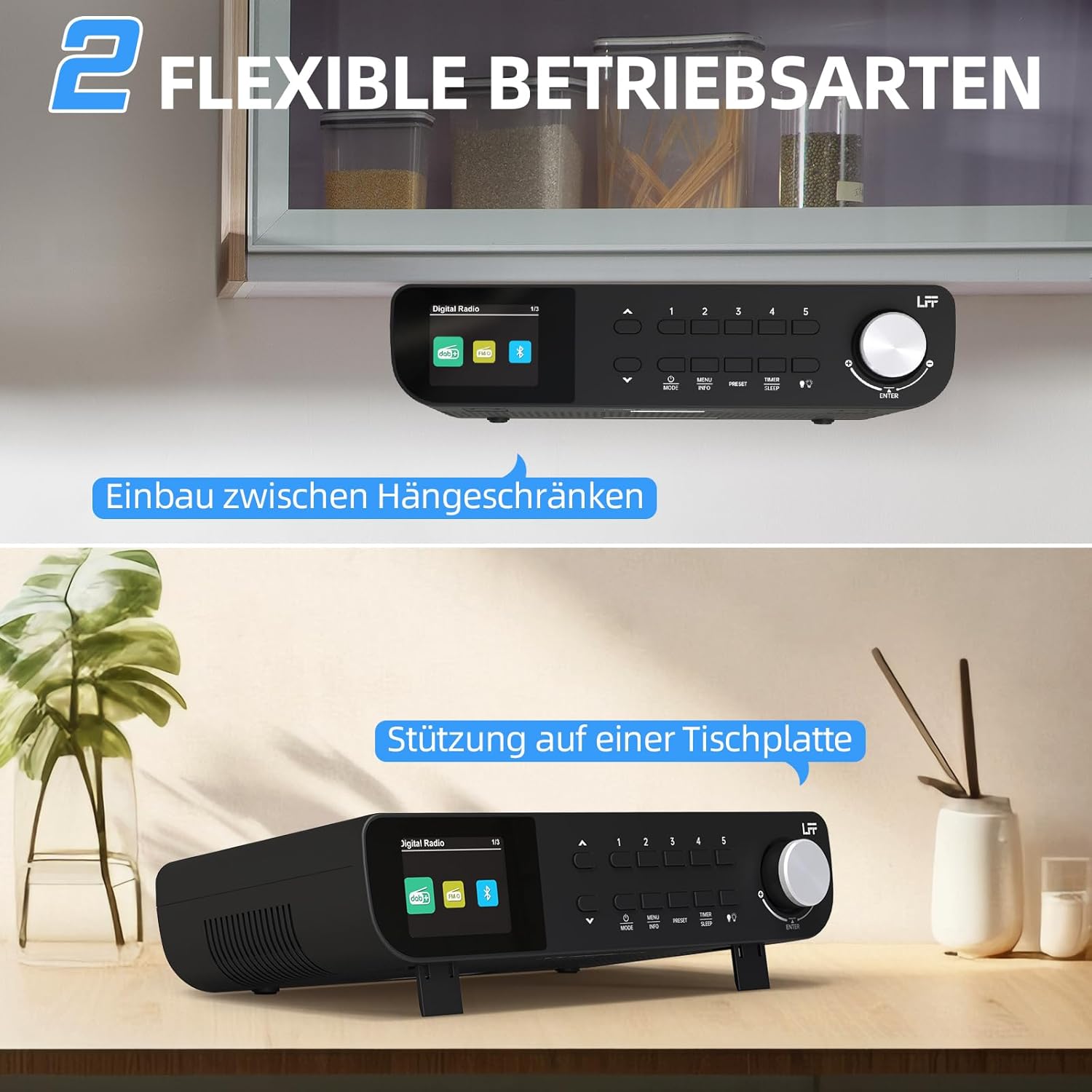
Slika 7.1: The LFF Kitchen Radio displayed in two common installation scenarios: mounted underneath a kitchen cabinet and placed freestanding on a tabletop.
7.1. Tabletop Placement
Simply place the radio on a stable, flat surface. Ensure it is not near the edge to prevent accidental falls.
7.2. Under-Cabinet Mounting
For under-cabinet installation, use the provided mounting kit.
- Pripravite lokacijo: Choose a suitable location under a kitchen cabinet, ensuring there is enough space and access to a power outlet.
- Označite vrtalne luknje: Use the provided mounting template to mark the drill holes on the underside of the cabinet.
- Vrtanje pilotnih lukenj: Na označenih mestih izvrtajte vodilne luknje.
- Attach Mounting Plate (if applicable): Some models may include a separate mounting plate. Attach this to the cabinet using the screws.
- Zavarujte radio: Align the radio with the mounting holes or plate and secure it using the provided screws. Ensure it is firmly attached.
- Priključite napajanje: Priključite napajalnik.

Slika 7.2: Detailed diagram showing the steps for under-cabinet mounting, including measuring distances (e.g., 58mm) and securing the radio with screws.
8. Vzdrževanje
- Čiščenje: To clean the radio, disconnect it from the power supply. Use a soft, dry, lint-free cloth. Do not use abrasive cleaners, waxes, or solvents.
- Antena: Ensure the antenna is extended for optimal reception in DAB+ and FM modes. Handle it gently to avoid damage.
- Shranjevanje: Če radio shranjujete dalj časa, ga izključite iz električnega omrežja in shranite na hladnem in suhem mestu.
9. Odpravljanje težav
| Težava | Možen vzrok | rešitev |
|---|---|---|
| Brez moči | Napajalnik ni priključen ali pa je vtičnica pokvarjena. | Preverite priključek za napajanje. Poskusite z drugo vtičnico. |
| Slab sprejem DAB+/FM | Antena ni iztegnjena, signal je šibek ali obstajajo motnje. | Fully extend the antenna. Reposition the radio. Perform a full scan. |
| Bluetooth se ne povezuje | Radio not in pairing mode, device too far, or already connected to another device. | Ensure radio is in Bluetooth mode. Move device closer. Disconnect from other devices. |
| Brez zvoka | Volume too low, mute activated, or incorrect mode. | Increase volume. Check if mute is active. Ensure correct mode (DAB+, FM, Bluetooth). |
| Zaslon ne deluje | Brightness too low or device malfunction. | Adjust display brightness. If problem persists, contact support. |
10. Specifikacije

Slika 10.1: Diagram showing the dimensions of the LFF Kitchen Radio: 250mm length, 146mm width, and 55mm height.
| Funkcija | Podrobnost |
|---|---|
| Znamka | razširitev LFF |
| Številka modela | LDR113-EU |
| barva | Črna |
| Povezljivost | Bluetooth |
| Tehnologija uglaševanja | DAB Plus, FM |
| Vir napajanja | Električni kabel |
| Pogostost | 108 MHz (FM max) |
| Dimenzije (D x Š x V) | 250 mm x 146 mm x 55 mm |
| Prednastavitve | 60 |
| Zaslon | LCD barvni zaslon |
| Posebne lastnosti | Dual Alarms, Sleep Timer, Under-cabinet mounting option, LED Light |
11. Garancija in podpora
This product comes with a standard manufacturer's warranty. Please refer to the warranty card included in your package for specific terms and conditions. For technical support, troubleshooting assistance, or warranty claims, please contact your retailer or the LFF customer service department.